Tag Pair Desk: Matching Tag Highlight for HTML, JSX, Vue, Svelte, PHP
Highlights the whole matching tag pair from anywhere inside an element, in HTML, XML, JSX/TSX, Vue, Svelte, PHP and Blade. 14-day free trial, then $12 once for Pro. No login, no telemetry.
Get Pro — $12 one-time. After the trial, matching-tag highlight, jump and select need Pro. Pro also adds unclosed / mismatched tag checks with quick fixes for PHP and Blade (plus Liquid, Jinja / Twig / Nunjucks, Handlebars and ERB) in one extension, a workspace Tag Health report and pair-aware multi-cursor rename.
Screenshots
What it does
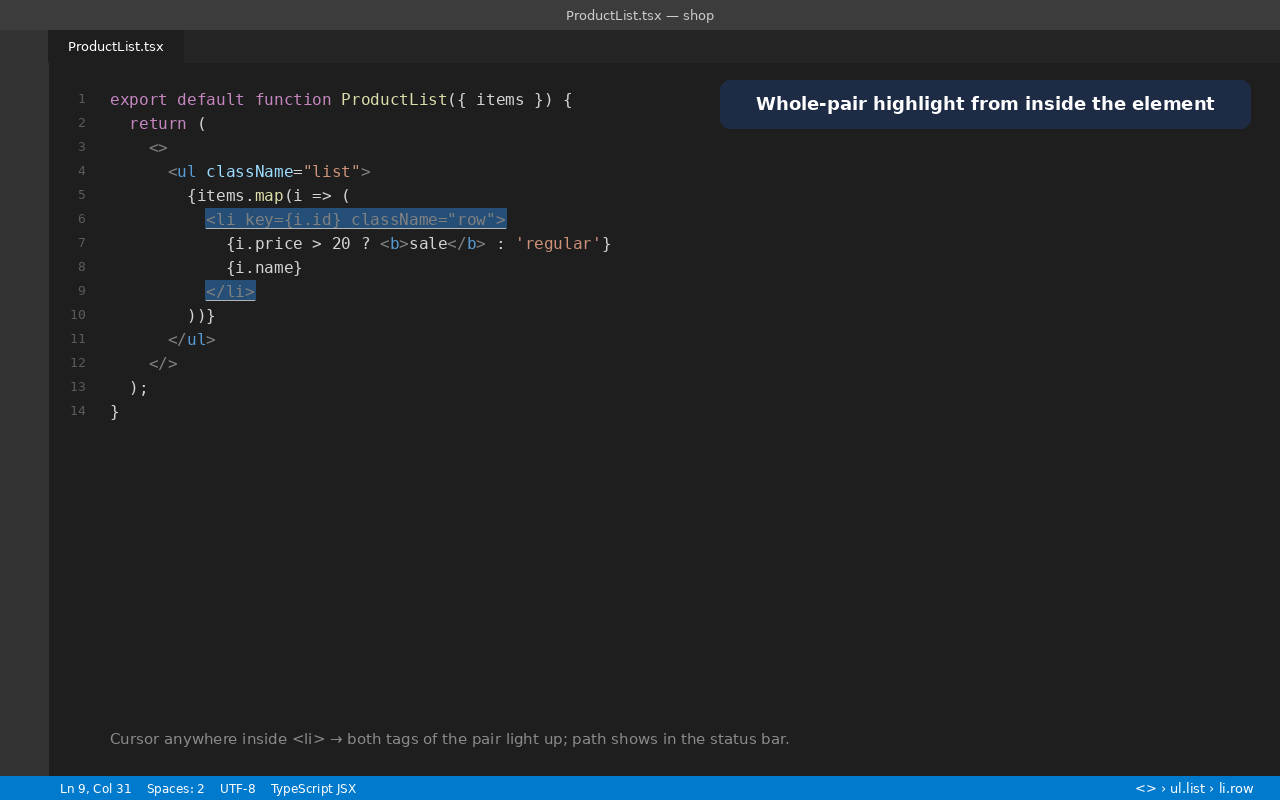
- Whole-pair highlight from anywhere inside the element: put the cursor on a tag, an attribute, the text or a child, and both the opening and closing tag of the enclosing element light up. Styles: whole tag, tag name only, underline, or outline (
tagPairDesk.style).
- Languages: HTML, XML / XSL / SVG, JSX / TSX (including fragments
<>…</>, {items.map(i => <li>…</li>)} and generic components <List<Item>>), Vue, Svelte, PHP, Blade (including <x-slot:title>…</x-slot>), and HTML inside Handlebars, Liquid, Jinja / Nunjucks / Twig and ERB templates. Template code such as {{ a > b }}, {% if a < b %}, <?php … ?> and <% … %> is skipped, so that code doesn't confuse the matcher. Liquid / Jinja {% comment %}, {% raw %}, and Liquid {% javascript %}, {% stylesheet %}, {% style %} and {% schema %} blocks are skipped whole.
- Jump to Matching Tag, Select Tag Pair (whole element) and Select Tag Contents, with multi-cursor support.
- Tag path in the status bar:
html › body › div#app › ul.list › li. Click it to jump to the matching tag.
- Unclosed tag at the cursor is drawn with a wavy warning underline instead of a pair.
- HTML rules: void elements (
<br>, <img>, <input> …) and optional end tags (<li>, <p>, <td> …) are handled, plus your own void elements (tagPairDesk.customVoidElements).
- Fast: activates only for the languages above, parses each file version once, and skips files over
tagPairDesk.maxFileSizeKB (default 1500 KB).
- Sticky Scroll-friendly: highlights are plain range decorations, with no whole-line or injected text, so Sticky Scroll and breadcrumbs stay clean.
Works alongside VS Code's built-in linked editing and Emmet (Balance, Go to Matching Pair). Those still do renaming and wrapping; Tag Pair Desk adds the persistent whole-pair highlight they don't draw, in every language above.
Commands
| Command |
What it does |
| Tag Pair Desk: Jump to Matching Tag |
Opening tag ↔ closing tag; from inside the content it jumps to the closing tag |
| Tag Pair Desk: Select Tag Pair (whole element) |
Selects <div …> … </div> |
| Tag Pair Desk: Select Tag Contents |
Selects what is between the tags |
| Tag Pair Desk: Toggle Matching Tag Highlight |
On / off |
No default keyboard shortcuts are added, so nothing clashes with Emmet or your keymap. Add your own in Keyboard Shortcuts (search "Tag Pair Desk").
Settings
| Setting |
Default |
Notes |
tagPairDesk.enabled |
true |
Turn highlighting on or off |
tagPairDesk.style |
tag |
tag, name, underline, outline |
tagPairDesk.highlightFromContent |
true |
false = highlight only when the cursor is on a tag |
tagPairDesk.highlightSelfClosing |
true |
Also highlight <br> / <Icon /> |
tagPairDesk.highlightUnmatched |
true |
Wavy warning on an unclosed tag at the cursor |
tagPairDesk.highlightColor / borderColor / unmatchedColor |
theme |
Any CSS colour, e.g. #3fb6a833 |
tagPairDesk.languages |
see list |
Language IDs to highlight |
tagPairDesk.customVoidElements |
[] |
Extra elements with no closing tag |
tagPairDesk.noDefaultVoidElements |
false |
Use only your list |
tagPairDesk.maxFileSizeKB |
1500 |
Larger files are skipped |
tagPairDesk.statusBar.enabled / showIdClass / maxSegments |
true / true / 6 |
Tag path in the status bar |
Coming from another matching-tag highlighter? Its style options map to tagPairDesk.style plus the three colour settings, "highlight from content" maps to tagPairDesk.highlightFromContent, and custom empty/void tags map to tagPairDesk.customVoidElements.
Get Pro
14-day free trial, then $12 once for Pro. Matching-tag highlight, jump to the pair, select pair / contents, and the tag path in the status bar work for 14 days from first use. The four (Pro) commands — template tag checks, the Tag Health report, depth colour presets, and pair-aware multi-cursor rename — are not included in the trial; they need the Pro add-on. After the trial, highlight, jump, select, and the tag path stop until you get Pro. A status bar item shows how many days are left.
Tag Pair Desk Pro is a separate add-on installed from a .vsix you get after purchase (Extensions → … → Install from VSIX…). Installing Pro unlocks this extension permanently and adds:
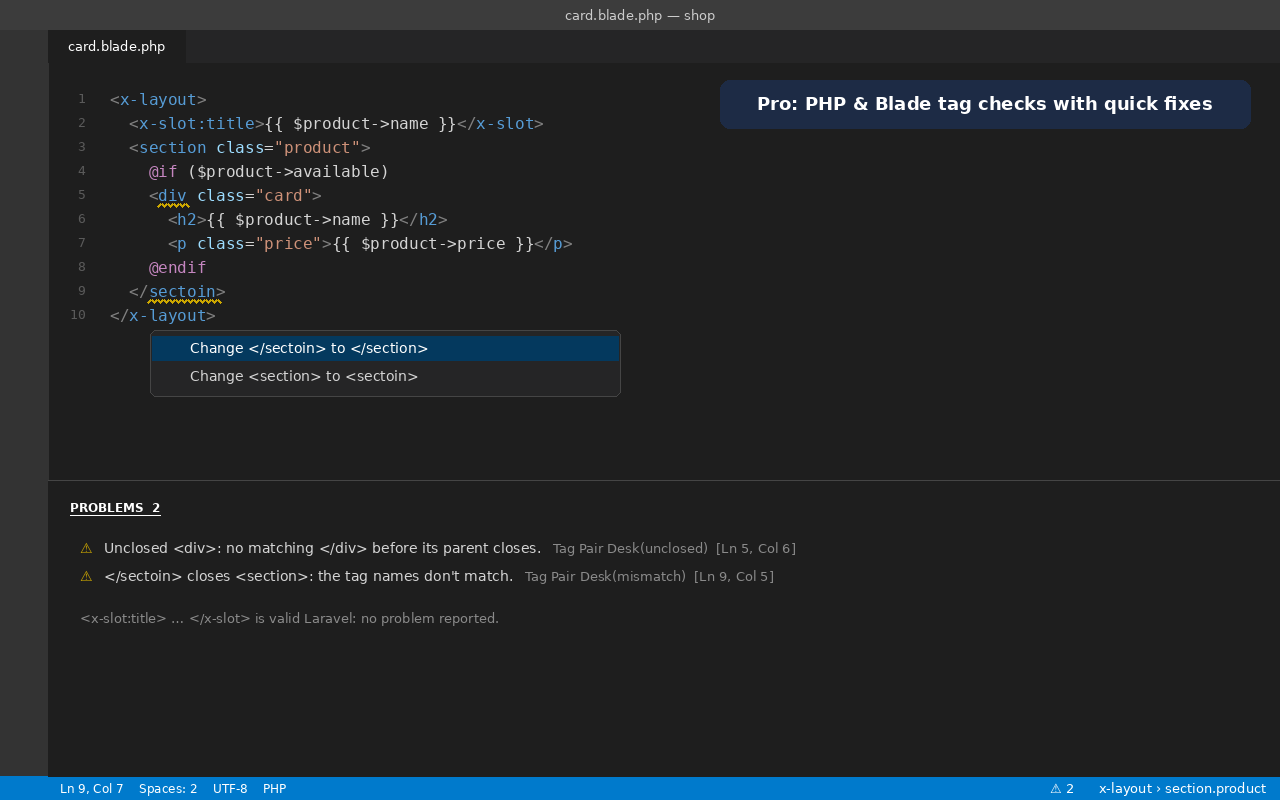
- Unclosed / mismatched tag diagnostics for PHP and Blade, plus Liquid, Jinja / Nunjucks / Twig, Handlebars and ERB, in one extension: no account and no extra command-line tool to install. Problems appear in the Problems panel with quick fixes: insert the missing
</div>, fix a misspelled closing tag, or remove a stray one.
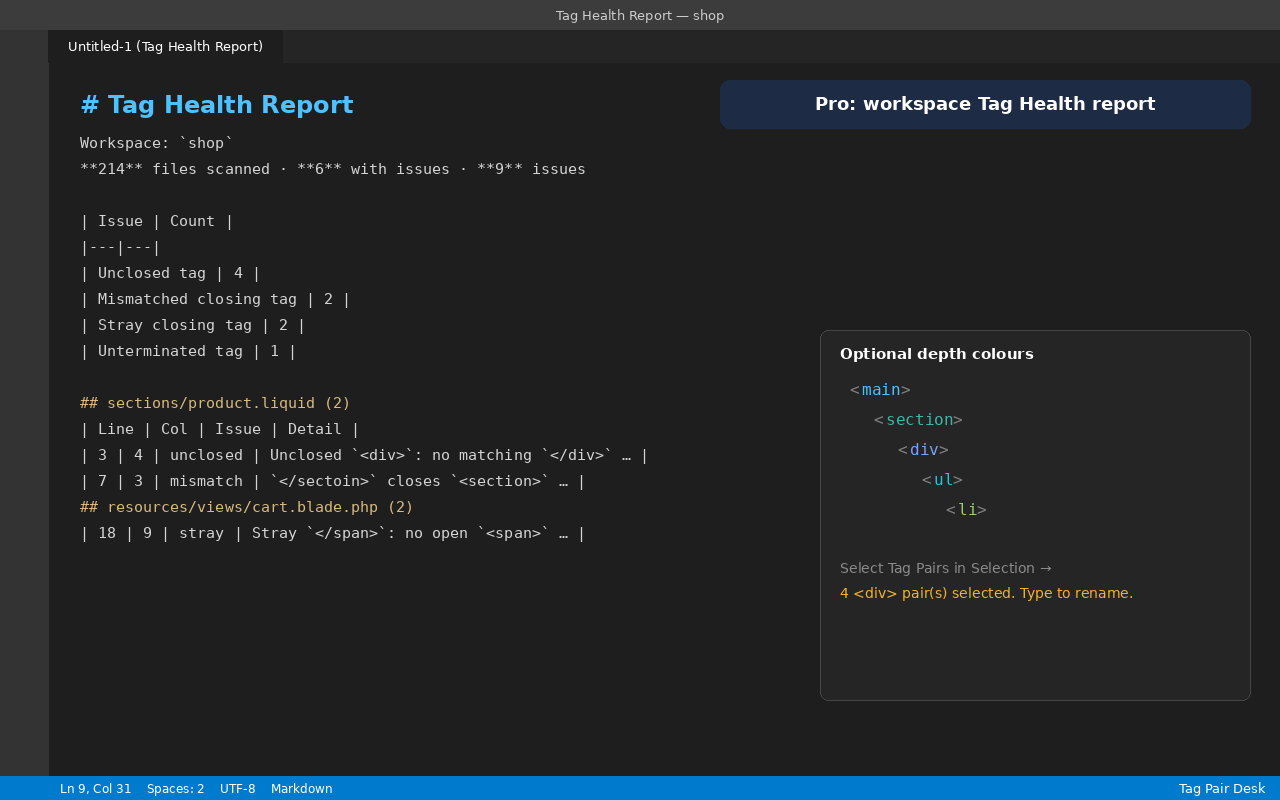
- Workspace Tag Health report in Markdown: every unclosed, mismatched, stray or unterminated tag across your templates, by file and line.
- Also included: optional depth colour presets for tag names (off by default).
- Pair-aware multi-cursor rename: put cursors on every matching
<div> / </div> pair inside a selection, then type once.
You can also unlock this extension by entering a Payhip license key (Command Palette: Tag Pair Desk: Enter license key).
Get Pro — $12 one-time
Known limits
- Tags produced by template logic (for example an opening
<div> in two {% if %} branches with one shared </div>) can't be matched by a text scanner; the highlight follows the source text.
- Template branches, second case (Pro checks): different tags opened in
if / else branches and closed in a later matching if / else (for example {% if a %}<a>{% else %}<span>{% endif %}…{% if a %}</a>{% else %}</span>{% endif %}) show as one unclosed tag plus one stray closing tag. Silence them with a tag-pair-desk-ignore-next-line comment (or tag-pair-desk-disable-file).
- In JSX, tags inside attribute expressions (
icon={<Icon />}) and inside template literals are skipped.
- HTML optional end tags are closed implicitly; the highlight covers the element up to where the browser would close it.
.erb, .vue, .svelte, .liquid, .njk and .twig files are recognised by their file extension even when VS Code opens them as Ruby or plain text. A single loose file of these types opened outside a workspace folder may need another supported file opened first.
Privacy
Runs on your computer. No login, no account, no telemetry, and it collects no data. The only network request is an optional license check, sent to the Zecro license service when you enter a license key, and automatically about every 30 days while a key is stored, to confirm it is still valid. File contents are never sent.
Support
Email zecroapp@gmail.com, or https://zecro.io/contact.
Built by Zecro LLC with AI-assisted development; no AI runs inside the extension.
License: see LICENSE (proprietary; all rights reserved).
© 2026 Zecro LLC. Washington State governing law.
| |

