SQL in Strings Desk: Highlight & Check SQL Inside Code Strings
See the SQL you write inside JavaScript, TypeScript, Python, Go and Ruby strings in color, and catch the slips that only show up at runtime (an unclosed (, a trailing comma before FROM, FORM instead of FROM) while you type. Free, offline, no account.
Get SQL Format Desk Pro ($12 one-time) to format that SQL in place inside JS/TS, Python, PHP, Go and Ruby strings, with ?, $1, :name and interpolations kept safe.
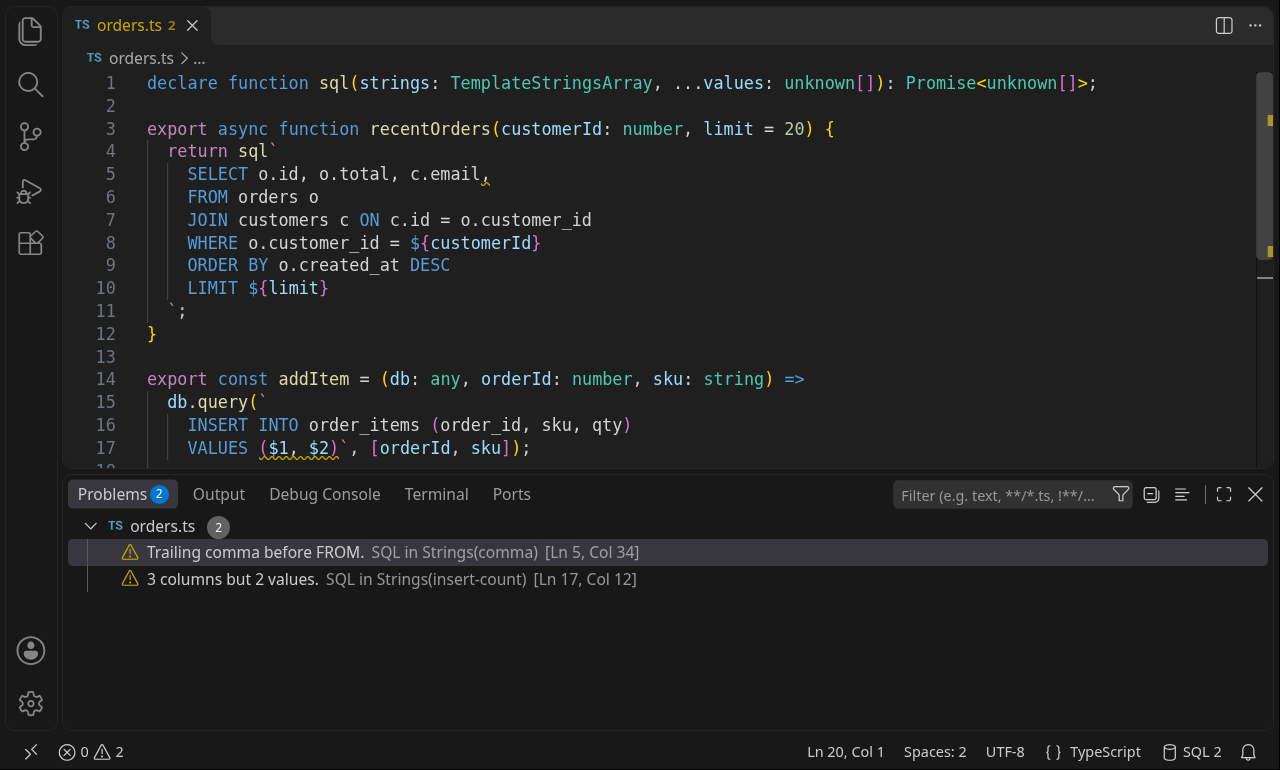
Features (Free)
SQL coloring inside strings
- JS / TS / JSX / TSX:
sql`...` and SQL`...` tags (also sql.unsafe, sql<Row>), /* sql */ before a string, a --sql first line, the first argument of query(, execute(, exec(, prepare(, raw(, and any string whose first line starts with SELECT, INSERT, UPDATE, DELETE, WITH, CREATE, ALTER…. ${...} stays JavaScript.
- Python:
"...", '...', """...""" and f-strings that start with a SQL keyword or --sql, and triple-quoted strings passed straight to execute(, executemany(, read_sql(, text(…. f-string {...} stays Python; %s, %(name)s, ?, :name show as placeholders.
- Go: raw
`...` and "..." strings that start with a SQL keyword, /* sql */ before a raw string, and the query argument of Query, QueryRow, Exec, Prepare and their ...Context(ctx, ...) forms.
- Ruby: quoted strings that start with a SQL keyword (
#{...} stays Ruby). VS Code already colors <<~SQL heredocs.
- PHP: VS Code already colors many SQL strings in PHP; SQL in Strings Desk adds the checks and commands below.
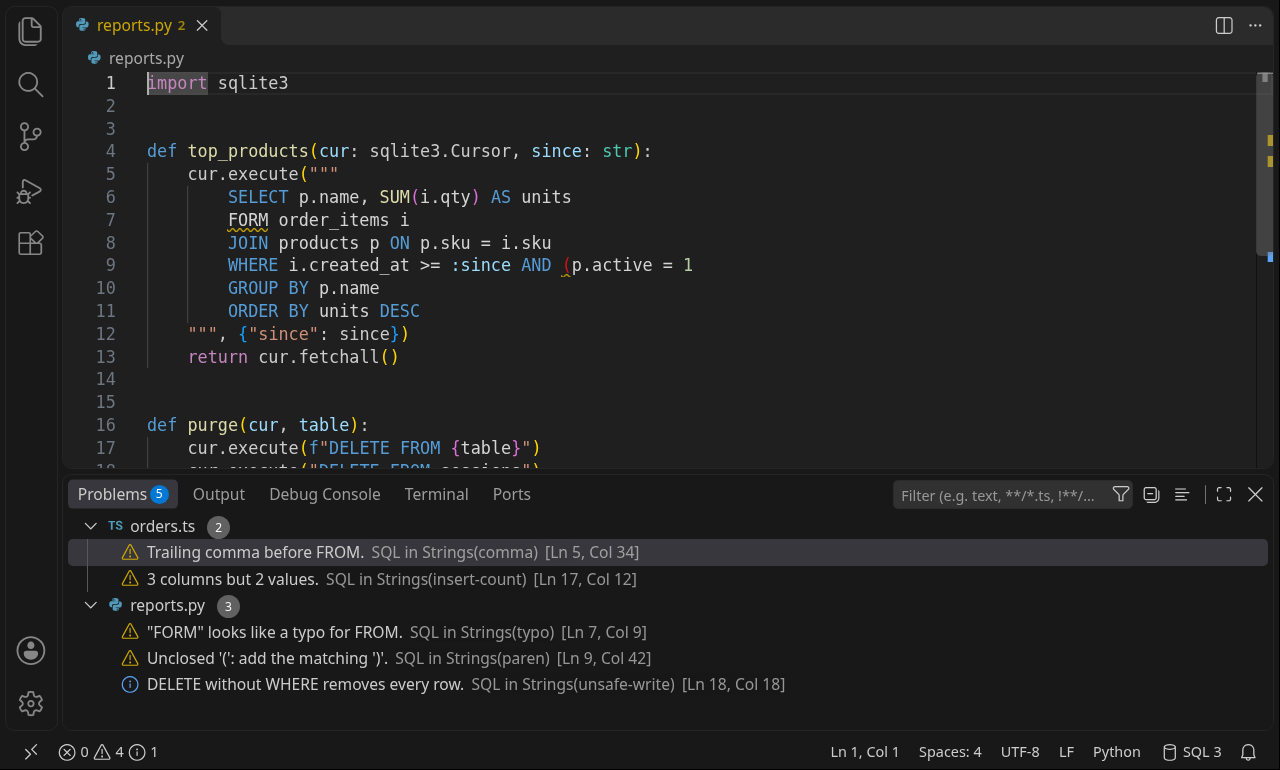
Syntax checks (Problems panel and squiggles) for SQL in JS/TS, Python, Go, PHP and Ruby strings:
- unclosed
(, unmatched ), unterminated 'string', "identifier" or /* comment
- trailing comma before
FROM, WHERE, ) or the end; double commas
- empty
WHERE, FROM with no table, SELECT with no columns, ORDER BY / GROUP BY with nothing after it, dangling AND / OR
- keyword typos in keyword positions:
SELCT, FORM, WHRE, JION…
INSERT INTO t (a, b, c) VALUES (?, ?): 3 columns but 2 values- info hint for
DELETE / UPDATE without WHERE (can be turned off)
- interpolations (
${}, f-string {}, #{}, {$var}) are skipped, never flagged
Dialect setting for quoting rules: Generic, PostgreSQL ($$ strings; backticks flagged), MySQL ("double-quoted" strings, # comments, backslash escapes), SQLite
Open SQL at Cursor in a SQL Tab (dedented, ready to paste into your database tool) and Copy SQL at Cursor
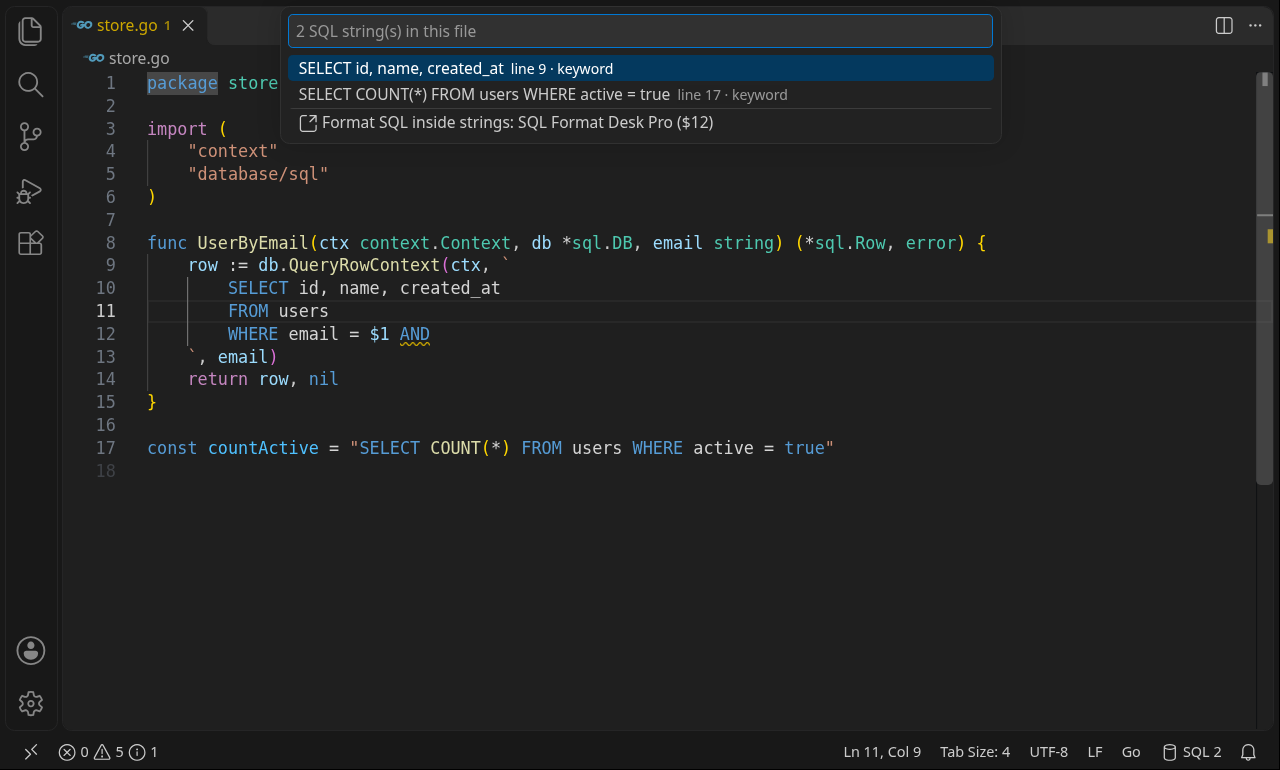
List SQL Strings in This File: jump to any query; the status bar shows how many the file has
100% offline: no network requests, no telemetry, no child processes, no webview
Commands
| Command |
What it does |
| SQL in Strings: Open SQL at Cursor in a SQL Tab |
Opens the query under the cursor in a new SQL editor beside this one |
| SQL in Strings: Copy SQL at Cursor |
Copies the query (placeholders kept as written) |
| SQL in Strings: List SQL Strings in This File |
Quick pick of every SQL string; pick one to jump there |
| SQL in Strings: Select Dialect for Checks |
Generic, PostgreSQL, MySQL or SQLite |
| SQL in Strings: Format SQL in This String (Pro) |
Runs SQL Format Desk Pro if installed; otherwise explains what Pro adds |
| SQL in Strings: Get SQL Format Desk Pro |
Opens the SQL Format Desk Pro page ($12 one-time) in your browser |
Settings
| Setting |
Default |
|
sqlInStrings.diagnostics |
true |
Show syntax problems for SQL in strings |
sqlInStrings.dialect |
generic |
generic, postgresql, mysql, sqlite |
sqlInStrings.warnUnsafeWrites |
true |
Info hint for DELETE / UPDATE without WHERE |
sqlInStrings.showStatusBar |
true |
Show the SQL string count |
Known limits
- The checks are structural, not a full parser per dialect: they catch common slips and stay quiet when unsure. They don't know your tables or columns.
- Coloring follows VS Code's TextMate rules: for a string that starts on one line and has its SQL on the next, use a
sql tag, /* sql */, a call like db.query( / cur.execute(, or a --sql first line. The checks look at the whole string either way.
- Go: if strings don't color, semantic highlighting from your Go language server may be painting over them. Add
"[go]": { "editor.semanticHighlighting.enabled": false } to your settings (or set "gopls": { "ui.semanticTokens": false }) to get the TextMate colors back. Go highlighting is best-effort.
- Pro leaves Ruby
%Q{} / %{} literals and +-joined strings unchanged. Strings joined directly with + (or . in PHP, or adjacent Python literals) are left unchanged. A query built across statements (q = "…"; q += "…") or with join() can still have its first part formatted, so check the preview diff.
- Only the SQL keywords are case-insensitive for coloring; to avoid coloring English text, a plain string must start with an UPPERCASE keyword (or a clear lowercase form such as
select ... from, insert into, delete from).
Free vs Pro
|
Free (this extension) |
SQL Format Desk Pro ($12 one-time) |
| SQL coloring inside strings |
✅ |
(use with this extension) |
| Syntax checks, Open / Copy / List SQL strings |
✅ |
(use with this extension) |
| Format SQL in place inside JS / TS / Python / PHP / Go / Ruby strings |
— |
✅ |
?, $1, :name, @name, ${}, f-string {}, %s, %(n)s, PHP $var, Ruby #{}, Go %s/%d kept intact while formatting |
— |
✅ |
Ruby <<~SQL heredocs and Go raw strings formatted in place |
— |
✅ |
| Round-trip guard: refuses to change a query if a token would be lost |
— |
✅ |
Procedure / function body formatting, .sqlformat.json team style, lint hints |
— |
✅ |
| 100% offline, no telemetry |
✅ |
✅ |
Get Pro
Everything above marked Free is free and complete. SQL Format Desk Pro is a separate offline extension for a one-time $12, no subscription. With it installed, SQL in Strings: Format SQL in This String (Pro) formats the query under your cursor in place inside JavaScript, TypeScript, Python, PHP, Go and Ruby strings (SQL Format Desk Pro 1.0.2 or later), keeping every placeholder (?, $1, :name, @name) and interpolation intact. It shows a preview diff first and refuses any change that would lose a token.
Install it next to this extension and the free SQL Format Desk Lite (Extensions → … → Install from VSIX… with the Pro file). Get SQL Format Desk Pro for $12
Privacy
Runs entirely on your computer. No network, no data collection.
Support
Bugs and ideas: zecroapp@gmail.com
© 2026 Zecro LLC, Washington, USA. MIT License; see LICENSE.
| |

