Sheet Glance: Excel & CSV Viewer
Open spreadsheets in VS Code as a clean, fast, read-only grid. Click an .xlsx file and it opens in a tab. That's it: no sign-up, no nag screens, no trial, no telemetry, and nothing ever leaves your computer.
What you get
- Opens the formats you actually have:
.xlsx, .xlsm, .xlsb, .xls (Excel 97–2003), .ods (LibreOffice/OpenOffice), .csv, .tsv and .tab.
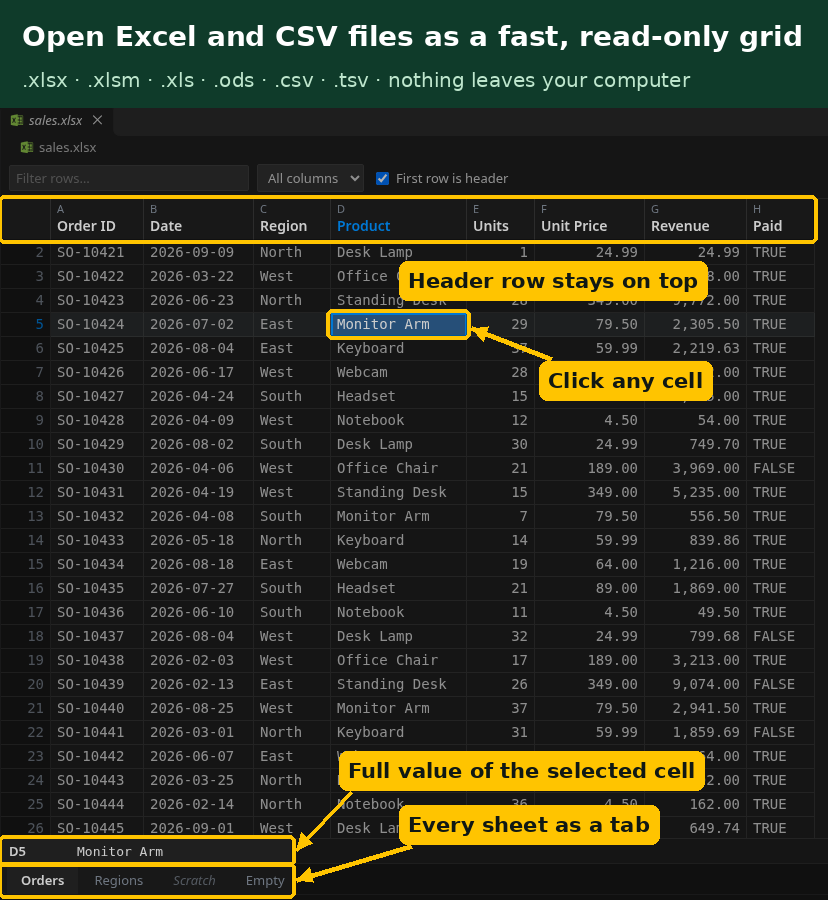
- Sheet tabs along the bottom, like Excel. Hidden sheets are marked as hidden.
- Frozen header row. The first row stays at the top as column names. Turn it off with one checkbox.
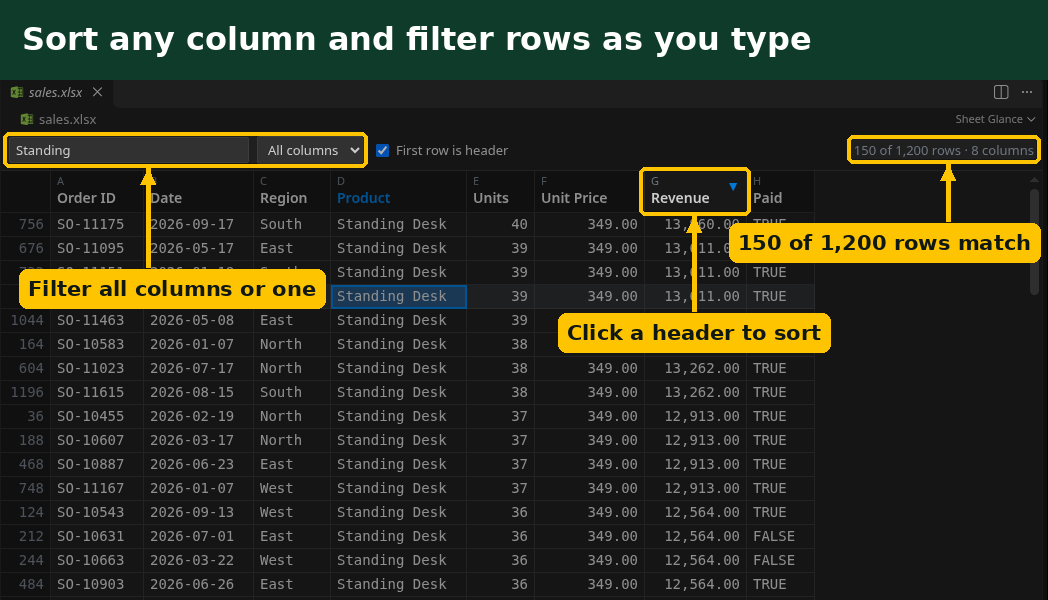
- Sort and filter. Click a column header to sort (A→Z, Z→A, off). Numbers sort as numbers and dates as dates. Type in the filter box to show only matching rows, across all columns or just one.
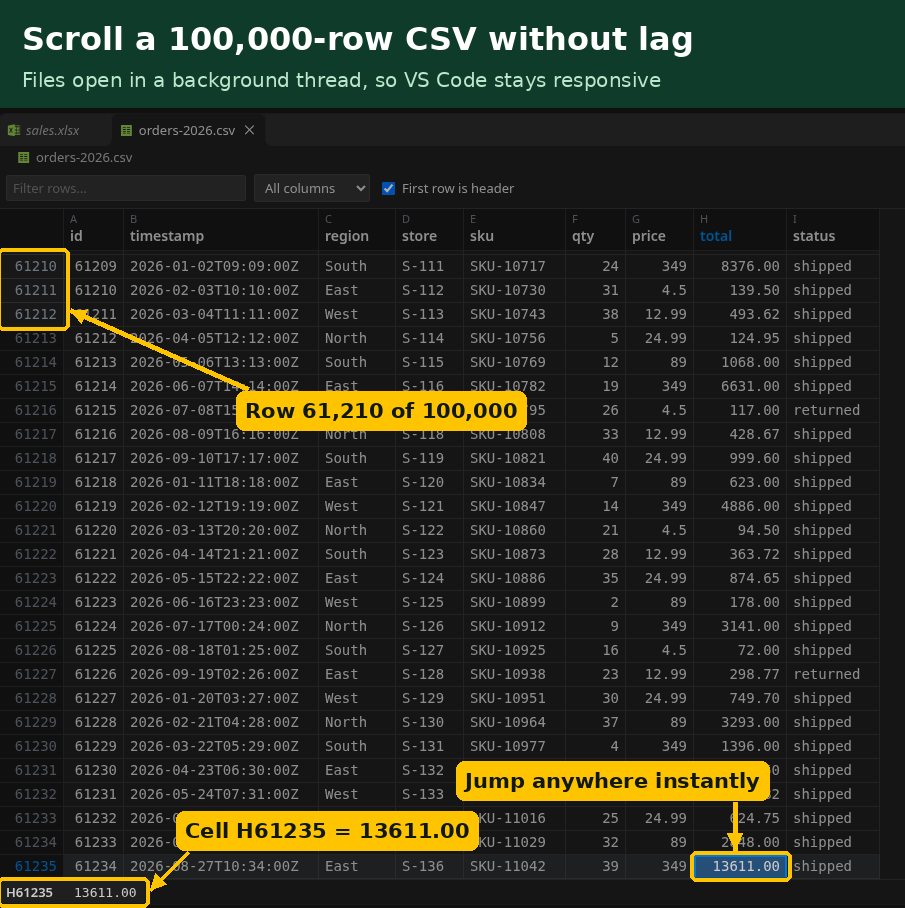
- Big files stay smooth. Rows are drawn only as you scroll, and files are read in a background thread, so VS Code stays responsive. A 10 MB workbook opens in about 2 seconds, and a 100,000-row CSV opens in under half a second. Files over 100 MB show a heads-up that opening them may take a while and use a lot of memory.
- Follows your theme. Light, dark and high-contrast themes all work, and the grid uses your editor font.
- See the full value. Click a cell to show its address and full content in the status strip. Use
Ctrl+C (Cmd+C on macOS) to copy it, and the arrow keys, Page Up/Down and Home/End to move around.
- Auto-reload. When the file changes on disk (for example, a script rewrites it), the grid refreshes and keeps your sheet and scroll position.
- Values as Excel shows them. Number and date formats from the workbook are applied, so
0.256 with a percent format shows as 25.6%.
CSV and TSV files
CSV files still open in the normal text editor by default, so editing them as text works the same as before. To see one as a grid, click the table icon in the editor title bar, or right-click the file and choose Open in Sheet Glance. In the grid, Open as Text switches back.
The delimiter (comma, semicolon, tab or pipe) is detected automatically. Quoted fields, line breaks inside cells and UTF-8, UTF-16 or Windows-1252 text are handled. Values are shown exactly as written, so 00501 stays 00501.
To always open CSV files as a grid, add this to your settings:
"workbench.editorAssociations": { "*.csv": "sheetGlance.csv" }
Privacy
Sheet Glance runs entirely on your computer. It makes no network requests, sends no telemetry and has no account, license key or activation. The grid runs under a strict content-security policy that allows only the extension's own bundled files.
Known limits
- Read-only. Sheet Glance shows workbooks and never changes your file.
- Charts, images, pivot tables, comments and cell colors are not shown. Formulas show their last calculated value, as saved in the file.
- Merged cells show their value in the top-left cell.
- Password-protected (encrypted) workbooks cannot be opened.
- Files that aren't really spreadsheets (for example a damaged download) show "not a valid spreadsheet file" instead of a grid.
Get Sheet Glance Pro ($9)
Everything above is free and complete, and you never need Pro to use it. Sheet Glance Pro is a separate add-on for a one-time $9, with no subscription. It adds:
- CSV/TSV editing in the grid, with save and undo. Rows you don't touch are saved exactly as they were, in the file's original encoding.
- Search across all sheets of a workbook, jumping straight to each match.
- Column statistics: count, sum, mean, median, min, max and the most common values.
- Export a sheet or your filtered rows to CSV, TSV, JSON or Markdown.
- Compare two sheets or files and see added, removed and changed rows.
Pro is also fully offline, with no account or license key. Get Sheet Glance Pro for $9
Support
Email bhamlefty@gmail.com.
Sheet Glance is made by Zecro LLC. It is not affiliated with Microsoft, or with other spreadsheet viewer extensions. See LICENSE for terms and THIRD-PARTY-NOTICES.md for the open-source components it includes.
| |

