HTTP Desk Lite — Local .http / REST Client
Send HTTP requests straight from .http and .rest files. No login, no account, no cloud sync, no telemetry.
Buy HTTP Desk Pro — $12 one-time — collections, environments, history, bulk runs, and response diff on top of this free Lite edition.
▶ Send Request above every request (CodeLens), editor-title Run button, Ctrl+Alt+R / Cmd+Alt+R- Pretty response panel beside your file: status badge, time (ms), size, pretty JSON / XML, headers, sent request; Copy Body and Save Response to File
- File variables (
@baseUrl = …), {{var}} everywhere, .env via # @dotenv .env, {{$timestamp}} {{$isoTimestamp}} {{$uuid}} {{$randomInt}}
Authorization: Basic user:password (encoded for you), Bearer token from a local file, request body from a local file- Paste cURL as Request turns a common cURL command into a
.http block (-X, -H, -d, --data-urlencode, --json, -u, -b; @file bodies become < ./file; unsupported flags such as -F, -k, --proxy are flagged with a # WARNING comment instead of being silently changed)
- Redirects (up to 5; credentials stripped across origins, HTTPS→HTTP downgrades blocked), gzip / deflate / br, 10 MB response cap, per-request wall-clock timeout, cancel
- Standard methods plus uppercase custom / WebDAV verbs (
PROPFIND, MKCOL, PURGE …); CONNECT tunnels are not supported
- Sent Request view masks
Authorization, Cookie, API-key and token headers
Example
# @dotenv .env
@baseUrl = https://api.example.com

### List users
# @expect status 200
GET {{baseUrl}}/users?limit=5
Accept: application/json
Authorization: Bearer < ./token.txt

### Create user
# @name createUser
POST {{baseUrl}}/users
Content-Type: application/json
Authorization: Basic {{user}}:{{pass}}

{ "name": "Ada", "createdAt": "{{$isoTimestamp}}" }

### Upload payload from a file
# @timeout 5000
# @no-redirect
PUT {{baseUrl}}/users/1
Content-Type: application/json

< ./payload.json
Screenshots
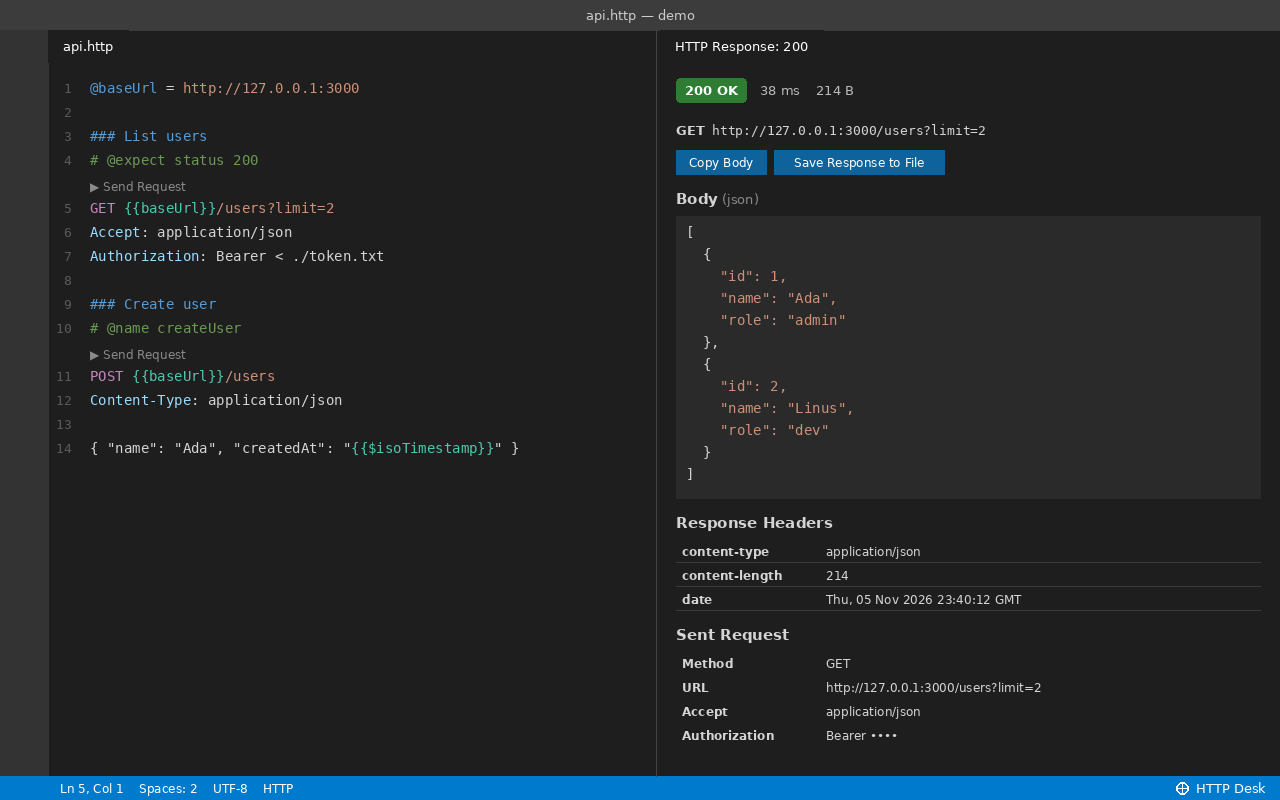
.http file with ▶ Send Request and the JSON response panel beside it.
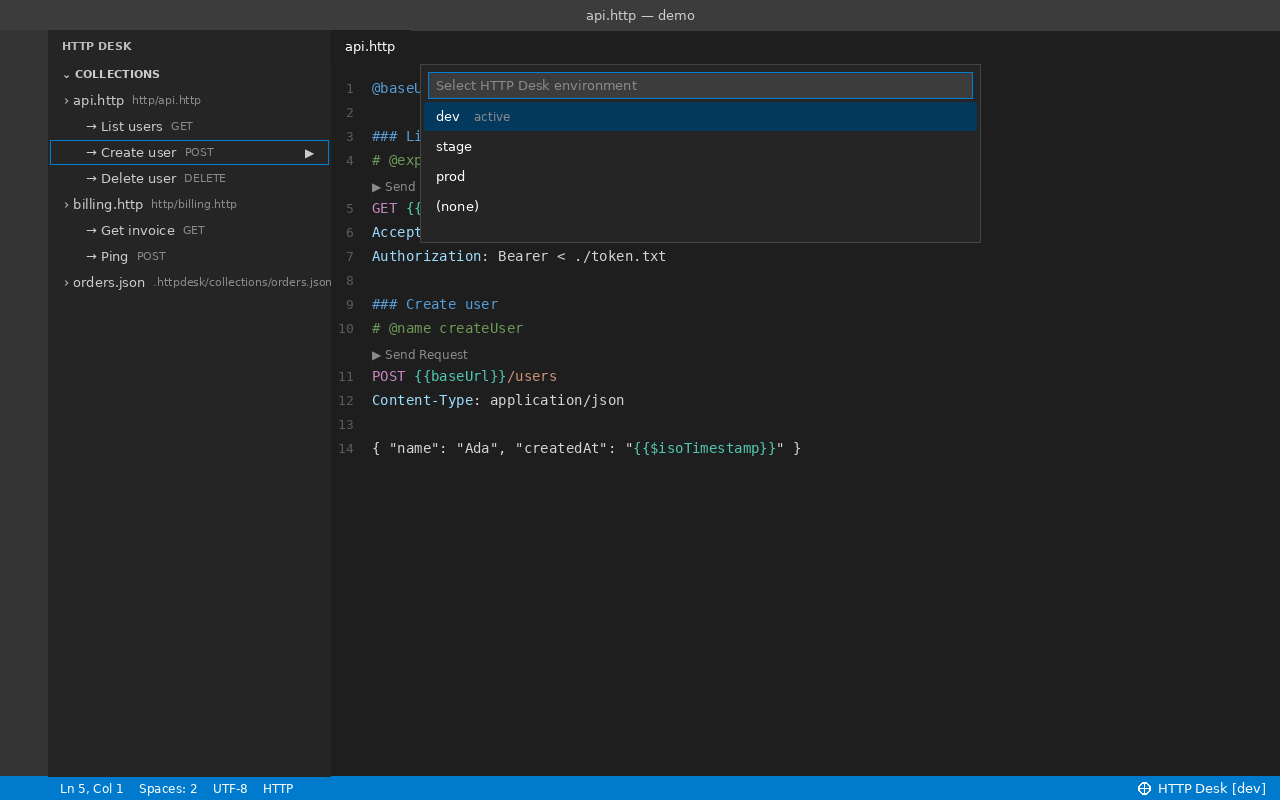
Pro Collections sidebar and environment switcher (dev / stage / prod).
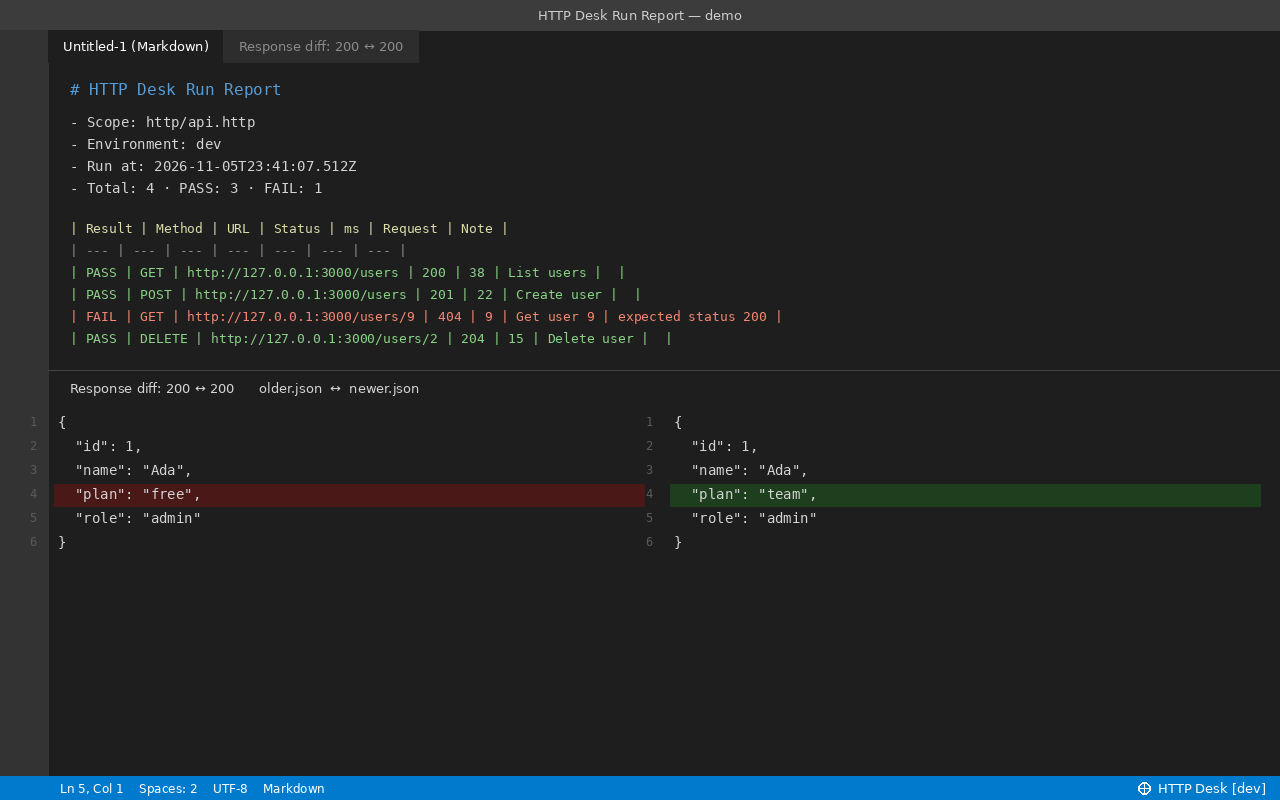
Pro bulk-run report (PASS / FAIL) and response diff.
Commands
| Command |
What it does |
| HTTP Desk: Send Request |
Send the request under the cursor |
| HTTP Desk: Paste cURL as Request |
Convert a cURL command from the clipboard into a request |
| HTTP Desk: New Request File |
Open a starter .http file |
| HTTP Desk: Switch Environment / Open Request History / Run All Requests in Folder/File / Diff Last Two Responses / Import Collection JSON |
Pro |
Directives
| Directive |
Meaning |
### Title |
Starts a request; optional title |
# @name id |
Names the request |
@var = value |
File variable |
# @dotenv .env |
Load variables from a .env file next to the .http file |
# @bearer_file ./token.txt |
Send Authorization: Bearer <file contents> |
# @timeout 5000 |
Timeout in ms |
# @no-redirect |
Do not follow redirects |
# @expect status 200 / # @expect contains text |
Checks used by the Pro bulk runner |
Privacy
HTTP Desk has no login, no account, no cloud sync and no analytics. Zero telemetry, zero accounts, zero background network calls. Network requests are sent only when you explicitly run a request, to the target URL (and any redirect Location hops unless # @no-redirect is set, with credentials stripped across origins and HTTPS→HTTP downgrades blocked). In an untrusted (Restricted Mode) workspace, local files (< ./file, @bearer_file, @dotenv) are not read. Your files stay on your computer.
Get Pro
Get HTTP Desk Pro for $12
- Collections sidebar — your
.http / .rest files and every named request in them, plus .httpdesk/collections/*.json. Click to jump or ▶ to send. Plain files you can commit to Git; no cloud sync.
- Environment switcher (dev / stage / prod) —
.httpdesk/environments.json, switch from the status bar.
- Bulk runner + Markdown run report — run every request in a file or folder, check
# @expect, get a PASS / FAIL report.
- Response diff — compare the last two responses in VS Code's diff view (optional sorted-key JSON).
- Local request history — last 100 requests, auth / cookie / API-key headers and secret query values masked, re-send any of them.
- Collection JSON import — Collection v2.1 / v4 export JSON into local
.http files.
Pro is an add-on and needs this free extension.
Support
zecroapp@gmail.com
License
MIT (see LICENSE). Governed by the laws of the State of Washington, USA.
| |

