Cron Desk: Cron Expression Explainer & Next Run Times
What does this cron expression actually mean? Cron Desk answers in plain English, right where the expression is written, including cron strings inside your code (cron.schedule(...), @Scheduled(cron = ...), APScheduler, Celery beat, Hangfire, Quartz), not only crontab and YAML files. Next to the meaning you get the next run times in the schedule's time zone with your own local time beside them, so 02:30 CET reads as 17:30 PST without any arithmetic. Quartz and 6-field "with seconds" syntax are understood too, and invalid expressions are flagged before they ship. Works offline. No login, no telemetry.
25 free uses, then Pro ($9 one-time). Get Pro — $9 one-time
Screenshots
What it does
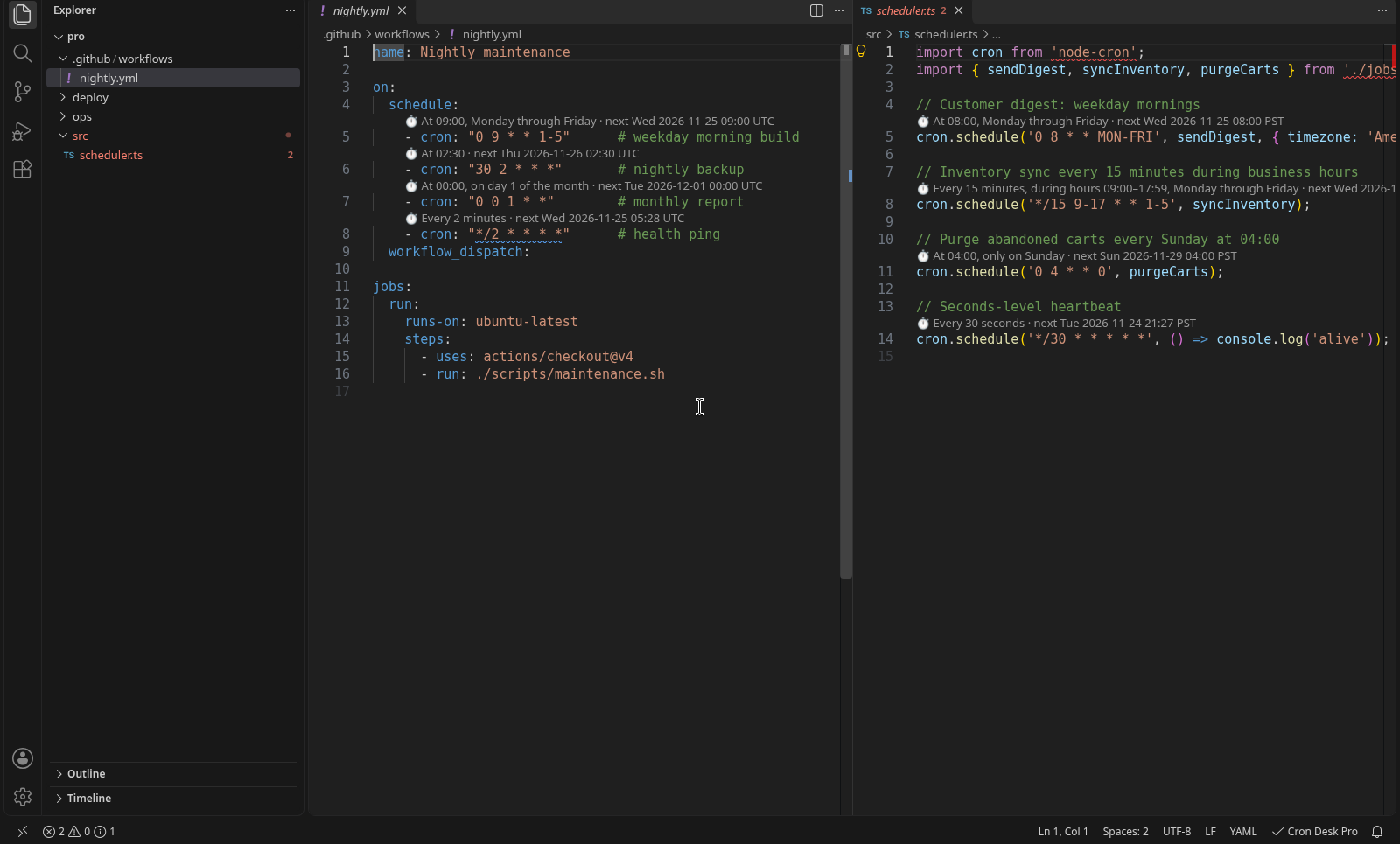
- Meaning + next run above every expression (CodeLens):
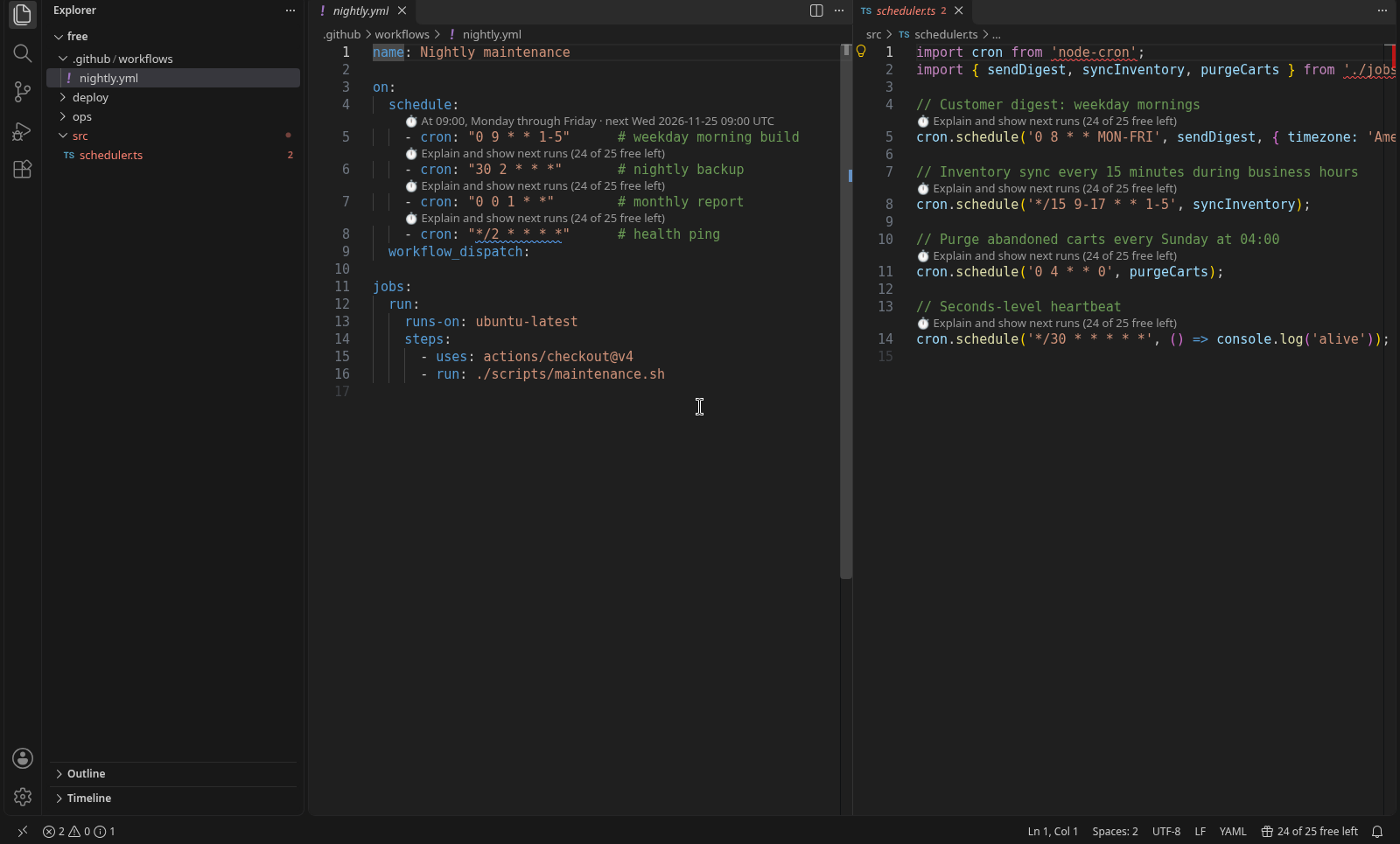
⏱ At 09:00, Monday through Friday · next Wed 2026-11-25 09:00 UTC. Click it for the next 10 runs. Free: the lens reads ⏱ Explain and show next runs, and one click explains that expression (one use); with Pro the meaning is always shown, no click.
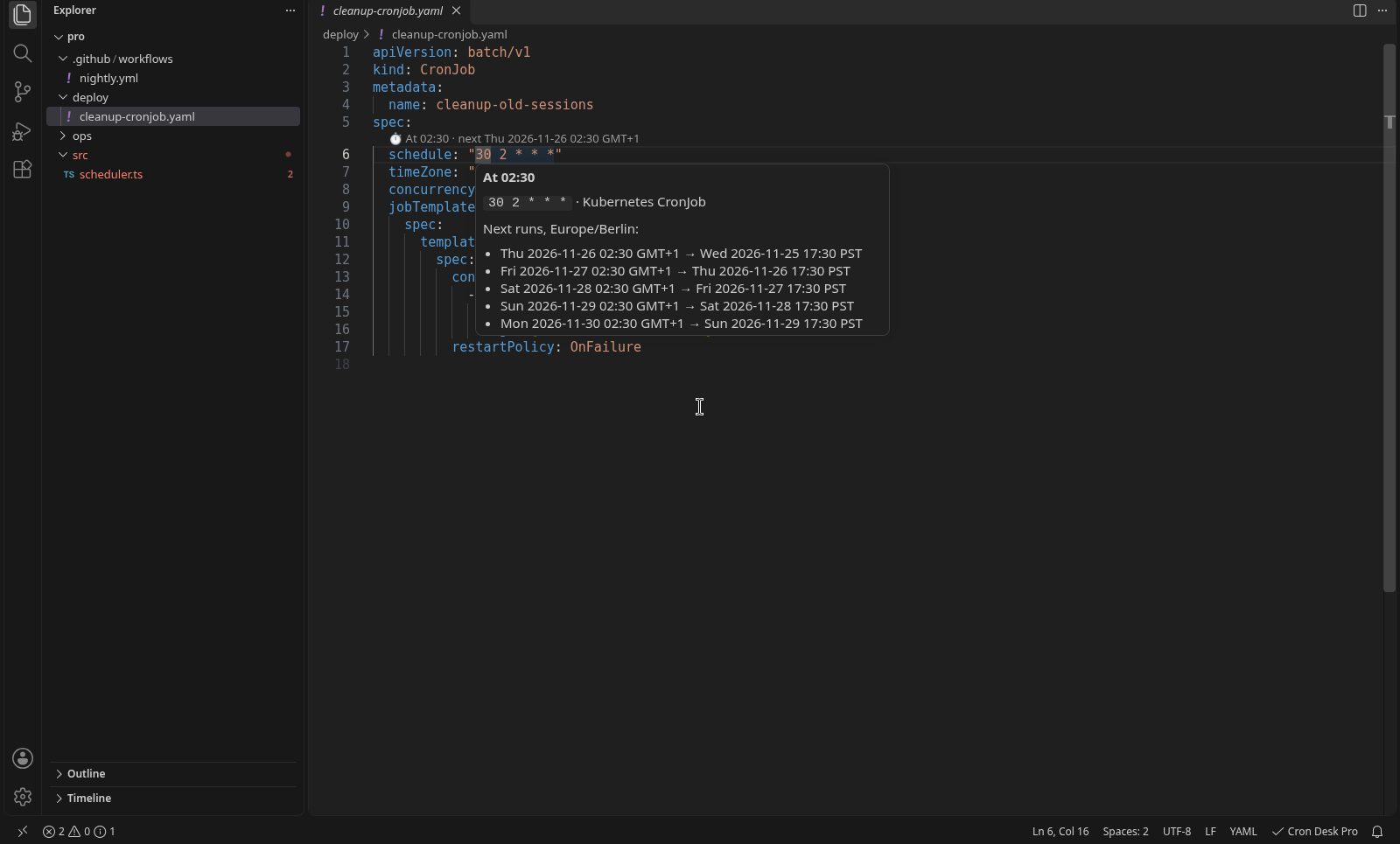
- Hover for the full explanation and the next 5 runs, in the schedule's time zone with your local time beside it (
02:30 CET → 17:30 PST). Free: the hover has an Explain and show next runs link (one use); with Pro the full hover appears on its own.
- Knows where the schedule runs:
- workflow schedules (
on: schedule: - cron:) always run in UTC, and a note appears when a schedule asks for more often than every 5 minutes, which the runner won't honour;
- Kubernetes CronJobs use
spec.timeZone when set;
- crontab files honour
CRON_TZ= / TZ= lines, skip environment lines, and work with the extra user column in /etc/crontab and cron.d.
- Cron strings in code:
cron.schedule("*/5 * * * *"), @Scheduled(cron = "0 0 9 * * MON-FRI"), APScheduler, Celery beat, Hangfire, Terraform and more. Any quoted string that is a cron expression is picked up in JS/TS, Python, Go, Java, Kotlin, C#, Ruby, PHP, Rust, JSON, TOML, shell, Terraform and others (cronDesk.languages).
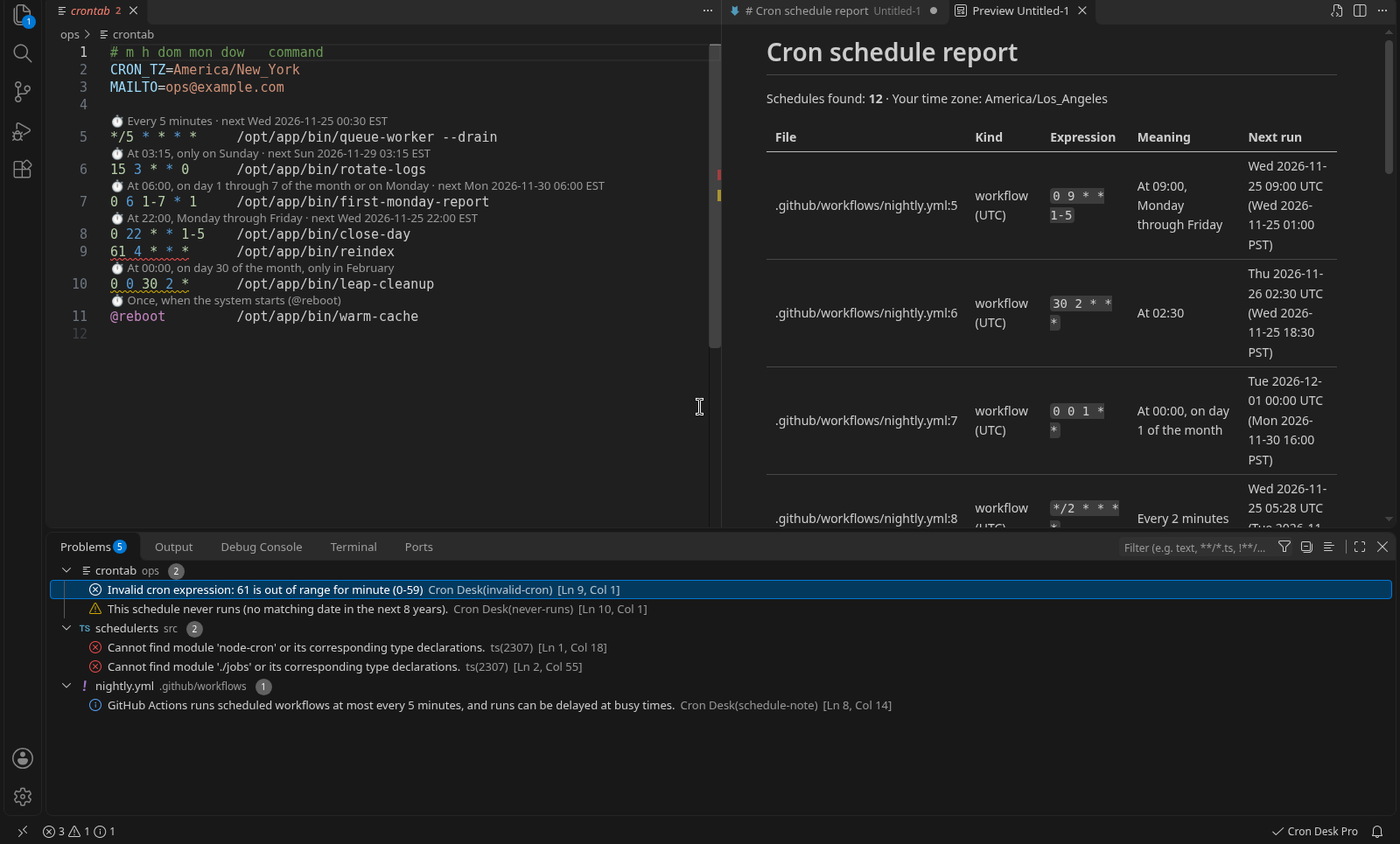
- Checks: out-of-range values (
61 * * * *), unknown names, bad steps, wrong field counts, and schedules that never run (0 0 30 2 *) appear in the Problems panel.
- Explain Cron Expression…: select any expression (or type one) and see its meaning and next 10 runs.
- Insert Cron Expression…: common schedules ready to drop in.
- Workspace Schedule Report: one Markdown table of every crontab entry, workflow schedule and CronJob in the workspace, with meaning, next run and errors.
- Syntax highlighting for
crontab, *.cron and *.crontab files.
Syntax supported: standard 5-field cron with names (JAN, MON), lists, ranges, steps, wrap-around ranges (FRI-MON) and @yearly / @monthly / @weekly / @daily / @hourly / @reboot; 6-field cron with seconds (node-cron, Spring); Quartz (6 or 7 fields, ?, L, W, LW, #, Sunday = 1, L alone in day-of-week = Saturday). Quartz-only characters (?, L, W, #) in a 5-field expression are flagged, because standard cron won't run them. Standard cron's rule that a restricted day-of-month or day-of-week matches is applied and spelled out ("on day 13 of the month or on Friday").
How this differs from what you already have
VS Code shows a cron string as plain text, and an online cron explainer means copying it out one at a time. Other schedule checkers list findings for crontab and YAML files. Cron Desk tells you what each expression means in plain English, works on the cron strings in your application code as well, shows your local time beside the schedule's zone, and inserts common schedules for you.
25 free uses, then Pro
Exactly these actions use one free use each:
- Explain Cron Expression…
- Show Next Run Times, including clicking the
⏱ Explain and show next runs CodeLens or the link in a hover
- Insert Cron Expression… (picking a schedule and inserting it; cancelling the list uses nothing)
- Workspace Schedule Report
Explain, Show Next Run Times and Insert count once per distinct expression per VS Code session. After you explain an expression, its CodeLens and hover show the meaning and next runs for the rest of the session without using more. Opening files, CodeLenses and hovers never use a free use on their own. Checks for invalid expressions don't use any and run while you have free uses left.
The status bar shows how many are left (for example 20 of 25 free left). After 25 uses, explanations, next run times, checks and the report stop until you get Pro. Pro is $9 one-time. It gives unlimited use, and it shows the meaning and next run on every CodeLens and hover automatically, with no click. Unlock it either way:
- install the Pro add-on
.vsix from your Payhip receipt (Extensions → … → Install from VSIX…), or
- run Cron Desk: Enter license key and paste the key from your receipt.
Get Pro — $9 one-time
Commands
| Command |
What it does |
| Cron Desk: Explain Cron Expression… |
Meaning and next 10 runs of the selection or a typed expression |
| Cron Desk: Show Next Run Times |
Next 10 runs of the expression on the current line |
| Cron Desk: Insert Cron Expression… |
Pick a common schedule |
| Cron Desk: Workspace Schedule Report |
All crontab entries, workflow schedules and CronJobs in one table |
| Cron Desk: Get Pro / Enter license key / Remove license key |
Pro and licensing |
Settings
| Setting |
Default |
Notes |
cronDesk.timeZone |
"" |
Your zone for "your time" (IANA name). Empty = this computer's zone |
cronDesk.nextRunsCount |
5 |
Runs listed on hover |
cronDesk.flavor |
auto |
How strings in code are read: auto, unix, seconds, quartz |
cronDesk.codeLens.enabled / hover.enabled / diagnostics.enabled |
true |
Turn each part on or off |
cronDesk.detectInStrings |
true |
Look for cron expressions in quoted strings in code |
cronDesk.languages |
many |
Languages checked for cron strings |
cronDesk.report.exclude |
node_modules, .git, dist, vendor |
Left out of the report |
Known limits
- A time that doesn't exist on a daylight-saving change day (for example 02:30 on spring-forward day) is skipped in the preview, though some cron daemons run it right after the change. A time that happens twice on fall-back day (for example 01:30) is listed twice, once before the change and once after. Whether your cron daemon runs it once or twice depends on the daemon.
- AWS EventBridge's 6-field cron format (with a year field) is not supported.
- In code, only quoted strings are checked, and a string must contain
* or ? (or be an @ macro) to count as cron, so version numbers and dates are not mistaken for schedules.
- Files over 400 KB are not scanned.
Privacy
Runs on your computer. No login, no account, no telemetry, and it collects no data. Your files never leave your computer. The only network request is an optional license check, sent to the Zecro license service when you enter a license key, and automatically about every 30 days while a key is stored, to confirm it is still valid.
Support
Email zecroapp@gmail.com.
GitHub® is a trademark of GitHub, Inc. Kubernetes® is a registered trademark of The Linux Foundation. Quartz is a trademark of its respective owner. Cron Desk is not affiliated with or endorsed by any of them.
Built by Zecro LLC with AI-assisted development; no AI runs inside the extension.
License: see LICENSE (proprietary; all rights reserved).
© 2026 Zecro LLC. Washington State governing law.
| |

