Mermaid Gantt Editor
Japanese | English
Overview
Edit Mermaid Gantt charts visually while preserving Markdown source and Git-reviewable diffs.
Mermaid Gantt Editor is a VS Code extension for teams that keep implementation plans, release plans, migrations, investigations, and lightweight schedules in Markdown. It opens Mermaid Gantt source as a Task Grid, lets you edit tasks, dates, dependencies, tags, and sections, then writes the result back to the original .mmd file or fenced Markdown block.
The extension is Git-native, Markdown-native, lossless, and Gantt-specific. It keeps unchanged source readable for pull requests, preserves comments and unsupported syntax where possible, surfaces diagnostics before unsafe edits, and still renders with GitHub, GitLab, Obsidian, and other Mermaid hosts.
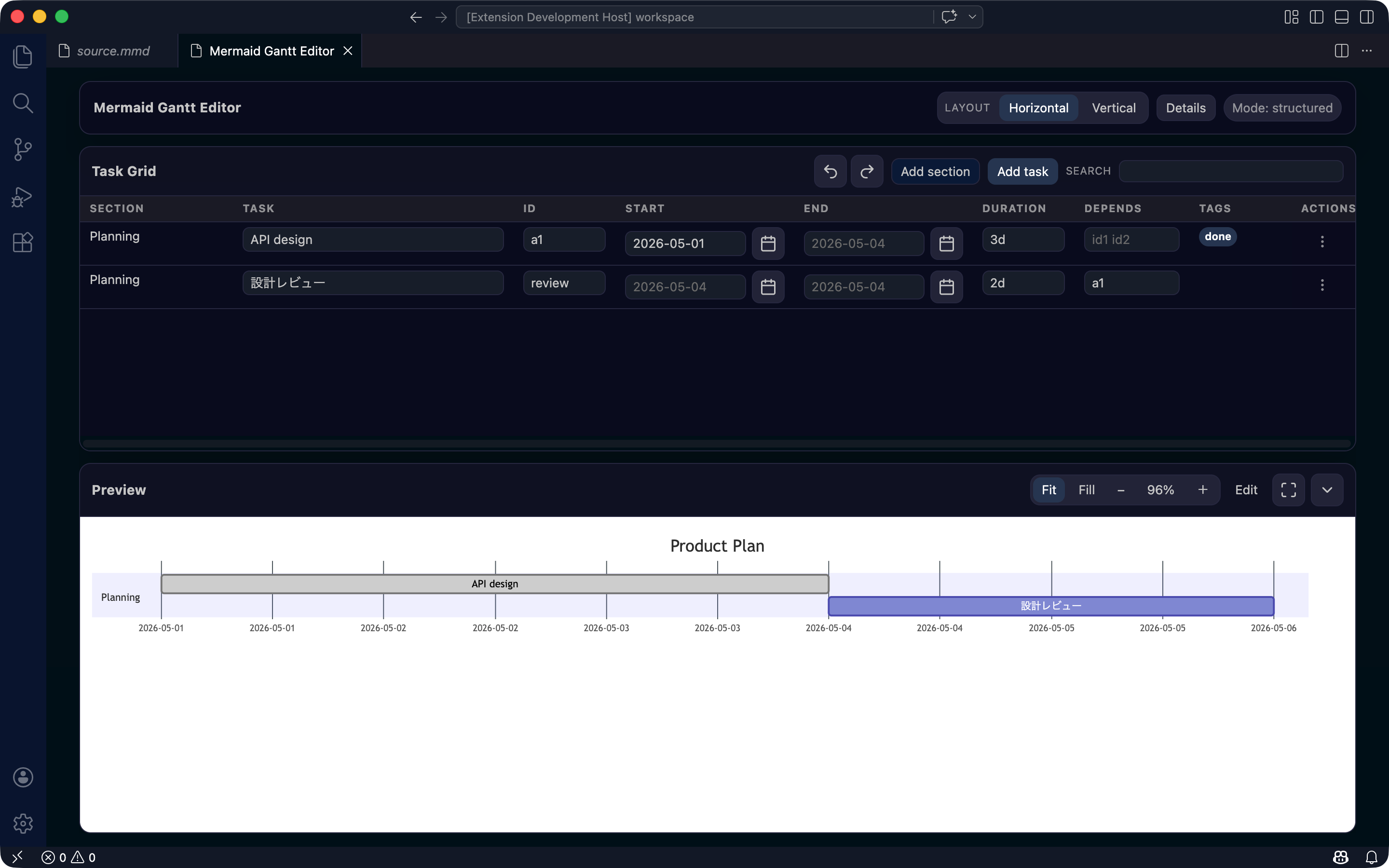
The editor is designed as a short review loop: open a Mermaid Gantt block, edit it in the Task Grid, check Preview and Diagnostics, then apply only source-safe changes back to the original file.
Try It in Your Browser
Try the static web version at mermaid-gantt-editor.pages.dev to see the Task Grid, Mermaid Preview, source-safe editing flow, format review, share, and PNG / SVG download behavior without installing the VS Code extension.
The static site is useful for evaluating the editor experience. Use the VS Code extension when you want Markdown CodeLens integration, diagnostics in your local workspace, and write-back to local .mmd or Markdown files.
What You Can Do
- Open standalone
.mmd Mermaid Gantt files in the Gantt Editor
- Open fenced
mermaid Gantt blocks from Markdown using CodeLens
- Edit task labels, IDs, start dates, end dates, durations, dependencies, and tags
- Edit section labels and document settings
- Add, duplicate, move, and delete sections and tasks
- Search, sort, and filter large Gantt plans
- Preview the Mermaid chart while editing
- Review diagnostics such as duplicate IDs, missing dependencies, self references, and dependency cycles
- Apply safe quick fixes when the source range is known
- Review and apply source formatting before it changes your file
- Export the rendered chart as SVG or PNG
- Review fallback diagnostics when structured editing is not safe
- Write changes back only to the selected Mermaid block
Installation
To install from the Marketplace:
- Open the VS Code Extensions view
- Search for
Mermaid Gantt Editor or mermaid-gantt-editor
- Press
Install
- Open a
.mmd file or a Markdown file that contains Mermaid Gantt source
For local validation, you can also install a VSIX build.
pnpm run package:vsix
pnpm run install:vsix
Quick Start
1. Create Mermaid Gantt source
Use either a .mmd file or a Markdown fenced code block.
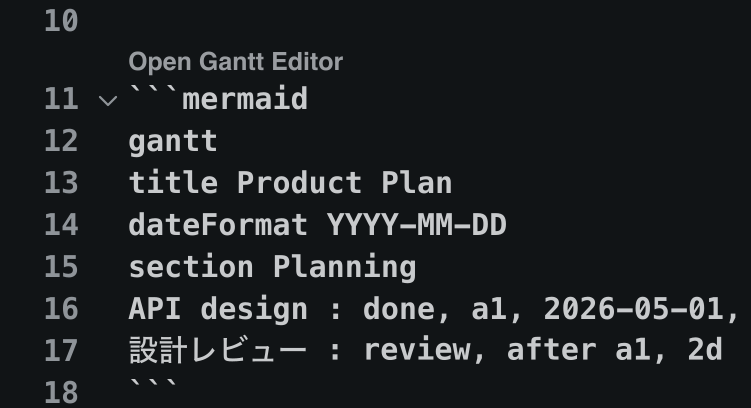
```mermaid
gantt
title Product Plan
dateFormat YYYY-MM-DD
section Planning
API design : done, a1, 2026-05-01, 3d
Design review : review, after a1, 2d
```
2. Open the Gantt Editor
In Markdown, use the Open Gantt Editor CodeLens above a Mermaid Gantt block.
From the Command Palette, run:
Mermaid Gantt Editor: Open Gantt Editor
3. Edit in the Task Grid
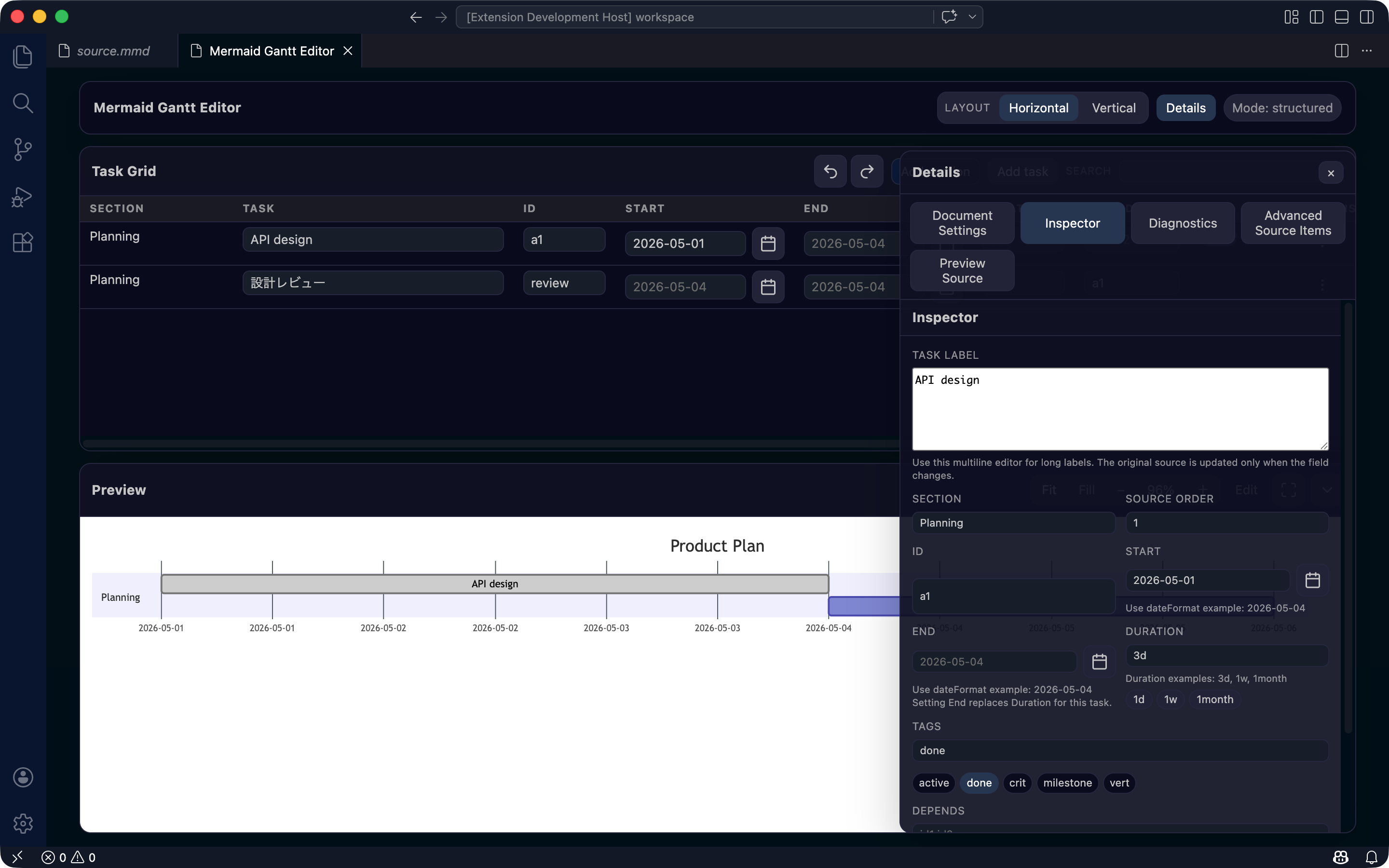
Edit labels, IDs, schedules, dependencies, and tags directly in the Task Grid. The Preview shows the Mermaid chart, and Details shows the selected task and document settings.
4. Review Diagnostics
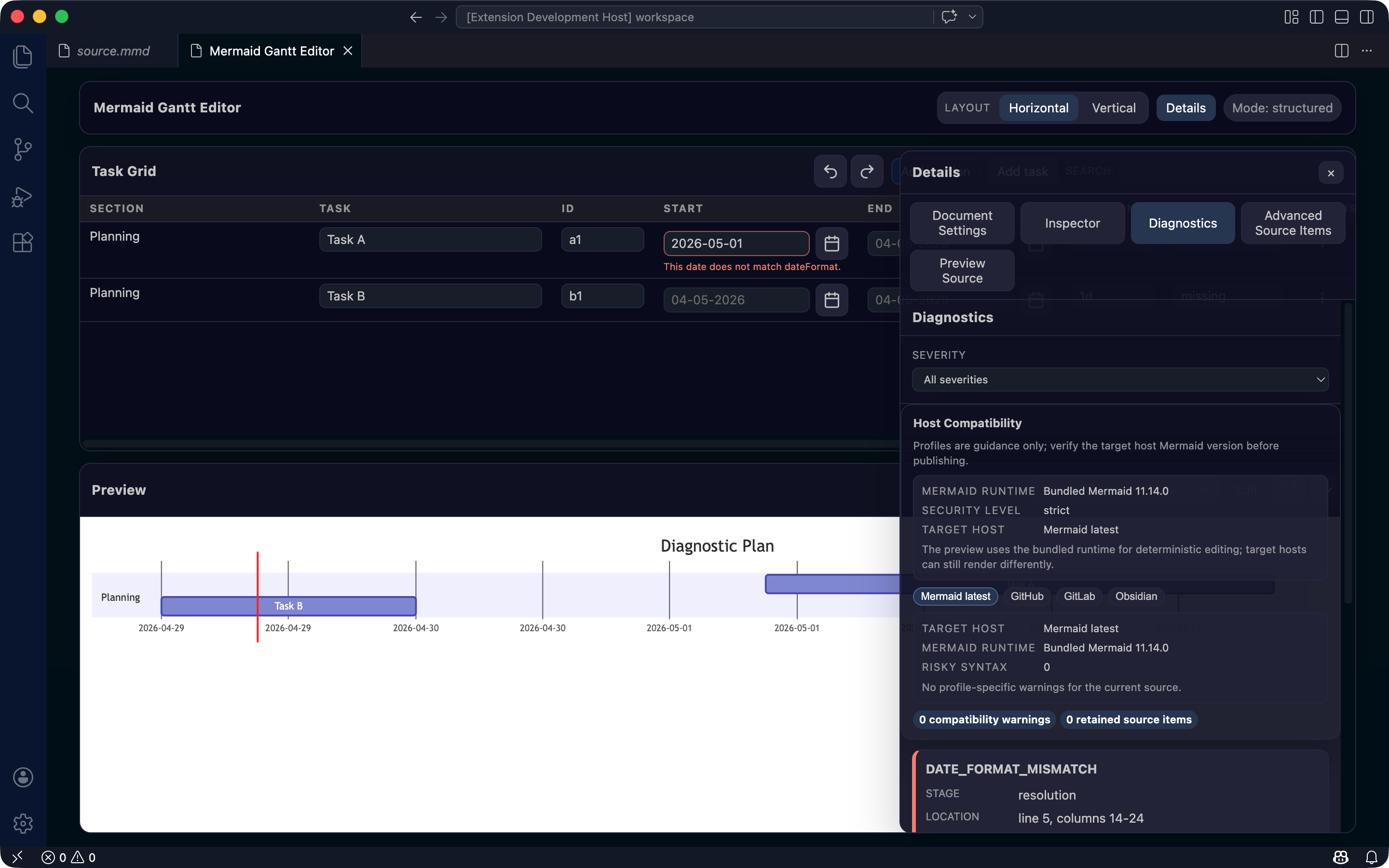
Problems are shown in Diagnostics. Dependency issues are summarized by undefined references, self references, and cycles, with related source snippets and next steps. When a fix is safe, you can apply it through a quick fix.
5. Review fallback diagnostics when needed
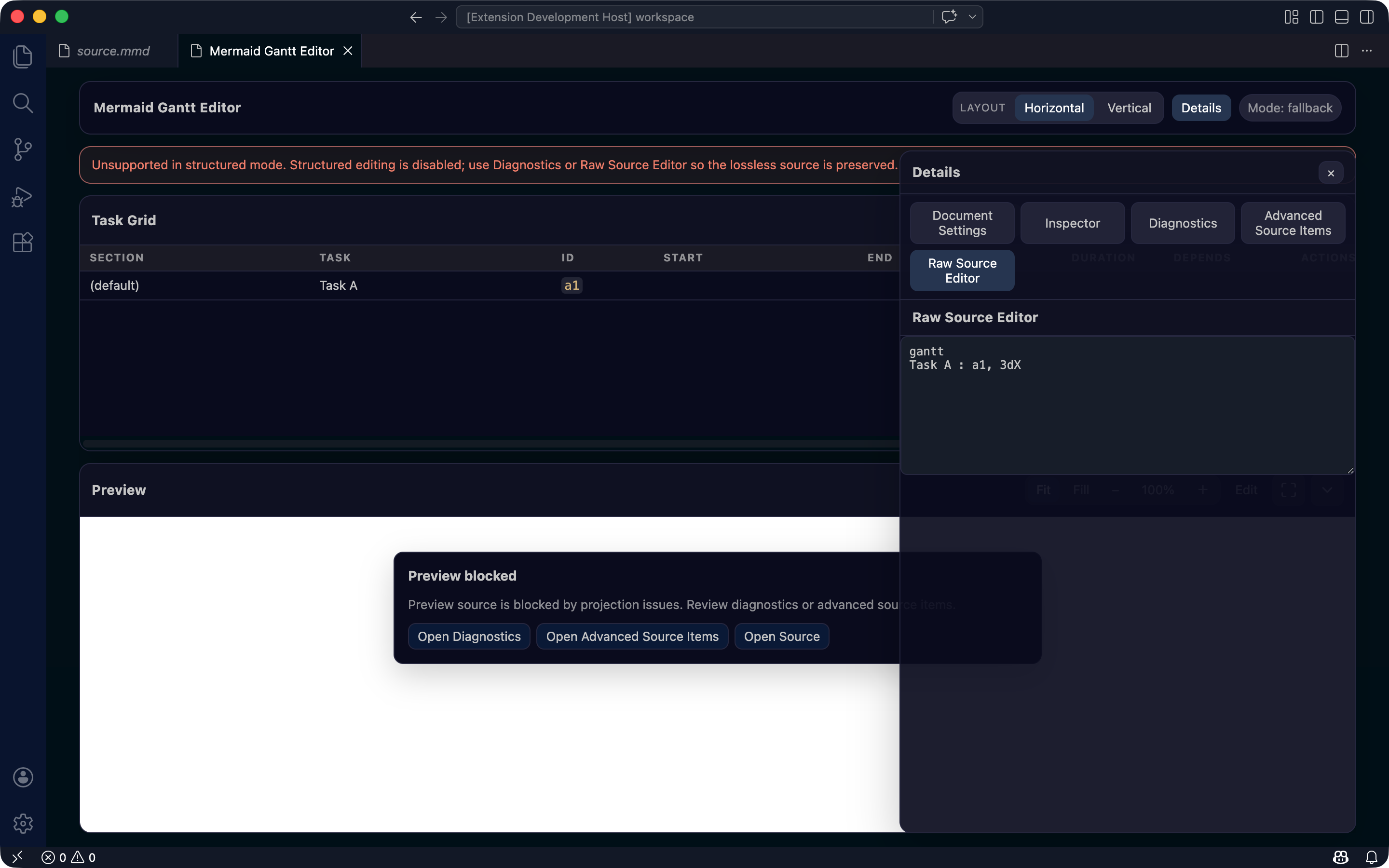
If the source contains unsupported syntax or risky metadata, the extension protects the Mermaid text by blocking unsafe structured edits and surfacing diagnostics.
Features
| Feature |
What it does |
Notes |
| Task Grid |
Edits Gantt tasks in a table |
Supports labels, IDs, dates, durations, dependencies, and tags |
| Markdown block editing |
Opens fenced mermaid Gantt blocks directly |
Writes back only to the selected block in multi-block Markdown files |
| Mermaid preview |
Shows the chart while editing |
Uses the bundled Mermaid runtime |
| Details |
Edits the selected task and document settings |
Switch between Inspector, Diagnostics, retained source items, and more |
| Diagnostics |
Finds common hand-written source problems |
Duplicate IDs, dependency issues, date format mismatch, and more |
| Quick fix |
Applies safe repairs |
Only when the source range is explicit |
| Format Review |
Formats Mermaid Gantt source after review |
Shows before / after source with syntax highlighting before write-back |
| SVG / PNG export |
Saves the rendered preview |
Useful for docs, issue comments, and release notes |
| Source-safe write-back |
Keeps edits scoped |
Preserves comments, directives, raw text, and unknown syntax |
| Fallback diagnostics |
Protects source that is unsafe to structure-edit |
Keeps Mermaid text in the source editor and avoids unsafe write-back |
| Host compatibility |
Shows GitHub / GitLab / Obsidian guidance |
Helps compare bundled Mermaid with host Mermaid behavior |
Main Workflows
Open from Markdown
A CodeLens appears above each fenced mermaid Gantt block. Press Open Gantt Editor to open the editor for that block.
Open from a .mmd file
Open a standalone Mermaid Gantt file, then run Mermaid Gantt Editor: Open Gantt Editor from the Command Palette.
Edit tasks
Edit cells directly in the Task Grid. after dependencies are easier to choose from existing task IDs, and dates / durations stay compatible with Mermaid Gantt source.
Inspect without changing source order
Search, sort, and filter are view-only. Changing the view does not reorder tasks in the Mermaid source.
Press Format in the Task Grid header to preview the formatted Mermaid Gantt source. Apply it only after reviewing the before / after source comparison.
Export the preview
Use the Preview export menu to save the rendered chart as SVG or PNG.
Handle unsafe source
Unsupported directives, retained click / call statements, raw metadata, and other risky source patterns are surfaced through diagnostics or fallback. The extension avoids silently normalizing source it cannot safely edit.
Source-Safe Editing
The extension treats Mermaid source as the source of truth and avoids rewriting unrelated text for GUI convenience.
- Preserves unchanged source regions
- Preserves comments, frontmatter, directives, raw text, and unknown syntax
- Writes back only to the target Mermaid block in Markdown
- Keeps source order unchanged when using view-only sort or filter
- Leaves Mermaid text readable for pull request and Codex / LLM review
Limitations
| Limitation |
Details |
| Gantt only |
This is not a GUI editor for all Mermaid diagram types |
| Not a PM suite |
Resource planning, cost tracking, baselines, and formal critical path management are out of scope |
| Host rendering depends on the host |
GitHub, GitLab, and Obsidian use their own Mermaid runtime and security policy |
| Not every Mermaid Gantt construct is GUI-editable |
Unsupported syntax is retained and may use fallback |
| Preview is guidance |
Always verify final rendering in your target Markdown host when publishing |
Requirements / Compatibility
| Item |
Requirement |
| VS Code |
Desktop 1.105+ |
| Mermaid runtime |
Extension bundled Mermaid 11.16.1 |
| Supported files |
.mmd Mermaid Gantt files and Markdown fenced mermaid Gantt blocks |
| Marketplace package |
Includes README.md, README.ja.md, and screenshot assets |
Build from Source
Requirements:
- Node.js
24.19.0 (see .node-version)
- pnpm
10.30.3 (exact package-manager baseline)
- VS Code Desktop
1.105+
Install dependencies and build the extension:
pnpm install
pnpm run build
Package a local VSIX:
pnpm run package:vsix
Install the generated VSIX into VS Code:
pnpm run install:vsix
Run the main verification gate:
pnpm run verify
For UI changes:
pnpm run verify:ui-change -- --scenario task-grid --id <feature-id>
License

