AsciiDoc Table Editor
Japanese | English
Overview
Edit AsciiDoc pipe tables visually while preserving source-safe, Git-reviewable diffs.
AsciiDoc Table Editor is a VS Code extension for teams that maintain specifications, runbooks, migration notes, and technical documents in AsciiDoc. It opens an AsciiDoc table as a grid, lets you edit cells, spans, block cells, rows, columns, clipboard imports, and formatting, then writes safe changes back to the original .adoc, .asciidoc, or .asc document.
The extension treats AsciiDoc source as the source of truth. It keeps unsupported table syntax out of unsafe structured edits, preserves table attributes where possible, and surfaces diagnostics instead of silently normalizing source it cannot own safely.
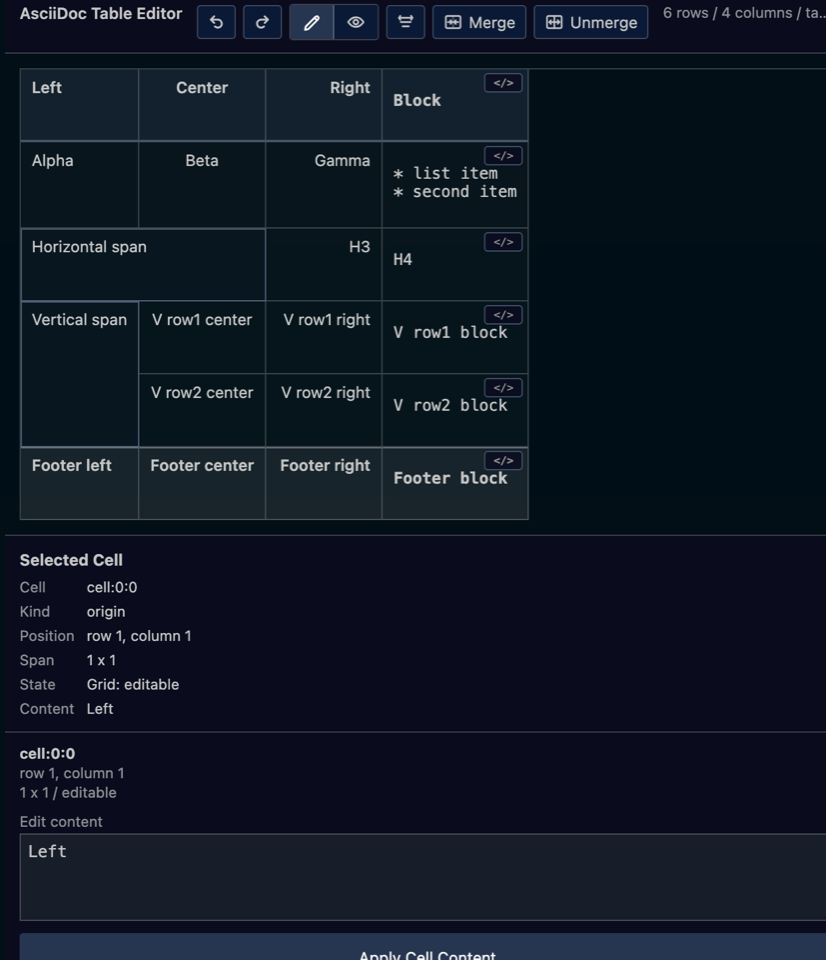
The editor is designed as a short review loop: open a table from CodeLens or the Command Palette, edit it in the grid, check Preview or Format Review when needed, then apply only source-safe changes back to the selected table block.
Try It in Your Browser
Try the static web version at asciidoc-table-editor.pages.dev to see the grid editor, rendered AsciiDoc Preview, clipboard paste, block cell editing, and format review behavior without installing the VS Code extension.
The static site is useful for evaluating the editor experience. Use the VS Code extension when you want AsciiDoc CodeLens integration, diagnostics in your local workspace, and write-back to local .adoc, .asciidoc, or .asc files.
What You Can Do
- Open AsciiDoc pipe tables from
.adoc, .asciidoc, and .asc files
- Open a specific table from CodeLens using
Open Table Editor
- Edit plain cells in the grid or bottom Cell Editor
- Select ranges with keyboard or mouse drag
- Merge and unmerge rectangular cell ranges
- Insert and remove rows or columns from the table context menu
- Paste tables copied from Word, Excel, Pages, Numbers, and browsers
- Auto-expand rows and columns when pasted tables exceed the current grid
- Preserve imported merged cells when the target range is safe
- Map safe inline clipboard content such as bold, italic, monospace, and links
- Convert non-table list or multiline HTML fragments into block cells
- Edit block cell raw source in the bottom editor and preview it in the Inspector
- Switch between Edit and rendered AsciiDoc Preview
- Review table formatting before applying it
- Use VS Code undo / redo for table edits
Installation
To install from the Marketplace:
- Open the VS Code Extensions view
- Search for
AsciiDoc Table Editor or asciidoc-table-editor
- Press
Install
- Open an AsciiDoc document that contains a table
For local validation, you can also install a VSIX build.
pnpm run package:vsix
pnpm run install:vsix
Quick Start
1. Create an AsciiDoc table
Use an AsciiDoc pipe table.
= Preview comprehensive fixture

[options="header,footer",cols="<,^,>,2a"]
|===
| Left
| Center
| Right
| Block

<| Alpha
^| Beta
>| Gamma
a| * list item
* second item

2+| Horizontal span
| H3
| H4

.2+| Vertical span
| V row1 center
| V row1 right
| V row1 block

| V row2 center
| V row2 right
| V row2 block

| Footer left
| Footer center
| Footer right
| Footer block
|===
2. Open the Table Editor
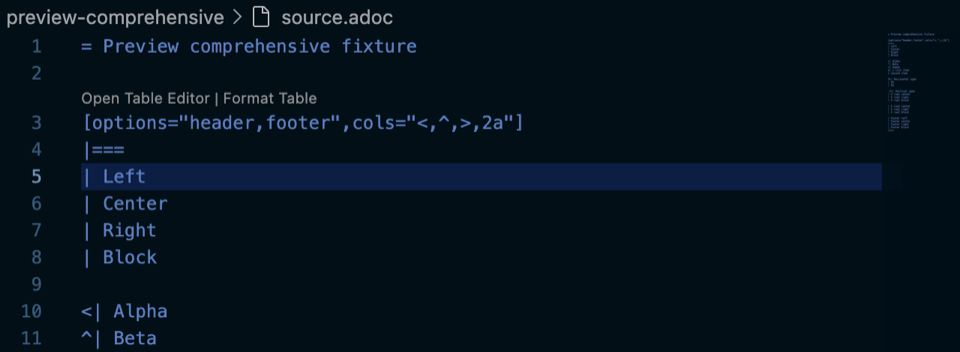
Use the Open Table Editor CodeLens above an AsciiDoc table.
From the Command Palette, run:
AsciiDoc Table: Open Table Editor
3. Edit in the grid
Edit plain cells, select ranges, merge cells, paste tables from office tools, and use the bottom Cell Editor for the selected cell. Block cells stay readonly in the grid, but their raw AsciiDoc source can be edited from the same bottom editor.
4. Preview rendered AsciiDoc
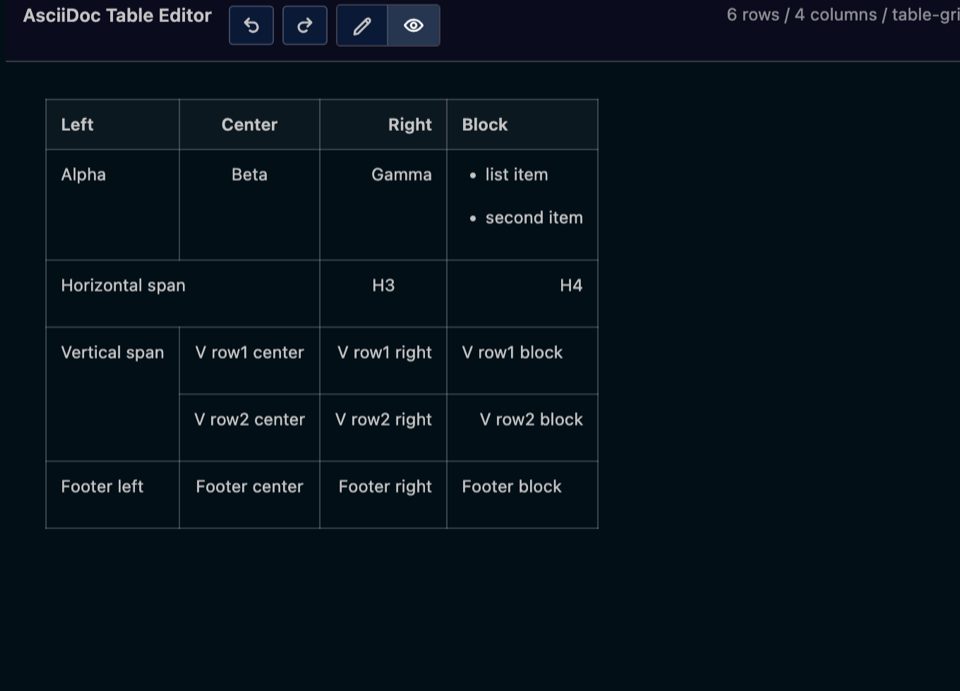
Switch to Preview to inspect the rendered table, including spans, alignment, links, and block cell content.
Use Format Table from CodeLens or the toolbar to open Format Review. Review before / after source, choose a format mode, and apply only after confirming the result.
Features
| Feature |
What it does |
Notes |
| Table Grid |
Edits supported AsciiDoc pipe tables visually |
Plain cells, spans, block cells, rows, and columns |
| CodeLens |
Opens a specific table block |
Also exposes Format Table for the same table |
| Cell Editor |
Edits the selected cell from a stable bottom editor |
Plain cells and block cell raw source use the same editing surface |
| Merge / Unmerge |
Updates AsciiDoc span syntax |
Uses source-safe rectangular range validation |
| Row / column editing |
Inserts and removes rows or columns |
Handles supported span-aware updates |
| Clipboard paste |
Pastes copied tables into the current grid |
Supports HTML table and TSV-style fallback |
| Rich clipboard mapping |
Keeps common inline content |
Bold, italic, monospace, safe links, and list-to-block-cell paste |
| Block cell preview |
Shows rendered block cell content |
Raw source remains the editable source of truth |
| AsciiDoc Preview |
Shows the selected table as rendered AsciiDoc |
Uses bundled @asciidoctor/core 3.0.4 |
| Format Review |
Reviews table formatting before write-back |
Includes table layout and cell-per-line modes |
| Diagnostics / fallback |
Blocks unsafe structured edits |
Keeps source intact when a table is unsupported |
| VS Code undo / redo |
Uses the document undo stack |
Works with table edits because changes are document edits |
Main Workflows
Open a table
Open an AsciiDoc document and use Open Table Editor above the table you want to edit. In documents with multiple tables, the editor targets only the table selected by CodeLens or cursor position.
Edit cells
Select a cell and edit it from the grid or the bottom Cell Editor. Press the apply button or use the supported keyboard flow to write the change back to the AsciiDoc document.
Select and merge ranges
Drag across cells or use keyboard range selection, then press Merge. The extension validates that the selected range can be represented safely in AsciiDoc before it writes span syntax.
Copy a table from Word, Excel, Pages, Numbers, or a browser, select the destination cell, and paste. Plain rectangular tables can expand the current table, while imported merged cells are preserved when the target range is safe.
Edit block cells
Block cells are readonly in the grid because they may contain lists, paragraphs, source blocks, or nested AsciiDoc content. Edit their raw content in the bottom Cell Editor and use the Inspector preview to check the rendered result.
Run Format Table to open Format Review. The extension shows before / after source and applies formatting only after you confirm it.
Source-Safe Editing
The extension is built around a lossless table parser and grid projection. It avoids rewriting unrelated source for GUI convenience.
- Writes back only to the selected table block
- Preserves table attributes and unsupported source where possible
- Keeps block cell content as raw AsciiDoc source
- Blocks edits when table structure is malformed or unsafe
- Uses diagnostics instead of silent lossy conversion
- Leaves source readable for pull request and LLM review
Limitations
| Limitation |
Details |
AsciiDoc psv table format only for structured editing |
The structured grid targets AsciiDoc pipe tables |
| CSV / TSV / DSV table bodies |
These are not structured-editable in the grid |
| Nested tables |
Nested table structured editing is out of scope; use raw block cell editing and Preview |
| Complex block cells |
Lists, source blocks, paragraphs, and nested content are edited as raw block source |
| File import |
.xlsx and .docx file import are not supported; use clipboard paste |
| Rich formatting fidelity |
Clipboard paste keeps a safe subset and does not recreate all Word / Excel styling |
| Unsupported tables |
Unsafe tables use diagnostics or fallback instead of destructive write-back |
Requirements / Compatibility
| Item |
Requirement |
| VS Code |
Desktop 1.105+ |
| Node.js for source builds |
24 LTS+ |
| Supported files |
.adoc, .asciidoc, .asc |
| Preview renderer |
Bundled @asciidoctor/core 3.0.4 |
| Marketplace package |
Includes README.md, README.ja.md, LICENSE, and screenshot assets |
Build from Source
Requirements:
- Node.js
24 LTS+
- pnpm
10.30.3+
- VS Code Desktop
1.105+
Install dependencies and build the extension:
pnpm install
pnpm run build
Package a local VSIX:
pnpm run package:vsix
Install the generated VSIX into VS Code:
pnpm run install:vsix
License

