Skip to content
| Marketplace
Sign in
Visual Studio Code>Other>Lily# Scan Import (Beta)New to Visual Studio Code? Get it now.
Lily# Scan Import (Beta)

Lily# Scan Import (Beta)

Preview

Yoshifumi Tsuda

|
1 install
| (0) | Free
Reads a page image or PDF of printed music into editable Lily# (.lys) text, with the uncertain places marked. Free while in beta. Adds to the Lily# extension; runs locally on Windows.
Installation
Launch VS Code Quick Open (Ctrl+P), paste the following command, and press enter.
Copied to clipboard
More Info

Lily# Scan Import (Beta)

Reads a page image or a PDF of printed music into editable Lily# text (.lys). The places it is unsure of are marked in the text with @todo; Lily# shows them in red in the preview, with a note on what to check, and opens the original page beside the score.

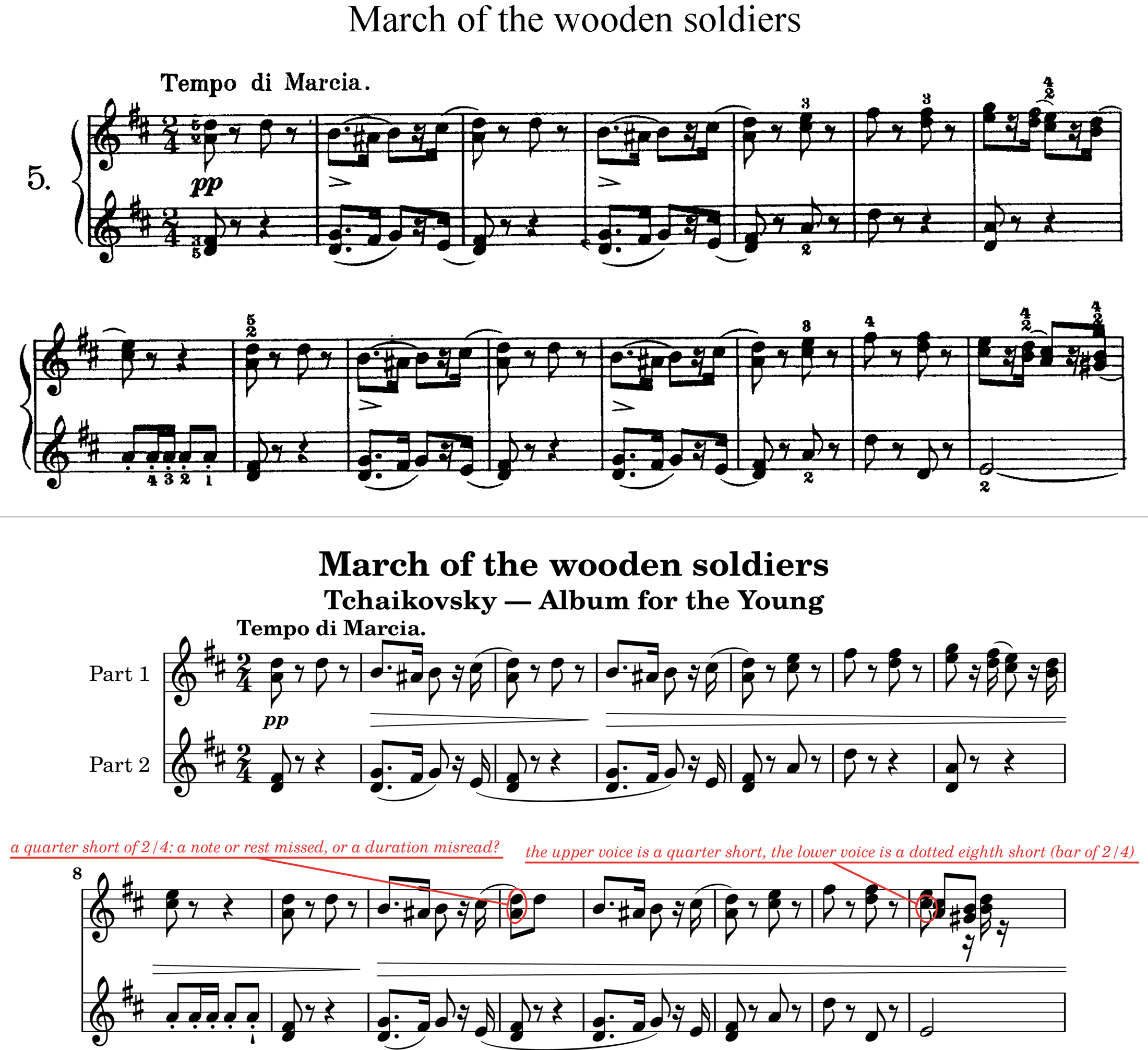
A scanned page of Tchaikovsky's March of the Wooden Soldiers, and the same bars as the reader wrote them, drawn by Lily# with two places marked in red

Above: a 1904 edition from a scan (G. Schirmer; public domain, from IMSLP). Below: the first bars as the reader wrote them, drawn by Lily#. Two places are marked for a look: bars where the notes it read do not fill the time.

Beta, free. Later versions may be offered for a fee (see LICENSE.md).

Use

  1. Install the Lily# extension (0.13.0 or later) too: the commands that read a scan are Lily#'s, and this extension shows nothing without it.
  2. Right-click an image (PNG, JPEG, BMP, TIFF) or a PDF in the Explorer, or run Convert Image/PDF to Lily# (.lys)… (Beta) from the Command Palette, and pick the pages of one piece in order.
  3. The .lys is written beside the image, with x.omr.json (where each bar is on the page) and x.omr-pNN.png (the pages with the marked places boxed) beside it.
  4. Correct what it misread. Show Original Scan opens the page beside the score; saving checks the corrected text against the page again and keeps the marks that still differ.

This extension adds no commands of its own: it carries the reader that Lily#'s commands run. What Lily# is, and how its editor and preview work: https://yotsuda.github.io/LilySharp/ (the scan commands are under Commands).

What it reads

Printed (engraved) music: staves, clefs, key and time signatures, notes and chords, rests, dots, accidentals, beams, tuplets, ties and slurs, grace notes, several voices on a staff, piano systems, multi-bar rests, percent repeats, octave lines, guitar and bass TAB, drums; dynamics, hairpins, pedal marks and articulations; the tempo marking, the title, subtitle, composer and poet over the first system, and the rehearsal marks in boxes over the staff, which become the sections of the .lys.

Best results come from clean digital pages (PDF or image exports of LilyPond, MuseScore, Dorico, Finale) and good black-and-white scans at about 300 dpi.

Not yet (Beta)

  • Lyrics and chord names are passed over (not misread as notes, but not written).
  • Repeat barlines, volta brackets, D.S. and Coda are not read: the piece comes out as played once through (a repeat's dots are not taken for a note's).
  • A rehearsal mark of a single letter in a box (A, B, …) becomes a nameless section (Mark); section names printed without a box are not read.
  • Lead sheets (melody, chord names and verses) and parts laid out in columns are read poorly.
  • Handwritten music is not read. Colour or low-contrast scans read worse than black and white.
  • Words (title, tempo, rehearsal marks) are read with the OCR built into Windows, in the languages installed for it (Settings › Language), so a Latin title on a Japanese-only PC may come out with a wrong letter or two.

Check what it reads: a mark says where it was unsure, but a bar with no mark can still be wrong.

Privacy

Everything runs on your computer: a small learnt symbol detector (ONNX), the rules of notation and Windows' own text recognition read the page. No image or result is sent anywhere.

Requirements

Windows 10 version 2004 (build 19041) or later, x64. The Lily# extension 0.13.0 or later (installed separately; this one starts with VS Code, lightly, only to tell Lily# the reader is there, and never starts Lily# itself).

  • Contact us
  • Jobs
  • Privacy
  • Manage cookies
  • Terms of use
  • Trademarks
  • Your Privacy Choices
  • Consumer Health Privacy
© 2026 Microsoft