My EF Vibe — VS Code extension (v0.5.0)
Run efvibe from VS Code — the EF Core LINQ REPL with workspace settings for -p, -s, and -c.
Install: Visual Studio Marketplace — Extensions → search efvibe (yeahbah.vscode-efvibe). User guide: myefvibe.com/docs/vscode.html. Source: github.com/yeahbah/my-ef-vibe.
Screenshots
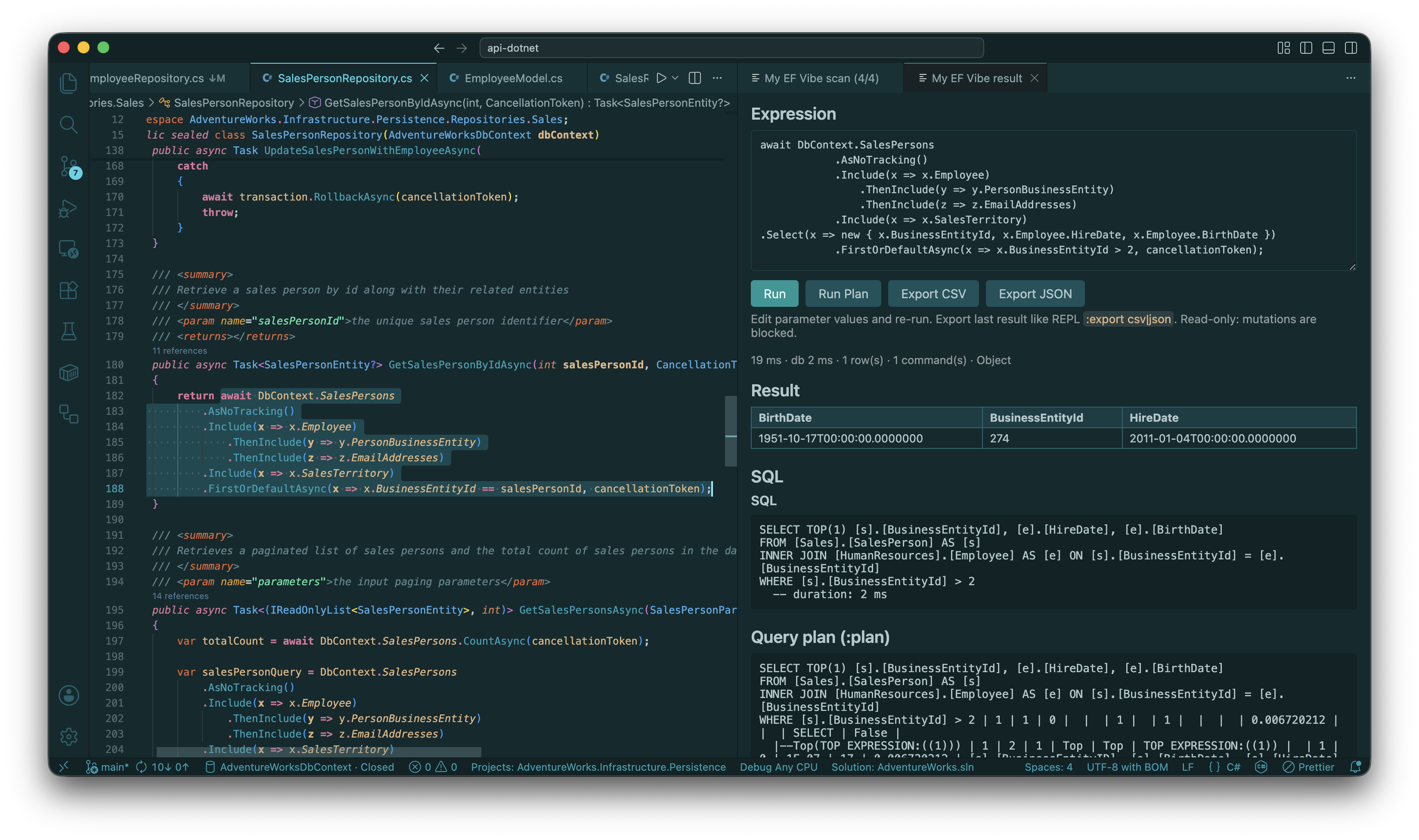
Run Selection — evaluate LINQ in place; result panel with rows and captured SQL (Shift+Alt+E):

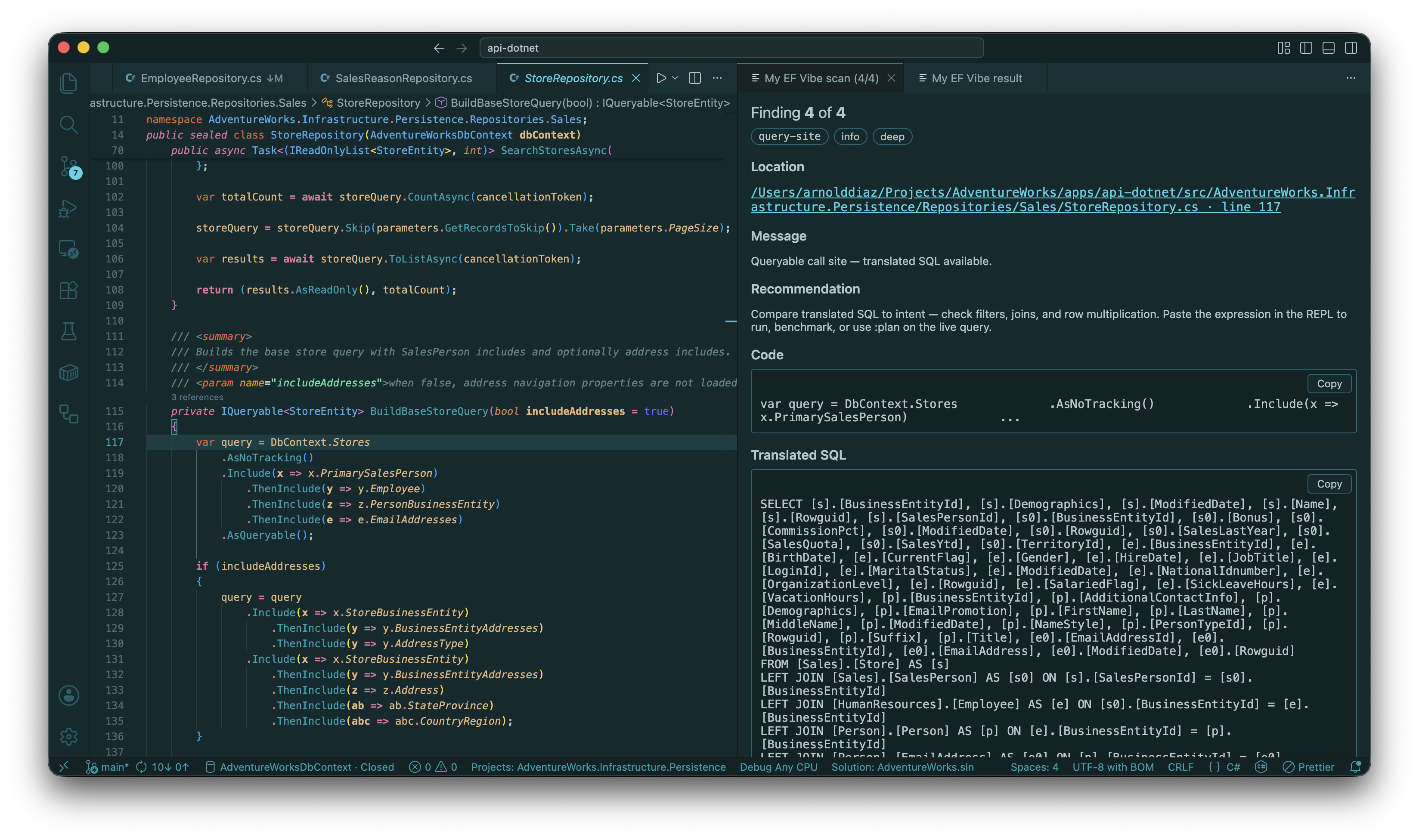
Scan Review — deep-scan findings carousel with SQL, query plan, note, and dismiss:

Prerequisites
Build MyEfVibe locally for --tables-json, --describe-json, --dbinfo-json, --completions-json, efvibe language-server, and efvibe scan note|dismiss.
Run Selection uses efvibe serve by default (efvibe.useDaemon: true) so build + DbContext stay warm. Set efvibe.useDaemon: false to force one-shot efvibe -e per run.
Commands
| Command |
Description |
| efvibe: Start REPL |
Opens an integrated terminal running efvibe with your settings |
| efvibe: Run Selection |
Evaluates the selected LINQ (Shift+Alt+E in C#) |
| efvibe: Run Line at Cursor |
Evaluates the current line |
| efvibe: Run Statement at Cursor |
Expands and evaluates the statement around the cursor |
| efvibe: Run Expression |
Selection, or prompt if nothing selected |
| efvibe: Show Last SQL |
Opens SQL from the last JSON evaluation |
| efvibe: Export Last Result |
Save last panel result as CSV or JSON (like REPL :export) |
| efvibe: Generate REPL Task |
Writes/updates efvibe: Start REPL in .vscode/tasks.json |
| efvibe: Check Prerequisites |
Verifies dotnet and efvibe on PATH |
| efvibe: Refresh Status |
Refreshes the status bar (DbContext from settings; tool version via efvibe --about-json) |
| efvibe: Scan Workspace |
Runs efvibe scan and opens Scan Review (carousel) |
| efvibe: Scan Workspace (Deep) |
Deep scan with SQL translation (requires efvibe.context) |
| efvibe: Open Scan Review |
Browse findings (Previous / Next, Go to code, Save note, Dismiss) |
| efvibe: Refresh Scan Diagnostics |
Reload findings from scan JSON (REPL :scan or file watcher) |
| efvibe: Dismiss Scan Finding |
Opens Scan Review at the finding under the cursor |
| efvibe: Send to REPL |
Starts the REPL if needed, collapses selection to one line, submits with ; (Ctrl/Cmd+Shift+Enter) |
| efvibe: Refresh efvibe Session |
Reloads the efvibe Session sidebar (EF model + session files) |
| efvibe: Run Count |
From Session tree DbSet: runs db.{DbSet}.Count() in the result panel |
Right-click in a .cs file for Run Selection / Run Line at Cursor / Send to REPL.
Send to REPL opens the efvibe terminal and runs efvibe with your settings (waits for the first build on cold start). Multi-line repository queries are sent as a single line ending with ; so the shell does not run await as a zsh command. The REPL normalizes DbContext → db, await, and Async terminals the same way as Run Selection.
efvibe Session (Explorer sidebar): toolbar Scan Deep, Run Query, Start REPL, and Refresh; DbContext with DbSets at the top, then scan/session folders. Right-click a DbSet:
| Action |
Behavior |
| Run Query |
Opens the result panel (prefills db.{DbSet}.AsNoTracking() when started from the tree; empty from the command palette) |
| Describe |
Entity members (like REPL :describe) in a side panel |
| Go To Definition |
Opens the entity .cs file (C# workspace symbols or search) |
| efvibe: Run Count |
Evaluates db.{DbSet}.Count() |
Phase 3 commands:
| Command |
Description |
| Pick Entity |
Quick Pick over DbSets (:tables data) |
| Show DbInfo |
:dbinfo panel (--dbinfo-json) |
| Show Query Plan |
Full-screen plan from last Run Plan result |
| Show Session Charts |
Timing history + compare baseline (:chart stats/compare) |
| Set / Clear Compare Baseline |
Mirror REPL :compare baseline |
| efvibe Session sidebar |
EF model (DbSets), scan JSON, notes, dismissals, exports |
| CodeLens |
Run with efvibe on LINQ-like C# lines (efvibe.codeLens.enabled) |
| Completion |
db.* DbSet and LINQ member suggestions (efvibe.completion.enabled) |
Scan Review shows one finding at a time: rule, location (click to open code), message, code, SQL/plan (deep), 📋 copy on those blocks, editable Note, Dismiss, and ← / → navigation (arrow keys when the panel is focused).
The result panel uses the same 📋 copy buttons on expression SQL blocks and query plan output.
Settings
Configure in .vscode/settings.json:
{
"efvibe.project": "${workspaceFolder}/src/MyApp.Data/MyApp.Data.csproj",
"efvibe.startupProject": "${workspaceFolder}/src/MyApp.Api/MyApp.Api.csproj",
"efvibe.context": "AppDbContext",
"efvibe.dotnetFramework": "net8.0",
"efvibe.dbLog": true,
"efvibe.resultDestination": "panel",
"efvibe.toolPath": "${workspaceFolder}/../my-ef-vibe/src/MyEfVibe/bin/Debug/net10.0/myefvibe"
}
| Setting |
Description |
efvibe.resultDestination |
panel (split webview with result + SQL), output, or terminal |
efvibe.dbLog |
When true (default), CLI database logging is on; when false, passes --no-dblog |
efvibe.toolPath |
Optional path to myefvibe / efvibe (use a local build for latest CLI features) |
efvibe.useDaemon |
When true (default), Run Selection uses efvibe serve; falls back to one-shot if unavailable |
efvibe.scan.mode |
lite (static heuristics) or deep (heuristics + SQL translation) for Scan Workspace |
efvibe.scan.respectDismissals |
Hide dismissed findings on scan (default true) |
efvibe.scan.openReviewOnScan |
Open Scan Review tab after scan (default true) |
efvibe.scan.problemsPanel |
Also show squiggles in Problems (default false; avoids C# LSP conflicts) |
efvibe.scan.refreshOnSave |
Reload review when scan JSON changes (default true; includes REPL :scan) |
efvibe.scan.onSave |
Run scan after saving C# files, 2s debounce (default false; uses efvibe.scan.mode) |
efvibe.scan.minSeverity |
Optional minimum severity filter |
Deprecated: efvibe.showSql (renamed to efvibe.dbLog; the CLI flag is --dblog, not --sql).
Scan artifacts: lite → {workspaceRoot}/{Project}/scan/myefvibe-scan-lite.json; deep → {workspaceRoot}/{Project}/{DbContext}/myefvibe-scan-deep.json.
Running repository code from the editor
Select a full handler query (including await, DbContext, and cancellationToken) and use Run Selection. The CLI adapts it the same way as deep-scan probes: DbContext → db, parameters stubbed, async terminals converted to sync. See features.md for details and limits.
Install
Recommended: Visual Studio Marketplace — open Extensions, search efvibe, install My EF Vibe (publisher yeahbah).
code --install-extension yeahbah.vscode-efvibe
Alternatives: VSIX from GitHub Releases or local npm run package — see INSTALL.md. Contributors: F5 Run Extension from this folder.
Development
cd vscode-extension
npm install
npm run compile
Open the repo root and press F5 → Run Extension.
Point efvibe.toolPath at your local build if needed:
{
"efvibe.toolPath": "${workspaceFolder}/src/MyEfVibe/bin/Debug/net10.0/myefvibe"
}
Phase roadmap
- Phase 0: Terminal REPL, settings, prerequisites, status bar
- Phase 1: Run selection, JSON evaluation, SQL panel,
efvibe serve, export
- Phase 2 (this release): Scan Review carousel, dismiss/note, optional Problems panel — see docs/vscode-extension-plan.md
- Phase 3+: Schema sidebar, richer REPL webview