Mergecraft
Resolve Git conflicts in a three-way view modelled on the merge dialog of JetBrains IDEs, review changes side by side, shelve work in progress and browse GitHub pull requests.
Preview release. Please report problems in the Q&A tab of the Marketplace page. More at mergecraft.xopseasy.org.
Features
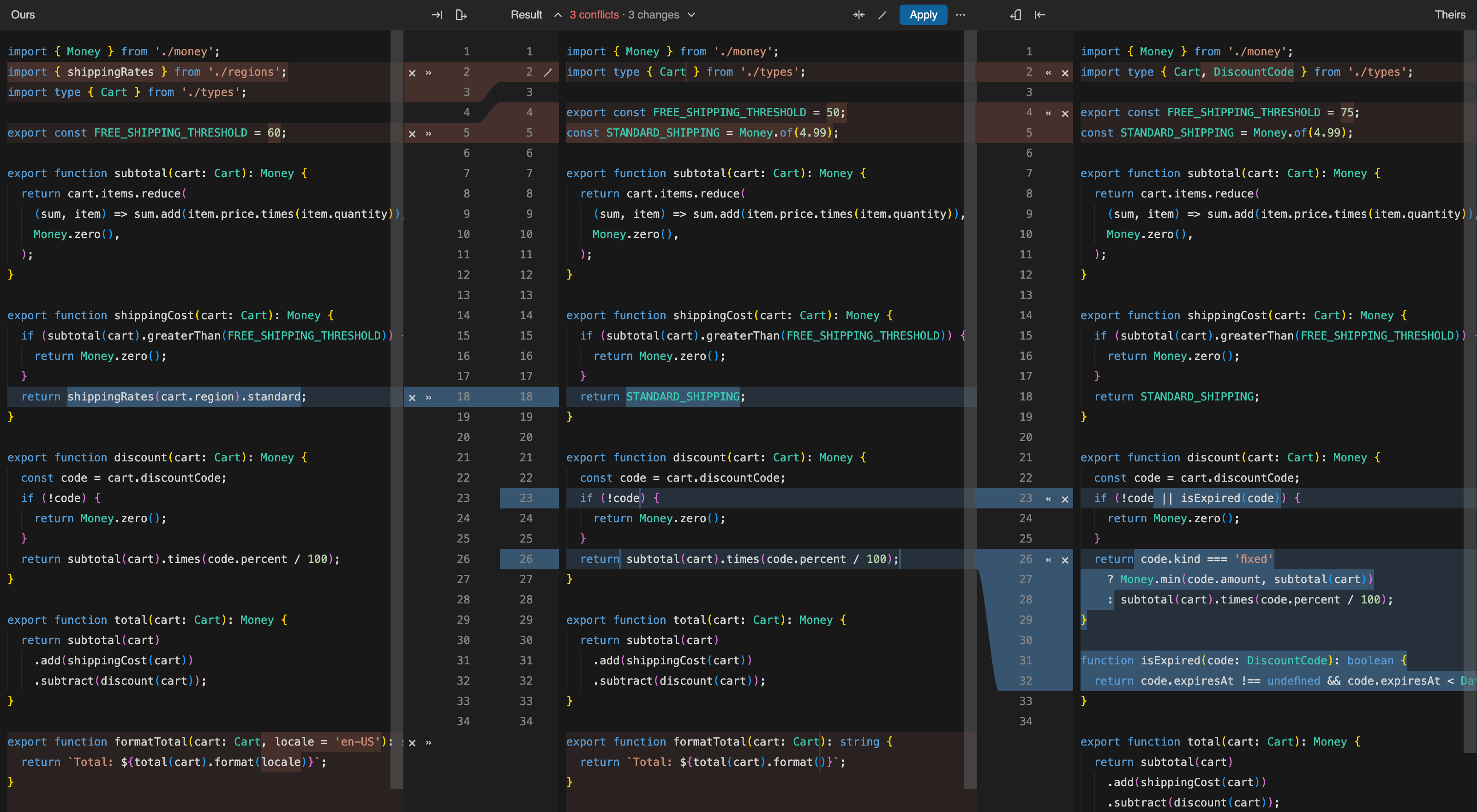
Three-way merge
- Ours, Result and Theirs side by side. The merge is computed from Git's index stages, not from the conflict markers in the file, so every change lines up with where it came from.
- Changes are coloured by type (conflict, modified, inserted, deleted), with word-level highlights inside each change and curved connectors between the panes.
- Accept a side with
» / «, then append the other side to the same conflict, or ignore a side with ×. Ctrl/Cmd+click resolves the whole conflict in one step.
- Apply all non-conflicting changes from the left, the right or both, and resolve simple conflicts automatically when the two sides change different words.
- Edit the Result directly. Undo restores the text and the state of each change together.
- During a rebase your commit is shown on the left, the way JetBrains IDEs do it.
- Files that were deleted on one side, deleted on both sides or are binary get a simple choice of which whole version to keep.
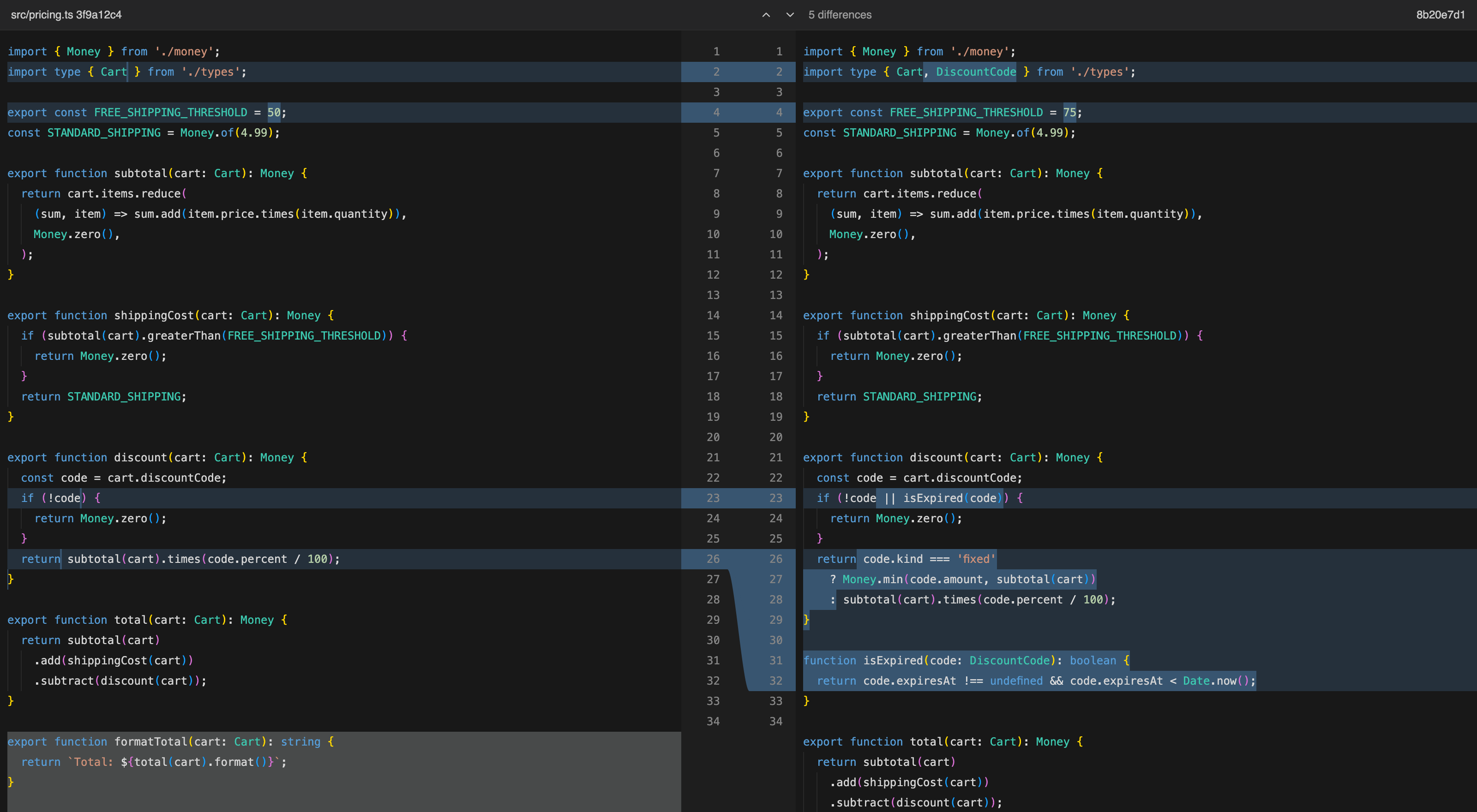
Side-by-side diff
- Changed files in the commit tool open in a two-pane diff computed the way IntelliJ does it, with word-level highlights and curves between the editors.
- Both editors scroll together, and F7 / Shift+F7 jump between differences.
- Unchanged lines are collapsed into a "N unchanged lines" row, with four lines of context around each change, in the diff and in all three panes of the merge view. Click a row to show more, or turn it off with the Collapse Unchanged Fragments button in the pane header.
Sidebar
- Conflicts, changes and untracked files with Source Control style status letters.
- Stage and unstage with the checkboxes.
- A commit box with Amend, Sign-off and Skip hooks, and Commit & Push.
- Continue or abort a merge, rebase, cherry-pick or revert from the view title.
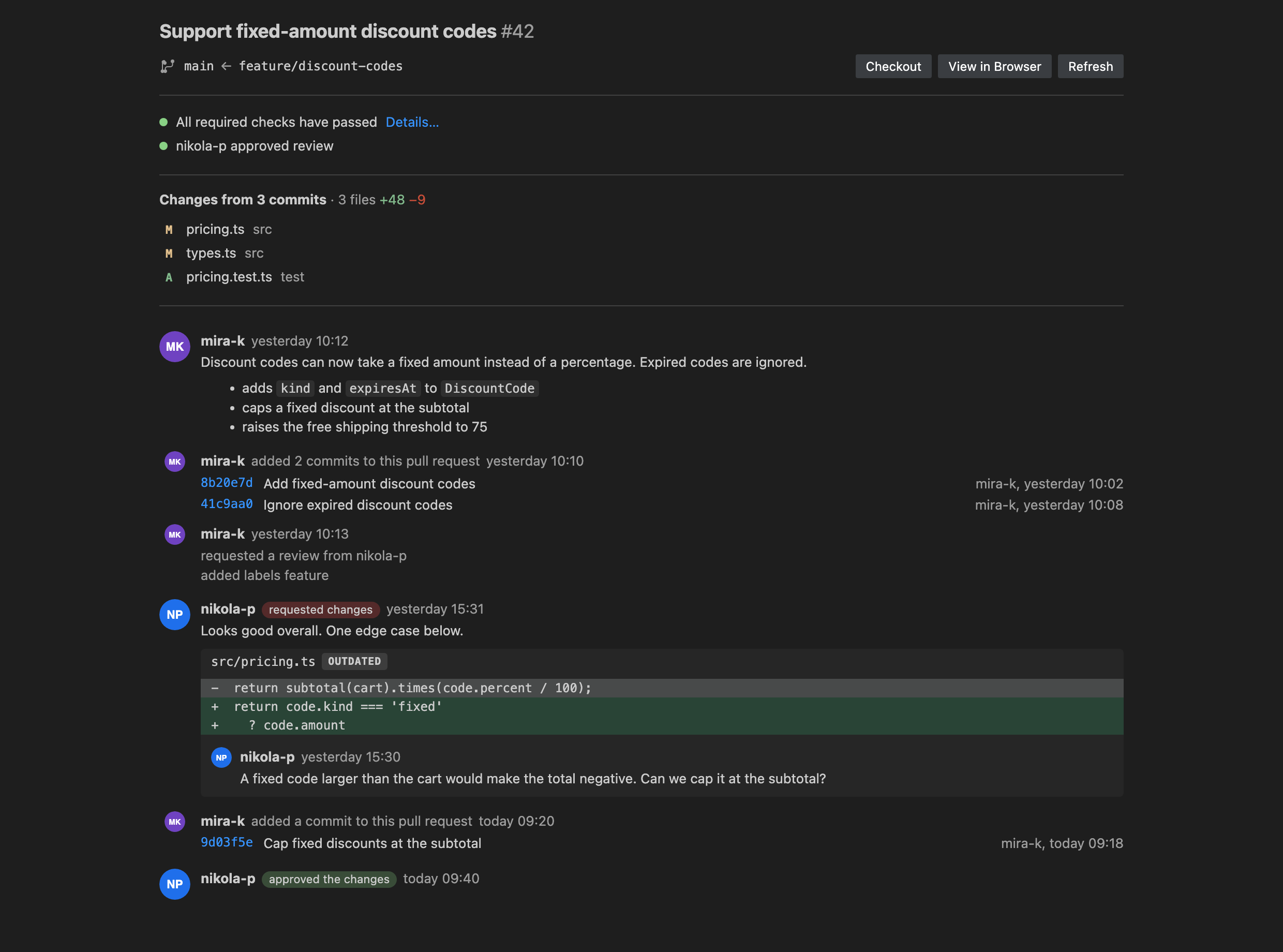
Pull requests
- A Pull Requests view for the repository's GitHub remote, modelled on the pull request tool window in JetBrains IDEs. Sign in with the GitHub account VS Code already uses (Accounts menu). The view title shows the account, and its menu can switch to another one. Signing out happens in the Accounts menu, because VS Code owns the GitHub sign-in.
- Quick filters (Open, Your pull requests, Assigned to you, Review requests), state, sort and free GitHub search.
- Expand a pull request to see its changed files and open each one in the side-by-side diff, from the merge base to the pull request head.
- View Pull Request opens a tab with the branches, checks, reviewers, changed files and the timeline of commits, comments, reviews with their threads, and events.
- Checkout Branch creates a local branch for the pull request, also for pull requests from forks.
Shelf
- Set changes aside without committing them, like the shelf in JetBrains IDEs. Right-click files in Changes and choose Shelve Changes…, or use the command from the view menu to pick files.
- Shelved changes are listed in the Shelf view with their date and branch. Click a file to see the shelved version next to its base version.
- Unshelve a whole shelf or single files. When a file changed since it was shelved, the changes are merged; overlapping edits become a conflict that you resolve in the three-way view.
- Shelves are stored in the repository's
.git folder, so they are never committed and survive branch switches.
Usage
- Start a merge, rebase, cherry-pick or revert that stops on conflicts.
- Open Mergecraft in the activity bar and click a file under Conflicts.
- Resolve each change with the gutter buttons, or use the actions in the pane headers.
- Click Apply to save the result and mark the file resolved.
- When every file is resolved, use Continue in the view title.
Keyboard
| Key |
Action |
| F7 / Shift+F7 |
Next / previous unresolved difference |
| Ctrl/Cmd+S |
Save the result without marking the file resolved |
Ctrl/Cmd+click on », « or × |
Apply or ignore and close the whole conflict |
| Ctrl/Cmd+Enter in the commit message |
Commit |
Settings
| Setting |
Default |
Description |
mergecraft.diff.collapseUnchangedFragments |
true |
Collapse unchanged lines in diff and merge views. |
mergecraft.diff.contextLines |
4 |
Unchanged lines kept next to each change (1, 2, 4 or 8). |
Requirements
- Git on your
PATH.
- A trusted workspace. Mergecraft runs Git commands, so it is disabled in Restricted Mode.
Known limitations
- Pull requests are read-only for now: reviewing, commenting and merging happen on GitHub. Only github.com is supported, not GitHub Enterprise.
- Very large differences (more than about 20,000 changed lines between two versions) are shown as a single change.
- Ignoring a change with
× cannot be undone with Ctrl/Cmd+Z.
- Whitespace is always compared exactly; there is no "ignore whitespace" option yet.
Credits
The diff and merge algorithms are translated to TypeScript from IntelliJ Community (Apache License 2.0). See NOTICE for details. Mergecraft is not affiliated with or endorsed by JetBrains.
License
Apache License 2.0. The full text is in the LICENSE file that ships with the extension.
| |

