x2c - C with batteries
This VS Code extension provides the TextMate grammar and language
configuration for ordinary x2c source modules (.x, .xc, .xh, .x2c,
and .xp) and Lisp files (.xlisp).
It highlights x2c list, array, map, string, Symbol, and SymbolSet literals,
including data-first Array and Map contents and their runtime unquotes;
pattern variables; runtime unquote and List splice forms; protocols; macros;
decorators; with assignment blocks; alias declarations; List
destructuring; imports; delegate fields; Self method types; standalone
Lisp files; and the C-compatible syntax used by the language.
Macro signatures use $value for one syntax value and @items for a
sequence. Code templates highlight @items, @producer(args), and
quotation holes such as @(expression). Singular $ unquotes and $! source quotations use the macro sigil scope,
including a standalone $. The color settings below make sigils bold. Quoted Lists retain runtime
@items and @(expression) splices; Lisp retains ,@ unquote-splicing.
Native C variadic ... remains distinct from macro syntax.
With a compatible x2c compiler available, the extension provides compiler
diagnostics, definition navigation, type hover, completion, symbols,
references, rename, and lexical semantic tokens. Syntax highlighting works
without the compiler. The extension does not install tools or collect
telemetry.
Installation
Run npm ci && npm run build in etc/vsc-extension, then install the resulting
0.4.0 VSIX with Extensions: Install from VSIX.
Compiler diagnostics, definitions, and hover
See the book's editor setup and configuration.
Compiler language features require a compiler that provides x2c lsp and
its matching server executable. Syntax highlighting remains available with
older compilers; upgrade the compiler to enable language features.
For a development checkout, run make commands and select its matching
compiler:
"x2c.semantic.compilerPath": "/path/to/x2c/builds/0/x2c"
VS Code 1.82 or newer is required. The extension starts x2c lsp over
stdio and keeps one server per local workspace. Setup errors appear in the
x2c Output channel.
Semantic analysis runs only in trusted local workspaces because compiling
x2c can execute macros. Untrusted and virtual workspaces retain syntax
highlighting. The book describes project/target selection, unsaved sources,
native CPP limitations, and the boundaries of the server's results.
Distinct x2c colors
The extension contributes scopes but does not override the active theme. To
use the colors shown below, copy either the dark or light setting into VS Code's
settings.json.
Dark backgrounds:
"editor.tokenColorCustomizations": {
  "textMateRules": [
    {
      "scope": [
        "keyword.control.in.x2c",
        "keyword.control.try.x2c",
        "keyword.control.catch.x2c",
        "keyword.control.finally.x2c",
        "keyword.control.defer.x2c",
        "keyword.control.raise.x2c",
        "keyword.control.match.x2c",
        "storage.modifier.delegate.x2c",
        "storage.modifier.threaded.x2c",
        "storage.modifier.meta.x2c",
        "storage.modifier.native.x2c",
        "storage.modifier.module.x2c",
        "keyword.declaration.module.x2c",
        "keyword.control.import.x2c",
        "keyword.control.with.x2c",
        "keyword.declaration.alias.x2c",
        "keyword.declaration.protocol.x2c",
        "keyword.declaration.class.x2c",
        "keyword.control.foreach.x2c",
        "keyword.operator.is.x2c",
        "storage.type.self.x2c",
        "keyword.declaration.macro.x2c",
        "keyword.other.macro.using.x2c",
        "keyword.operator.arrow.x2c"
      ],
      "settings": { "foreground": "#FF4FD8", "fontStyle": "bold" }
    },
    {
      "scope": [
        "source.x2c punctuation.definition.literal",
        "source.x2c punctuation.definition.interpolation",
        "punctuation.definition.macro.sigil.x2c",
        "punctuation.definition.macro.splice.x2c"
      ],
      "settings": { "foreground": "#FF4FD8", "fontStyle": "bold" }
    },
    {
      "scope": "support.type.prelude.x2c",
      "settings": { "foreground": "#29D3E2", "fontStyle": "" }
    },
    {
      "scope": [
        "storage.type.macro.result.x2c",
        "storage.type.macro.hole.x2c"
      ],
      "settings": { "foreground": "#FFB454", "fontStyle": "italic" }
    }
  ]
}
Light backgrounds:
"editor.tokenColorCustomizations": {
  "textMateRules": [
    {
      "scope": [
        "keyword.control.in.x2c",
        "keyword.control.try.x2c",
        "keyword.control.catch.x2c",
        "keyword.control.finally.x2c",
        "keyword.control.defer.x2c",
        "keyword.control.raise.x2c",
        "keyword.control.match.x2c",
        "storage.modifier.delegate.x2c",
        "storage.modifier.threaded.x2c",
        "storage.modifier.meta.x2c",
        "storage.modifier.native.x2c",
        "storage.modifier.module.x2c",
        "keyword.declaration.module.x2c",
        "keyword.control.import.x2c",
        "keyword.control.with.x2c",
        "keyword.declaration.alias.x2c",
        "keyword.declaration.protocol.x2c",
        "keyword.declaration.class.x2c",
        "keyword.control.foreach.x2c",
        "keyword.operator.is.x2c",
        "storage.type.self.x2c",
        "keyword.declaration.macro.x2c",
        "keyword.other.macro.using.x2c",
        "keyword.operator.arrow.x2c"
      ],
      "settings": { "foreground": "#A626A4", "fontStyle": "bold" }
    },
    {
      "scope": [
        "source.x2c punctuation.definition.literal",
        "source.x2c punctuation.definition.interpolation",
        "punctuation.definition.macro.sigil.x2c",
        "punctuation.definition.macro.splice.x2c"
      ],
      "settings": { "foreground": "#A626A4", "fontStyle": "bold" }
    },
    {
      "scope": "support.type.prelude.x2c",
      "settings": { "foreground": "#007C8A", "fontStyle": "" }
    },
    {
      "scope": [
        "storage.type.macro.result.x2c",
        "storage.type.macro.hole.x2c"
      ],
      "settings": { "foreground": "#A15C00", "fontStyle": "italic" }
    }
  ]
}
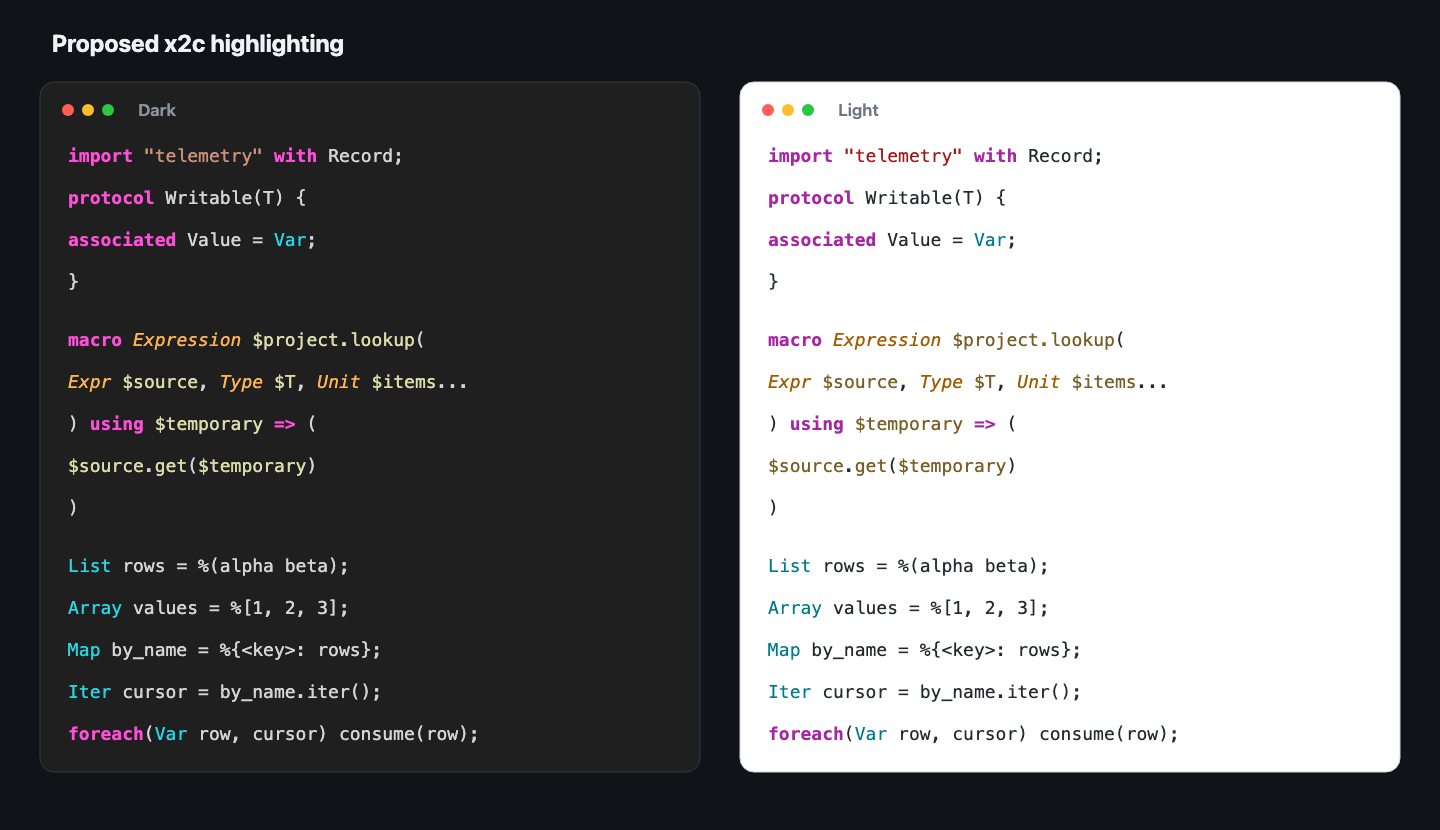
The syntax scopes cover in, try, catch, finally, defer, raise,
match, delegate, threaded, import, with, alias, as,
protocol, associated, foreach, is not, Self, macro, keyword,
using, and =>. Prelude types use support.type.prelude.x2c: Array, Atom, Block,
Buffer, Bytes, Context, Error, ErrorHandler, File, Func, Iter,
Lambda, Lisp, List, Logger, LogSink, Map, Mutex, Pool, Scope,
Split, String, Symbol, SymbolSet, Thread, Token, Tokenizer, and
Var. Semantic macro types and capitalized syntax kinds share this type
color; the complete catalog is below. Macro result and hole kinds keep the
storage.type.macro.result.x2c and storage.type.macro.hole.x2c scopes.
For another background, keep the scope arrays and change only the
foreground values. An empty fontStyle keeps prelude types upright. The
specific keyword and modifier scopes retain their broader parent scopes, so
existing theme rules continue to apply when these settings are absent.
Semantic macro types and syntax kinds
etc/syntax/grammar.x is the machine-readable source grammar. Its
result-kind, hole-kind, and quotation-kind rules describe the syntax
kinds; src/macros/macros.x owns their case-insensitive recognition. lib/meta.x
declares the semantic macro types.
| Category |
Names |
| Semantic macro types |
Code, Macro, Type, TypeInfo, Source |
| Result kinds |
Expr, Expression, Stmt, Field, Entry, Enumerator, Unit, Declaration, Decorator |
| Hole kinds |
Expr, Expression, Stmt, Field, Entry, Enumerator, Unit, Function, NamedType, Type, Decl, DeclaratorRow, Name, Literal, Param, Catch, Captures, MatchRow |
| Additional quotation kinds |
Type, Param |
Stmt replaced Statement. Name and the other syntax kinds are grammar
categories, not additional runtime typedefs. Outside result and hole
positions, capitalized and uppercase kinds (such as Stmt and STMT) use
support.type.prelude.x2c, like the reserved
runtime types. Result and hole positions retain their existing specific
scopes and italic type color.
Declarations use meta, meta static, meta native, or meta native static.
The meta and native tokens have distinct modifier scopes and standard
keyword scopes, so ordinary themes color them without custom settings.
Declarations can follow another declaration on the same line or continue
across comments and line breaks. A static macro
uses the ordinary static modifier and the macro declaration scope. Named,
local, and anonymous macro definitions share the macro declaration scope.
module before a declaration uses storage.modifier.x2c and
storage.modifier.module.x2c. This includes macros, functions, typedefs,
classes, and aggregate types. A module { ... } member block uses
keyword.declaration.module.x2c. Private static type declarations keep the
ordinary static modifier scope.
auto uses storage.modifier.auto.x2c for both managed declarations
(including inferred types) and acquired-value initializers after =.
Declaration auto cleans up the variable at block exit; initializer auto
manages the acquired value like $auto(...). Macro using clauses recognize
both retained names and fresh $name entries.
Managed compound declarations use one leading auto when cleanup semantics
are unchanged: auto Array left = [], right = [];. Initializer auto
remains available for bindings that change or mixed ownership groups.
The grammar also highlights native auto regions, control statements, and
function definitions, with auto (destination) for an explicit Scope.
Empty auto() is rejected by the compiler, not the TextMate highlighter.
$!, $name, $(expression), and a standalone $ use pronounced
sigil styling with the settings above. @ sequence forms share that styling.
The grammar supplies scopes; the active VS Code theme controls their color
and weight. Applying the recommended settings is necessary to guarantee bold
sigils with a theme that does not style these scopes.
The website and mdBook read this TextMate grammar through site/shiki-x2c.mjs.
Their dark and light palettes in site/shiki-x2c-theme.mjs use the same
modifier colors and bold sigil settings. Both documentation and website
examples therefore share these grammar scopes and styles.
Development
Open this directory in VS Code and press F5 to launch an Extension Development
Host. Open an x2c source file and use Developer: Inspect Editor Tokens and
Scopes to inspect the grammar.
The most useful scopes are:
punctuation.definition.literal.*.x2c for literal delimiters;meta.literal.*.content.x2c for collection contents;constant.other.atom.x2c for bare data names;constant.other.symbol.x2c for symbols;variable.other.pattern.*.x2c for pattern variables; andvariable.other.interpolation.*.x2c for runtime unquote and splice forms;meta.destructuring.*.x2c and
variable.other.readwrite.destructuring.x2c for List destructuring;keyword.declaration.macro.x2c and entity.name.function.macro.x2c for
macro definitions and applications;punctuation.definition.macro.splice.x2c for sequence prefixes in code; and*.lisp.x2c for standalone Lisp files.
Standard C strings retain the standard string.quoted.double and
string.quoted.single scopes for theme compatibility.
Packaging
Install the pinned development dependencies, run the scope tests, then build
the VSIX:
npm ci
npm test
npm run build
The packaged VSIX is tracked with the extension source. Install it from
VS Code with Extensions: Install from VSIX.
When changing the grammar, keep x2c-specific rules ahead of competing C
operator, call, string, and angle-bracket rules. Add scope tests for both the
x2c form and the ordinary C syntax it could be confused with.
Marketplace identity
The Marketplace publisher is x2c-lang, displayed as x2c. The extension ID is
x2c-lang.x2c-syntax. Version 0.4.0 retains the Preview label.
License and support
The extension is licensed under the
Apache License 2.0;
its attribution notice is in
NOTICE.
x2c is experimental and has no support commitment. See
SUPPORT.md
for reporting bugs and getting help.

