SVG Viewer


中文文档
A powerful VS Code extension for viewing SVG and image files in a beautiful waterfall gallery layout.
✨ Features
- 🖼️ Waterfall Gallery View - Display images in an elegant masonry layout
- 🌲 Tree View Explorer - Browse all images in your workspace from the sidebar
- 📍 Bottom Panel Integration - Fixed panel view for convenient image browsing
- 🔄 Multiple Opening Methods - Open in editor or bottom panel
- 🎯 Quick Actions - Hover actions for instant access to common operations
- 📂 Recursive Scanning - Automatically finds images in nested folders
- 🎨 Format Support - SVG, PNG, JPG, JPEG, GIF, WEBP, ICO, BMP
📸 Screenshots
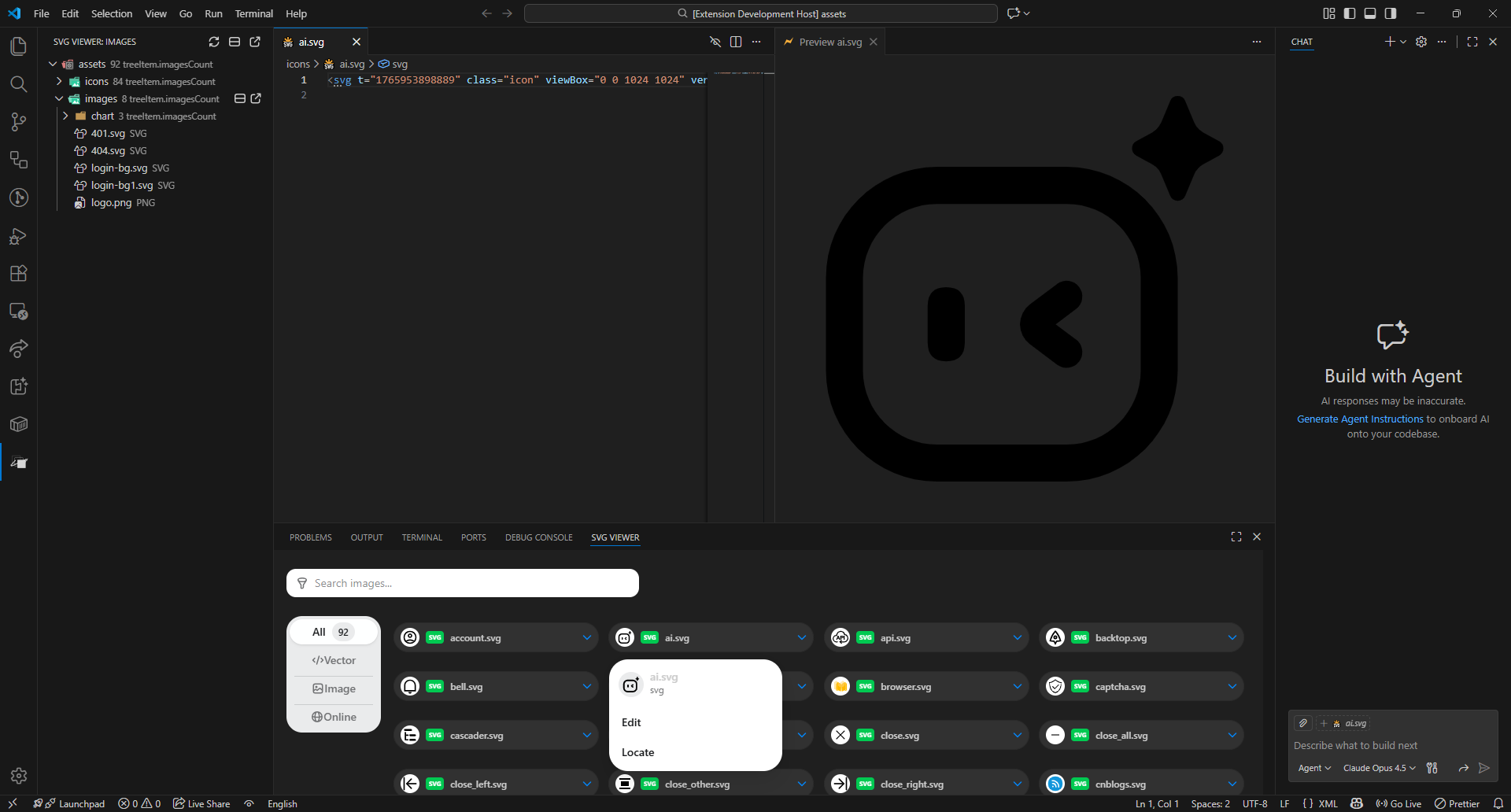
Screenshot will be added here
🚀 Installation
From VSIX File
- Download the latest
.vsix file from Releases
- Open VS Code
- Go to Extensions view (
Ctrl+Shift+X)
- Click the
... menu at the top
- Select
Install from VSIX...
- Choose the downloaded
.vsix file
From Source
git clone https://github.com/woyaodangrapper/svg-viewer.git
cd svg-viewer
pnpm install
pnpm run package
📖 Usage
- Click the SVG Viewer icon in the Activity Bar (left sidebar)
- Browse your workspace images in the tree view
- Click on any image or folder to open in the viewer
- Use toolbar buttons:
- 🔄 Refresh - Reload the image list
- 🪟 Open in Editor - Open selected images in editor area
- 📋 Open in Panel - Open selected images in bottom panel
- Right-click on files/folders in Explorer or Editor
- Choose "Open in SVG Viewer" or "Open in SVG Viewer Panel"
Command Palette
Press Ctrl+Shift+P and search for:
SVG Viewer: Open in SVG ViewerSVG Viewer: Open in SVG Viewer Panel
⚙️ Configuration
The extension works out of the box with no configuration required.
Supported File Types
.svg - Scalable Vector Graphics.png - Portable Network Graphics.jpg, .jpeg - JPEG Images.gif - Graphics Interchange Format.webp - WebP Images.ico - Icon Files.bmp - Bitmap Images
🛠️ Development
# Install dependencies
pnpm install

# Build extension
pnpm run build

# Build webview
pnpm run build:webview

# Build all
pnpm run build:all

# Package extension
pnpm run package
📝 License
MIT © woyaodangrapper
🤝 Contributing
Contributions, issues and feature requests are welcome!
Feel free to check issues page.
Made with ❤️ by woyaodangrapper
| |


