Jupiter Workspaces
Activate a folder. Focus the work. Guide it safely to delivery.
Jupiter is an explicit, per-workspace AI delivery workflow for VS Code.
Set Up Jupiter → Workspace Task → Agent → verified changes → PR or MR
Activate Jupiter for the workspace where you need it. Work directly in the folder or give each task an isolated worktree and AI agent.
Install Jupiter Workspaces from Visual Studio Marketplace

What Jupiter does
Jupiter keeps task context, an AI Agent, changed files, verification evidence, and delivery actions in one VS Code workflow. It supports a permanent Workspace Task for the folder you opened and isolated Git worktrees for parallel tasks.
| Without Jupiter |
With Jupiter |
| Rebuild task context in every AI chat |
Open an Agent with task and workspace context attached |
| Switch, stash, and repair one checkout |
Give parallel Git tasks their own branch and worktree |
| Search separate tracker, Git, CI, and review tabs |
Follow one delivery rail from context to review |
| Guess whether a change is safe to publish |
See evidence, blockers, and the next best action |
| Put tokens into scripts or prompts |
Keep provider credentials in VS Code SecretStorage |
Explicit per-workspace activation
Opening a folder does not start Jupiter project services.
Before setup, the Jupiter view shows only the extension version and Set Up Jupiter — Configure this workspace. Jupiter does not create project state, inspect Git, poll providers, collect Problems, or start MCP or Telegram services until you activate a folder.
Setup is one action for a single-root workspace. In a multi-root workspace, you choose exactly one folder. The activation marker stays in local VS Code workspace state and is never added to the repository.
Use Jupiter: Deactivate for This Workspace to stop project services without deleting saved configuration or task state.
Works without Git after setup
Workspace Task works in an ordinary writable folder. A .git directory, remote, hosting account, and task tracker are not required.
Git is discovered only when you use a Git capability. GitHub, GitLab, Jira, Trello, Sentry, Datadog, Crashlytics, Telegram, Actions, and QAA are configured independently and can always be added later.
Workspace Task
Workspace Task is the fastest way to give the current folder a durable task boundary. Open it immediately after setup, then choose Create Agent. Jupiter asks for the AI provider only at that moment and saves the choice for the workspace.
Need a project-wide conversation instead? Open Global Agent creates or restores the project Agent. Need isolation for several changes? Start external or custom tasks in separate Git worktrees.
Task-to-delivery workflow
Task Details presents one theme-aware delivery rail:
Context → Agent → Changes → Verification → Delivery → Review
The next-best-action engine explains why an action is recommended, which evidence supports it, and what blocks delivery. Read-only checks may refresh automatically. Local changes require an explicit command. Push, Actions, PR/MR creation, and other external mutations show a preview and require confirmation. Destructive operations keep typed confirmation.
From Task Details and Task Files you can:
- Continue or create the task Agent.
- Inspect current and branch diffs.
- Resolve stale branches, conflicts, and paused rebases.
- Run delivery preflight, GitHub Actions, or QAA verification.
- Commit and push reviewed changes.
- Create or open a GitHub PR or GitLab MR.

Isolated Git tasks
GitHub Issues, GitLab Issues, Jira tickets, Trello cards, Sentry bugs, and local custom tasks enter the same flow. A Git task can own:
- A predictable task branch.
- A dedicated Git worktree.
- A VS Code workspace for that worktree.
- Saved source, Agent, verification, and review state.
- Generated Agent context with worktree and branch guardrails.
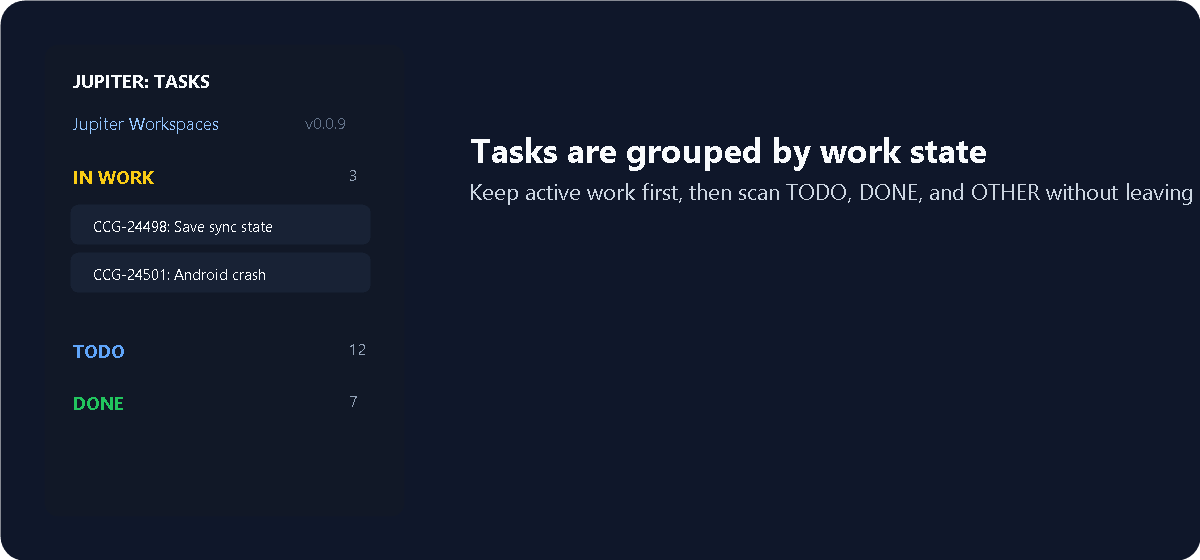
Problems to verified fixes
Jupiter can collect selected Sentry, Datadog, and Firebase Crashlytics problems into a local encrypted evidence database. A problem can become an investigation, a task, an Agent, and a verified fix while preserving the same task boundary.
Jupiter Head: meetings that remember
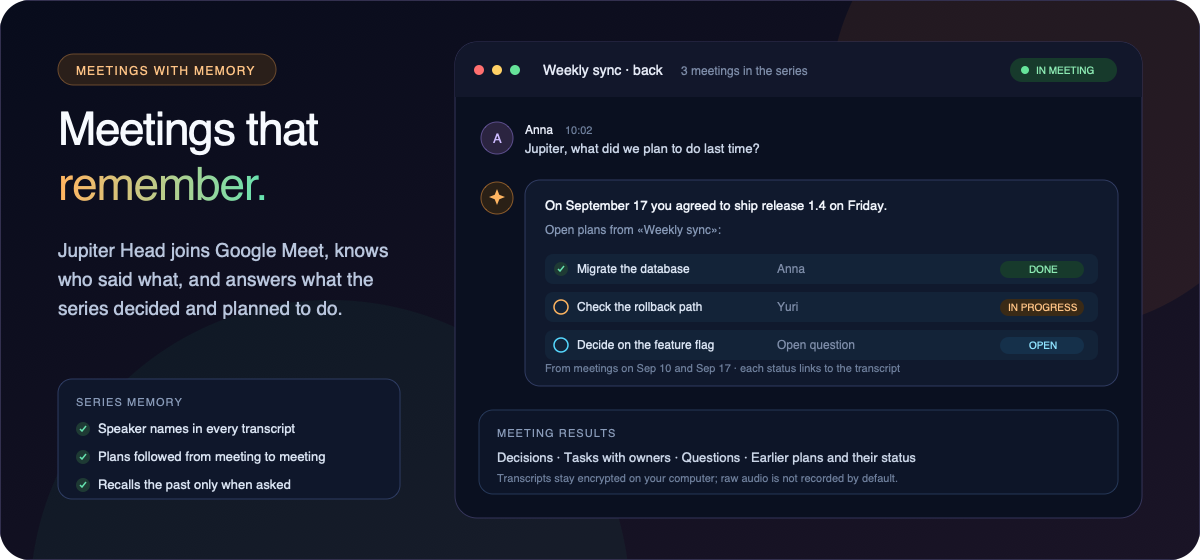
Jupiter Head joins Google Meet as a voice participant for the project in your current window. Say “Jupiter, …” and it answers by voice, can read the project’s Heart, tasks, and available code, and turns the meeting into a record you can check against the transcript.
- Knows who spoke. Each participant is transcribed from their own audio track, so transcripts and results carry names instead of one anonymous mix.
- Remembers the series. Meetings with the same title, or the same Meet link, form a series. Ask “What did we discuss last time?” or “What did we plan to do?” and Jupiter answers from earlier meetings with their dates, keeping agreed decisions apart from proposals. It does not bring up the past unless asked.
- Connects conversations. When results are prepared, open plans and questions from earlier meetings are checked against the new discussion and marked done, in progress, blocked, changed, or cancelled, each linked to the transcript.
- Stays under your control. Head runs as a separate background service on your computer. Transcripts and results stay encrypted locally, and raw audio is not recorded by default. Meetings from other series of the same project are used only while the meeting may read project data. Deleting a meeting also removes it from later results.
Open Jupiter: Head: Setup and Meetings to connect the meeting accounts, run the one-time connection check, and join a meeting.
Integrations
| Capability |
State and workflow |
| AI Agents |
Codex IDE/CLI, Claude IDE/CLI, and VS Code Chat / GitHub Copilot |
| Git hosting |
GitHub, GitLab.com, and self-managed GitLab |
| Task sources |
GitHub, GitLab, Jira Cloud, Trello, Sentry, and local tasks |
| Verification |
Read-only delivery preflight, GitHub Actions, and QAA |
| Problems |
Sentry, Datadog Error Tracking, and Firebase Crashlytics |
| Knowledge |
Scoped read-only Trello knowledge through Jupiter MCP |
| Collaboration |
Optional Telegram forum topics connected to durable local sessions |
| Meetings |
Google Meet through Attendee with OpenAI voice and transcription, speaker names, and memory per meeting series |
Each capability reports Available, Needs configuration, Connected, or Unavailable without blocking base workspace activation.
Local-first security and privacy
- Jupiter adds no hosted Jupiter cloud service.
- Provider credentials stay in VS Code SecretStorage and are not inserted into Agent prompts.
- Non-secret project state stays local and is excluded through
.git/info/exclude when possible.
- External mutations remain explicit; Jupiter does not silently push, create a review request, or transition a provider task.
- Telemetry follows the global VS Code telemetry choice and
jupiter.telemetry.enabled.
- Product events contain event names plus fixed source/provider/verification categories only. Jupiter never sends workspace paths, folder or repository names, task or branch data, files, code, messages, errors, durations, stack traces, or Jupiter-created identifiers.
See SECURITY.md for reporting and the supported security boundary.
60-second quick start
- Install Jupiter and open the folder where you want it.
- Open the Jupiter Activity Bar view and choose Set Up Jupiter.
- Choose Open Workspace Task. Git is optional.
- Choose Create Agent and select a provider.
- Review changes and verification evidence in Task Details.
- Connect Git or an external service only when the task needs delivery.
Essential commands
- Set Up This Workspace — explicitly activate the selected folder.
- Open Workspace Task — work directly in the active folder without requiring Git.
- Create Agent / Open Agent — create or restore the task-aware AI session.
- Show Workspace Dashboard — inspect activation, the next best action, blockers, integrations, and privacy status.
- Configure Workspace — optionally configure Git and advanced workspace defaults.
- Show Task Files — inspect task-scoped files and diffs.
- Run Delivery Preflight — verify current branch evidence without an external mutation.
- Commit & Push Task — commit reviewed changes and push after confirmation.
- Create Pull / Merge Request — preview and create the review request.
- Head: Setup and Meetings — connect meeting accounts, join Google Meet, and open results and series memory.
- Deactivate for This Workspace — stop Jupiter while preserving saved state.
- Delete Saved Workspace State — separately remove only saved
state.json after typed confirmation.
Requirements
- VS Code 1.120 or newer.
- A writable folder for Workspace Task.
- Git in
PATH only for branch, worktree, commit, push, or PR/MR workflows.
- Credentials only for the optional providers you connect.
- For Jupiter Head: an Attendee account, an OpenAI API key, and a public HTTPS route to your computer through a managed Cloudflare Tunnel or your own server.
Support
Read SUPPORT.md, search existing issues, or open a report in the public Jupiter issue tracker. Include the first relevant Jupiter diagnostic or log message, but never include tokens or other secrets.
This repository is the canonical source for Jupiter Marketplace copy and public image assets. Extension releases contain a checked snapshot and fail the release gate when that snapshot differs.

