crag — Make AI Obey Your Code
One governance.md → compiled to 23 AI tool configs. Auto-recompile, drift detection, inline diagnostics.


One command, 23 targets
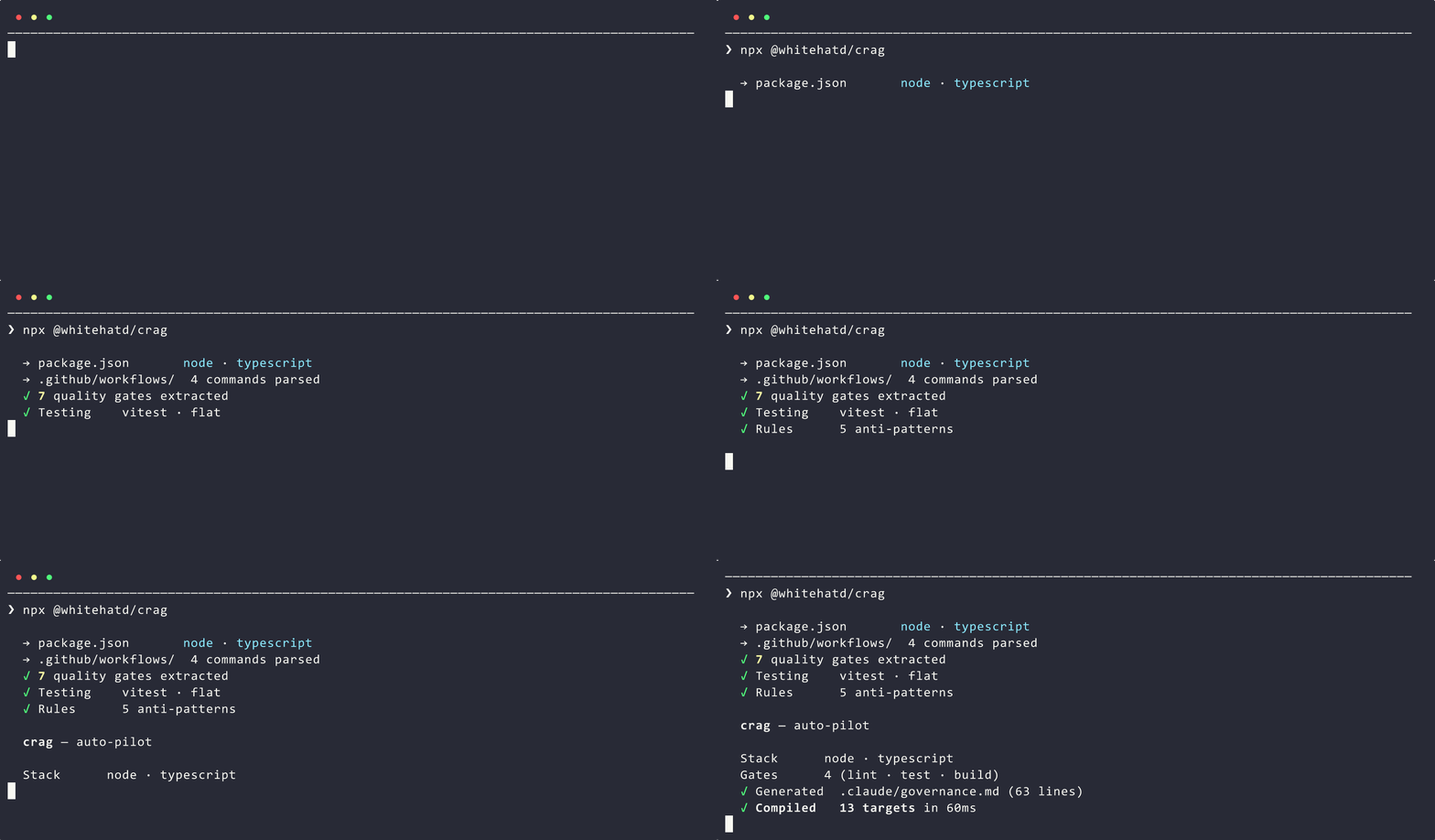
Run crag on any project. It reads your CI, package manifests, and configs — then generates a governance.md with your real gates and compiles it to 23 tool-native formats. No interview, no config.
Drift detection built in
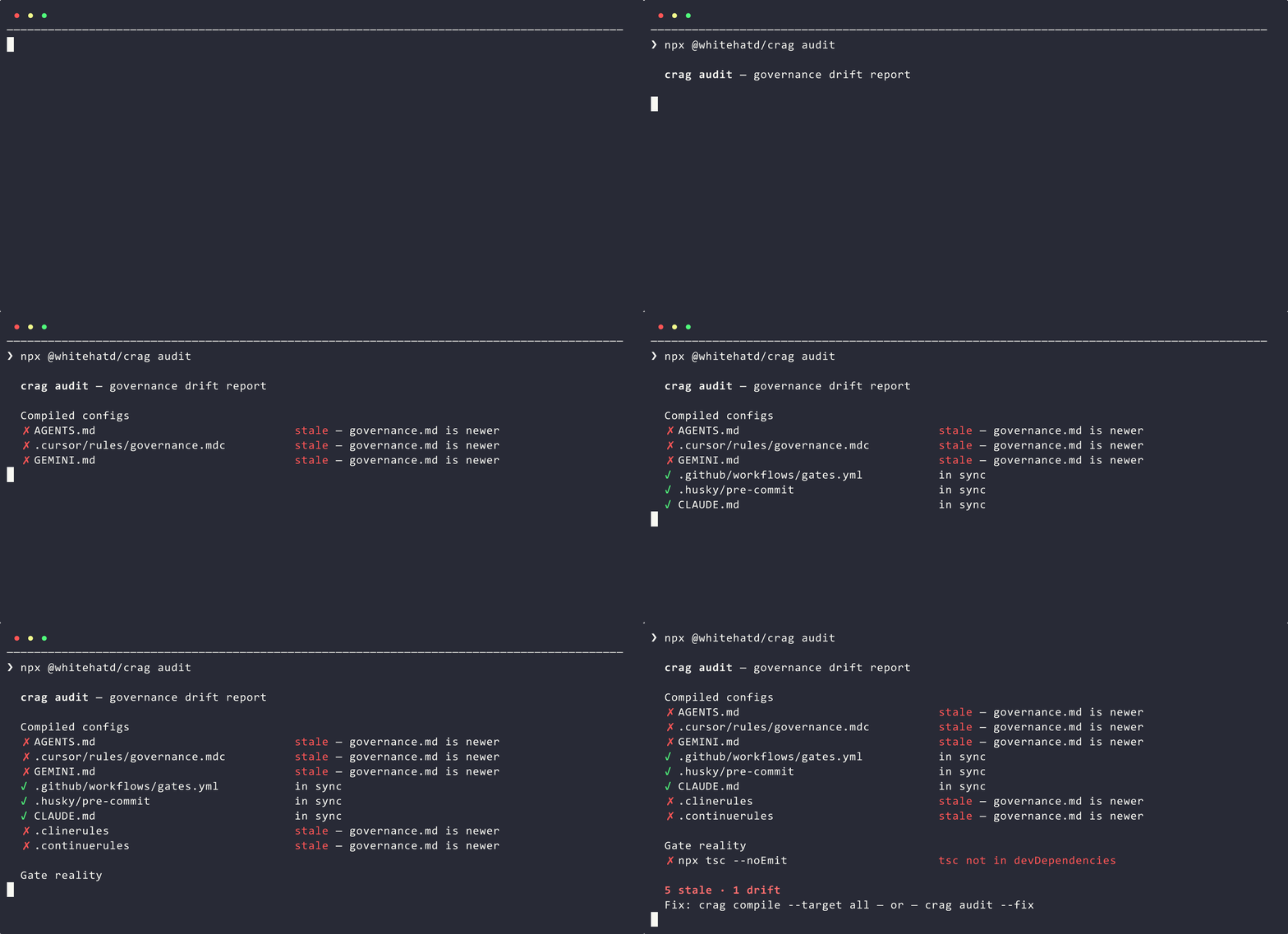
crag audit compares governance against reality: stale compiled configs, phantom gates that reference tools you don't have, CI commands missing from governance. Fix drift before your AI agents inherit it.
See every target compile
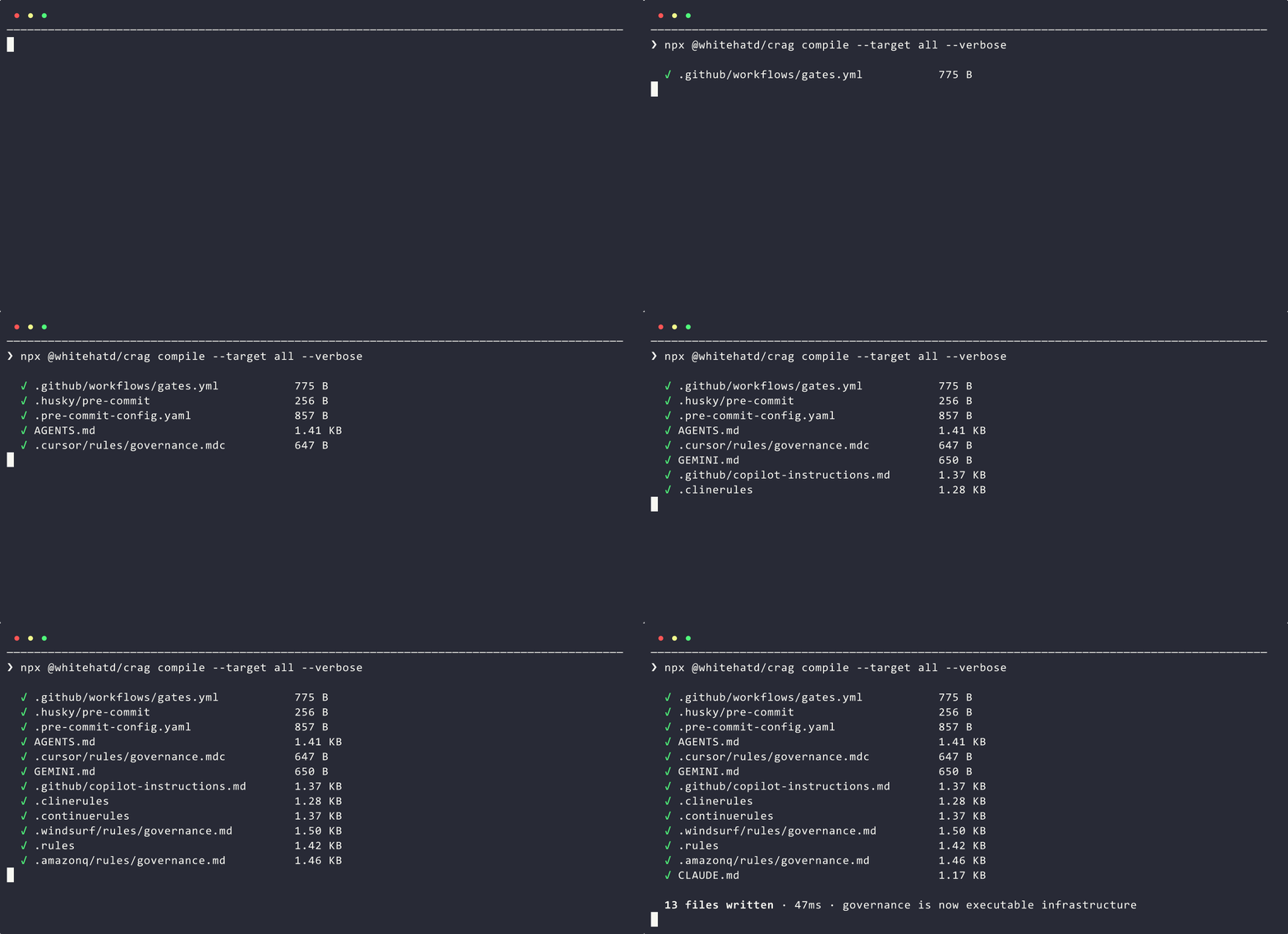
One governance.md in, 23 deterministic files out. Each in its tool's native format — MDC frontmatter for Cursor, YAML triggers for Windsurf, numbered steps for AGENTS.md. Same input, byte-identical output.
What you get in VS Code
| Feature |
What it does |
| Sidebar |
Tree view of all compile targets — sync/stale status, one-click compile |
| Status bar |
Live health summary (crag: 12 pass / crag: 2 fail · 1 warn). Click to run doctor |
| Auto-recompile |
Save governance.md → all 23 targets recompiled instantly (500ms debounce) |
| CodeLens |
Inline Compile / Audit / Diff actions right inside governance.md |
| Diagnostics |
Drift issues in the Problems panel with line numbers |
| Startup audit |
Background audit on workspace open — know your drift state immediately |
Commands
Ctrl+Shift+P → type crag:
| Command |
What it does |
| Analyze Project |
Generate governance.md from your codebase |
| Compile All Targets |
Compile governance to all 23 formats |
| Compile Target... |
Pick a specific target from a list |
| Audit Drift |
Check for stale configs, phantom gates, CI drift |
| Audit + Auto-Fix |
Audit, scaffold missing infrastructure, and recompile stale targets |
| Diff |
Compare governance vs codebase reality |
| Doctor |
Deep diagnostic of governance integrity |
| Install Pre-Commit Hook |
Install the crag pre-commit hook |
| Open governance.md |
Jump to the governance file |
| Refresh |
Re-scan targets and refresh the sidebar |
Compile Targets
One governance.md → deterministic output:
| Target |
Output |
Consumer |
agents-md |
AGENTS.md |
Codex, Aider, Factory |
claude |
CLAUDE.md |
Claude Code |
cursor |
.cursor/rules/governance.mdc |
Cursor |
gemini |
GEMINI.md |
Gemini, Gemini CLI |
copilot |
.github/copilot-instructions.md |
GitHub Copilot |
cline |
.clinerules |
Cline |
continue |
.continuerules |
Continue.dev |
windsurf |
.windsurf/rules/governance.md |
Windsurf Cascade |
zed |
.rules |
Zed |
amazonq |
.amazonq/rules/governance.md |
Amazon Q Developer |
aider |
CONVENTIONS.md |
Aider |
junie |
.junie/guidelines.md |
JetBrains Junie |
kiro |
.kiro/steering/quality-gates.md |
Amazon Kiro |
goose |
.goose/GOOSEHINTS |
Goose |
coderabbit |
.coderabbit.yaml |
CodeRabbit |
github |
.github/workflows/gates.yml |
GitHub Actions |
forgejo |
.forgejo/workflows/gates.yml |
Forgejo / Gitea Actions |
gitlab |
.gitlab-ci.yml |
GitLab CI |
circleci |
.circleci/config.yml |
CircleCI |
azuredevops |
azure-pipelines.yml |
Azure DevOps |
husky |
.husky/pre-commit |
Husky |
pre-commit |
.pre-commit-config.yaml |
pre-commit.com |
lefthook |
lefthook.yml |
Lefthook |
The scaffold meta-target generates hooks, editor settings, and agent configs — run separately via crag compile --target scaffold.
Settings
| Setting |
Default |
Description |
crag.autoCompileOnSave |
true |
Recompile when governance.md is saved |
crag.showStatusBar |
true |
Show drift count in status bar |
crag.auditOnStartup |
true |
Background audit on workspace open |
crag.cliPath |
"" |
Custom crag binary path |
crag.diagnostics.enabled |
true |
Show drift in Problems panel |
crag.compileTargets |
[] |
Restrict to specific targets |
Requirements
- crag CLI —
npm install -g @whitehatd/crag
- Node.js 18+
The extension auto-detects crag via npx if not installed globally.
Works with 5 VS Code-compatible editors
VS Code · Cursor · Windsurf · Cline · Continue
One 20 KB extension. All are VS Code forks — zero porting needed.
25+ Language Stacks
Node · Python · Rust · Go · Java · Kotlin · Ruby · PHP · .NET · Swift · Elixir · Haskell · OCaml · Zig · C/C++ · Dart · Crystal · Nim · Julia · Erlang · Lua · Terraform · Docker
The crag ecosystem
crag.sh · Docs · GitHub · npm · Dashboard · Status · JetBrains · Neovim

