waterplane: Cost & Context for Claude Code
What each prompt cost, the context window over time, the token split and what your CLAUDE.md costs on every turn. Read from Claude Code's own logs on this machine. No telemetry, no network.
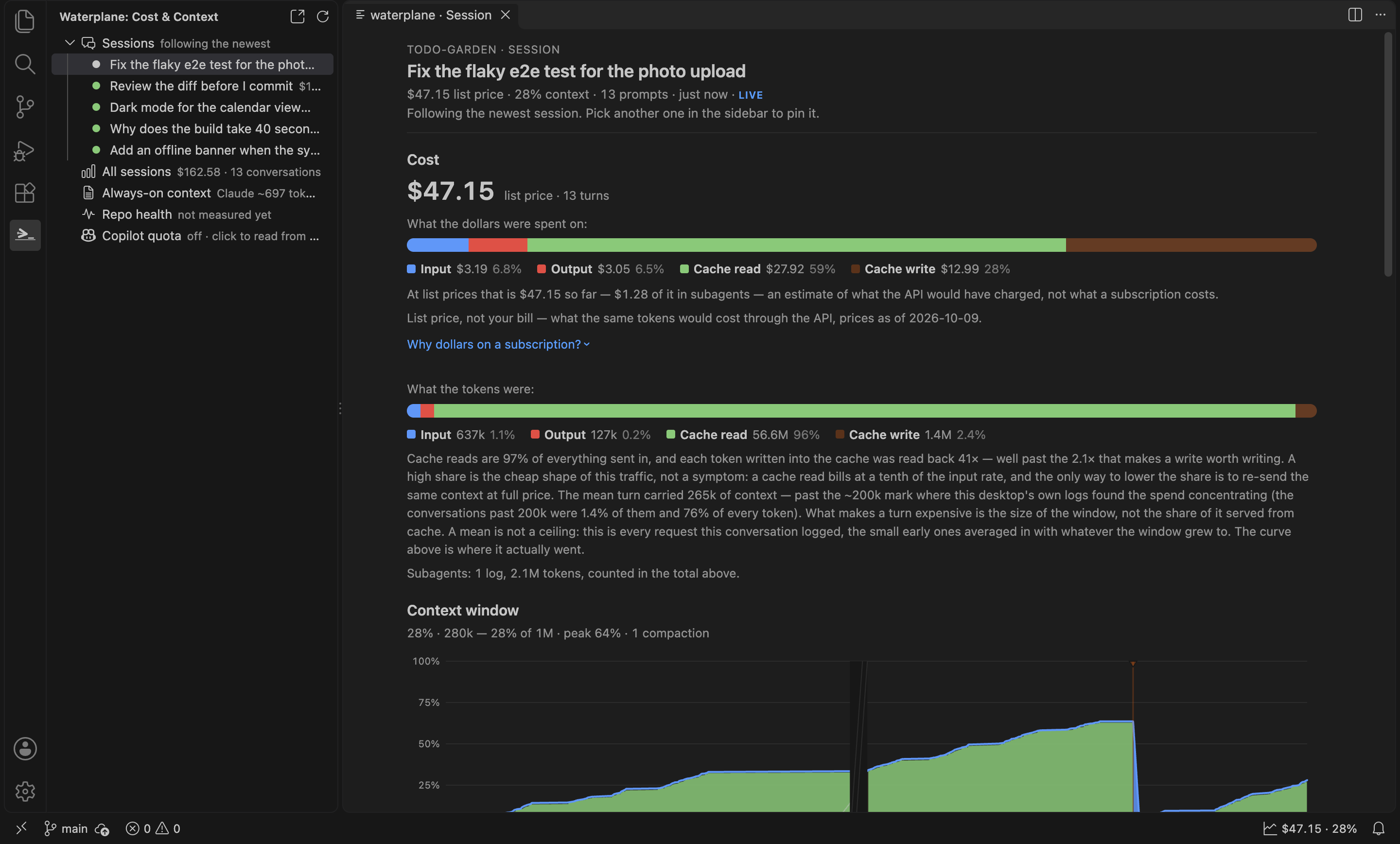
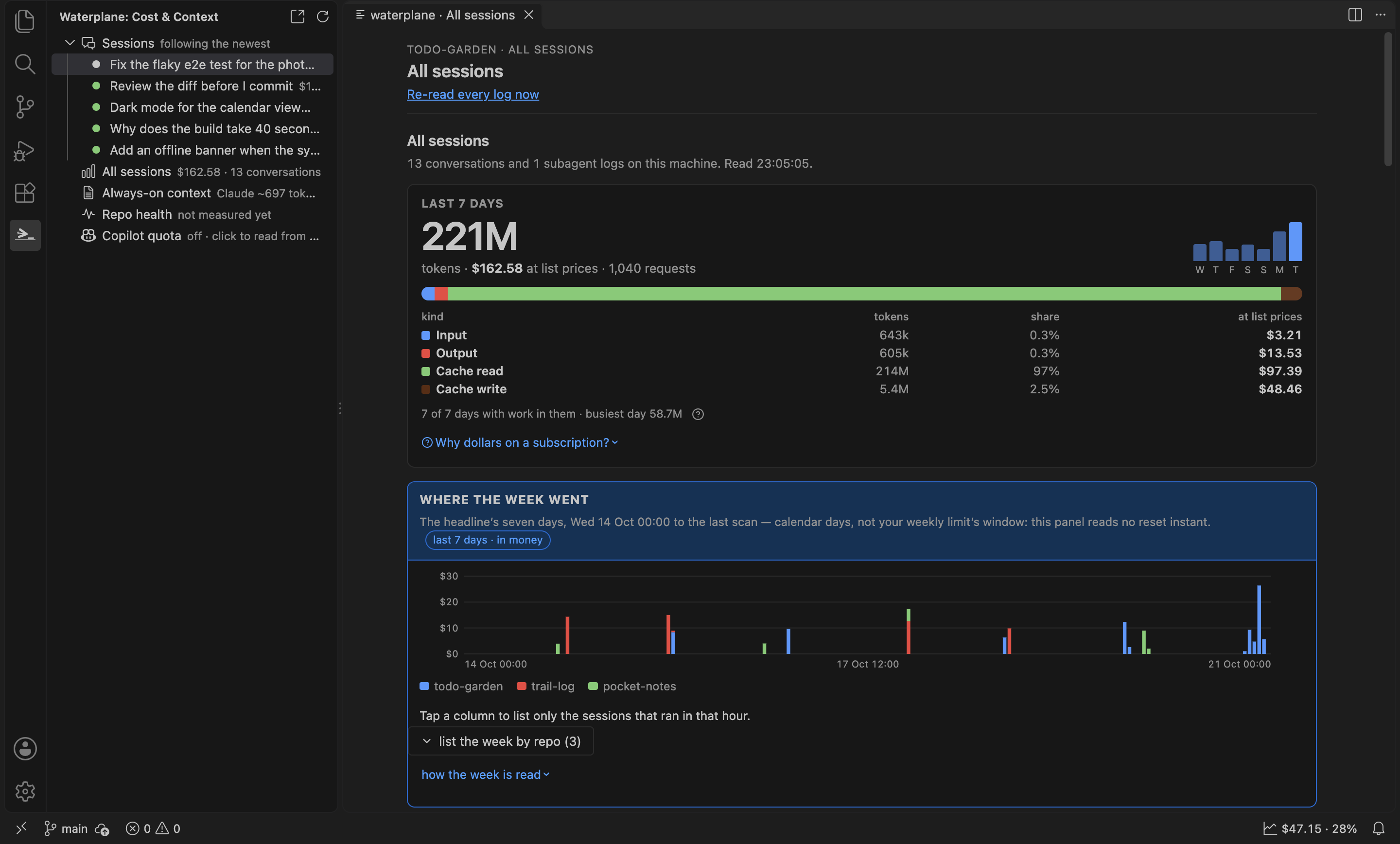
Fictional repos and a generated session, its token shape scaled from real use (npm run screenshots).
What it shows
Two parts: the waterplane tree in the activity bar on the left is the navigation, and the panel — an editor tab in the centre — shows the one view you picked there. Open both from the status bar item ($4.21 · 38%: this session's cost and how full its context window is) or with waterplane: Open cost & context from the command palette.
- Your sessions, in the tree. The folder's conversations written to in the last day (newest first, at most 12), each with its last prompt, its cost, how full its context window is, its age and a live marker while it is being written to. Click one to show it in the panel; Follow the newest session (the default) lets go again. The list refreshes when any listed log changes, reading only the logs that changed.
- This prompt cost X. Every prompt in the selected session with its cost, the context it carried and how many requests it took. Pick one to see why it was dear. A prompt that is still running is pinned at the top (
running · $0.42 so far · 7 requests · 1m 20s) and its cost climbs as the log grows; before the first reply it says it is waiting for it. It counts as running only while the log ends mid-turn (an unanswered prompt, or a reply that stopped for a tool) and was written to in the last ten minutes, otherwise nothing is claimed.
- Context window over time. Compactions and cold cache rebuilds are marked on the chart.
- The split. Wherever a total appears it comes with input, output, cache read and cache write, because the kinds differ by up to 100x in price and a bare total hides it.
- What this folder's CLAUDE.md costs on every turn. The folder's
CLAUDE.md (and .claude/CLAUDE.md) and every skill description in .claude/skills are re-sent with every prompt. The panel measures that always-on weight, per skill. Your user-level ~/.claude/CLAUDE.md and a CLAUDE.local.md are not counted.
- Optimisation prompts. Six ready-made prompts (groom
CLAUDE.md, shrink skill descriptions, hand off to a fresh session, why a prompt was expensive, split the file that grew most, why a health metric is rising). Copy one, or type it into the active terminal. It is typed, not sent: you press Enter. Nothing applies itself.
- All sessions. Total over time, by model, by repo and your dearest conversations. Reading every log takes a few seconds the first time, so it happens when you open the panel or run waterplane: Re-read Claude Code logs, never at startup.
Repo health over time
The Repo health view charts how the folder's code changes over its git history: file size, the longest files, duplication, dead exports and the always-on weight, one reading per day. It is read by the extension's bundled engine, never by a script in your workspace, and it is measured only when you click build the series / update the series (or run waterplane: Measure repo health from git history). Opening the view only reads what was measured before. The series is stored in VS Code's global storage for this extension, not in your folder, and the view prints its path. If the waterplane desktop app has already measured the folder (.waterplane/repohealth.jsonl, plus a series per scope listed in .waterplane/repohealth-scopes.json), the view reads that series instead unless the extension's own is newer, says so, and offers the scopes; the extension only reads those files, never writes them. It grows with the history — tens of MB for a thousand-commit repo (about 51 MB measured on 1,243 commits). Forget this series and measure again, offered when a series is refused or cannot be read, deletes that copy and nothing else. If git is missing, the checkout is shallow or the folder is not a repository, the view says so in words instead of drawing a number.
The view is laid out as the phone's: one status line with a ? that holds the series' details, a jump bar that sticks to the top (one chip per card on screen, and the refresh button), one x axis choice for every chart — weeks (each week's last reading) or commits (every reading; offered when the series scores per commit) — then a card each: the score, the longest file, the reading tiles (a two-column grid; click one to open its full chart), the always-on weight, the size of the tree, the readings as a table, and the repo's own readings.
The first card is the health score, as on the phone: an absolute 0–100 number per week, held down by its worst reading (an alert, in words, names it), its line over the weeks and what pushed each week up or down. Beside it, once the All sessions view has read your logs, a dotted line shows the context each Claude request in this folder re-sent per week — context, never part of the score. It is computed from the same series the view read, with the default context warn line; it is the one place the view takes a side, and is not drawn for a scope.
The readings come in two groups, each under its own heading as on the phone: waterplane's readings, measured the same way in every repo, and the repo's own readings, declared in the folder's committed .waterplane-shared/health.json. That file can also disable one of waterplane's readings or replace it with the repo's own command; the tile says so, with the repo's reason, and the file's ignored entries are listed under the heading. The extension never runs a command that file names: it starts only git, so a repo's own readings and its overrides show as absent here with that reason, and a disable (which needs nothing run) is honoured. The waterplane desktop app runs them, and a series it measured carries their numbers. When the bundled engine's definition moves on with an extension update, the extension's own copy is drawn as it is, a measure refuses to add rows under the new definition, and Forget this series and measure again re-cuts it.
Subagent lanes
A session's subagents get their own lanes under the context chart and their cost is part of the session total — or the total is withheld when their logs cannot be read.
The tree
The waterplane icon in the activity bar opens the tree: Sessions (the recent ones, as above) and All sessions, Always-on context, and Repo health, each with a one-line headline. A click shows that view in the panel; the panel itself has no tab bar and no session list, so nothing is on screen twice. The tree never scans all your logs, only the few listed sessions.
With several workspace folders open, the panel follows the folder of your active editor; the tree's folder row picks another.
Privacy
- No telemetry. No network requests.
- It reads only the
claude CLI's local logs under ~/.claude/projects (or CLAUDE_CONFIG_DIR), plus CLAUDE.md and skill files in your workspace folder.
- The repo-health engine runs
git on this machine against the folder's own history — read-only object reads (rev-list, log, ls-tree, cat-file); it never runs git fetch, pull or push, never touches the index or the working tree, and writes its series only into VS Code's global storage for this extension. dist/healthworker.mjs is the one file that can start a process, and the only program it starts is git — never a command a repo declares in .waterplane-shared/health.json.
- It reads, and never writes, a waterplane series already in your folder (
.waterplane/repohealth*.jsonl).
- It writes only its own cache and series, in VS Code's global storage for this extension.
- The one thing it opens in a browser is a link to waterplane.dev or the extension marketplace, when you click it.
Dollars are list prices, not your bill
Costs are what the API would have charged at published list prices (as of the date shown in the panel), computed from the token counts in the logs. If you use Claude Code on a subscription, you pay a flat fee instead. The figure is useful because it weighs each kind of token by its own rate, so prompts, sessions and models can be compared. It is an estimate. A model with no published rate is counted in tokens and left out of the dollars; it is never shown as $0.
Settings
| Setting |
Default |
What it does |
waterplane.statusBar |
true |
Show the current session's cost and context in the status bar. |
waterplane.pollSeconds |
5 |
How often the active session log is re-checked when file watching misses a write (minimum 2). |
waterplane.claudeConfigDir |
empty |
Override the claude CLI's config dir (else CLAUDE_CONFIG_DIR, else ~/.claude). |
waterplane.healthSeconds |
600 |
How long one repo-health measurement may run before it is stopped; rows measured so far are kept and the next measure continues. |
Commands
- waterplane: Open cost & context
- waterplane: Re-read Claude Code logs
- waterplane: Copy an optimisation prompt
- waterplane: Measure repo health from git history (
waterplane.healthRefresh): opens the Repo health view and measures the active folder.
Drive these sessions from your phone
waterplane is also a phone app that remote-drives the real claude CLI on your desktop over Tailscale, with these same cost and context readings on the phone. See waterplane.dev.
"Claude Code" is named here only to say what the logs come from. This extension is not made or endorsed by Anthropic.
License
MIT

