🦉 Wise Owl Material Theme
A beautiful VS Code theme designed for developers who spend 8+ hours coding daily. Combining the beloved Night Owl aesthetics with Material Design principles, this theme offers perfect eye comfort and code clarity.


🎨 Theme Variants
There are 4 versions of this theme:
- Wise Owl Material (Dark - Recommended)
- Wise Owl Material Light (For light theme lovers)
- Wise Owl Material High Contrast (Maximum accessibility)
- Wise Owl Atom Material (Atom One Dark-inspired)
✨ Features
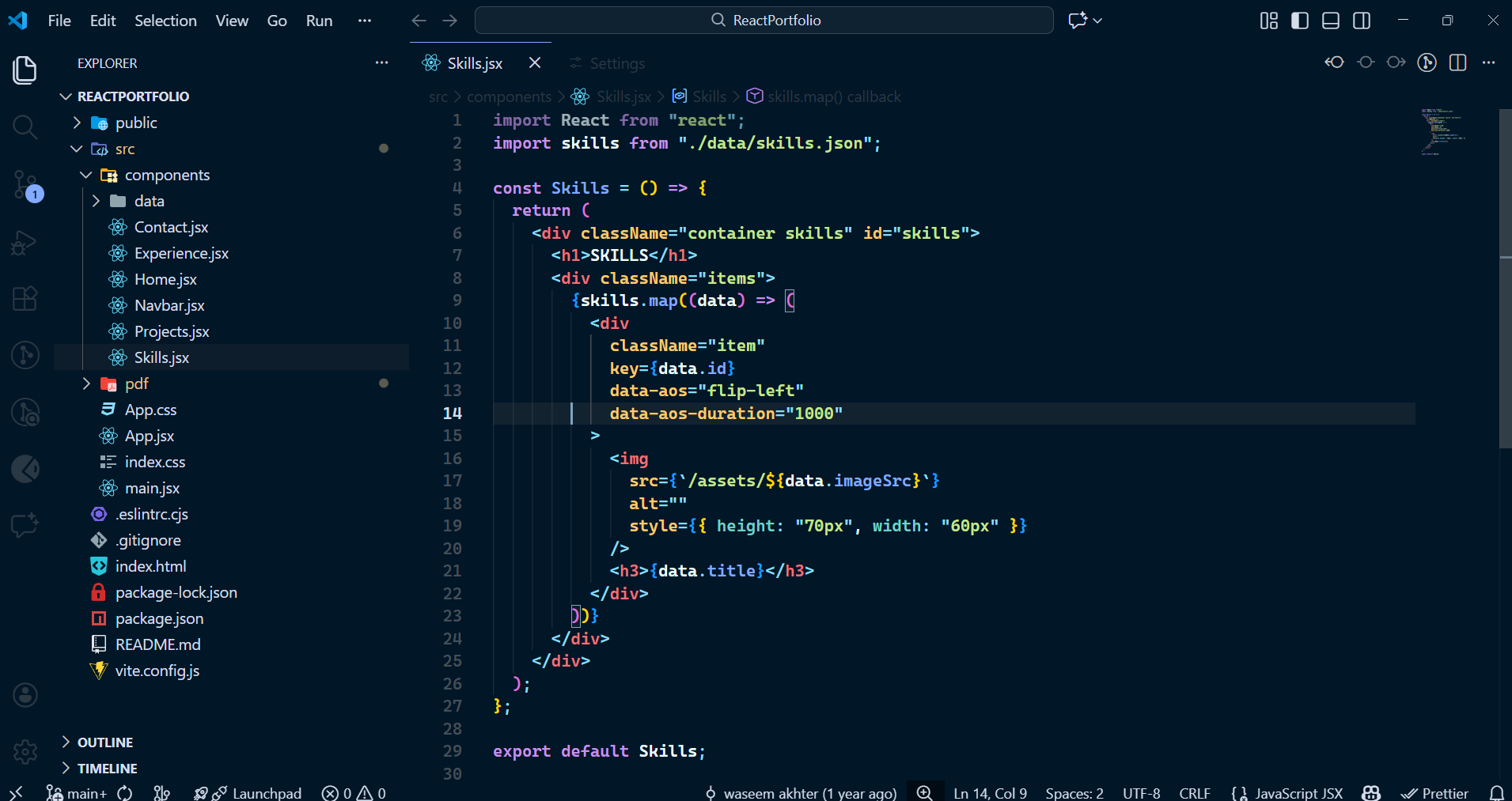
🌙 Dark Theme (Recommended)
- Eye Comfort: Blue-tinted dark background (
#011627) reduces eye strain during long coding sessions
- Perfect for React & Node.js: JSX tags, components, and functions are beautifully highlighted
- Seamless UI: Sidebar, tab bar, and editor backgrounds perfectly match
- Professional Color Palette: Carefully chosen colors for all syntax elements
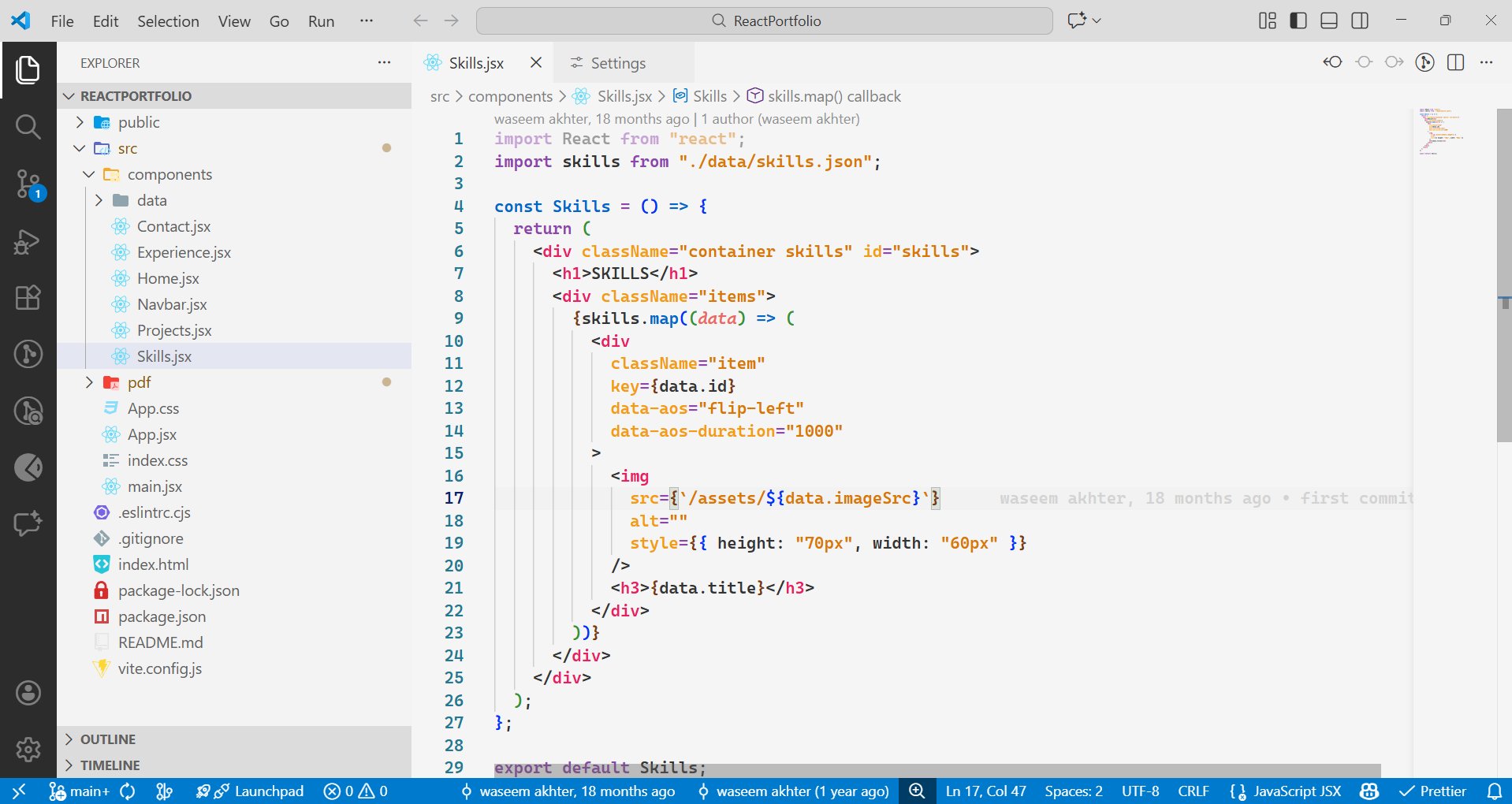
☀️ Light Theme
Light theme is for those folks who still love to work in light mode. You might attract bugs, but hey, that's your choice! 😄
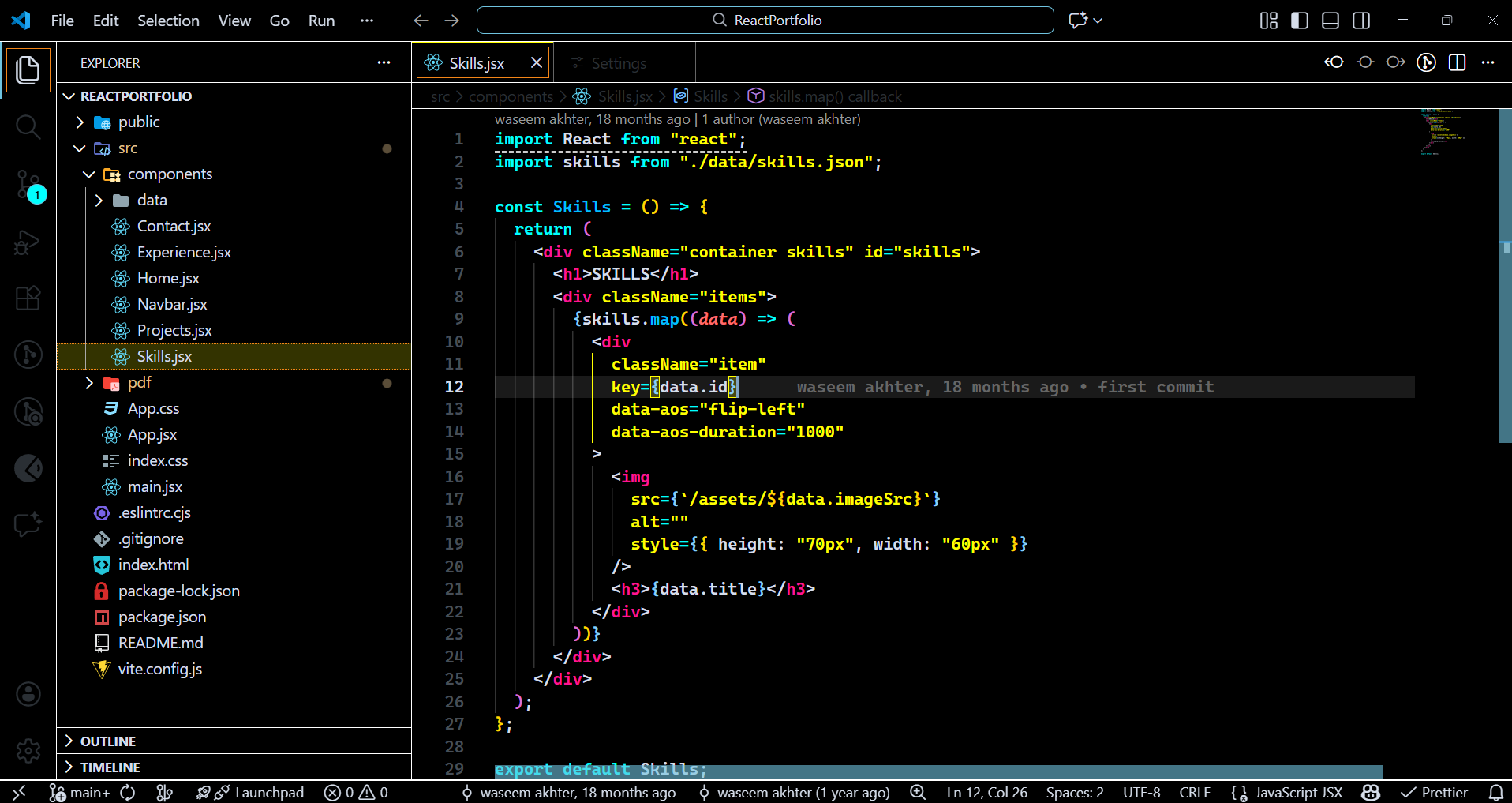
⚡ High Contrast Theme
Maximum readability with pure black background and bright, bold colors. Perfect for:
- Accessibility needs
- Bright environment coding
- Quick debugging sessions
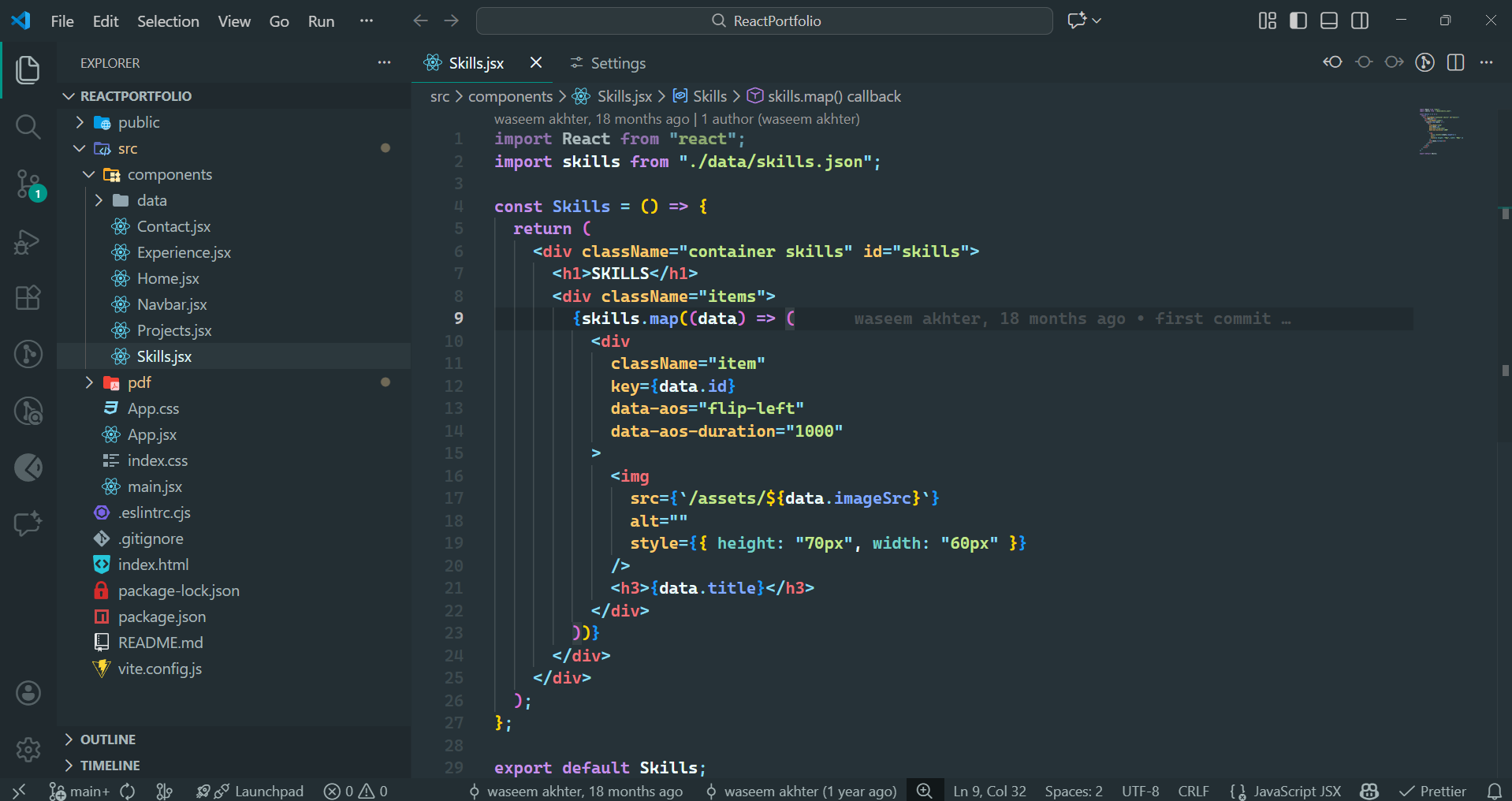
🎨 Atom Material Theme
If you loved Atom themes, Atom Material brings that feeling back—refined for VS Code. Perfect for:
- A clean, material-inspired theme built for focus and long coding sessions
- A perfect balance of contrast, color, and calm for modern developers
- Minimal noise. Maximum readability
🎯 Why Wise Owl Material?
This theme is specifically designed for:
✅ Full-stack developers working 8+ hours daily on React and Node.js projects
✅ Professional developers who need consistent, comfortable visuals
✅ Code clarity with distinct colors for every element:
- JSX Tags: Coral (
#f07178) - Stands out clearly
- Functions: Blue (
#82aaff) - Easy to spot
- Strings: Green (
#c3e88d) - Perfect readability
- Keywords: Cyan (
#00bcd4) - Clear distinction
- Properties: Purple (
#c792ea) - Beautiful contrast
📸 Screenshots
Dark Theme
Light Theme
High Contrast Theme
Atom Material Theme
🚀 Installation
- Open Extensions in VS Code (
Ctrl+Shift+X or Cmd+Shift+X)
- Search for "Wise Owl Material"
- Click Install
- Press
Ctrl+K Ctrl+T (or Cmd+K Cmd+T on Mac)
- Select "Wise Owl Material" from the list
⚙️ Recommended Settings
For the best experience, use these font settings:
{
  "editor.fontFamily": "'Fira Code', 'Cascadia Code', 'JetBrains Mono', Consolas, monospace",
  "editor.fontSize": 16,
  "editor.fontLigatures": true,
  "editor.lineHeight": 24,
  "editor.letterSpacing": 0.5,
  "terminal.integrated.fontSize": 14,
  "editor.wordWrap": "on",
  "editor.cursorBlinking": "smooth",
  "editor.cursorSmoothCaretAnimation": "on"
}
🎨 Color Palette
Main Colors
- Background:
#011627 - Deep night blue
- Foreground:
#d6deeb - Soft white
- Accent:
#82aaff - Bright blue
- Highlight:
#c3e88d - Fresh green
Syntax Colors
- Keywords:
#00bcd4 (Cyan)
- Strings:
#c3e88d (Green)
- Functions:
#82aaff (Blue)
- Classes:
#ffcb6b (Yellow)
- Properties:
#c792ea (Purple)
- Numbers:
#f78c6a (Orange)
- Comments:
#637777 (Grey, italic)
🤝 Contributing
Contributions are welcome! If you'd like to improve this theme:
- Fork the repository
- Create your feature branch (
git checkout -b feature/amazing-feature)
- Commit your changes (
git commit -m 'Add some amazing feature')
- Push to the branch (
git push origin feature/amazing-feature)
- Open a Pull Request
🐛 Issues
Found a bug or have a suggestion? Please open an issue on GitHub.
📝 Changelog
Version 1.0.0
- Initial release
- Dark theme with Night Owl aesthetics
- Light theme variant
- High contrast theme variant
- Atom material theme variant
- Optimized for React and Node.js development
- Seamless UI with matching sidebar and tab bar
📄 License
This theme is licensed under the MIT License.
👨💻 About the Author
Created with ❤️ by [WaseemAkhter]
🙏 Inspiration:
Wise Owl Material is an original VS Code theme inspired by the following works and community contributions:
- Night Owl by Sarah Drasner
- Material Theme by Mattia Astorino
- The amazing VS Code community
All color palettes, UI styling, and theme configurations have been independently created for the Wise Owl Material theme.
⭐ Support
If you like this theme, please:
- ⭐ Star the repository on GitHub
- 📝 Leave a review on the VS Code Marketplace
- 📢 Share it with your fellow developers
Happy Coding! 🦉✨
"Code in comfort, create with clarity"

