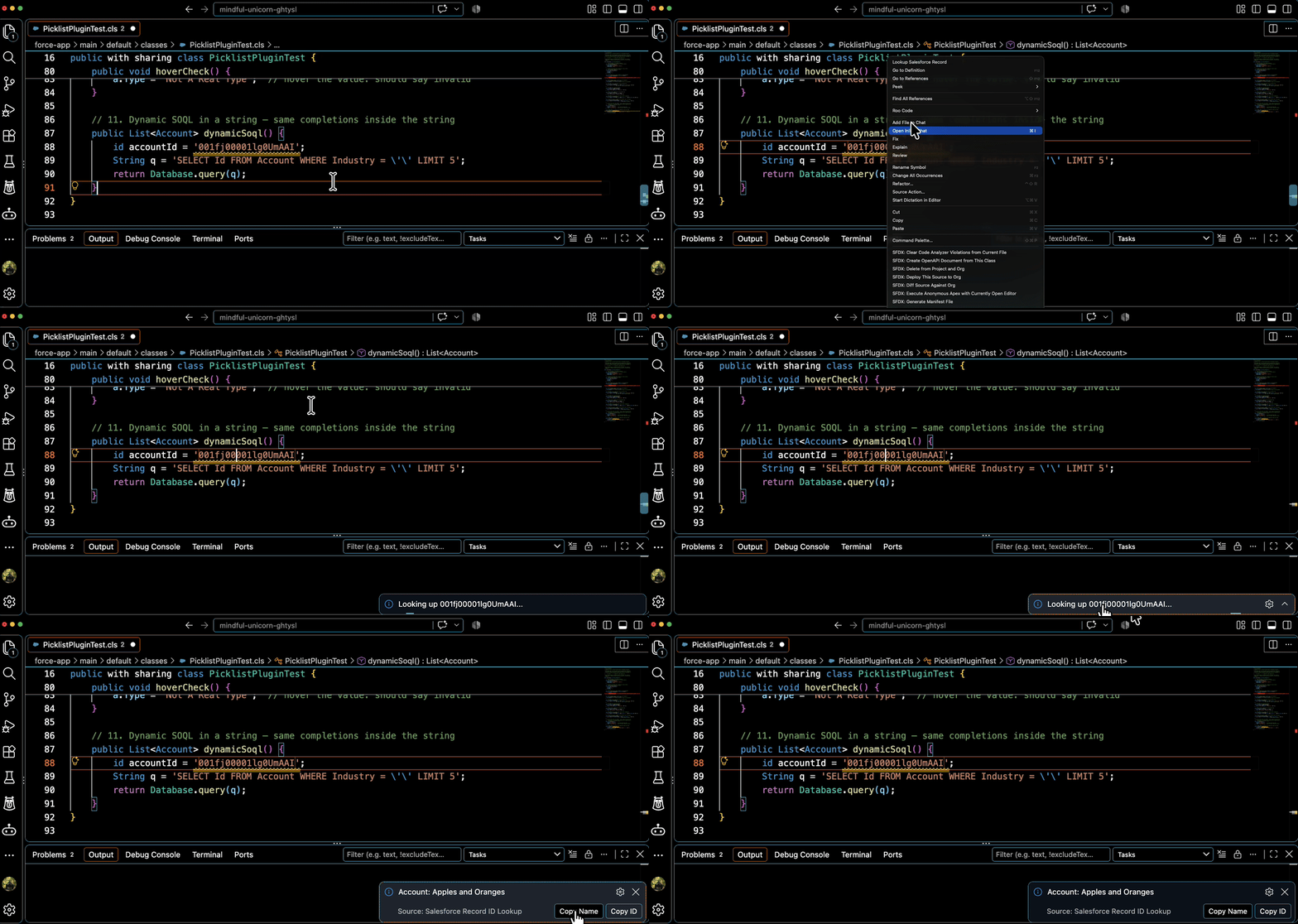
A VS Code extension that looks up Salesforce record names by their ID. Select or place your cursor on any Salesforce ID in your code to instantly see what record it refers to — no Salesforce CLI required.
Features
Cursor / Selection Lookup — Select or place cursor on a Salesforce ID and run the lookup (also in the right-click menu)
Automatic ID Detection — Recognizes 15 and 18 character Salesforce IDs
Object Type Detection — Determines the object type from the ID's key prefix, with built-in mappings for common objects
Copy to Clipboard — Quickly copy the record name or ID after lookup
Built-in Org Login — Browser-based OAuth login without installing any CLI
Requirements
A Salesforce org authorized on your machine. If none is set up yet, run Salesforce: Log in to Org and the extension opens your browser to authorize.
No Salesforce CLI (sf) needed — the extension talks to the Salesforce REST API directly.
Usage
Open a file containing Salesforce IDs
Place your cursor on a 15 or 18 character Salesforce ID (or select it)
Run Lookup Salesforce Record (Command Palette or right-click)
View the record name in the notification popup
Example IDs the extension recognizes:
001xx000003DGbYAAW (Account)
003xx000004TmiQAAS (Contact)
012000000000000AAA (RecordType)
Commands
Lookup Salesforce Record — Look up the record at cursor position (also in right-click menu)
Salesforce: Log in to Org — Authorize a Salesforce org via browser login (shared with other Wallencreek Salesforce plugins)
Extension Settings
Setting
Default
Description
wallencreekSf.targetOrg
""
Target org username or alias. Shared with other Wallencreek Salesforce plugins. Leave empty to use the org marked as default in the shared org config.
sfRecordId.defaultOrg
""
Deprecated: use wallencreekSf.targetOrg. Still honored if set.
sfRecordId.cacheKeyPrefixes
true
Cache object key prefixes for faster lookups
Supported Objects
The extension includes built-in mappings for common Salesforce objects:
Account, Contact, Lead, Opportunity
Case, Task, Event
User, Profile, Permission Set
RecordType
Campaign, Contract, Order
Product, Price Book, Price Book Entry
And many more...
For anything else, the extension queries the org's EntityDefinition to determine the object type.
How It Works
The extension extracts the 3-character key prefix from the Salesforce ID
It resolves the object type from built-in mappings, the session cache, or an EntityDefinition query
It queries the record over the Salesforce REST API (via @salesforce/core — the same credentials the sf CLI stores, so orgs logged in with the CLI work automatically)
The record name is displayed in a VS Code notification
Working with Other Wallencreek Plugins
This extension shares login state and the Salesforce: Target Org setting with the other Wallencreek Salesforce plugins (Apex Picklist Autocomplete, Open Flow, Anti-Pattern Scanner). Log in once and all of them see the org.
Known Issues
None currently. If the org has never been authorized, the lookup prompts you to log in first.