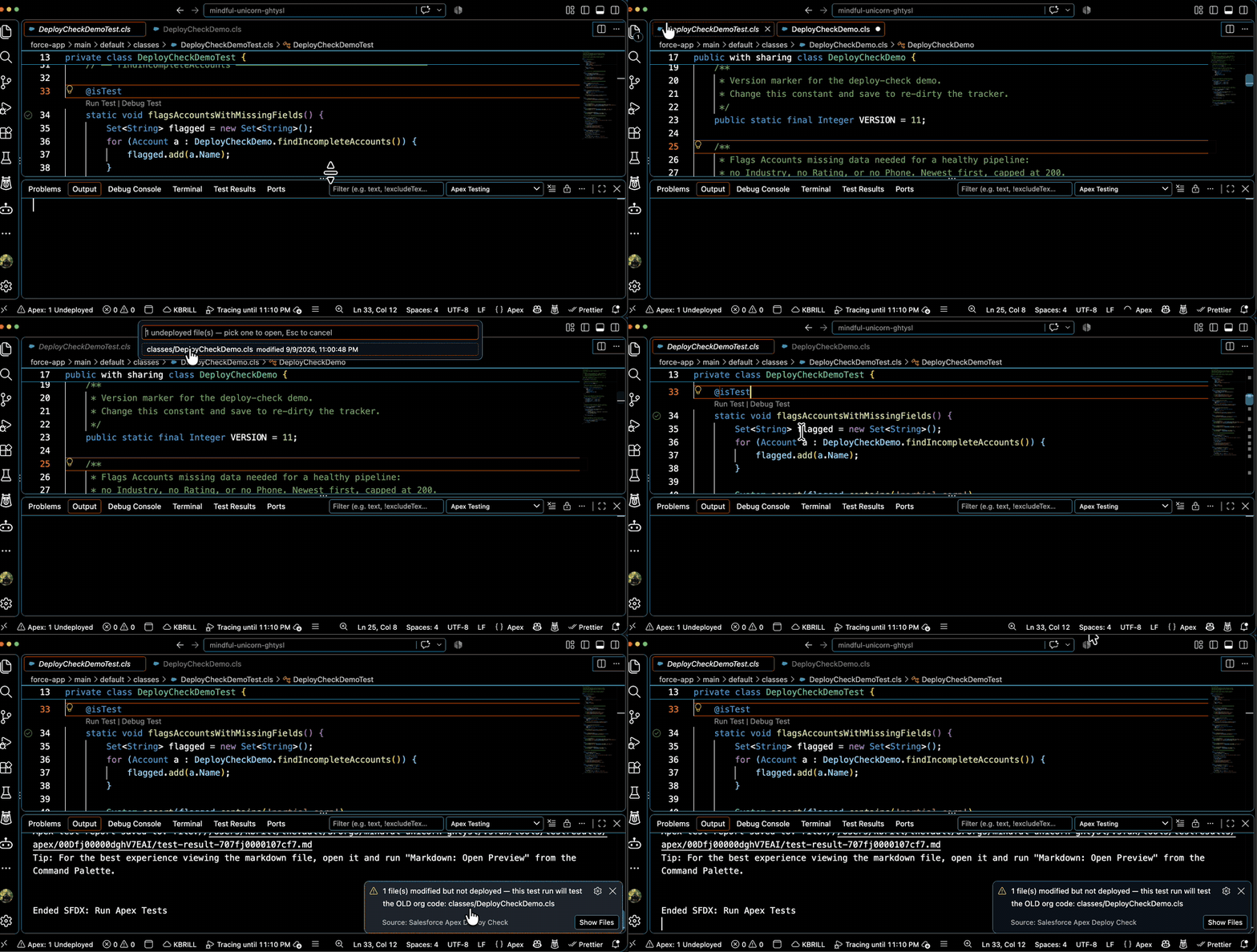
A VS Code extension that warns you when you run Apex tests against undeployed code — and nothing more. It never blocks a test run, never re-runs your tests, and adds no new way to run tests. Keep using SFDX: Run Apex Tests, right-click Run Tests, or sf apex run test exactly as you do today; if modified files haven't been pushed to the org, you'll get a heads-up before the results mislead you.
Why
If you edit a .cls locally but forget to deploy it, the Salesforce extension happily runs the old version of the class from the org — and the results lie to you. This plugin watches for that and says so.
Features
Test-Run Warning — when a native Apex test run starts (Salesforce extension task or sf apex run test in the integrated terminal) while files are undeployed, a warning lists exactly which files would run stale. One click opens any of them. Nothing is blocked or rerouted.
Status Bar Tracker — persistent ✓ Apex: All Deployed / ⚠ Apex: N Undeployed indicator, clickable to list the files.
Deploy Detection — deploys made through the Salesforce extension (tasks) or sf project deploy in the integrated terminal automatically clear the dirty state. Only success evidence clears it — a failed deploy never marks files clean.
Persistent State — tracker state survives VS Code restarts (.vscode/sf-deploy-check.json).
Requirements
An SFDX-format project (workspace contains sfdx-project.json)
No Salesforce CLI or org login required for the warning itself — it compares save times, not org state
Usage
Edit and save any tracked file (.cls, .trigger, .page, .component by default) — the status bar count updates
Run tests however you normally would — if files are undeployed, you'll see:
2 file(s) modified but not deployed — this test run will test the OLD org code: …
Deploy when you're ready (any method) — the tracker clears itself on successful deploys
Commands
SF Deploy Check: Mark Current File as Deployed — clear the dirty flag for the active file
SF Deploy Check: Mark All Files as Deployed — clear every dirty flag
SF Deploy Check: Show Undeployed Files — list undeployed files with modification times
SF Deploy Check: Reset Deployment Tracker — forget all tracked state
Salesforce: Log in to Org — shared with the other Wallencreek Salesforce plugins
Extension Settings
Setting
Default
Description
sfDeployCheck.warnOnTestRun
true
Show a warning when an Apex test run starts while files are undeployed
sfDeployCheck.showStatusBarItem
true
Show undeployed file count in status bar
sfDeployCheck.trackDeployTerminals
true
Detect successful deploys (SF extension tasks, sf CLI in terminal) and clear the dirty state
sfDeployCheck.watchedExtensions
[".cls", ".trigger", ".page", ".component"]
File extensions to track
wallencreekSf.targetOrg
""
Shared target-org setting across Wallencreek Salesforce plugins
How It Works
Every save of a tracked file records an event in .vscode/sf-deploy-check.json
A successful deploy (by the Salesforce extension or the sf CLI) records a later event, clearing the dirty flag
A file is undeployed when its last save is newer than its last deploy
When an Apex test run starts, any undeployed files are called out in a warning — the run itself is untouched
Working with Other Wallencreek Plugins
Login state and the Salesforce: Target Org setting are shared with the other Wallencreek Salesforce plugins (Record ID Lookup, Apex Picklist Autocomplete, Open Flow, Anti-Pattern Scanner).
Known Issues
Test-run detection covers Salesforce-extension tasks and sf apex run test in the integrated terminal (shell integration required for terminal detection). Runs started in an external terminal can't be seen.
The deploy detector is heuristic: a successful deploy clears all dirty state, which can over-clear if you deploy only some files manually. Use Mark Current File as Deployed for fine-grained control.