CSV Spreadsheet — GridSheet
A VS Code extension that opens and edits .csv / .tsv files in an
interactive GridSheet grid instead of raw
text — scrollable, with row/column headers, selection, formulas, and copy.
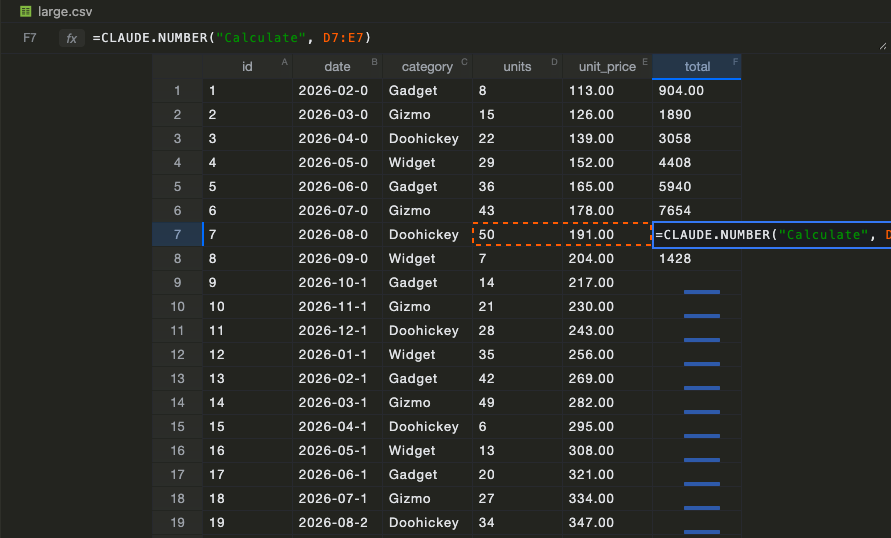
Cells take formulas (=A1+B1), and AI functions like
=CLAUDE(…) / =CODEX(…) / =CLAUDE.NUMBER(…) resolve right in the grid — see
docs/ai-functions.md.
Usage
- Right-click a
.csv / .tsv file → Open With… → CSV Spreadsheet (GridSheet), or
- run the command “Open with GridSheet CSV/TSV Viewer” from the palette while the file is focused, or
- click the table icon in the editor title bar of an open
.csv/.tsv text file.
The grid live-updates when the file changes on disk. Delimiter is chosen by
extension (.tsv/.tab → tab, otherwise comma); quoted fields and escaped
quotes ("") are handled.
Editing
- Edit cells directly. The grid keeps edits in memory and owns its own document
model, so the tab shows the native unsaved-changes dot ●, Ctrl+S saves
(serializing only then — never on every keystroke), closing an unsaved grid
prompts to save, and unsaved edits survive a window restart (hot-exit).
- First row as header — promote the first row to editable column labels
(double-click a header to rename it).
gridsheet.viewer.saveEvaluated (default on) — on save, write formula
results (=A1+B1 → 30, resolved =CLAUDE() answers included); turn off to
keep the formula source. Literal cells are unaffected.gridsheet.viewer.eager (default on) — evaluate every formula cell on
open, not just the ones scrolled into view, so off-screen =CLAUDE() /
=CODEX() cells fire without scrolling. Turn off for lazy, scroll-to-evaluate.gridsheet.viewer.autoExpand (default both) — a paste or an autofill
that runs past the last row/column adds the missing rows/columns instead of
dropping the overflow (vertical / horizontal limit it to one axis, none
turns it off). The growth undoes together with the write.- Merged cells aren't offered — CSV/TSV has no way to store a merge.
gridsheet.ai.concurrency (default 10) — cap how many AI CLI processes
run at once, so opening a file with many AI cells doesn't burst.- Add N rows at the bottom — extend the sheet with empty capacity rows
(trailing empty rows are trimmed on save, so they don't bloat the file).
- Open as text ⇄ — one click switches back to the plain text editor; the
editor-title table icon switches back to the grid.
Unsaved-state highlights
The footer shows a single ● followed by what's pending, and cells are tinted
to match — so you can see what would change on save:
- Changed (amber) — cells you edited by hand that aren't saved yet.
- Evaluated (purple) — formula cells whose computed result isn't in the file
yet (only when
saveEvaluated is on, since off saves the source verbatim). A
formula also lights when a cell it references changes, or when its =CLAUDE()
/=CODEX() result lands. Everything clears on save.
It follows the active VS Code theme: the webview detects light/dark from the
vscode-* body class and uses GridSheet's inherit-light / inherit-dark
modes, so the grid is transparent and blends into the editor background
(--vscode-editor-background), updating live when you switch themes.
Develop
pnpm install
pnpm build          # bundles dist/extension.js + dist/webview.js via esbuild
Then press F5 in VS Code (with this folder open) to launch an Extension
Development Host, and open a .csv/.tsv file with the viewer.
The webview bundles Preact + @gridsheet/preact-core (much smaller than a
React bundle, and self-contained since the webview is an isolated host); the
extension host code keeps vscode external. pnpm watch rebuilds on change.
How it works
src/CsvEditorProvider.ts — a CustomEditorProvider that owns the document
model: it reads the file (src/parse.ts), posts the rows to the webview, and
handles save / save-as / revert / hot-exit backup by asking the webview to
serialize the current grid. Dirty state (tab ●, close prompt) is driven by the
webview's edit/evaluation reports. A file watcher re-posts on external changes.webview/main.tsx — a Preact app that renders the rows with <GridSheet>, keeps
edits in memory, and serializes back only on save/backup.
License
Apache-2.0

