🌙 Crimson Dusk — VS Code Theme
A carefully crafted maroon-based dark theme designed for comfort, focus, and elegance during long coding sessions.
✨ Why Crimson Dusk?
- 🎯 Eye-friendly colors — reduces strain during long hours
- 🌸 Soft maroon aesthetic — calm, minimal, and modern
- ⚡ Balanced contrast — clear readability without harsh brightness
- 🎨 Consistent UI design — editor, sidebar, terminal all aligned
🎨 Preview
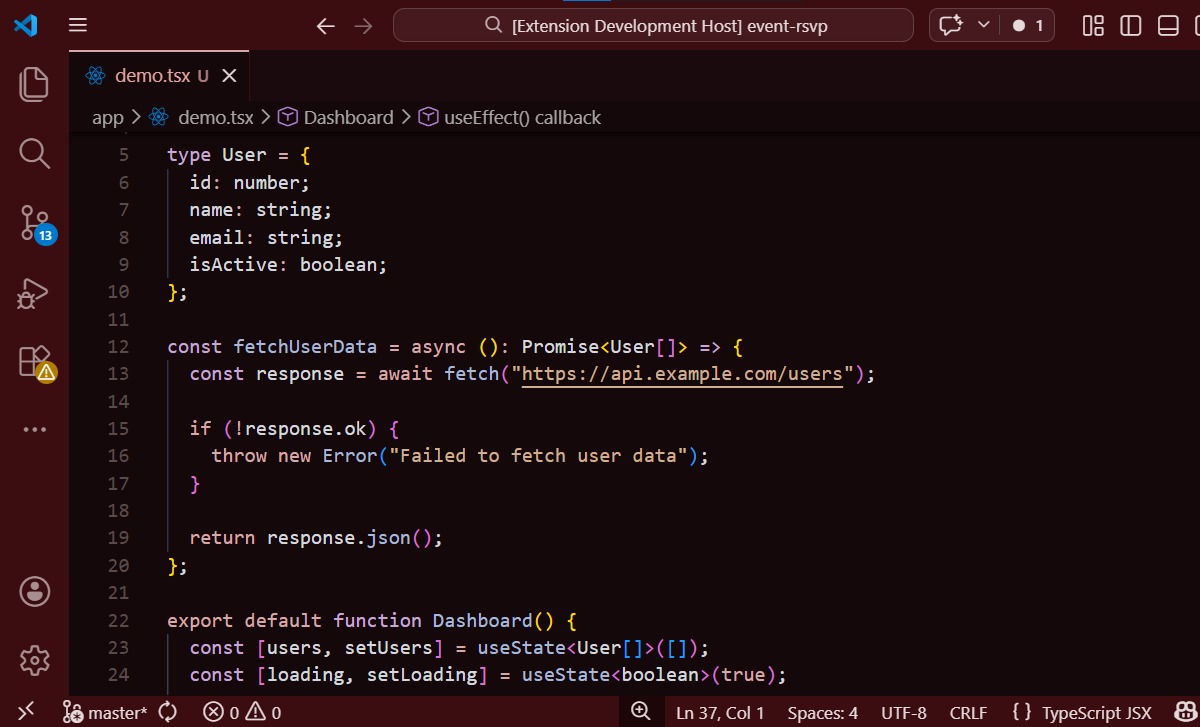
🧠 Designed For
- Developers who code at night 🌙
- UI/UX lovers who want aesthetic editors
- Anyone tired of harsh blue/green themes
🚀 Installation
Open VS Code
Go to Extensions
Search for Crimson Dusk
Click Install
Select theme:
Preferences → Color Theme → Crimson Dusk
💡 Features
- Custom Git colors (no harsh green ❌)
- Soft terminal palette
- Smooth selection visibility
- Elegant sidebar & UI
🛠️ Future Updates
- More color variants (Crimson Night, Soft Rose 🌸)
- Better syntax tuning
- Icon theme (maybe 👀)
🤍 Support
If you like this theme:
⭐ Star it
📢 Share it
💬 Give feedback
📜 License
MIT License
| |

