Version: 1.0.49
Unity Utilities for VS Code
A lightweight, VS Code extension that adds helpful tools for Unity and C# workflows.
Created by: Landon Snellgrove
✨ Script Creation
Simply right click to open the menu to create these scripts.
Right-click menu screenshot:
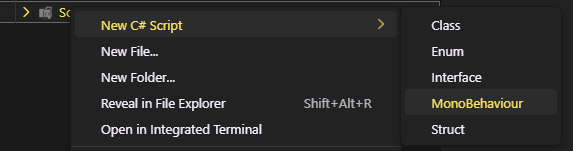
- MonoBehaviour Script — Class with
Start() and Update() plus UnityEngine imports
- Class — Standard C# class
- Enum — Enumeration template
- Interface — Interface template
- Struct — Struct with UnityEngine reference
🚀 Features
This extension automatically:
- Creates scripts inside the folder you clicked
- Generates namespaces based on directory structure
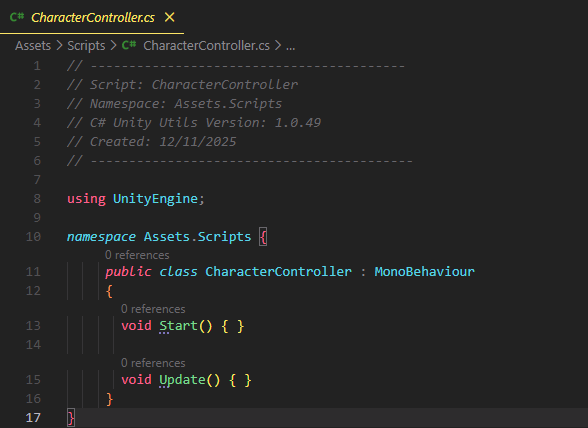
- Adds a small header (script name, namespace, extension version, date)
- Opens the newly created file immediately
- Remains simple, clean, and easy to expand
📸 Example Workflow
1. You choose a script type
2. You’re prompted to name the script

3. The generated script opens automatically
📦 Future Additions
The extension is designed to be expandable. Additional utilities may include:
- ScriptableObject templates
- EditorWindow / Custom Inspector templates
- Unity event script generators
- Common patterns (Singleton, Manager, Service Locator, etc.)
- Other Unity or project-specific file tools
📝 Why This Exists
Unity developers often repeat the same script creation tasks.
This extension streamlines that workflow with:
- A simple right-click menu
- Clean script templates
- No unnecessary clutter
- Easy customization for your project or team
| |


