CodeExplorer
A visual knowledge graph and codebase intelligence tool for developers and AI agents.
CodeExplorer maps complex polyglot repositories, microservices, and monorepos into an interactive visual knowledge graph directly inside Visual Studio Code. It is powered by an embedded SQLite graph database with native Cypher query compilation and requires no external dependencies, Docker containers, or complex configuration.
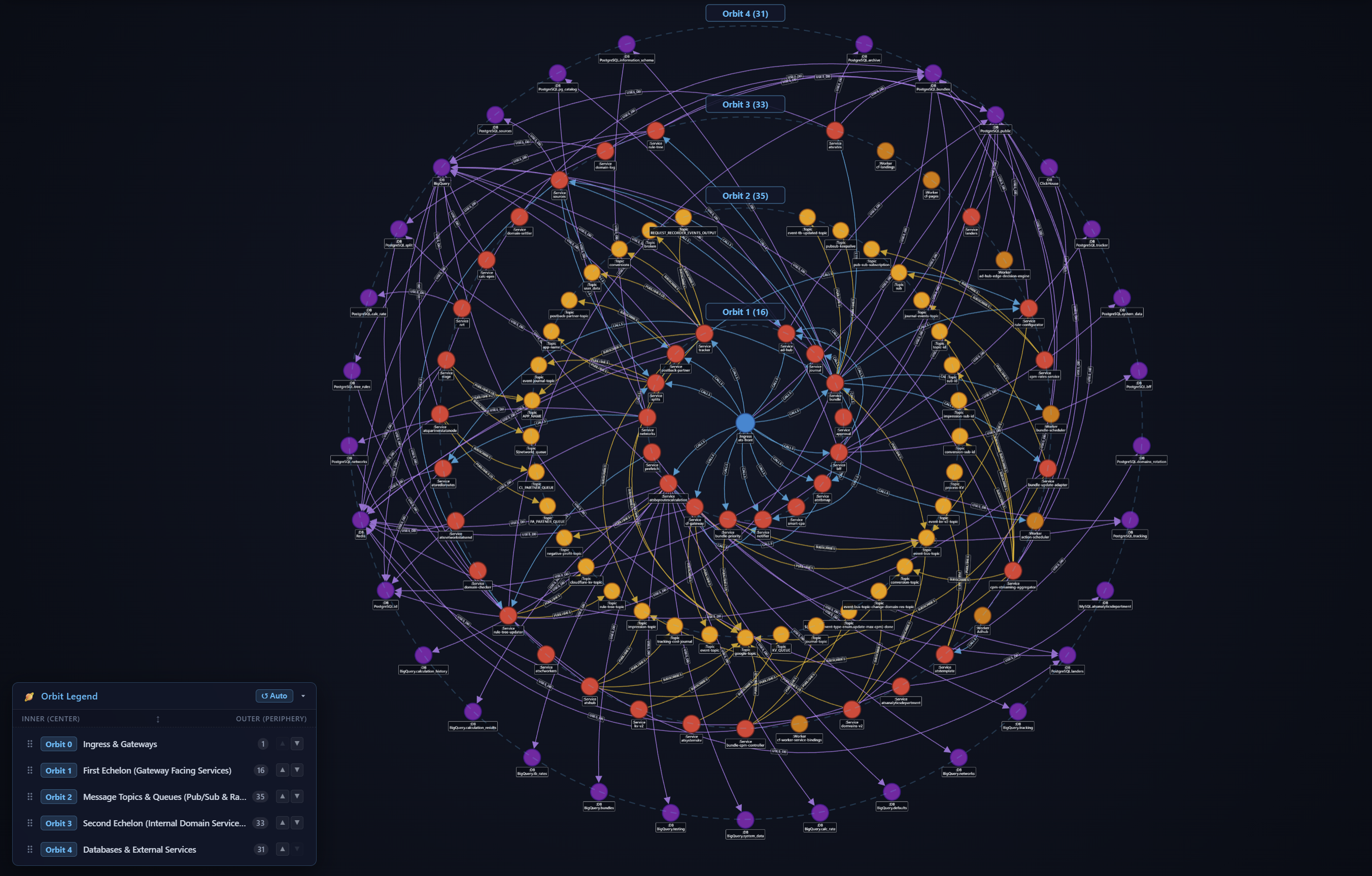
Full-system microservice topology projected across 5 Concentric Architectural Orbits with live transitive dependency routing.
⚡ Extension Features
CodeExplorer provides an interactive visual architecture view inside VS Code (Code Graph). Designed for high-density architectures, it clarifies distributed systems and monoliths:
- Interactive Visual Architecture: Explore microservice topologies across concentric architectural orbits, swimlanes, bounded context islands, hive plots, and C1/C2 project flow diagrams.
- Smart Transitive Contraction: Automatically synthesizes clean, dashed transitive links when intermediate brokers (Kafka, RabbitMQ, SQS) are hidden or filtered, preserving architectural fidelity without visual noise.
- Click-to-Code Navigation: Double-click any node or click "Jump to Code" in the details drawer to immediately open the source file at the exact declaration line in your editor.
- Batteries-Included & Zero Setup: Pre-compiled, self-contained
ce native binaries are bundled for each platform (Windows x64/ARM64, macOS Apple Silicon/Intel, Linux x64/ARM64). No manual .NET installation or global CLI setup required!
- Ad-Hoc Cypher Querying: Run custom openCypher queries directly from the top search bar (e.g.
MATCH (n:Project)-[r]->(m) RETURN n,r,m) to explore arbitrary subgraphs and blast radius.
- Real-Time WebSocket Engine: Communicates over low-latency WebSockets with the local
ce engine, supporting live graph patching and scan progress reporting.
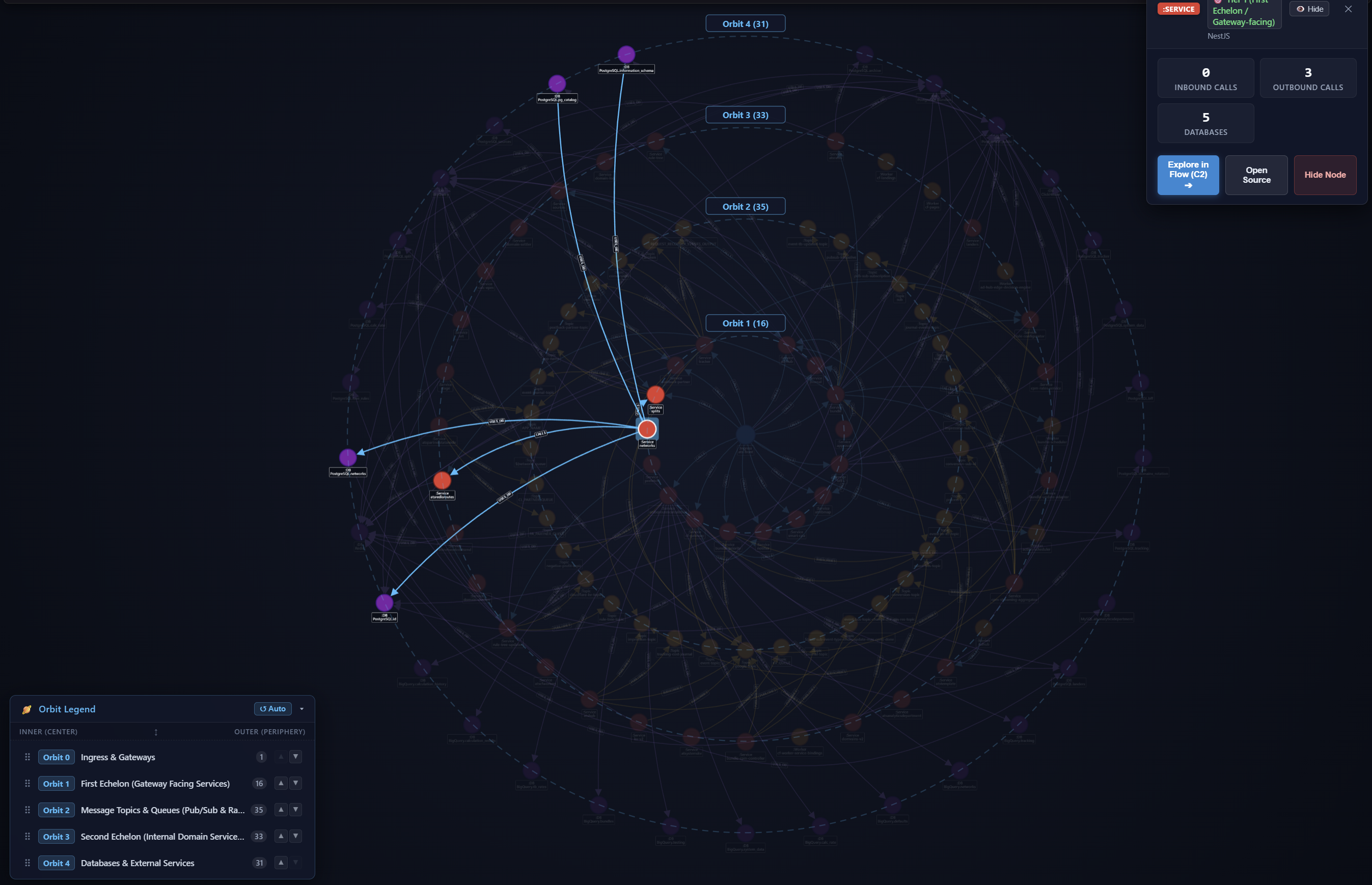
Focused sub-graph inspection with live HUD metrics, orbit reordering, and edge curvature sliders.
🚀 Quick Start
- Open any project workspace in VS Code.
- Click the
Code Graph button in the status bar or run CodeExplorer: Show Architecture Graph from the Command Palette (Ctrl+Shift+P).
- Click the
Initialize & Scan button in the UI (or run ce scan via CLI) to parse your repository and build the local SQLite knowledge graph.
- Explore the graph, use the top search bar to filter nodes, or double-click nodes to jump straight to their source code.
🧠 Local Architectural Inference & MCP
CodeExplorer goes beyond just visualization:
- Model Context Protocol (MCP): The extension bundles a standard MCP server, giving AI agents (Cursor, Claude, Copilot, Antigravity) access to architectural maps, call chains, downstream blast-radius analysis, and arbitrary Cypher queries.
- Local Intent Distillation: Automatically enriches graph nodes with business domains, architectural patterns, and capability tags using an embedded GGUF model via native
llama.cpp.
- Polyglot Support: Bridges C#, Java, TypeScript, JavaScript, Go, Python, ColdFusion, and SQL into a single unified semantic graph.
The extension bundles native ce binaries for:
- Windows:
x64, ARM64
- macOS:
Apple Silicon (M1/M2/M3/M4), Intel x64
- Linux:
x64, ARM64
Note: Zero orphaned processes — automatically allocates ephemeral ports and auto-shuts down background server instances when all windows are closed.
⚙️ Configuration Settings
| Setting |
Default |
Description |
codeExplorer.executablePath |
"" |
Custom path to the ce or ce.exe binary. If empty, automatically discovers bundled binaries or searches system PATH. |
codeExplorer.serverPort |
0 |
Port for the CodeExplorer WebSocket server (0 for automatically assigned ephemeral port). |
codeExplorer.idleTimeout |
60 |
Inactivity timeout in seconds before background server process terminates when no clients are connected. |
| |

