Encore for VS Code
Encore for VS Code adds source navigation, workspace discovery, local run and debug actions, and Encore Cloud-aware tooling to Encore Go projects.
Features
- Runs, debugs, stops, and restarts Encore applications from the explorer.
- Runs and debugs Encore tests from VS Code.
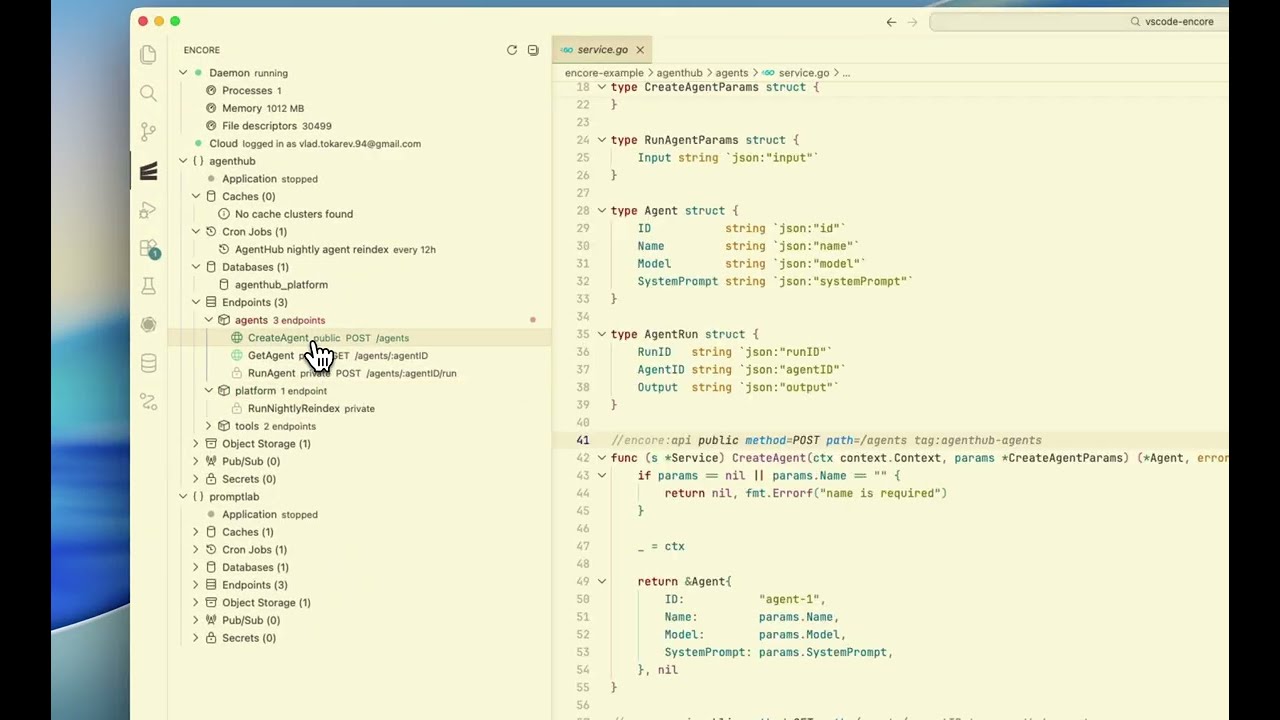
- Shows Encore applications, endpoints, databases, caches, Pub/Sub topics, buckets, cron jobs, and secrets in the Encore explorer.
- Highlights, validates, and autocompletes
//encore: directives with hover documentation.
- Redirects Go to Definition away from
encore.gen.go wrappers and into the real service implementation.
- Adds quick navigation actions such as Go to Source, Copy Connection URI, Show Migrations, and Open Endpoint in Console.
- Suggests secret fields inside
var secrets struct { ... } blocks when an Encore Cloud session is available.
- Adds secret environment decorations inside Go files.
- Shows Encore Cloud login state directly in the explorer.
- Validates
encore.app files with the bundled JSON schema.
Requirements
Encore for VS Code is designed for projects that contain an encore.app file and use the Encore CLI locally.
Note: Encore for VS Code currently supports Encore Go only. Encore TypeScript support is planned for a future release.
Why Encore for VS Code
Encore Go projects generate helper wrappers in encore.gen.go. Default Go navigation often lands in generated files instead of the source implementation. Encore for VS Code fixes that navigation path and adds Encore-specific project context on top of normal Go tooling.
Explorer
The Encore explorer adds a dedicated view for Encore application structure.
The Encore explorer currently includes:
Daemon statusCloud login status- Application-level groups for
Application, Caches, Cron Jobs, Databases, Endpoints, Pub/Sub, Buckets, and Secrets
The Encore explorer only loads secrets for an authenticated Encore Cloud session. The Encore explorer runs encore secret list from the matching application directory, so monorepos and multi-app workspaces behave correctly.
Commands
Encore for VS Code contributes the following commands:
| Command |
Purpose |
Encore: Refresh |
Refresh the Encore explorer and re-scan the workspace. |
Encore: Go to Source |
Open the source definition for a selected Encore item. |
Encore: Copy Connection URI |
Copy an Encore database connection URI. |
Encore: Start Daemon |
Start the Encore daemon. |
Encore: Kill Daemon |
Stop the Encore daemon. |
Encore: Run Application |
Run the current Encore application. |
Encore: Debug Application |
Debug the current Encore application. |
Encore: Stop Application |
Stop the current Encore application. |
Encore: Restart Application |
Restart the current Encore application. |
Encore: Show Application Output |
Show the application output channel. |
Encore: Open URL |
Open an Encore application URL. |
Encore: Show Migrations |
Open the migrations directory for a database. |
Encore: Run Test |
Run an Encore test from VS Code. |
Encore: Debug Test |
Debug an Encore test from VS Code. |
Encore: Open Endpoint in Console |
Open an endpoint in the Encore local console. |
Configuration
Encore for VS Code contributes the following settings:
| Setting |
Default |
Description |
encore.enabled |
true |
Enable Encore for VS Code. |
encore.run.port |
4000 |
Port for the Encore development server. |
encore.run.watch |
true |
Enable file watching for automatic reloads during local runs. |
encore.run.logLevel |
"" |
Minimum log level for Encore application output. |
encore.debug.stopOnEntry |
false |
Pause the Encore application on start during debugging. |
Requirements
Encore for VS Code expects the following tools:
- VS Code 1.80 or newer
- Go tooling configured for the workspace
- Encore CLI available on
PATH
- An Encore Go project with at least one
encore.app file
Encore Cloud-backed features also expect a valid Encore Cloud session. The explorer checks the current session with encore auth whoami.
Installation
VS Code Marketplace
Install Encore for VS Code from the VS Code Marketplace.
Open VSX
Install Encore for VS Code from Open VSX.
Local .vsix
Package and install a local build:
npm install
npm run compile
npx @vscode/vsce package
code --install-extension encore-0.1.0.vsix
Development
Local development uses the standard VS Code extension workflow:
npm install
npm run compile
Press F5 in VS Code to open an Extension Development Host.
See CONTRIBUTING.md for contributor guidance and RELEASING.md for publication steps.
Limitations
- Encore Cloud features depend on local Encore CLI output formats.
- Encore Cloud features require a signed-in Encore Cloud session.
- Database connection URI fetching still assumes a workspace root execution context at the time of writing.
Licence
Encore for VS Code is released under the Unlicense. See LICENSE.

