
HydraGit
An IntelliJ-style git panel for VS Code — branches, history, and diff in one place. No paywall.
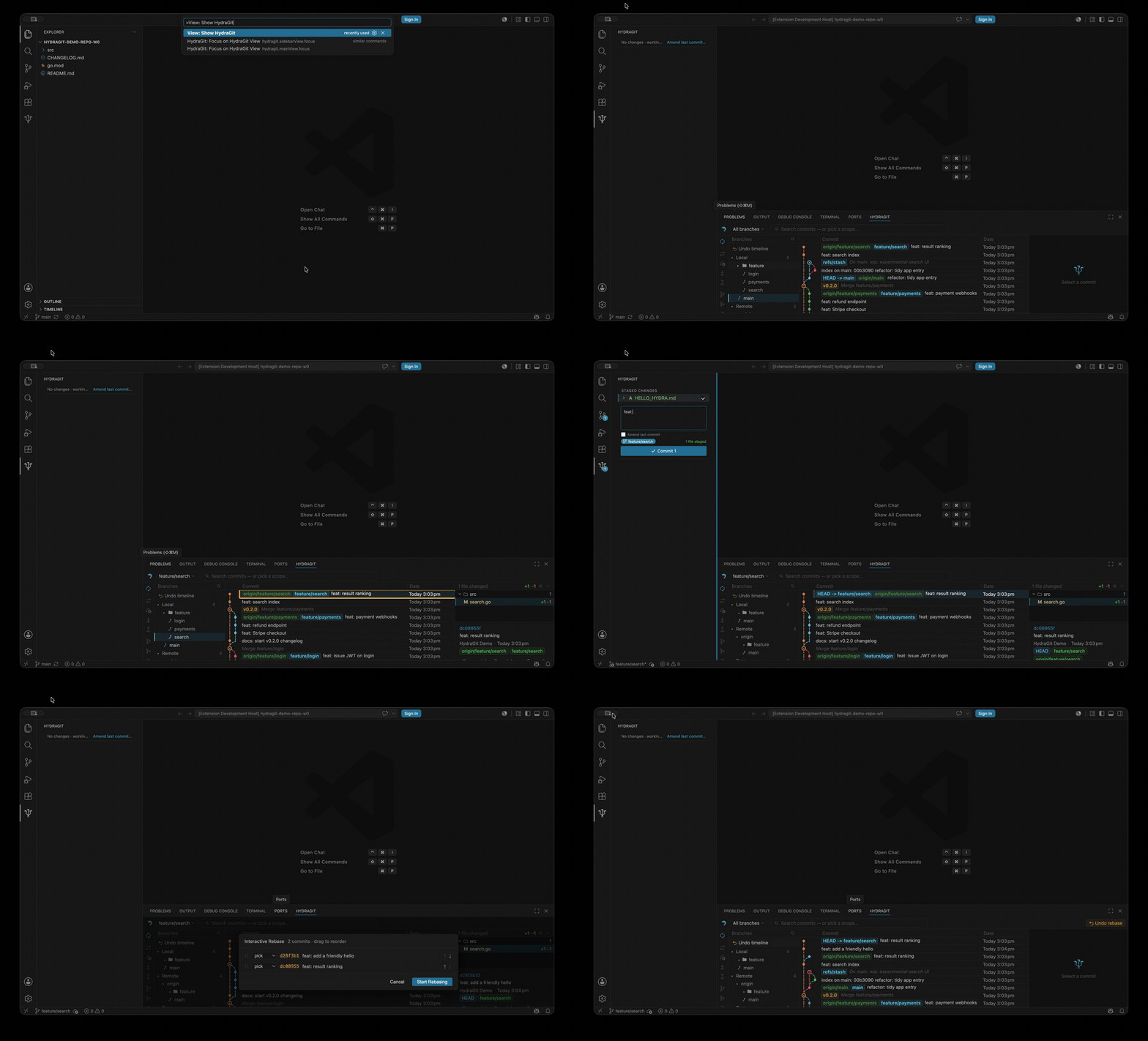
Everything git, in one panel: your branch tree, the full commit graph, and the
diff — right where you'd expect them. Click a branch to switch. Click a commit to
see what changed. Right-click for the action you want. That's the whole learning
curve.
No sign-in, no cloud, no "upgrade to Pro." HydraGit drives plain git through a
tiny local binary — your code never leaves your machine — so it's instant on the
first open and works fully offline.
Why
I love how the JetBrains-style IDEs put branches, history, and diff in one place —
and I missed that in VS Code, where the built-in git view has no history graph. So
I built the panel I wanted: that one-panel workflow, native to VS Code, and free
for good.
What you get
Three things, immediately, with zero config:
- 🌳 See your history — a real lane graph of every branch and commit, virtualized so it stays smooth on huge repos.
- 🖱️ Move around it — one click to switch branches, stage, commit, push, stash, or diff. No command palette spelunking.
- 🛟 Fix mistakes safely — visual interactive rebase, guided conflict resolution, and an undo timeline that auto-snapshots before anything risky.
It won't let you lose work
The thing that makes HydraGit different: it's built so a wrong click can't cost
you your changes.
- 🛟 Auto-snapshot safety net — before any destructive op (merge, rebase, reset, checkout, discard, stash pop, cherry-pick, revert…) HydraGit silently snapshots your working tree to
refs/hydragit/snapshots. Discarded the wrong file? Reset too far? Restore it in one click — even things plain git can't undo.
- 🔍 Merge conflict preview — see exactly which files will conflict before you merge. A true dry-run (
merge-tree) that never touches your index or working tree.
- 🚧 Pre-commit safety checks — warns before you commit a secret (
.env, keys, tokens), a leftover <<<<<<< conflict marker, a huge file, or straight onto a protected branch.
- ⏮️ Undo timeline — a reflog-based history of where HEAD has been; soft/mixed/hard reset back to any point, or undo the last operation outright.
Also included
- Commit log + lane graph — HydraGit's own lane engine, virtualized full history, hover-highlight, search (message / hash / file / author)
- Branch tree — local + remote, folder grouping, right-click actions, ahead/behind
- Inline diff & compare — per-file hunks; branch/ref ↔ ref, ref ↔ working tree, file ↔ local
- Stage & commit — file tree, hunk staging, commit / commit & push / amend, right from the sidebar
- Visual interactive rebase — squash, drop, reword, fixup + autosquash, create patch, push-up-to — all pause-on-conflict
- Guided conflict resolution — keep current/incoming, open merge editor, continue/abort; optional
rerere auto-reuse
- Branch actions — checkout, create, merge, rebase, reset, rename (local + remote + folder), delete (local + remote)
- Remotes — one-click Sync, fetch/pull (+ mode)/push, safe force-push (
--force-with-lease), auto-set upstream
- Worktrees — full GUI: add/remove/lock/unlock/move/prune/open
- History & blame — file history, line/selection history, buffer-aware inline blame (correct even with unsaved edits)
- Stash manager & tags — stash list/save/pop/apply/drop/clear/show; tags list/create/delete
📖 Full feature documentation (every entry point → what happens next):
hydragit docs site ·
feature index + per-version history: CHANGELOG.md
Install
Search HydraGit in Extensions, or: ext install vkushnarenko.hydragit
Usage
Open it from either surface:
- Click the HydraGit hexagon in the activity bar (sidebar staging view).
- Open the HydraGit tab in VS Code's bottom panel (branch tree + log + diff).
Editor extras: right-click a file → HydraGit: File History; select lines →
History for Selection; Toggle Line Blame for inline blame.
License
GPL-3.0 — free forever. Forks must stay open source under the same
license, so nobody can take HydraGit, tweak it, and put it behind a paywall.
The HydraGit name and logo are not covered by this license — forks must use
their own name and branding.
Marketplace: vkushnarenko.hydragit
Started: March 2026
| |

