VixTab — parallel Claude Code tabs
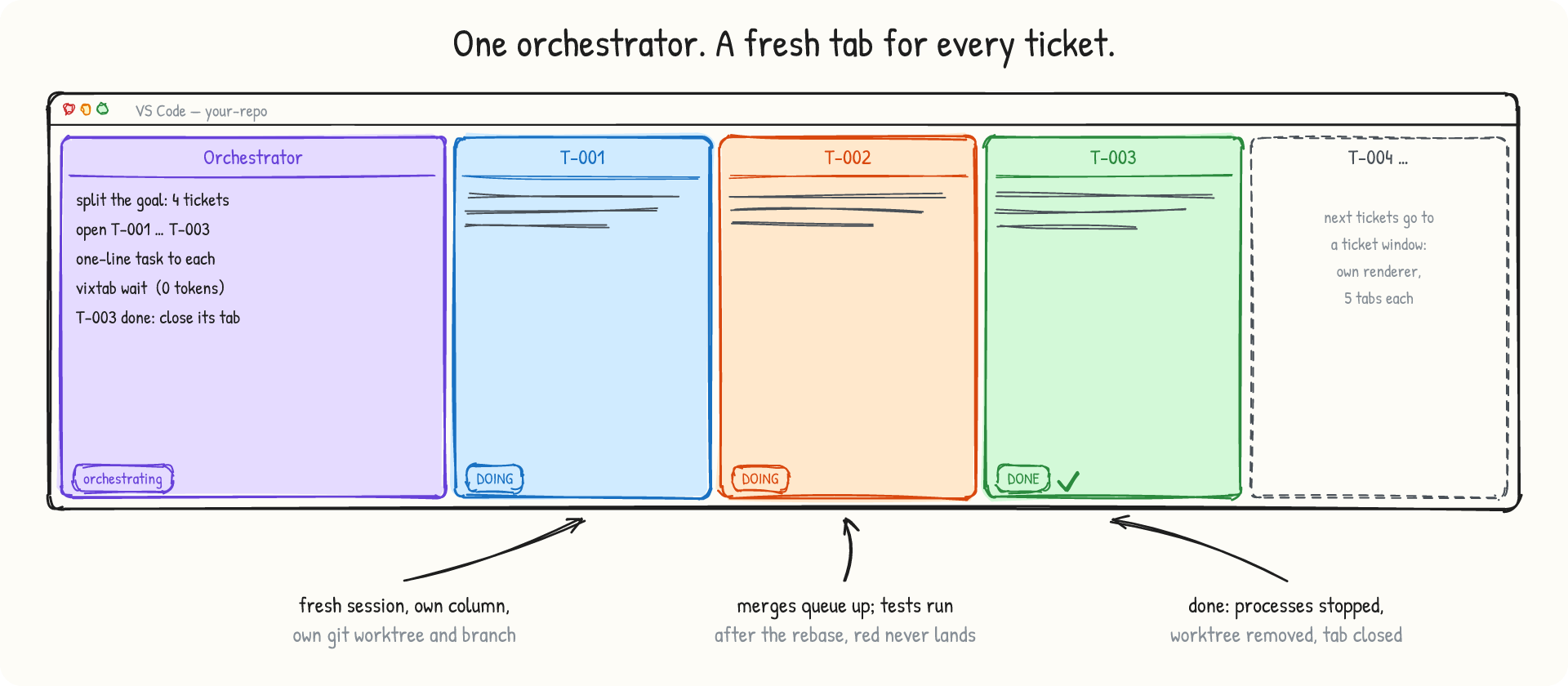
Run many Claude Code sessions in parallel on one repository. One Orchestrator tab splits your goal into tickets, opens a
fresh, labeled tab for every ticket, gives it a one-line assignment, sleeps until something happens, and closes the tab
when the ticket is done. Every ticket works in its own git worktree and lands on main through a test-gated merge queue.
Get started in three clicks
- Install this extension (the Claude Code extension comes along if you do not have it).
- In the setup notification, choose Set up for every project (any Claude Code session on this machine can then use
VixTab) or Only projects I choose (only the repositories where you click VixTab get it). It installs the
vixtab
command (~/.vixtab/bin) and the two Claude Code skills.
- Open a git repository and click VixTab in the status bar. An Orchestrator tab opens with
/vixtab-orchestrate typed
in. Add your goal, for example "fix issues #12, #15 and #18 in parallel", and press Enter.
Change the choice any time in Settings ▸ VixTab: Skills Scope; it is kept across upgrades.
The VixTab panel. Click the VixTab icon in the Activity Bar (the left bar, next to Claude Code's): start an orchestrator,
see whether this project can use VixTab and which version, set it up in one click, browse the board's tickets with their
status (click one to read it), open the playground, the doctor and the settings. VixTab: Show status (or vixtab status)
lists every version: the CLI, the extension in each open window, the skills.
The panel's Tabs section shows every Claude tab running on this machine, in every project, by VS Code window: a summary
(tabs, busy, idle, asking, windows, free RAM and CPU, whether a new tab can open), each window with its renderer load (⚠ from
90 %: its tabs lag), each tab with its state and for how long, its ticket's status and its model (click to read the ticket),
and Finished and closed: the tabs VixTab opened that have closed (last 50, with Clear). It refreshes every 5 s while the
panel is visible. Windows without the VixTab extension are not listed.
Want to see it first? Run VixTab: Create playground: a sandbox with five sample tickets that cannot reach GitHub or your
real projects.
Sessions wait for each other, only when they must
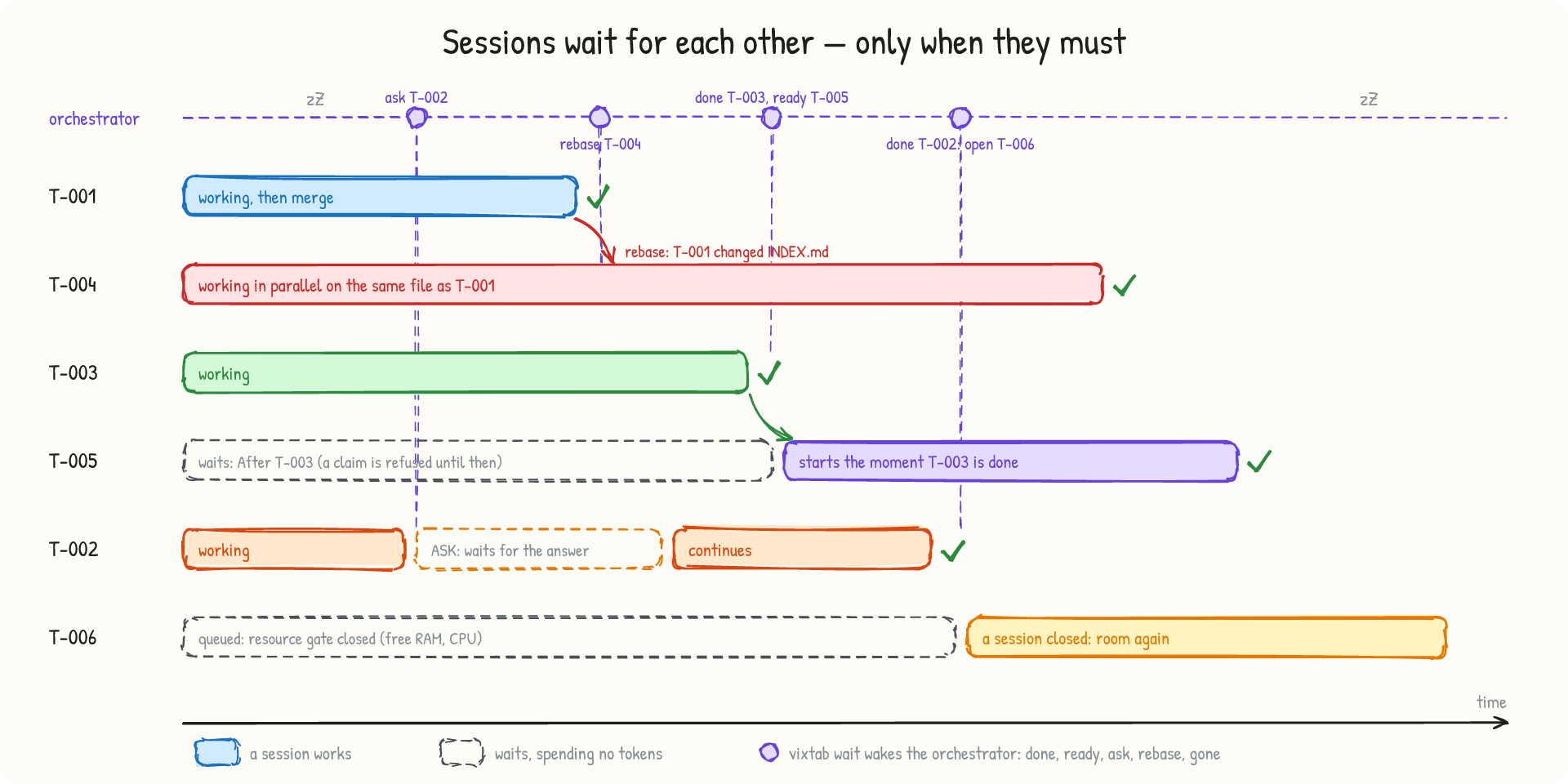
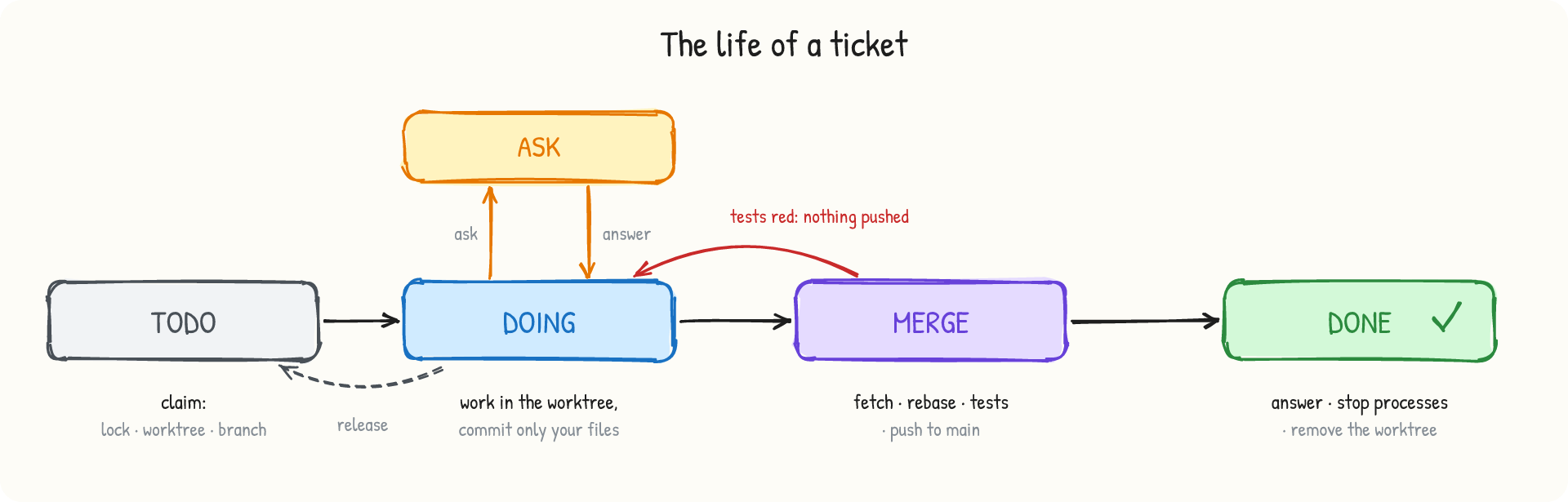
Tickets run in parallel by default. A session waits only for a real reason, and while it waits it spends no tokens:
- Dependencies. A ticket created with
--after T-003 cannot be claimed before T-003 is ✅ DONE: the claim is refused and
says what it waits for. vixtab ticket ready lists what can start now. The moment T-003 is done, the orchestrator is woken
with ready T-005 and opens it.
- Questions. A blocked session asks (
vixtab ticket ask) and stops. The question is written into the ticket on the board,
the orchestrator wakes up, answers, or asks you when only you can, and the session continues.
- Shared files. Two tickets that change the same file still run side by side. When the first one lands, the second is told
to rebase and re-run its tests.
vixtab ticket overlap shows every file shared by active tickets.
- Machine room. No fixed session cap: a new tab opens only when free RAM, swap, commit charge and CPU have room. Otherwise
the ticket waits in the queue and starts as soon as a session closes.
- A ticket that needs another ticket's result can wait for it by itself (
vixtab wait --as T-005 T-003) and continue when
it lands.
- A session that dies is reported (
gone), and a fresh session picks the ticket up where it was left (--takeover).
Context-saving orchestration
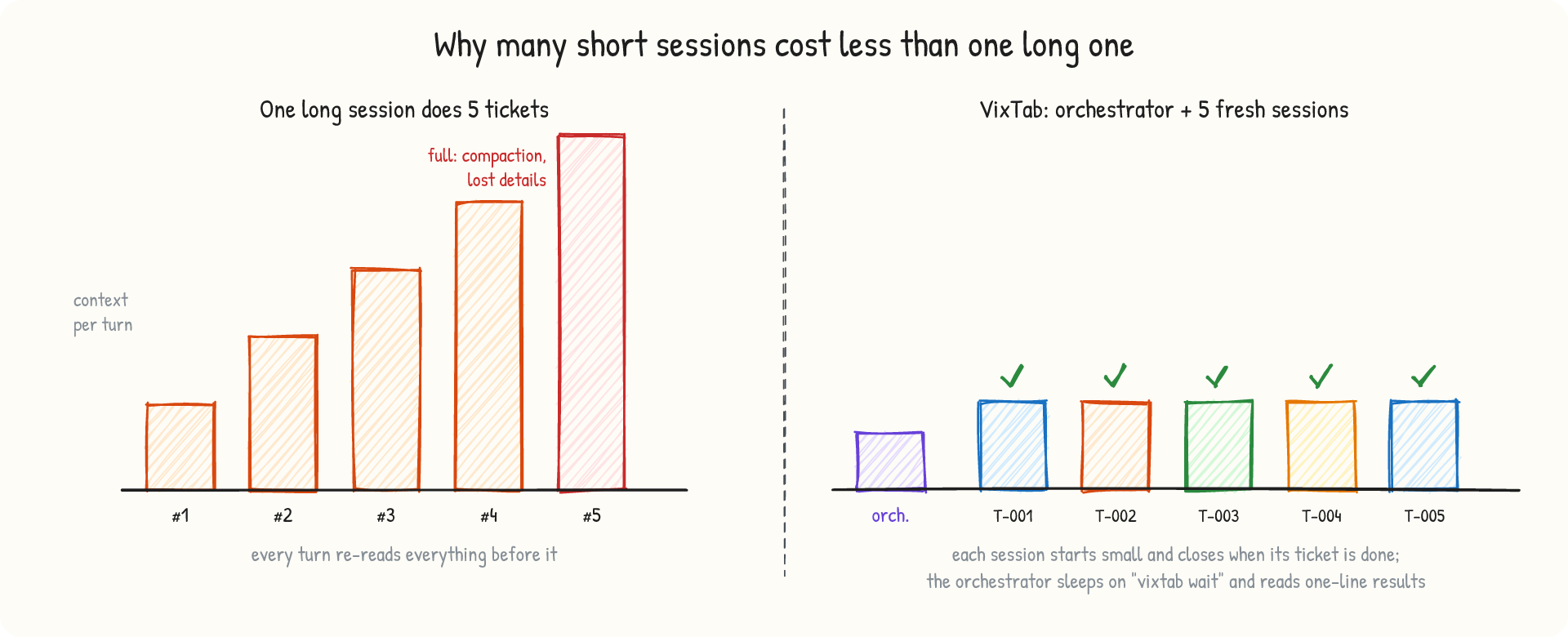
- The orchestrator plans, dispatches and verifies. It never implements a ticket, so its own context stays small.
- Every ticket gets a new session that starts small and closes when the ticket is done.
- One-line assignments. The protocol lives in a Claude Code skill, read once; tickets carry the files, the expected result
and the exact test command, so a session does not have to explore the repository.
- Waiting costs nothing. A background
vixtab wait wakes the orchestrator only on events: done, ready, ask,
rebase, gone. There is no polling loop in the conversation.
- Opening a tab costs nothing. No model turn runs to create the session, and the tab uses your default model.
- Cheaper models for simple tickets.
vixtab ticket new … --model sonnet runs that ticket's tab on Sonnet; your default stays.
- Handover. When the orchestrator's own context grows, it writes a short note, opens Orchestrator-2 and steps aside.
A tab per ticket, a renderer per window
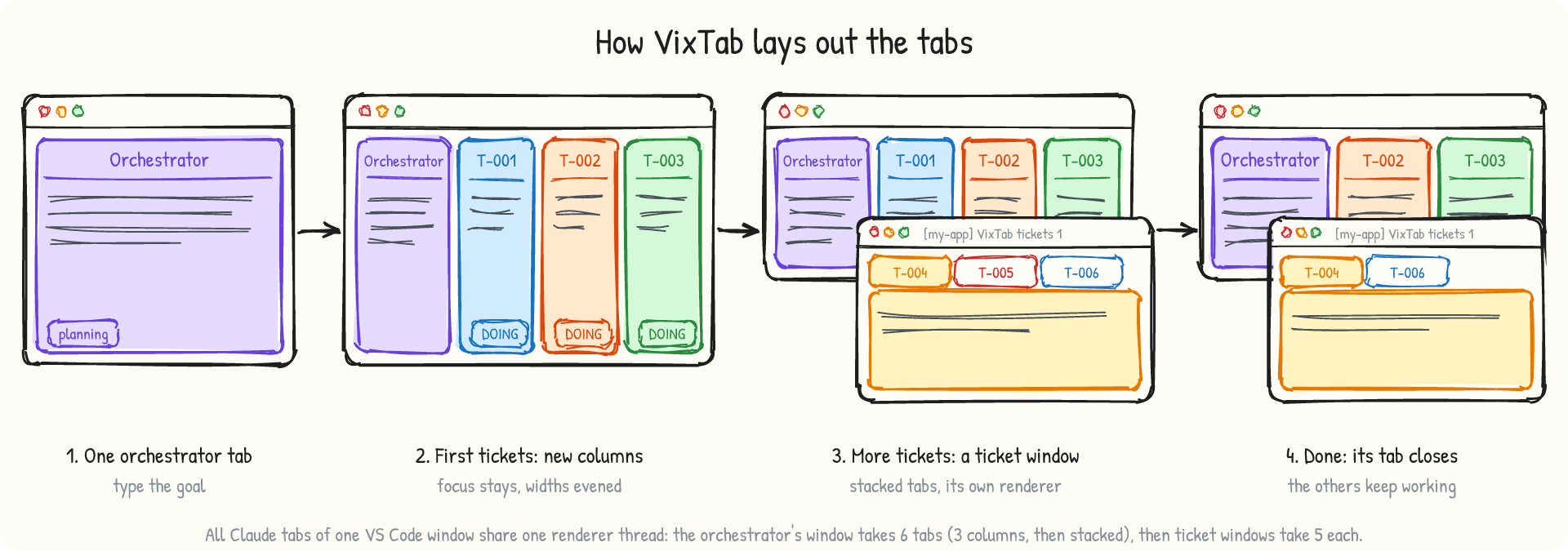
Each tab is labeled with its ticket id and opens without stealing your focus. All Claude tabs of one VS Code window share one
renderer thread: on a 44-thread workstation, 14 visible columns pushed it to 102 % of a core and every session froze. So the
orchestrator's own window is used first — up to 6 Claude tabs (3 columns, then stacked) — and only then do tabs stack in ticket windows, separate VS Code
windows with five Claude tabs each. A ticket window closes itself after its last tab. vixtab session count shows each window,
its tabs and its busiest renderer thread.
Parallel without conflicts
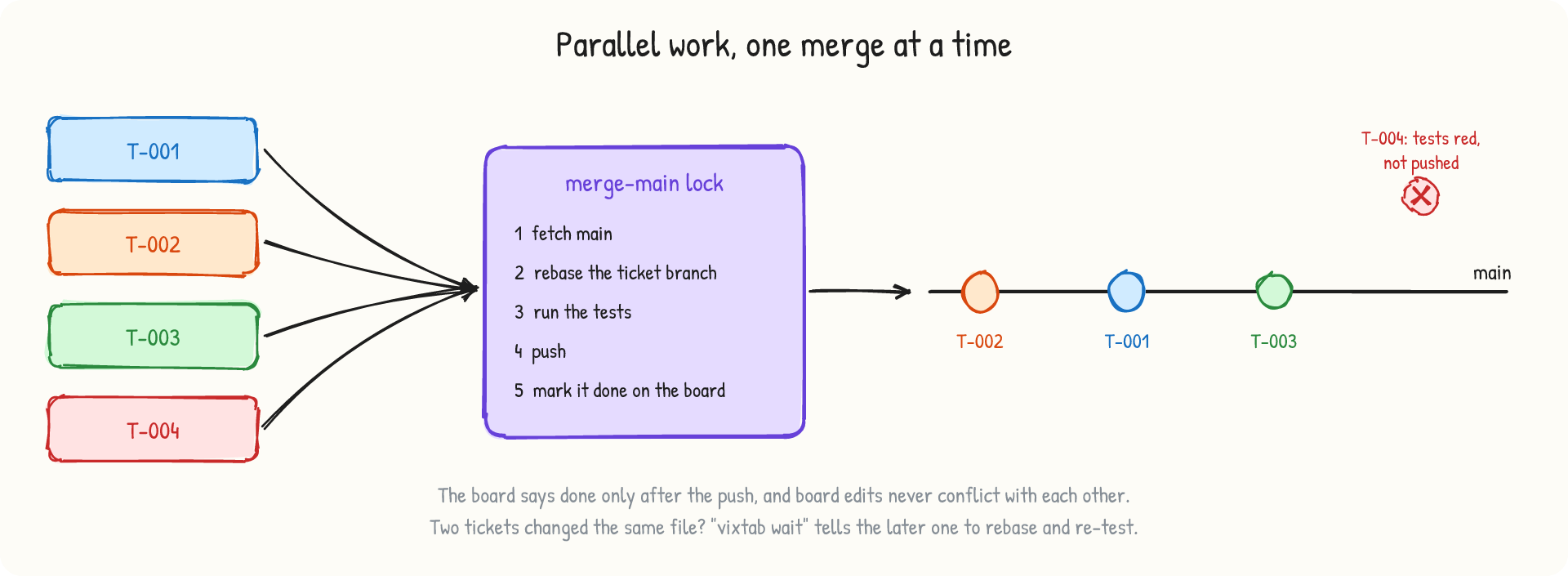
- Atomic claims: two sessions can never take the same ticket.
- One worktree and branch per ticket, and a private port in
.vixtab.env that moves out of the way when the port is busy.
- One merge at a time: fetch, rebase, run the tests on exactly what will be pushed, push, and only then mark the ticket
done on the board. Tickets claimed or finished at the same moment never conflict on the board.
- Red tests never land. Tests always run with
pipefail, so … | tail cannot hide a failure, and done refuses to
finish a ticket whose code is not merged.
A private board
The tickets, their questions and answers, and who worked on what live in a git repository on your machine, next to the
project (<repo>.vixtab/board, printed by vixtab board path). It is never pushed: your remote receives only code. To back
it up, copy the folder. A board made by VixTab 0.7.0 or older sits in tickets/ on your main branch and keeps working with a
warning; vixtab board migrate moves it into the private board and removes it from main in one commit (--dry-run first
shows what would move). The old files stay in your remote's git history; rewriting it is your decision.
The machine stays responsive
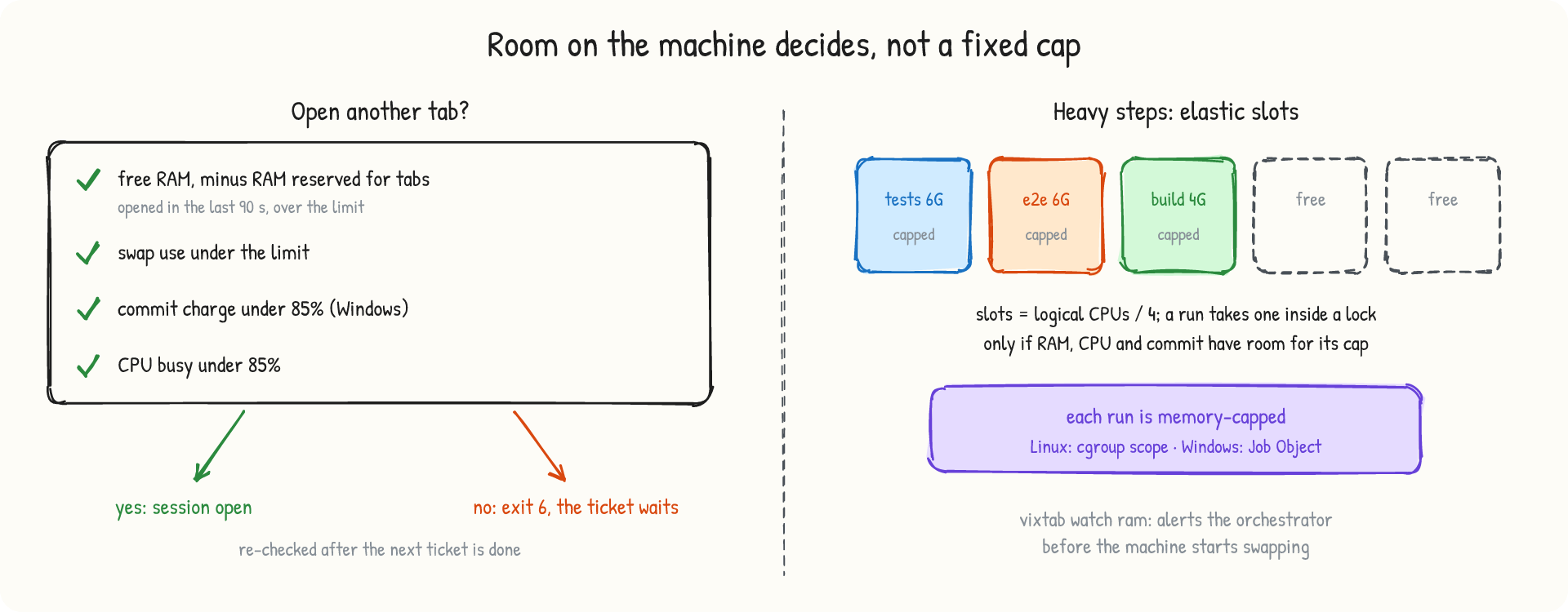
- Resource gate for new tabs, including RAM reserved for tabs opened a moment ago that have not grown yet.
- Heavy steps (full test suites, E2E, builds, browsers) run through elastic slots, max(2, CPUs / 4), each with a memory
cap: a cgroup scope on Linux, a Job Object on Windows.
vixtab watch ram alerts the orchestrator before the machine starts swapping.
Clean-up you can trust
done stops what still runs in the worktree (dev servers, browsers, test runners), then removes the worktree and branch.vixtab procs orphans finds processes left in finished tickets' folders.- VS Code, Claude Code, sshd and the desktop shell are never stopped.
- A lock whose owner died is taken over automatically. On Windows, leftover
node_modules junctions are unlinked without
following them.
Try it without spending tokens
|
What you see |
vixtab playground demo board |
4 parallel claims, an early claim refused, a duplicate claim refused, the overlap report, the merge queue, red tests blocked, rebase, ready and ask events, a leftover process stopped, an abandoned lock taken over, no board file on the remote (20 checks) |
vixtab playground demo tabs |
three labeled Claude tabs opening to the right, evened, then closed |
vixtab playground demo heavy |
five heavy runs sharing two slots; a run over its memory cap is stopped |
| VixTab: Create playground, then VixTab |
the real thing: on Windows, 5 tickets (a question and a dependency included) were done in about 6½ minutes |
Commands in VS Code
VixTab: Start orchestrator (status-bar button) · VixTab: Set up · VixTab: Run doctor · VixTab: Create playground ·
VixTab: Even column widths. The vixtab CLI does the rest (vixtab help).
Requirements
VS Code 1.90+, the Claude Code extension (signed in), git, and a remote with a main branch (a local bare repository is fine).
Linux x64/arm64 or Windows 10/11 x64, also with VS Code Remote SSH. Up to 0.6.0 this extension was phanthaitrung.vixtab;
this one removes it.
VixTab uses Claude Code internals that are not public APIs (checked with Claude Code 2.1.280 to 2.1.310); a Claude Code
update can break them, and vixtab doctor checks what it can. Independent project, not affiliated with Anthropic.
Documentation, CLI reference and source: https://github.com/VixAgent/vixtab · MIT License
| |

