viway — Project Knowledge Base Secretary
A VSCode extension that automatically maintains a structured project knowledge base in the .viway/ folder. It reads Claude Code and Codex CLI transcripts, runs a per-turn loop with workspace tools after every agent reply, and writes atomic ops through the OpenRouter, Anthropic, or Alibaba Cloud Model Studio API.
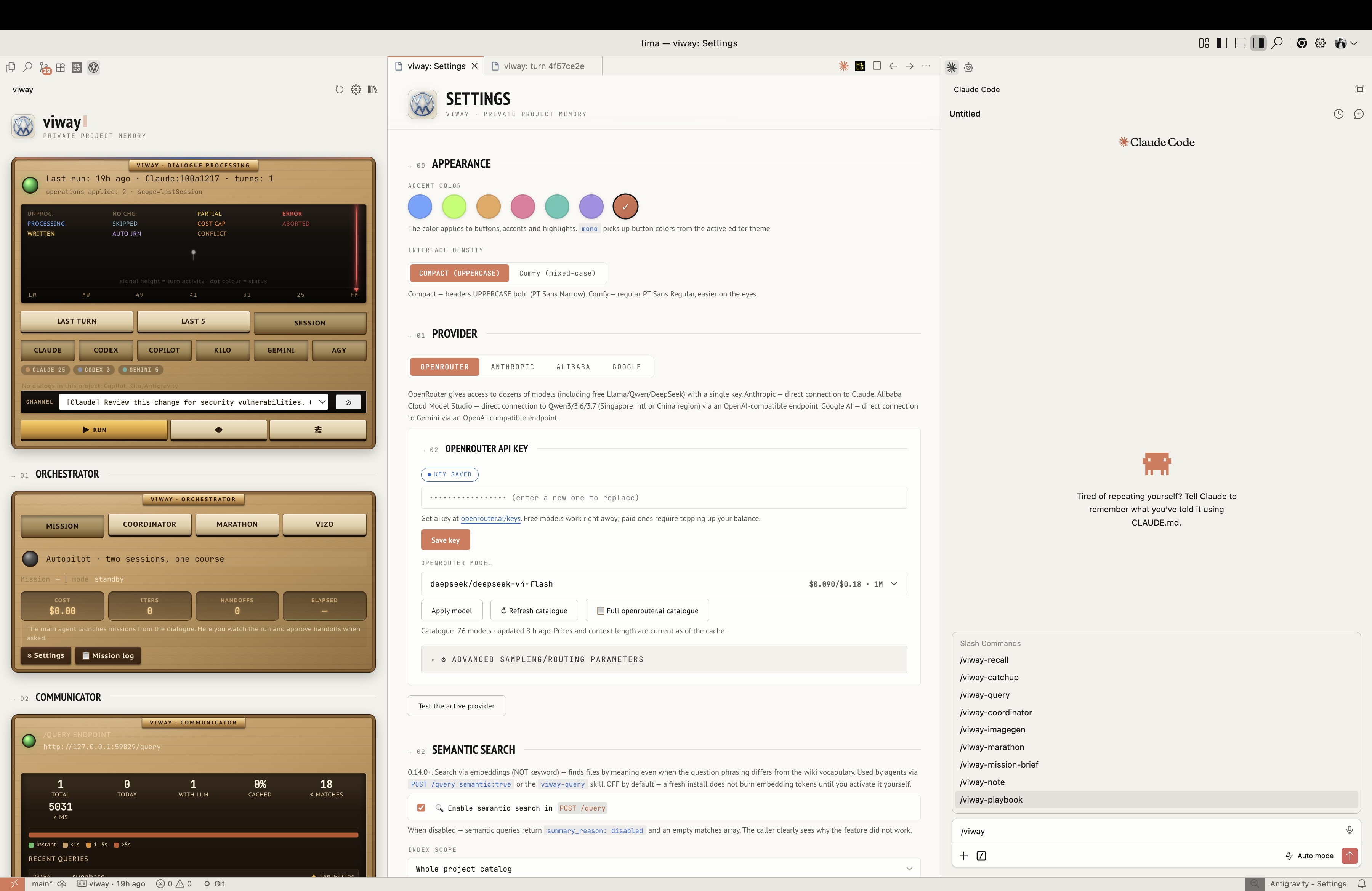
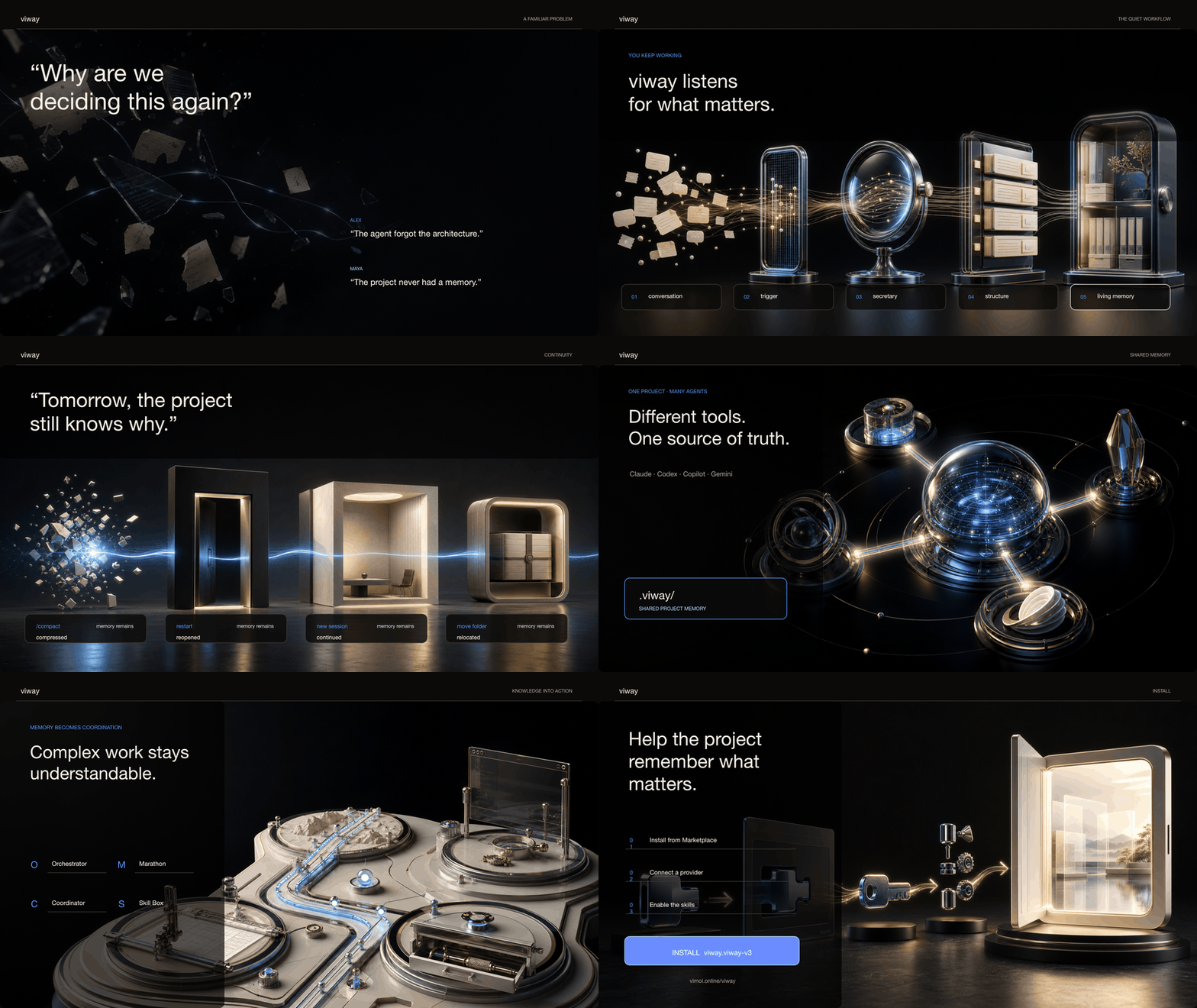
viway in 20 seconds:
Current version: 0.76.0. Full history — see the Changelog tab on this page.
viway ships English-first; the in-product UI also offers Russian.
🌐 Website: vimoi.online/viway — overview & screenshots. viway is free (MIT) — if it's useful, 💜 support the project / donate.
Why
Long conversations with coding agents blur quickly: decisions get lost in the scroll, new sessions don't remember what was discussed yesterday, facts get duplicated. viway turns the flow of conversation into a living wiki — with no manual work.
- Memory survives
/compact, VSCode restarts, and folder moves.
- Multiple parallel Claude/Codex instances share one base and stop duplicating the same thing.
- Decisions, open questions, and plans are organized into folders with clear semantics.
What the extension does
| Capability |
How it works |
| Per-turn secretary |
After every Claude/Codex end_turn, an agent loop runs — depth-capped, with read budgets derived from the model's context window (viway.readShareOfWindow) and a hard cost ceiling per turn (viway.agentTurnCostCap); viway.turnEngine picks the scout→writer two-phase scheme (default since 0.69, chosen by live measurement) or the one-conversation loop — with 10 workspace tools: read_file, search_workspace, list_directory, read_git_log, read_viway, read_turn, read_processed_history, check_existing, read_open_questions, query_viway. It applies 1–5 ops per folder. |
| Harvest agent (✨ Harvest) |
Full re-synthesis of a chosen folder. Up to 30 iterations of recon → write. |
| Stop hook auto-process |
Claude Code hooks (Stop / PreCompact / SessionEnd) launch the agent automatically. Eager mode (default) processes a finished turn right after a short debounce (viway.autoProcessDelaySeconds, default 5s) instead of waiting out the settle window — no manual clicks; turn off via viway.autoProcessEager. Non-Claude agents (Codex / Copilot) auto-process the same way via file-watch. |
| Multi-source ingestion (0.27.0+, narrowed in 0.70.0) |
One opt-in adapter beyond Claude/Codex: GitHub Copilot Chat (workspaceStorage delta-logs). Exact-workspace privacy matching, per-source secretary hints (viway.sources.<id>.analysisHint), watch-based auto-trigger with the same 90s settle window. Kilo Code / Cline-family, Gemini CLI and Antigravity IDE were readable until 0.70.0 and are not any more — three adapters no one asked to keep, each with its own storage quirks to maintain. |
| Knowledge lifecycle (0.62.0) |
Three states per fact — in force, retired, done — and one operation per transition. retire cuts the section out of the live file and lays it into 00_archive/, which mirrors the wiki's own shape (04_relations/x.md → 00_archive/04_relations/x-<section>-<date>.md) under a retired / superseded_by / reason / origin header, leaving a pointer behind. Nothing is deleted; nothing in the archive is served as current — the three searches return it as a separate «decided earlier» section with its own quota, live matches first. The single definition of retire-vs-duplicate is secretary/archivePaths.ts. Before each run one overwritable copy of the text goes to .state/undo/. |
| One panel, nine cabinets (0.63.0; «Руки» added in 0.71.0) |
Everything viway does lives in one isometric panel: Секретарь · Напарник · Планировщик · Коммуникатор · Браузер · Изображения · Видео · Руки · База знаний. The older flat dashboard and the skin switch that chose between the two are gone — one panel means nothing can quietly render in a layout nobody looks at. |
| Turn track |
Turns are a row of isometric blocks — one per turn, colour = outcome (processed / no changes / partial / error / skipped / stopped), a flat card for one not touched yet, a spinning cube for the one being processed right now, and a dashed outline with no number for the turn the agent is still writing. That last one matters: the secretary only takes a turn once it ends, and without the outline a forty-minute turn looked like a dead panel. The track follows the newest turn instead of opening on the oldest — unless you scrolled back to read an old one. |
| Turn detail |
Clicking a block opens a webview with the tool-calls log, applied ops, and errors. |
| Settings, one home (0.62.0) |
Every setting the panel can reach lives in viway: Settings, grouped the way the product is: the secretary, then a section per subsystem (partner, planner, browser, images, Skill Box, Archivarius). Settings that genuinely have no control are named on the page with the key to type into settings.json, instead of being silently absent — a setting you cannot find is indistinguishable from one that does not exist. |
| Communicator |
A local HTTP server on 127.0.0.1: POST /query (an answer by default since 0.69 — grep, then LLM synthesis, with a semantic fallback when the words are not there; raw:true for bare hits; a counter-question ask when the wiki knows little — over the .viway/ wiki or the whole project, viway.semanticSearch.indexScope), POST /recall (deterministic ranking of closed T-questions with symptom/cause/fix), POST /note (a write channel for agents). Bearer auth, timing-safe compare. The «Коммуникатор» tab is the human side of the same channel: three numbers that matter (asked today · found nothing · when and by whom), the question log with who asked each one (origin) and the answer kept beside it, an answer board, and a question box scoped to one wiki folder. Zero grep hits fall back to search-by-meaning automatically and say so — the words being absent is not the project being ignorant. Read-only by design: everything that CHANGES the wiki goes through Archivarius, where a human applies it. |
| Bundled skills |
viway-query, viway-recall, viway-catchup, viway-note, viway-fella, viway-browser, viway-images, viway-video, viway-computer, viway-planner, viway-playbook — installed into ~/.claude/skills/ with one button, and skills viway no longer ships are taken back out. |
| Partner (0.56.0+) |
A working partner for the main agent: one CLI session — Codex or Claude, whichever you pick on the «Напарник» tab — that takes one concrete task at a time and answers with a schema-constrained report — status (done/blocked/failed), summary, files touched, verify command. Runs headless (codex exec --json), so nothing is typed into a terminal and there is no TUI to fight. Context accumulates: the first task opens a Codex session, every later one resumes it, so the partner works sequentially and keeps everything it has learned. Hand over as many tasks as you like — they queue and run in order while the main agent carries on with its own work (the queue survives a VSCode reload). A blocked status means it stopped to ask instead of guessing — answer it from the dialogue or the dashboard and it continues in the same session. Every file it claims to have touched is checked with fs.stat, so a "done, tests added" that never happened is flagged, not believed. The main agent drives it via the viway-fella skill / POST /fellas/{task,answer,inbox,read,stop,reset}; reports land in .viway/03_process/fellas/ and survive a /compact. Its own tab «Напарник» streams the work live (commands, files, messages) and keeps the task history, each past dialogue re-readable as a conversation. Off by default (viway.fellas.enabled); needs the chosen CLI installed + logged in. The codex shell runs gpt-5.6-luna unless you say otherwise — deliberately its own model rather than whatever your interactive codex is set to, because the fella is a delegated worker and not you. Clear viway.fellas.codex.model to inherit ~/.codex/config.toml instead. |
| Planner (0.40.0+, renamed from «Марафон» in 0.62.0) |
A secretary-owned, living plan + execution tracker. For a non-trivial multi-step task the main agent authors the plan into the planner (viway-planner skill / POST /planner/{create,next,report,refine,set-status,verify,list}) instead of a throwaway plan file that gets forgotten after a /compact. The agent drives it step-by-step; the secretary reconciles each reported step against the actual project (does the cited evidence file exist?) AND amends the plan to match reality — inserting newly-discovered steps, retiring obsolete ones, journalled to amend-log.md. The human works the same plan from the «Планировщик» tab: a shelf of plan cards dragged into the order of work (order per plan), «проверить план» / POST /planner/verify to re-audit still-open steps against project evidence (daily log + git) and close the ones already done, «закрыть план» with a picked reason for a plan that stopped being relevant (the open steps stay open — the card keeps showing the work was not finished), and an archive of closed plans with restore and permanent delete. Optional interception mode (a PreToolUse gate + the «ловить планы» toggle, viway.planner.interceptPlanFiles) refuses plan/spec-file writes until the plan lives here. Plans live in .viway/05_plans/planner/; projects from before 0.62.0 are migrated from 05_plans/marathons/ on first run, and the old /marathon/* routes keep answering. |
| Archivarius (0.49.0+) |
A user-triggered reviser that audits the .viway/ wiki against the real code + git and produces a report-only list of discrepancies — nothing changes until you apply a finding. Three independently-toggleable checks: Reconcile — closed-but-still-open questions, wiki docs citing files that exist nowhere in the project (basename-resolved, so module-relative/moved citations aren't false-flagged), and plans that are fully done but still active; Stack conflicts (0.50) — a wiki-recorded decision the dependencies contradict (wiki says Tauri while every package.json has electron); File audit (0.51) — broken relative links across the project's markdown ([text](https://github.com/moiseenkovv-sketch/viway/blob/HEAD/path) pointing at a moved/deleted file). Findings live in the «База знаний» tab with per-finding Apply/Скрыть and a multi-select + bulk bar (Apply selected / Apply all / Clear list). Apply either annotates the wiki file with a ⚠ mark or archives it into 00_archive/ (reversible); every action is journalled to 00_archive/archivarius/apply-log.md. The archive of retired facts and the snapshots live on the same tab. POST /archivarius/{run,apply}, GET /archivarius/{list,result}; config viway.archivarius.{checks.*,maxFindingsPerRun}. There is no on/off switch and there never was one: the reviser runs only when you press Run review, and it only reports — a lock on a door that does not open by itself is furniture. |
| In-editor browser (0.58.0+, reworked in 0.59.0) |
The site you are building, open inside the editor — and every mark you leave on it queued for the agent. One home, one engine: an .html file, a folder, a dev server like localhost:5173 and a live site all open in viway’s own panel, identically in VSCode, Antigravity and Cursor. There is no second place and no button that chooses between two. A login works there — you sign in on the page itself, the site’s cookie is held against the proxy’s origin, and the session carries for as long as the page stays open (tests/browserLogin.test.ts drives a real login form end to end, with Domain-pinned Secure HttpOnly SameSite=None cookies and X-Frame-Options: DENY on the gated page). That fact is what let the second engine — the IDE’s own browser, borrowed over vscode.lm.invokeTool — be deleted outright in 0.62.0: it had been built on the belief that the proxy «can never have a login», which was never true. The panel states the four real limits (OAuth via Google/GitHub, passkeys, service workers, an app calling its own absolute address) rather than letting you find one by hitting it. Mark it up with the mouse: left click picks one element and clicking it again unpicks it; right click collects several into one shared comment; each pick gets a card in the panel with its own input, because the panel is where text can be reviewed and regrouped. Also move a block to a new place, nudge it with the arrow keys, draw an arrow, measure a distance, or draw over the page and send the frame. Each mark becomes one edit in .viway/05_plans/browser/edits.json (new → queued → in_progress → done/rejected, reversible), and «Собрать в план» turns the open queue into a plan. The agent gets its own sight: POST /browser/snapshot describes the page as roles, names and short e1-style handles — a live 23 315-byte gallery came back as 799 characters — with a diff mode that reports only what changed; POST /browser/act clicks, right-clicks, types, scrolls and waits on a MutationObserver; GET /browser/console and /browser/network are ring buffers with cursors that collapse repeats. It can talk back: POST /browser/show highlights an element, POST /browser/ask puts a question on the page and waits. And it can check itself: POST /browser/selftest (or the command palette) walks the entire markup loop on the open page — turns a tool on, picks and groups elements, files a comment and a gesture, reads them back through the same queue the agent reads, then empties it — and names the step that failed. Revised 2026-08-25 (audit + the human's five interface asks): a browser tab now survives a window reload — the editor hands it back and viway puts it on its page again instead of leaving a corpse you go on annotating; the panel has a third state, «on, but no page», where the tools are dimmed and say why instead of answering every press with silence; the marks hook follows the switch in both directions; the history is a journal that only grows, read from disk with no browser running; the page size moved into one picker and zoom is real zoom (at 200% the page lays out at half the width and nothing spills past the edge); highlighting is now a property of the tool, so «Стрелка» and «Линейка» stop lighting up elements they do not act on, and «Сдвиг» says out loud which element it holds and what the keys do; the queue is scoped to the page you are looking at and names how much it is NOT showing. New for the agent: POST /browser/viewport (set the width before judging any layout — the default is whatever the tab happens to be, measured live at 214px), POST /browser/close, and a /browser/state that returns everything the panel sees. Off by default (viway.browser.enabled); driven by the viway-browser skill. |
| Skill Box |
Project playbooks under .viway/05_plans/playbooks/: skills + human-verified scripts. Author via the viway-playbook skill or the panel; run, verify, and get suggestions mined from transcripts; opt-in enforcement gate (viway.skillbox.enforceGate) + SessionStart awareness (viway.skillbox.sessionContext). |
| Images studio (0.60.0+) |
Not a prompt box but a conversation with an image generator: it keeps the picture between turns, and it can answer in words when a question was asked rather than a redraw. Runs on the CLI you are already logged into — Codex or Grok — and bills your own subscription, no API key. The picture opens on a canvas in an editor tab where you draw on it and select areas; those marks are instructions the agent is expected to read before it redraws anything. POST /images/{generate,status,result}, the viway-images skill, and the «Изображения» tab for shell / model / effort / quality / frame, the conversation, the history and the references. Off by default (viway.images.enabled); settings section with a CLI probe. |
| Video studio (0.63.0+) |
Clips through OpenRouter, and the difference from the images studio is not cosmetic: every turn spends real money, so the studio takes an OpenRouter key of its own — the limit and the balance are counted per key, and a video key that runs dry cannot stop the secretary mid-dialogue. The «Видео» tab is a control desk, not a chat: model, length, frame, sound, attachments, the turn feed with actual prices, past work and what is left on the key. The conversation belongs to your main agent: POST /video/{generate,status,result} and the viway-video skill. The clip opens on a canvas in an editor tab — frame strip, audio track, a common timeline and marks that remember their second — and that canvas is what makes continuation possible at all: there is no session on the provider's side, so the next clip is anchored on the last frame of the previous one. What a model does not declare is not forbidden; what it declares it cannot do is not offered. Off by default (viway.video.enabled). |
| Hands (0.71.0+) |
The screen, mouse and keyboard of this machine, lent to the agent for a while — for the work that is neither a web page nor a file: a CAD seat, an installer, a licence dialog, a VM, any native app. Three things shape it. A human switches them on — no route does, there is a «Stop» that cuts a running batch, and they let go by themselves after the idle minutes you set. They are pointed at a set of windows the human ticked: coordinates are read from the target's own corner and clipped to its edges, so a stray number cannot reach your mail client; inside the set the agent switches windows on its own, outside it is refused and cannot widen the set. Everything is written down to .viway/.state/computer-journal.jsonl. What the agent gets: a picture of the window (taken from the window server, so your own windows may lie on top while it works) and a text outline — e7 button «Save» @412,388; a frame costs about 1.1–1.5 thousand tokens, the full outline of a loaded window about 4.5 thousand. It presses elements through the accessibility layer without moving your pointer, and says which of the two different things it did; a coordinate aimed where another window covers the target is refused, not silently delivered elsewhere. Open native menus on macOS (a dropdown list, a context menu) ignore synthetic input entirely — viway picks the item through the accessibility layer instead. Windows on another desktop are listed and named as such rather than looking closed, and the two macOS permissions are told apart by name when one is missing. Since 0.76.0 the system watches the windows as well (OS events on Windows, app switches on macOS): a batch with input answers with what became of the window, how its outline changed and a frame, taken once the window has actually reacted; wait_until waits for an element, a window or a title rather than for time; changes between the agent's turns reach it on their own (since in every reply, plus a Claude Code hook). Several viway windows share one keyboard — a batch is refused while another one holds the input, with who holds it; typing into a window that did not come forward is refused; on macOS text is typed exactly under any keyboard layout. macOS and Windows; POST /computer/{state,targets,target,snapshot,act,stop} + the viway-computer skill. Off until a human turns them on (viway.computer.enabled, viway.computer.idleReleaseMinutes). |
| Multi-provider |
OpenRouter (dozens of models), Anthropic (with prompt caching), Alibaba Cloud (Qwen). One API key each. Pictures are a separate matter: the images studio runs on the Codex or Grok CLI you are already logged into. |
| Audit |
A Markdown report: cumulative cost, status histogram, anomalies, last 20 turns, Stop hook boundaries. |
| Bundled fonts |
PT Sans (Latin + Cyrillic) + JetBrains Mono in the VSIX — works offline / behind a corporate proxy. |
Installation
code --install-extension viway.viway-v3
After installing:
Cmd+Shift+P → viway: Create .viway/ → pick a workspace.Cmd+Shift+P → viway: Settings → set an OpenRouter / Anthropic / Alibaba key.Cmd+Shift+P → viway: Install hook → auto-processing after every reply.- (Optional)
viway: Install skills → bundled skills into ~/.claude/skills/.
Requirements
- VSCode 1.90+
- An API key for at least one provider: OpenRouter (has a free tier), Anthropic, or Alibaba DashScope.
- Claude Code or Codex CLI to generate transcripts (
~/.claude/projects/ and ~/.codex/).
The .viway/ structure
| Folder |
Purpose |
00_archive/ |
Retired facts — a mirror of the folders above, one file per retired section (managed by the extension) |
01_intent/ |
Why the project exists — about.md, mission, scope |
02_inputs/ |
External material — articles, RFCs, links |
03_process/ |
Work journal — daily/YYYY-MM-DD.md, append-only |
04_relations/ |
Relationship graph + architectural decisions |
05_plans/ |
Active plans, specs, playbooks |
06_open/ |
Open questions (one file = one question); _closed/ — closed ones with YAML frontmatter for /recall |
07_visualization/ |
Themes, diagrams, visual artifacts |
Key settings
API keys are stored in VSCode SecretStorage:
viway.openRouterApiKey, viway.anthropicApiKey, viway.alibabaApiKey
Active provider: viway.provider (openrouter | anthropic | alibaba).
Frequently changed settings (Settings webview):
viway.agentDepth (quick / standard / deep / unlimited) — max iterations per turn (5 / 15 / 25 / 50)viway.turnEngine (twoPhase / loop) — how one turn is processed. twoPhase (default since 0.69) is a scout that reads and reports, then a writer holding only the report and the exact section to change; measured on 8 real turns replayed against a pre-turn wiki snapshot: 24 write-ops, 0 anchor misses, 0 truncated turns, $0.11 — against loop's 22 ops, 5 anchor misses and $0.35 on the same turns. loop is the one-conversation scheme where everything read is re-sent on later iterations; it stays available. Turns shorter than 2 000 characters go through loop either way — two phases would cost more than they save thereviway.readShareOfWindow (default 0.5) — the share of the model's context window the secretary may spend on reading in one turn; every read limit (per turn, per tool, whole-file threshold) is derived from this one number and the window of the backend that actually answersviway.toolReadBudget — explicit override of the per-turn read total; leave it empty and the window decidesviway.agentTurnCostCap (default 1 USD) — hard ceiling per turn; a turn that hits it is marked truncated and retried once, never reported as processedviway.maxOpsPerFolder (1–5) — op limit per folder per turnviway.maxTokens — output budget per LLM call (raised automatically under reasoning=medium/high)viway.reasoning (off / low / medium / high) — thinking budget; OpenRouter for thinking-capable models, Anthropic extended thinking; reasoning tokens are counted into the turn's costviway.openrouter.providerOrder — comma-separated backends to route through (e.g. deepseek); the prompt cache lives on one backend, so viway pins the backend that answered first for the rest of the turn — measured 70–80% of input from cacheviway.modelCatalog.minContextTokens — only show models with ≥ this context in the provider pickers; 0 = all (default 1000000). The catalog's number is the window of the best backend, so budgets use the smallest backend's window until one is pinnedviway.transcriptSource (all / claude / codex)viway.processScope (lastSession / lastTurn / last3Turns / last7Turns) — scope for the manual ▶ Run. last5Turns still works if you have it saved, and the panel then shows it as a fifth key so the scope never reads as unset.viway.autoProcess — auto-processing on the Stop hook (default true)viway.autoProcessEager — process a finished turn right after a short debounce instead of the full settle window (default true)viway.autoProcessDelaySeconds — debounce after the assistant stops before auto-processing (default 5); a trigger that lands while the secretary is busy is retried after 30 s instead of being droppedviway.preClassifierEnabled — deterministic SKIP of trivial turns (default true)viway.skipTrivialContinuations — skip "continue"-style chunks even in manual modeviway.excludedSessions — list of session UUIDs excluded from the auto-triggerviway.legacyWorkspacePaths — old project paths after a folder moveviway.llmHttpTimeoutSeconds (default 120) — hard timeout on the LLM HTTP fetchviway.browser.enabled — the in-editor browser (default false)viway.browser.defaultTarget — what viway: Open browser opens without asking (a path or localhost:5173)viway.browser.allowedOrigins — external sites allowed to open in the panel (viway's own server fetches and re-serves them); local files, localhost and 127.0.0.1 never need it. Shown and editable in viway: Settings → Browser (0.66.0+); kept per workspaceviway.browser.autoReload — reload the page when the watched source changes (default true)viway.browser.snapshotMaxChars — hard ceiling on one page snapshot (default 6000)
State persistence
.viway/.state/ (mode 0600 for endpoint.json):
| File |
Purpose |
processed.json |
Processing cursors per session + per-turn records |
harvest-history.json, harvest-logs/ |
✨ Harvest history + detailed traces |
turn-logs/<session>.<endUuid>.json |
Detailed trace of each per-turn run |
cumulative-metrics.json |
Cumulative metrics (calls / tokens / cost / conflicts) |
processing-history.json |
Last 50 runs (for the dashboard) |
queries.json |
Log of POST /query requests (FIFO 100) |
endpoint.json |
Communicator endpoint URLs + Bearer token |
note_inbox/ |
Inbox for POST /note records until the secretary consumes them |
session-roles.json |
Session labels, shown as a prefix in the channel list |
last-call.md |
Markdown diagnostics of the last LLM call |
Workspace migration
When you move the folder, add the old path to viway.legacyWorkspacePaths — the secretary will find the old Claude Code transcripts in ~/.claude/projects/<encoded-path>/*.jsonl. Codex sessions aren't recovered (the cwd is baked into session_meta).
Diagnostics
- Odd spend / too many iterations →
viway: Audit secretary work (a Markdown report with anomalies and the last call inline).
- The per-turn run writes nothing → click a block in the timeline → Turn detail → the Tool calls + Errors sections.
- Harvest produced 0 ops →
cat .viway/.state/harvest-logs/<folder>.<iso>.json | python3 -m json.tool (the finalAssistantText often explains why it skipped).
- Transcripts not found after a move → ⚙ → Workspace alias paths.
- VSCode doesn't see the new VSIX version → ⚙ → Maintenance → 🔄 Update extension (Reload Window).
- "Hook not installed" after installing (Windows) → fixed in 0.9.23; if it recurs, open an issue.
Build from source
cd v3/extension
npm install
npx tsc --noEmit              # type check
npm test                      # vitest (1600+ tests)
npm run verify:webview        # bundle + vm.Script for the dashboard inline JS
npm run package               # → viway-v3-<version>.vsix
Documentation
License
MIT
| |

