Git AutoReview — AI Code Review for GitHub, GitLab & Bitbucket

AI suggests. You decide.
Claude • Gemini • GPT — Review PRs with 3 AI models. You approve before publishing.
Website •
Documentation •
Changelog •
Pricing



See it in action
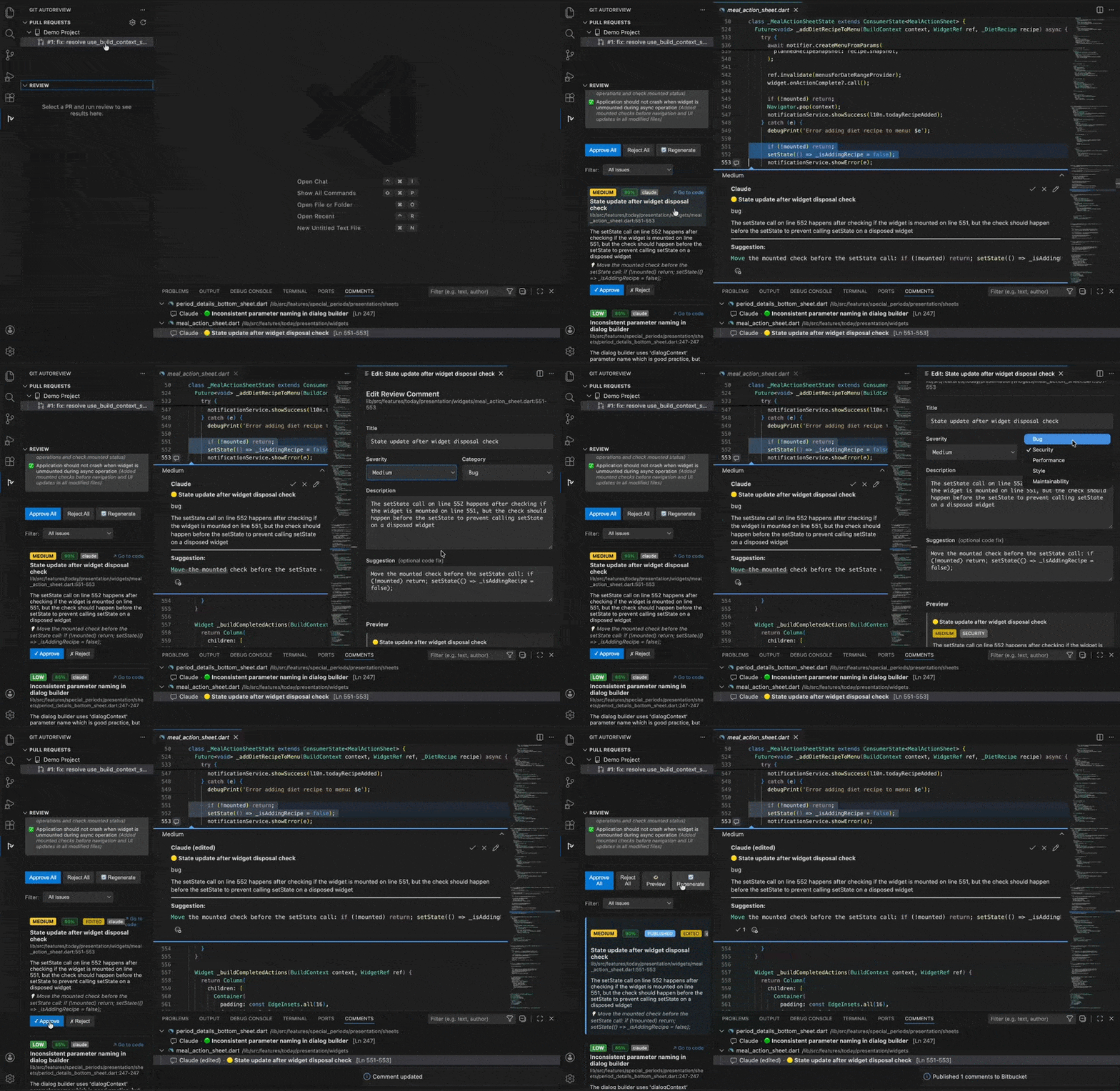
Code review completed in under 10 seconds
Why Git AutoReview?
| Feature |
Git AutoReview |
Other Tools |
| Human Approval |
✅ Review before publish |
❌ Auto-post to PR |
| Agent Reviews |
✅ Reads your files, follows imports |
❌ Sees only the diff |
| BYOK (Bring Your Own Key) |
✅ Your keys, your cost control |
❌ Locked to their API |
| Multi-Model AI |
✅ Claude + Gemini + GPT |
⚠️ Usually 1 model |
| Pricing |
✅ Per-team ($14.99/mo) |
❌ Per-user ($24+/user) |
| Privacy |
✅ Zero code storage |
⚠️ Code cached for days |
Features
Claude CLI Agent
Use your Claude Code subscription (Claude Pro ~$20/mo, or Max $100–200/mo) instead of an API key. No separate billing — your existing plan covers it.
Unlike standard API reviews that only see the diff, the CLI Agent runs inside your project and actively explores the codebase:
- Reads imported files to understand data flow and dependencies
- Searches for function usages to catch breaking changes
- Checks related tests to verify coverage
- Runs lint and checks coverage reports for full context
This takes 2-5 minutes instead of seconds, but the review quality is significantly deeper — the AI understands how your code fits together, not just what changed.
Falls back to API automatically if Claude Code isn't installed.
Install Claude Code, then select "Claude CLI" in Settings → Models.
Copilot CLI Agent (Experimental)
Use your GitHub Copilot subscription (Individual, Business, or Enterprise) instead of an API key. Copilot CLI gives you access to Claude, GPT, and Gemini models — all through your existing GitHub plan.
Same agent capabilities as Claude CLI: reads files, follows imports, searches for usages.
Note: Copilot CLI is v1.0.x — its API may change between updates, which could temporarily break reviews. GPT-4.1 is free (0 premium requests), other models consume your Copilot quota.
Install with npm i -g @github/copilot, then enable "Copilot CLI" in Settings → Models.
Code Quality Assessment
Every review includes a holistic quality score across 6 categories (1-5 scale):
- Design & Architecture — SOLID principles, coupling, cohesion
- Code Clarity — Readability, naming, logical flow
- Error Handling — Exception handling, validation, graceful degradation
- Complexity — Cyclomatic complexity, nesting depth, DRY
- Testability — Injectable deps, edge case coverage
- Production Readiness — Logging, secrets, backwards compatibility
Each category is individually toggleable in Settings → Review tab. Results include actionable recommendations and strengths.
Acceptance Criteria Verification
AI automatically checks whether your PR meets acceptance criteria from three sources:
- Jira ticket (auto-detected from PR title/branch)
- PR description (extracted from
## Acceptance Criteria section)
- Manual entry (textarea in the PR preview panel)
Each criterion is marked as addressed or not addressed in the review results.
Multi-Model AI
Choose your AI or run them together:
- Claude Sonnet 4.6 (default) / Opus 5 / Sonnet 5 / Fable 5 / Haiku 4.5 (Anthropic) — Deep reasoning, nuanced feedback
- Gemini 3.6 Flash / 3.5 Flash / 3.1 Pro (preview) (Google) — Fast, broad context understanding
- GPT-5.6 / 5.5 (OpenAI) — Industry-standard analysis and reasoning
- Dual-Model Mode — Compare results from 2 models
Custom Endpoints — Bring Any LLM
Connect any OpenAI-compatible model to your review pipeline:
- Local models — Ollama, LM Studio, llama.cpp — your code never leaves your machine
- Cloud providers — Groq, Together AI, Fireworks, Anyscale — pick the price/speed tradeoff you want
- Self-hosted — vLLM, TGI, or any endpoint behind
/v1/chat/completions
Add an endpoint in Settings → Models → Custom Endpoints, test the connection with one click, and it runs alongside your other models. API keys stored securely in VS Code SecretStorage.
- GitHub — Full support for Cloud & Enterprise
- Bitbucket — Cloud, Server & Data Center
- GitLab — Cloud & self-hosted (custom CA certs, skip SSL verification)
PR Search & Filter
Long PR list? Click the search icon in the sidebar to filter by title, author, PR number, or branch name. Active filter shows in the panel header — clear with one click.
File Review Rules
You decide what gets a full AI review and what gets skipped. In Settings, configure two lists:
- Always review — Files that always get a full review (e.g., CI/CD workflows, Dockerfiles, infrastructure configs)
- Treat as trivial — Files that should be skipped (e.g., CSS, locales, generated code)
GitHub Actions, GitLab CI, Bitbucket Pipelines, Dockerfiles, and Jenkinsfiles are reviewed by default. Your rules override ours.
Smart Review UX
- Click a PR to preview details — no AI tokens spent
- See existing platform comments inline in the diff view before reviewing
- Explicit "Start Review" button — no accidental reviews
- Cached results shown instantly on re-click
- Cancel in-progress reviews with clean state recovery
Human-in-the-Loop
- Review AI suggestions before publishing
- Approve, reject, or edit each comment
- No surprise comments on your PRs
Jira Integration
- Auto-detect ticket from PR title/branch
- Fetch acceptance criteria automatically
- AI verifies if PR meets AC requirements
Review Profiles
- Save different configurations (AI model, rules, provider settings) as named profiles
- Switch profiles instantly from the status bar
- Auto-bind profiles to workspace folders
Feedback & Analytics
- Rate reviews and individual suggestions with thumb icons
- Personal review stats dashboard in Settings
- Acceptance rate gauge and category breakdown
- Privacy-first: respects VS Code telemetry settings, no PII collected
Team Management
- Create and manage teams from the Settings Team tab
- Invite members by email with shareable invite codes
- Auto-detect pending invites on startup for seamless onboarding
- Shared Repositories — Admins configure repos once, all members see them in the PR sidebar
- Shared API Keys — Set team-wide AI provider keys so members don't need their own
- Team analytics: total reviews, hours saved, trend indicators, member leaderboard
- Seat management with owner/admin/member roles
Review History & Insights
- Browse past reviews in the Settings History tab
- See date, repo, issue count, and categories per review
- Personalized insights: top issue categories, severity trends, improvement tracking
- Register email to unlock history, insights, and 10 reviews/day
Security Scanning
- Hardcoded secrets & API keys
- SQL injection patterns
- XSS vulnerabilities
- 20+ built-in rules
Full Project Context
- API mode: AI sees function signatures, types, and imports extracted from your project
- Agent mode: AI actively opens and reads files in your project — follows imports, searches for usages, checks tests — like a real reviewer would
Quick Start
1. Install extension → Search "Git AutoReview" in VS Code
2. Open Settings    → Cmd+Shift+P → "Git AutoReview: Open Settings"
3. Add API key      → Claude, Gemini, or OpenAI
4. Add repository   → GitHub, GitLab, or Bitbucket
5. Review PR        → Click any PR → Preview → "Start Review" → Approve → Publish
Your first AI code review in under 2 minutes.
Full setup guide
Pricing
| Plan |
Reviews |
Price |
| Free |
10/day |
$0 |
| Developer |
100/day |
$9.99/mo |
| Team |
Unlimited |
$14.99/mo |
All plans include BYOK support. Team plan includes team management, shared repositories, shared API keys, team analytics, full Jira integration, and priority support.
View full pricing
Requirements
- VS Code 1.85.0+
- GitHub, GitLab, or Bitbucket account
- One of the following:
Privacy & Security
| What |
How |
| API Keys |
Stored in VS Code SecretStorage (encrypted) |
| Team API Keys |
AES-256-GCM double encryption (client + server) |
| Your Code |
Sent directly to your AI provider only |
| Our Servers |
Zero code storage |
| Telemetry |
Opt-out, respects VS Code settings |
| Analytics |
Your stats stay local until you opt in |
Resources
Keywords
AI code review, GitHub code review, GitLab code review, Bitbucket code review, automated code review, pull request review, merge request review, PR review tool, code analysis, code quality, VS Code extension, human-in-the-loop, BYOK, Claude code review, Gemini code review, GPT code review, CodeRabbit alternative, Copilot alternative, security scanning, Jira integration, team code review, AI pair programming, code reviewer, best AI code review tool, free AI code review
Made with ❤️ by Git AutoReview
© 2024-2026 Vitalii Tech. All rights reserved.

