VisiMark for VS Code
A document integrity layer for Markdown: it checks that every number in a document still matches the formula that produced it, so an agent's correct formula can't ship with a wrong total.
VisiMark checks the numbers in Markdown documents, especially ones an agent wrote. Every computed value carries its formula, a machine proves the two still agree, and CI fails when they don't. The document stays plain Markdown. This
extension is where that starts: the wrong number is squiggled as you type, and
gone by the time you save.
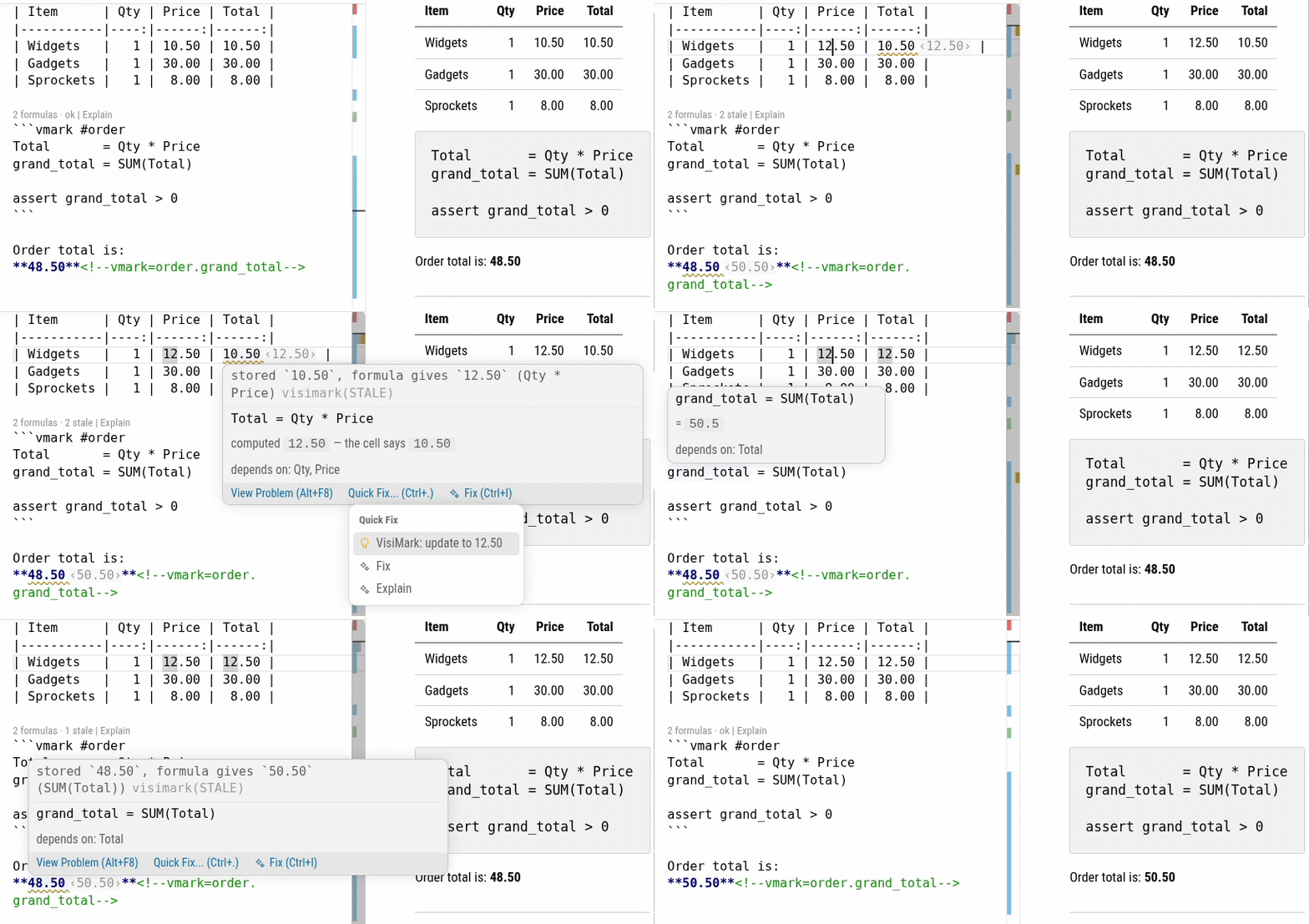
The problem, in four lines
Someone raised the on-call hours from 12 to 20 and updated nothing that
depends on it. The table still renders perfectly. GitHub does not complain.
Your Markdown preview does not complain. A reviewer may not notice.
| Item               | Qty |   Rate |     Net |
|--------------------|----:|-------:|--------:|
| Discovery workshop |   2 |1800.00 | 3600.00 |
| On-call support    |  20 | 260.00 | 3120.00 |

```vmark #lines
Net       = Qty * Rate
net_total = SUM(Net)
```

Net of tax the engagement comes to **6720.00**<!--vmark=lines.net_total--> PLN.
VisiMark complains. In the editor, 3120.00 and 6720.00 are squiggled, each
with the value it should hold shown beside it, and the status bar reads
VisiMark: 3 stale. The same document through the CLI, in CI:
$ visimark check invoice.md

  STALE   lines.Net       · On-call support         3120.00 ≠ 5200.00    Qty * Rate
  STALE   lines.net_total                           6720.00 ≠ 8800.00    SUM(Net)
  STALE   1 prose anchors bound to the values above

  3 problems (3 stale, 0 errors)
Note the last line: the bolded total in the prose is bound to the formula
too, and drifts with it.
In the editor
Live checking. Stale values, ambiguous dates, mixed units, unknown names
and circular definitions are squiggled as you type. Nothing is written.
Inline truth. A stale value shows what it should be, right beside it,
without the file changing.
Repair. Every stale value is brought up to date when you save — only the
computed cells and anchored values, never your prose or input columns. Also
on demand, as Fix All Stale Values, a Quick Fix on one cell, or "Format
Document". Turn off visimark.format.fixOnSave to keep it strictly manual;
autosave never triggers it.
Hover. Over a computed cell: the formula behind it, what it depends on,
and — if it is stale — what it computes versus what the cell says. Over a
function name: signature, parameters, return type, precision, rounding, and
the errors it can raise.
Explain. Every sheet in the document as a plain-text summary — inputs,
rules, and the order they evaluate in. What a reviewer reads instead of
re-deriving the arithmetic by hand:
#lines
  inputs:  Item, Qty, Rate
  rules:
    Net = Qty * Rate   precision 2 (derived)
  scalars:
    net_total = SUM(Net)   precision 2 (derived)
  order:   Net → net_total
A lens on every block reading 2 formulas · 2 stale, one click from
fixing that sheet or explaining it.
Quick fixes for the rest: rewrite an unambiguous date to ISO, wrap a
column reference in SUM(...), correct a misspelled name.
Marked preview. The built-in Markdown preview underlines every value the
document computes, and colours the ones that no longer match their formula.
Imports (from rows.csv) are read from the previewed file's own folder; an
untitled file has none, so values that depend on an import are left
unmarked. A file reached through a symlinked folder inside that folder is
still read; only a symlink to the file itself is refused. Turn the marks
off with visimark.preview.enable — the language server keeps running.
Written by an agent, checked by a machine
This matters most when the Markdown is written or edited by an AI agent.
Agents are reliable at writing formulas and unreliable at the arithmetic those
formulas describe: Net = Qty * Rate is something an agent gets right,
5200.00 is something it guesses. Write the formula instead of the number and
the number stops being a claim and becomes a derivation — visible in the
editor, readable in a diff, and enforceable in CI by the same engine.
Getting started
Open any Markdown file and add a vmark block. There is nothing to install
and nothing to configure — the engine ships inside the extension, no separate
runtime, no node_modules, no project setup. To fail a build on a document
that contradicts itself, add visimark check to CI.
Commands: Fix All Stale Values · Fix Sheet · Explain Sheet · Show Report ·
Restart Server.
Settings: visimark.enable, visimark.preview.enable, visimark.format.fixOnSave,
visimark.format.fixDates, visimark.inlayHints.enable,
visimark.codeLens.enable, visimark.statusBar.enable.
A VisiMark document is ordinary Markdown. It renders correctly on GitHub, in
VS Code preview, and through pandoc to both HTML and Word, with no plugin.
Documentation and the CLI →

