Env Studio: .env File Editor, Env Manager and Secret Masking
Edit .env files as a table, compare every env file side by side, catch keys missing from .env.example, and hide secrets when you share your screen. It is fast, uses no AI and sends nothing about your files anywhere.
Why Env Studio
Syntax highlighting alone is not enough. Env Studio does the jobs you actually have with env files:
- A new teammate's app crashes on start: a key in
.env.example is missing from their .env. Env Studio flags it and adds it with one click.
- Staging behaves differently from production: open the Env Matrix and see every key across
.env, .env.staging and .env.production at once.
- You are about to share your screen or stream: API keys, tokens, passwords and database URLs are already hidden behind dots.
- Someone is about to commit
.env.local: Env Studio warns you when an env file with values is not in .gitignore, or is already committed.
Features
Table editor
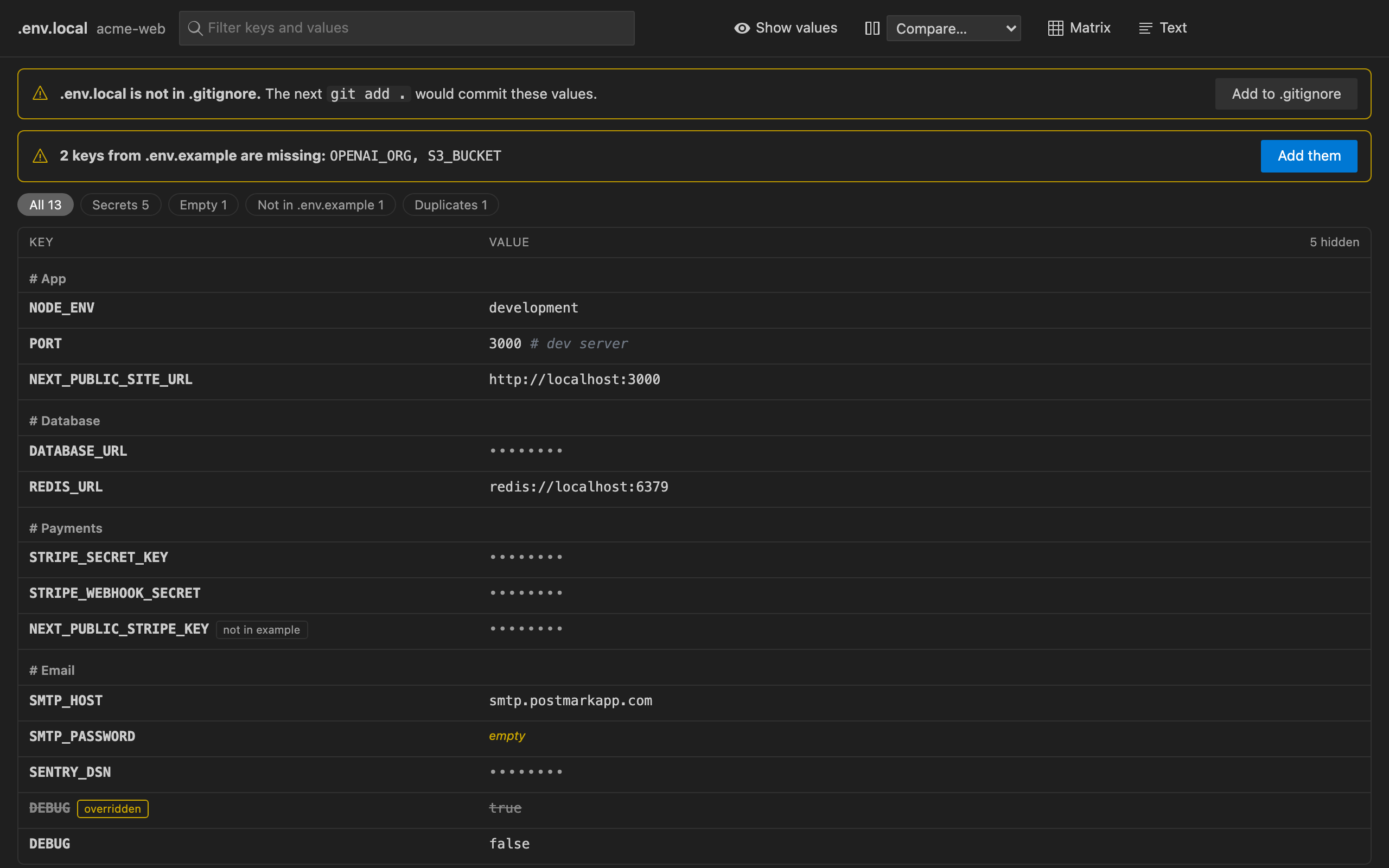
Open any env file as a table: Open as Table in the editor title bar, in the Explorer right-click menu, or from the Env Files sidebar.
- Edit values and rename keys in place. Every edit is a normal text edit, so Undo, Save and the text editor stay in sync, and comments, blank lines, quotes and
export are kept exactly as they were.
- Comment lines become section headers.
- Filter by name or value, or show only secrets, empty values, keys not in the example, or duplicates.
- Duplicate keys are struck through with a note that the last one wins (what dotenv loads).
- Multi-line values (private keys, certificates) and every quote style are supported.
- Copy a value without revealing it.
- Fully keyboard driven:
↑ ↓ move, Enter edit, F2 rename, Space show or hide a value, Cmd/Ctrl+C copy, Del delete, / filter, A add, H show all values, Cmd/Ctrl+Z undo.
Env Matrix: compare every env file
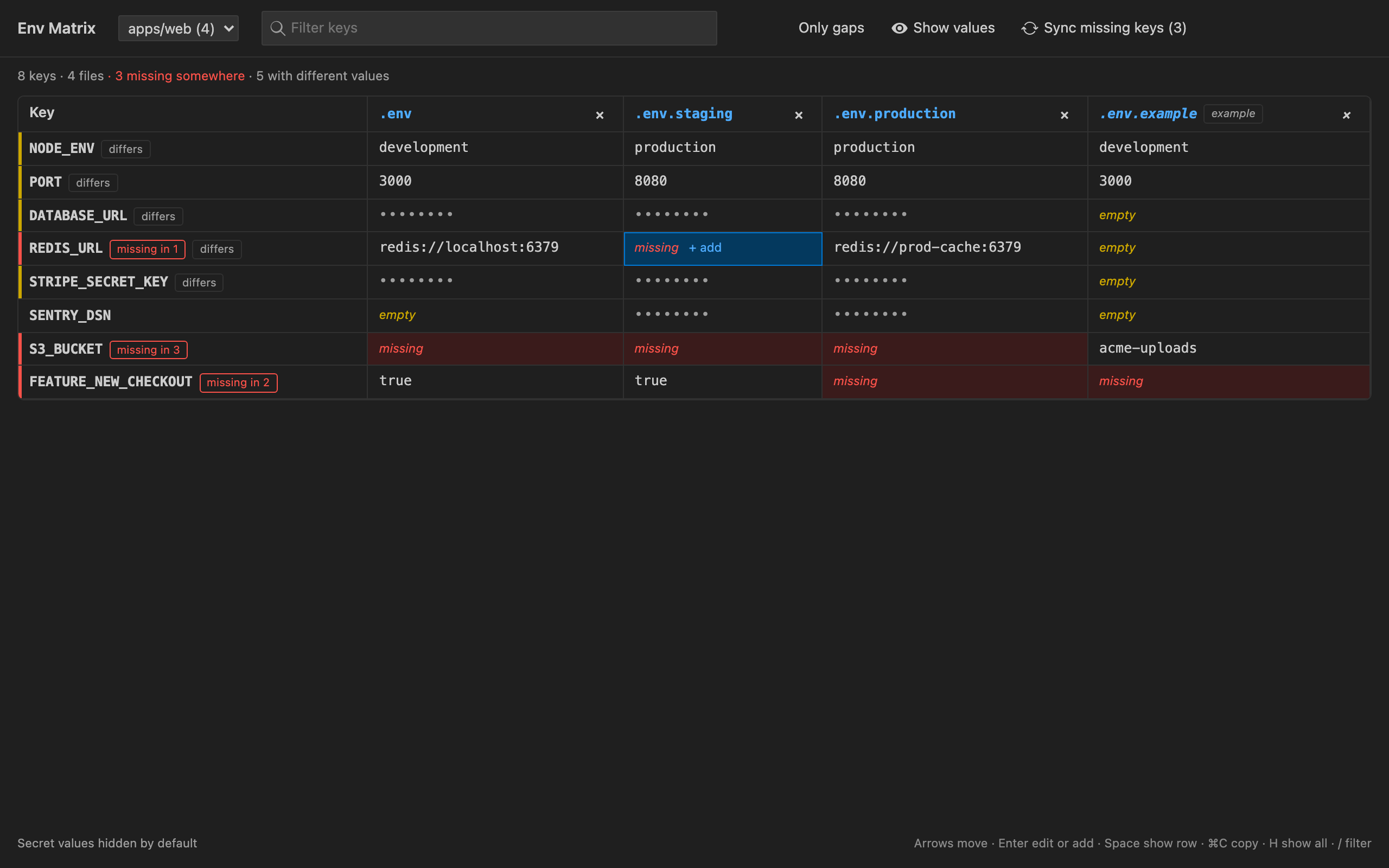
- Keys as rows and files as columns, for each folder of your workspace, so monorepos (
apps/web, apps/api...) each get their own view.
- Shows at a glance which keys are missing, empty or different between files.
- Compare any two files, even from different folders (Compare With…).
- Double-click a missing cell to add the key there, or double-click a value to edit it.
- Sync missing keys adds every missing key to the files that lack it. Values come from the example file when it has one and are never copied between real env files, so secrets don't spread.
- Hide columns you don't need. The matrix works with the keyboard too.
Secret masking (safe for screen sharing)
- Values that look secret are hidden behind
•••••••• in the normal text editor. This covers names like *_KEY, *_SECRET, *_TOKEN, PASSWORD and DSN, and values like Stripe, GitHub, Slack, AWS and Google keys, JWTs, private keys, URLs with a password and long random strings.
- The line you are editing is shown so you can still type. Turn this off with
envManager.mask.revealOnCursor.
- Set
envManager.mask.mode to all to hide every value.
- Toggle it from the status bar (Secrets hidden / Secrets visible) or the editor title bar.
Checks and quick fixes (in the Problems panel)
- Keys from
.env.example (or .env.sample, .env.template...) that are missing from this file. Quick fix: Add the missing keys.
- Keys that the example doesn't list. Quick fix: Add this key to the example, without its value.
- Duplicate keys. Quick fix: Remove the earlier duplicate.
- Lines that dotenv cannot read, and unclosed quotes.
- Leak check: warns when an env file with values is committed to git or is not in
.gitignore. Quick fix: Add this file to .gitignore. It uses your local git only.
- Check All Env Files checks every env file in the workspace at once.
And more
- Syntax highlighting for
.env, .env.* and *.env, including export, quotes, ${VAR} references and inline comments.
- Create .env.example from this file: every key and comment, no values, safe to commit.
- Key autocomplete in code after
process.env., import.meta.env., Bun.env., os.environ[...], os.getenv(...), ENV[...], getenv(...), os.Getenv(...), Deno.env.get(...) and ${ in compose files. It suggests key names only, never values.
- Env Files sidebar listing every env file by folder, with missing-key and git warnings.
- New Env File… starts a file from the folder's example.
- Follows your VS Code theme (light, dark and high contrast) and works on macOS, Windows and Linux.
Free trial and Unlimited
Env Studio starts with a free trial. It only counts time while you are actually using the table, the matrix or the checks. When the trial ends, choose an Unlimited plan (monthly, yearly or a one-time lifetime purchase) to keep using the table editor, the matrix, the checks, sync and autocomplete. Current prices are shown in the extension. Syntax highlighting and secret masking keep working either way, so your secrets never become visible just because a trial ended.
- Go Unlimited: when the trial ends, click Go Unlimited in the status bar or run Env Studio: Go Unlimited. Checkout is handled by Stripe in your browser, and Unlimited turns on without a reload.
- Already paid on another machine? Run Env Studio: Restore Purchase and enter the email you paid with.
- Manage or cancel a subscription: use Manage subscription on the Go Unlimited page.
Privacy
- Your env files and their values never leave your machine. Env Studio has no telemetry and no analytics, and uses no AI.
- The only network calls are for the trial and licence: an anonymous install ID, a hashed machine ID and how many seconds of active use to count. Checkout, restore and billing go to our payments backend (
api-ext.viralinc.live, which uses Stripe).
- The leak check runs your local
git binary (git ls-files, git check-ignore). It is turned off in Restricted Mode.
Settings
| Setting |
Default |
What it does |
envManager.mask.enabled |
true |
Hide values in the text editor |
envManager.mask.mode |
secrets |
secrets hides values that look secret; all hides every value |
envManager.mask.revealOnCursor |
true |
Show the value on the line you are editing |
envManager.check.enabled |
true |
Report problems in env files |
envManager.check.extraKeys |
true |
Point out keys that .env.example does not list |
envManager.check.gitignore |
true |
Warn about env files that are committed or not ignored |
envManager.completions |
true |
Suggest env keys in code |
envManager.exclude |
node_modules, build folders… |
Folders to skip when looking for env files |
To always open env files as a table, add this to your settings:
"workbench.editorAssociations": { "**/.env*": "envManager.table" }
Support
Questions or problems: ope@trysixth.com
| |

