
FlagLens — Flagsmith Live Feature FlagsLive inline feature flag status, 1-click toggles, wrap-in-flag code actions, and typo/stale flag auditing for self-hosted Flagsmith right inside VS Code. Installation Launch VS Code Quick Open ( Ctrl+P), paste the following command, and press enter.Copied to clipboard |


FlagLensLive feature flag inspection, 1-click toggles, experiment visibility, and codebase auditing for self-hosted Flagsmith — directly inside VS Code.
Built for Toggle Wars: The Flagsmith Experimentation Hackathon — Track 03: Build on Open Source Flagsmith Live Links & Installation
VS Code MarketplaceInstall FlagLens directly from the Visual Studio Code Marketplace (or via
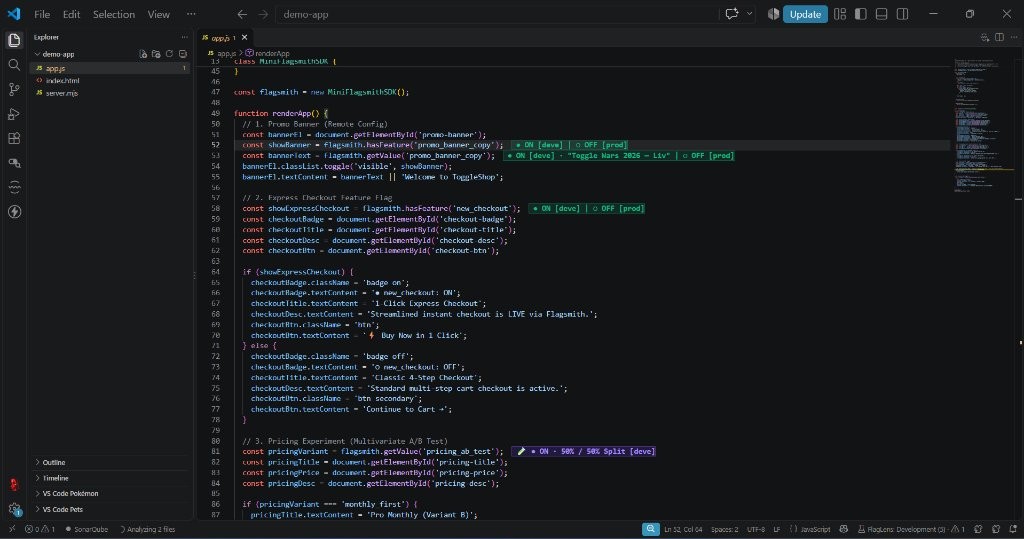
OverviewShipping features behind feature flags usually forces engineers to constantly alt-tab between their editor and the Flagsmith dashboard just to check whether a flag is enabled in Development vs. Production, inspect multivariate A/B split weights, verify spelling, or hunt down stale flags. FlagLens eliminates that context switch by bringing your self-hosted open-source Flagsmith instance straight into VS Code—with live inline status badges, cross-environment hover controls, 1-click code wrapping, and automatic Ghost & Stale flag diagnostics. ScreenshotsInline Live Status & Experiment Split BadgesLive
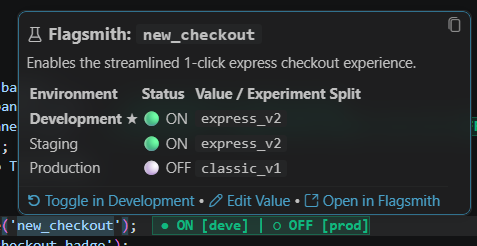
Cross-Environment Hover Card & 1-Click ToggleHover over any flag identifier in code to inspect its description and state across Development, Staging, and Production, then toggle the flag or edit its remote config value without leaving the editor.
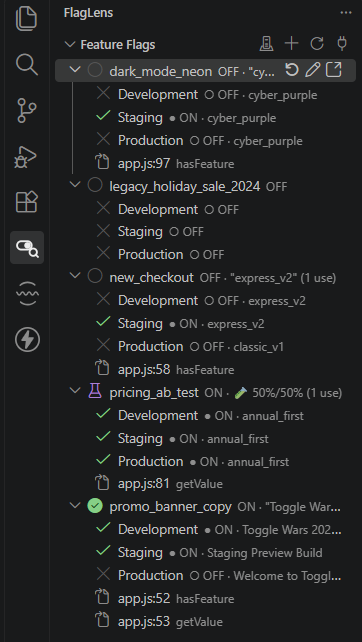
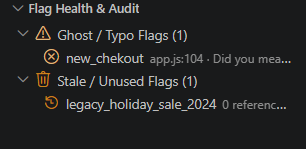
Sidebar Explorer & Flag Health AuditBrowse all flags, jump directly to every file and line reference, catch typos (Ghost Flags) with 1-click Levenshtein Quick Fixes, and surface Stale / Unused Flags with zero workspace references.
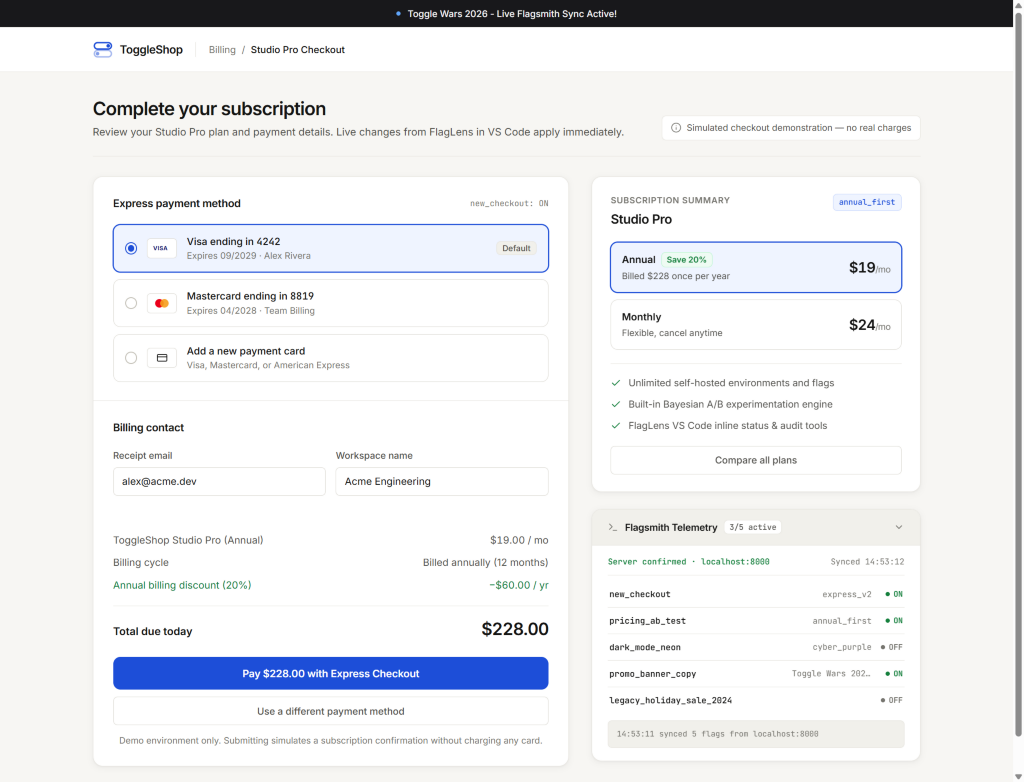
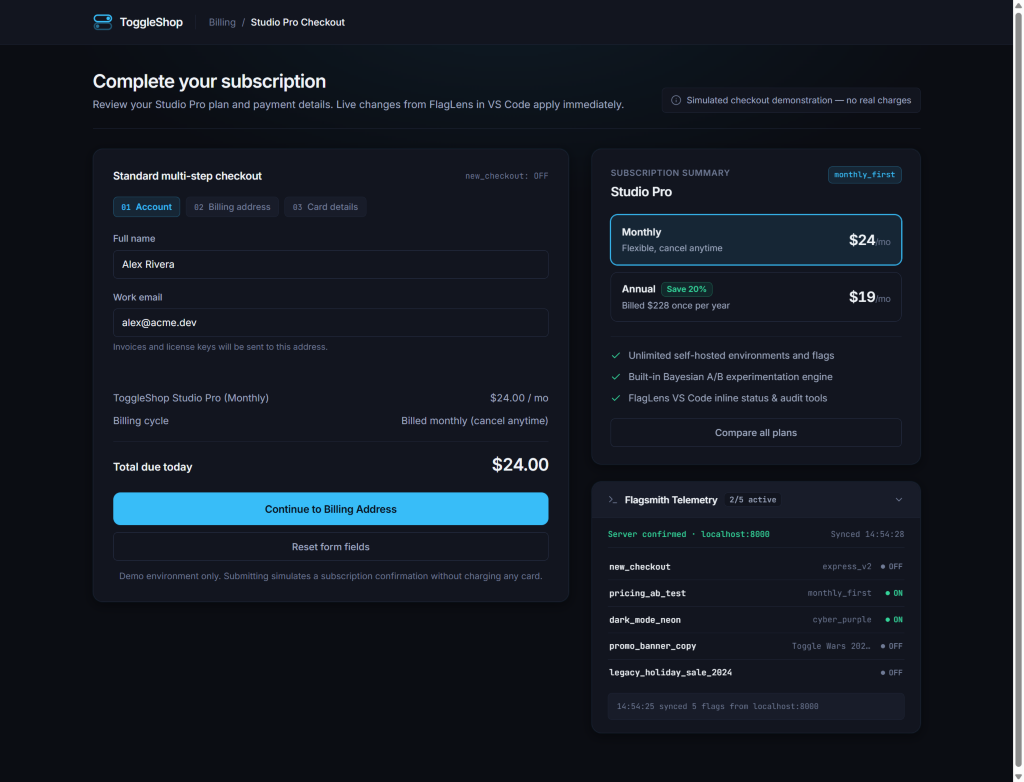
Live Demo Storefront (
|



| Light Mode · Express Checkout · Annual Variant | Dark Cyber Mode · 3-Step Checkout · Monthly Variant |
|---|---|
 |
 |
Key Capabilities
| Capability | Description |
|---|---|
| Inline Live Badges | Detects hasFeature, getValue, useFlags, is_feature_enabled, IsFeatureEnabled, and GetFeatureValue across JS/TS, React, Python, Go, Java, and Dart. |
| 1-Click Hover Actions | Cross-environment state matrix with direct Toggle, Edit Value, and Open in Flagsmith commands. |
| Wrap Selection in Flag | Highlight any block of code → Right-click or Ctrl+. → wraps the code in if (flagsmith.hasFeature('...')) and creates the flag in Flagsmith automatically. |
| Ghost Flag Diagnostics | Underlines unknown/misspelled flag names with 1-click Quick Fixes (Replace with "new_checkout" via Levenshtein matching, or Create flag in Flagsmith). |
| Stale Flag Detection | Scans your workspace and lists flags in Flagsmith with 0 code references to help eliminate flag debt. |
| Zero-Setup Local Sandbox | Connects to your self-hosted Flagsmith (localhost:8000) automatically, or starts an embedded Flagsmith-compatible sandbox if no external server is running. |
| v1 & v2 API Support | Works with Organisation API Keys (Api-Key ser.*), Admin Token auth, multivariate splits, and both Flagsmith v1 and Feature Versioning v2 environments. |
Quick Start
Option 1: Install & Try Instantly (Zero Setup)
# 1. Install the pre-packaged extension in VS Code
code --install-extension flaglens-1.0.0.vsix

# 2. Open the included demo workspace in VS Code
code demo-app
Open demo-app/app.js (lines 188–248). FlagLens automatically starts its embedded local Flagsmith sandbox on http://localhost:8000 if no external Flagsmith instance is running.
To watch the live ToggleShop storefront respond to your VS Code toggles:
npm run demo-app
# Open http://localhost:3000
Option 2: Connect to Self-Hosted Flagsmith (Docker)
FlagLens ships with Flagsmith's official Docker Compose configuration (PostgreSQL + Flagsmith API/UI + Task Processor, with Experimentation enabled by default):
# 1. Start self-hosted open-source Flagsmith on http://localhost:8000
cd docker
docker compose up -d

# 2. Create an account + project at http://localhost:8000 and generate an Organisation API Key (ser.*)

# 3. Seed the ToggleShop sample flags into your self-hosted instance
FLAGSMITH_URL=http://localhost:8000 FLAGSMITH_TOKEN=ser.YOUR_API_KEY node seed.mjs
In VS Code, click the Configure Connection (🔌) icon in the FlagLens sidebar and enter http://localhost:8000 with your ser.* API key.
How Flagsmith Is Integrated
- Self-Hosted Deployment (
docker/docker-compose.yml&docker/seed.mjs): Spins up open-source Flagsmith locally with Experimentation enabled and seeds 5 sample flags (new_checkout,pricing_ab_test,dark_mode_neon,promo_banner_copy, andlegacy_holiday_sale_2024). - Flagsmith Management REST API (
src/flagsmithClient.ts): Consumes/api/v1/projects/,/api/v1/environments/,/api/v1/projects/{id}/features/, and/api/v1/environments/{env_key}/featurestates/, and writes updates viaPUT(with automatic fallback to Feature Versioning v2/versions/+/publish/). - Flagsmith Client API (
demo-app/app.js): Polls/api/v1/flags/withX-Environment-Keyto reflect live flag toggles and A/B experiment variants in real time.
Configuration & Commands
Settings
| Setting | Default | Description |
|---|---|---|
flaglens.apiUrl |
http://localhost:8000 |
Base URL of your self-hosted Flagsmith or Flagsmith Cloud instance |
flaglens.apiToken |
flaglens-dev-token |
Flagsmith Organisation API Key (ser.*) or Admin Token |
flaglens.projectId |
0 |
Flagsmith Project ID (0 auto-selects the first project) |
flaglens.defaultEnvironment |
Development |
Default environment shown in inline badges and sidebar |
flaglens.autoRefreshSeconds |
15 |
Polling interval in seconds (0 disables auto-polling) |
flaglens.showInlineBadges |
true |
Toggle inline end-of-line status and experiment split badges |
flaglens.autoStartLocalSandbox |
true |
Auto-start embedded local sandbox when localhost:8000 is offline |
Commands
FlagLens: Switch Active EnvironmentFlagLens: Create New Feature FlagFlagLens: Toggle Feature FlagFlagLens: Edit Flag Remote Config ValueFlagLens: Wrap Selection in Flagsmith FlagFlagLens: Refresh FlagsFlagLens: Open in Flagsmith DashboardFlagLens: Configure Self-Hosted ConnectionFlagLens: Start / Stop Built-in Local Sandbox
Repository Structure
FlagLens/
├── src/
│   ├── extension.ts            # Extension entry point, commands & wrap-in-flag refactor
│   ├── flagsmithClient.ts      # Flagsmith Management API client (v1 + v2 fallback)
│   ├── flagScanner.ts          # Multi-language SDK call scanner & Levenshtein matcher
│   ├── flagStore.ts            # Reactive flag store, polling & workspace health audit
│   ├── localSandbox.ts         # Embedded zero-setup Flagsmith-compatible local sandbox
│   ├── decorationProvider.ts   # Inline status, A/B split & ghost flag decorations
│   ├── hoverProvider.ts        # Cross-environment hover cards & 1-click actions
│   ├── diagnosticsProvider.ts  # Ghost flag diagnostics, Quick Fixes & code actions
│   ├── sidebarProvider.ts      # Feature Flags & Flag Health TreeView providers
│   └── statusBar.ts            # Status bar environment switcher & health summary
├── docker/
│   ├── docker-compose.yml      # Official self-hosted Flagsmith Docker Compose stack
│   ├── seed.mjs                # Seeds sample flags into self-hosted Flagsmith
│   └── mock-flagsmith.mjs      # Standalone local Flagsmith-compatible API server
├── demo-app/                   # ToggleShop storefront wired to localhost:8000
├── tests/core.test.mjs         # Unit & end-to-end integration tests
├── media/                      # Extension icon (icon.png) & Activity Bar icon (icon.svg)
└── flaglens-1.0.0.vsix         # Pre-built installable VS Code extension package
Development & Testing
npm install       # Install dev dependencies
npm run compile   # Compile TypeScript (src/ -> out/)
npm test          # Run scanner, fuzzy-match & Flagsmith API integration tests
npm run package   # Build flaglens-1.0.0.vsix
Press F5 in VS Code to launch the Extension Development Host directly against demo-app/.