vDesign for VS Code
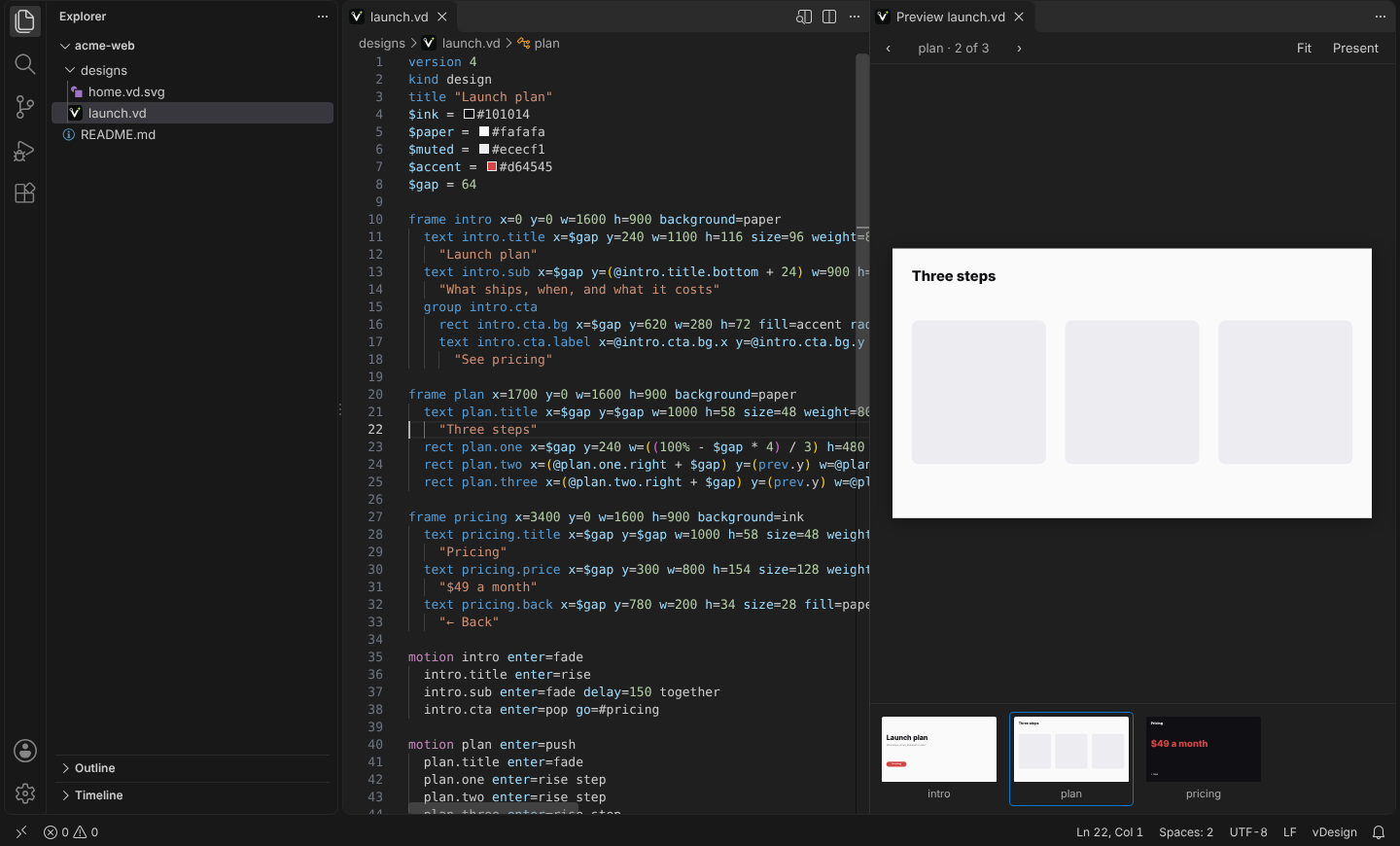
See your vDesign designs where you write code. Open a .vd file and the preview
shows every page beside the text, redrawn as you type. ```vd fences in your
Markdown are drawn in VS Code's own Markdown preview.
Designs are made in the vDesign app. This extension
views them. You can still change the text by hand, or ask your editor's
assistant to, and the preview follows.
What it does
Preview to the side: ⌘K V (Ctrl+K V) on a .vd, or the button at the
top right of the editor. Every page is in the strip along the bottom. Click
one to go there, and its frame line is revealed in the text. Move the
cursor into another page and the preview follows. Present plays the
design full-size; Escape stops.
.vd.svg files open straight into the preview. A .vd.svg is an SVG
exported from vDesign with "Keep the design inside": GitHub and any browser
show it as an image, and this extension shows it as the design.
Pages in the Outline view, the breadcrumbs and Go to Symbol (⌘⇧O).
Problems as you type, with the same messages the app gives: an unknown
property, a reference to a shape that is not there, text that overflows its
box.
Syntax colouring for .vd files, and for ```vd fences in Markdown.
```vd fences in the Markdown preview:
```vd page=pricing
version 4
kind design
frame pricing w=800 h=450 background=#fff
  …
```
page= picks one page. src=./designs/home.vd draws a file instead of the
fence's body.
Export Page as SVG… and Copy as Markdown Fence in the Command
Palette.
It works in VS Code, Cursor, Windsurf and VSCodium, and in vscode.dev and
github.dev: press . on a GitHub repository and .vd files preview with
nothing to install.
Editing with an assistant
The extension runs no agent and adds no tools. To have your editor's assistant
change a design well, point it at the format's reference:
https://getv.design/docs/llms-full.txt.
Privacy
No telemetry, and no network requests. The fonts and the renderer are files
inside the extension.
Settings
| Setting |
Default |
What it does |
vdesign.preview.fit |
page |
Fit the current page, or content to fit every page. |
vdesign.preview.background |
(empty) |
The colour behind the pages. Empty: the editor's own. |
Licence
Free to use, under the vDesign for VS Code Licence in LICENSE. It contains
@getv.design/embed 0.2.0, unmodified, under that package's own licence. The .vd format
is open: anyone may implement it (https://getv.design/docs/licence/).

