REST Client & API Tester
A fast API client inside VS Code that saves every request as a plain .http file you can commit. Build requests in a clean editor that follows your VS Code theme, or write them as text, and send either way. Collections, environments, full history, tests, request chaining and a collection runner are all included. There is no login, no cloud workspace and no sync server.
Why this one
- Your requests stay yours. Collections are
.http / .rest files in your repo. They diff and review like code, and your team gets them with git pull. The format works with the REST Client and JetBrains HTTP Client syntax, so files you already have open straight away.
- You can always look back. History keeps every request with its response. Your history, collections and files stay readable at any time.
- You get what text-only clients are missing: a GUI editor, tests, request chaining,
.env files, server-sent events and a collection runner with JUnit reports for CI.
Features
Request editor
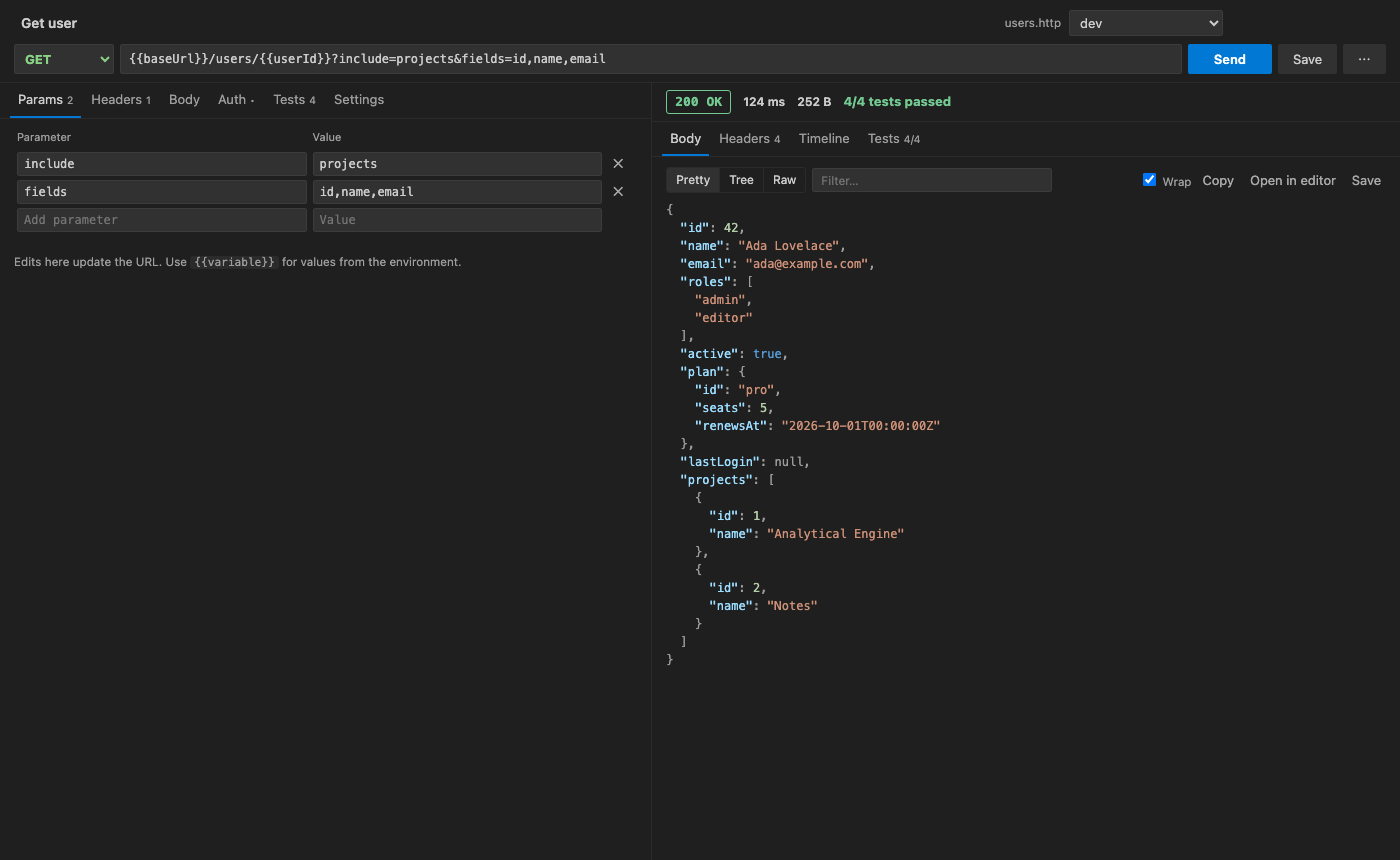
- Method, URL, query params (kept in sync with the URL), headers with suggestions, and auth (Bearer, Basic, API key in a header or the query).
- Body: JSON (format and validate,
{{variables}} allowed), text, XML, URL-encoded form, multipart with < ./file parts, GraphQL (query plus variables) and binary files.
- Paste a cURL command into the URL bar and it becomes a full request.
- Keyboard first:
Cmd/Ctrl+Enter sends, Esc cancels, Cmd/Ctrl+S saves to the .http file, Cmd/Ctrl+L focuses the URL.
Response viewer
- Pretty JSON and XML with syntax highlighting, a filter box, and wrap on or off.
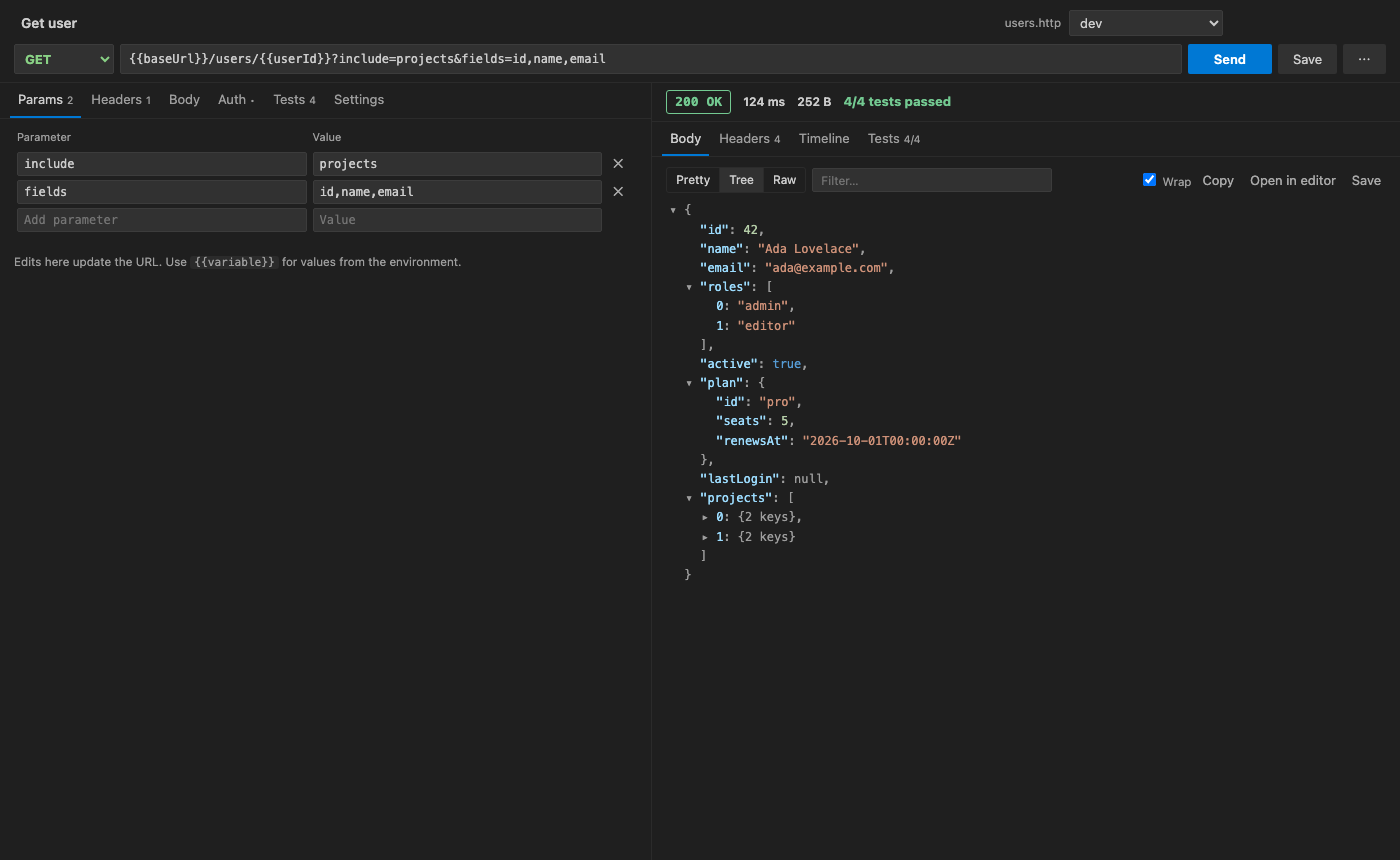
- JSON tree with collapsible nodes. Big arrays page in, and hovering a value gives Copy path (
$.data[0].id) and Assert (adds a test in one click).
- Raw body, image preview, save to file and open in an editor tab.
- Response headers, plus the request that was actually sent with every variable resolved.
- Timeline: DNS, TCP connect, TLS, time to first byte and download, plus any redirects.
- Server-sent events (
text/event-stream) stream into the pane live.
- A Send Request CodeLens above every request, plus Open in UI and Run All.
Cmd/Ctrl+Alt+R sends the request under the cursor.
- Syntax highlighting for
.http / .rest files.
- An activity bar view with Collections (every
.http file in the workspace), History (grouped by day) and Environments (click to switch).
@baseUrl = https://api.example.com

### Log in
# @name login
# @assert status == 200
# @assert $.token exists
POST {{baseUrl}}/auth/login
Content-Type: application/json

{ "email": "ada@example.com", "password": "{{$dotenv PASSWORD}}" }

### Current user
# @assert $.email == "ada@example.com"
GET {{baseUrl}}/me
Authorization: Bearer {{login.response.body.$.token}}
Environments and variables
- Put environments in
http-client.env.json: $shared plus local, dev, prod and so on. Put secrets in http-client.private.env.json and git-ignore it. Switch environments from the status bar, the sidebar or the request editor.
- File variables (
@name = value), .env values ({{$dotenv NAME}}) and process env ({{$processEnv NAME}}).
- System variables:
{{$guid}}, {{$randomInt 1 100}}, {{$timestamp}}, {{$datetime iso8601}}, {{$datetime "YYYY-MM-DD" -1 d}}.
- Request chaining:
{{login.response.body.$.token}} and {{login.response.headers.Location}}.
- Existing REST Client
rest-client.environmentVariables settings are read too.
Tests and the collection runner
- Write one test per line:
status == 200, duration < 500, header content-type contains json, $.items.length > 0, $.name matches ^A, $.id exists. They are saved as # @assert lines.
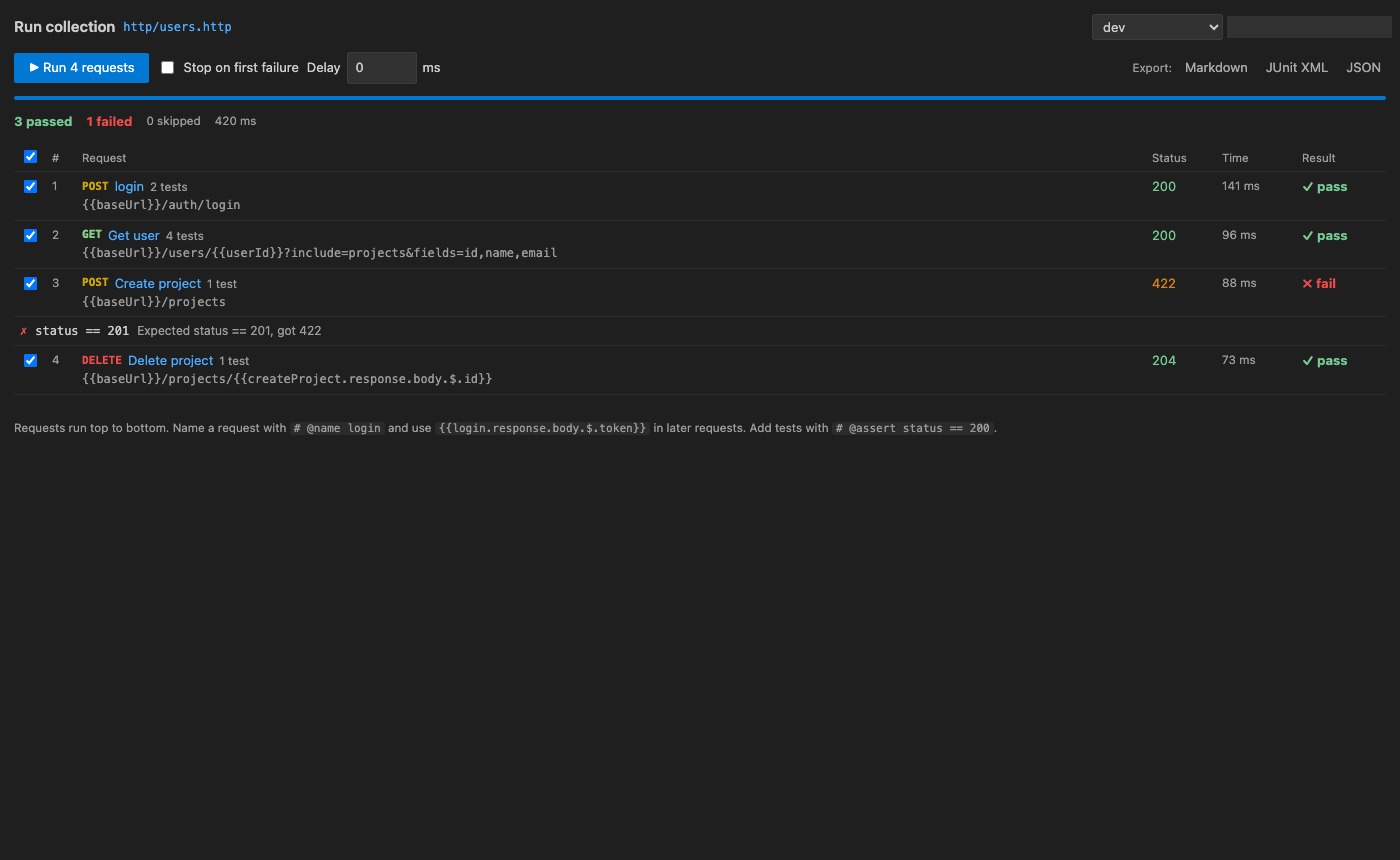
- Run a whole collection top to bottom, with chaining, stop-on-first-failure, a delay between requests, and live pass/fail.
- Export the run as Markdown, JUnit XML (for CI dashboards) or JSON.
Import and code generation
- Import: Postman v2 collections and environments, Insomnia v4 exports, Thunder Client collections and environments, and OpenAPI 3 / Swagger 2 (JSON). Each collection becomes a
.http file, and environments are merged into http-client.env.json.
- Generate code for cURL, JavaScript
fetch, Python requests, HTTPie, PowerShell and Go, with the active environment's variables filled in.
Everything else
- Cookie jar, redirects (per-request
# @no-redirect), gzip, deflate and brotli, timeouts (# @timeout 5000), and self-signed certificates (# @insecure or a setting).
- Works on macOS, Windows and Linux. The webviews use only your theme's colours, so light, dark and high-contrast themes all work.
Free trial and Unlimited
Every feature is included in the free trial. Only time you actively spend building and sending requests counts toward it, never idle time. When the trial ends, sending requests and running collections need Unlimited. It comes as a monthly or yearly subscription, or a one-time lifetime licence. Once the trial has ended, Go Unlimited in the status bar or in the editor shows the plans. Checkout is handled by Stripe in your browser, and Unlimited turns on as soon as the payment is confirmed. You don't need to reload.
Your collections, environments, history and past responses stay readable whether or not you buy Unlimited.
Already paid on another machine? Run REST Client: Restore Purchase or click "Already paid? Restore" on the plans screen.
Privacy
- Your requests go straight from VS Code to the servers you call. Nothing passes through us.
- Your requests and responses are never sent to us. If VS Code telemetry is turned on, the extension also sends two anonymous usage events (opened, and the Unlimited page shown) with the same random install id, and nothing else.
- The only calls the extension makes on its own are the trial and licence checks to
api-ext.viralinc.live. They send a random install ID, a hashed machine ID, the app ID and how many seconds of active use have passed. They never include your requests, URLs, headers, bodies or files.
- History is stored locally in VS Code's extension storage.
Commands
| Command |
Default key |
| REST Client: New Request |
Cmd/Ctrl+Alt+N |
REST Client: Send Request (at cursor in a .http file) |
Cmd/Ctrl+Alt+R |
| REST Client: Switch Environment |
Cmd/Ctrl+Alt+E |
| REST Client: Run Collection |
|
| REST Client: Import cURL |
|
| REST Client: Import Postman / Insomnia / Thunder Client / OpenAPI… |
|
| REST Client: Copy Request as cURL |
|
| REST Client: Edit Environments |
|
| REST Client: Go Unlimited / Restore Purchase |
|
Settings
| Setting |
Default |
|
restClient.timeoutMs |
30000 |
Request timeout |
restClient.followRedirects |
true |
Follow 3xx responses |
restClient.verifyTls |
true |
Verify TLS certificates |
restClient.rememberCookies |
true |
Cookie jar for the session |
restClient.historyLimit |
200 |
Entries kept in history |
restClient.collectionsFolder |
http |
Where new collections are created |
restClient.codeLens |
true |
Show "Send Request" in .http files |
Support
Questions, bugs or billing: ope@trysixth.com
| |

