React Refactor & Component Tree
Refactor React components in one click and see how your whole app fits together. Extract JSX to a new component (same file or a new file) with a TypeScript props interface inferred for you, extract a custom hook, rename a prop across every usage, wrap in memo / Suspense / ErrorBoundary, and switch between function and arrow components. A Component Tree of your workspace and your Next.js app router, "used in N places" above every component, a prop drilling trace, and an unused props and components finder.
Built on the TypeScript compiler, so tsconfig path aliases (@/components/...), barrel files (index.ts re-exports) and jsconfig.json projects resolve exactly like they do in your build. No AI, no account, nothing leaves your machine.
Features
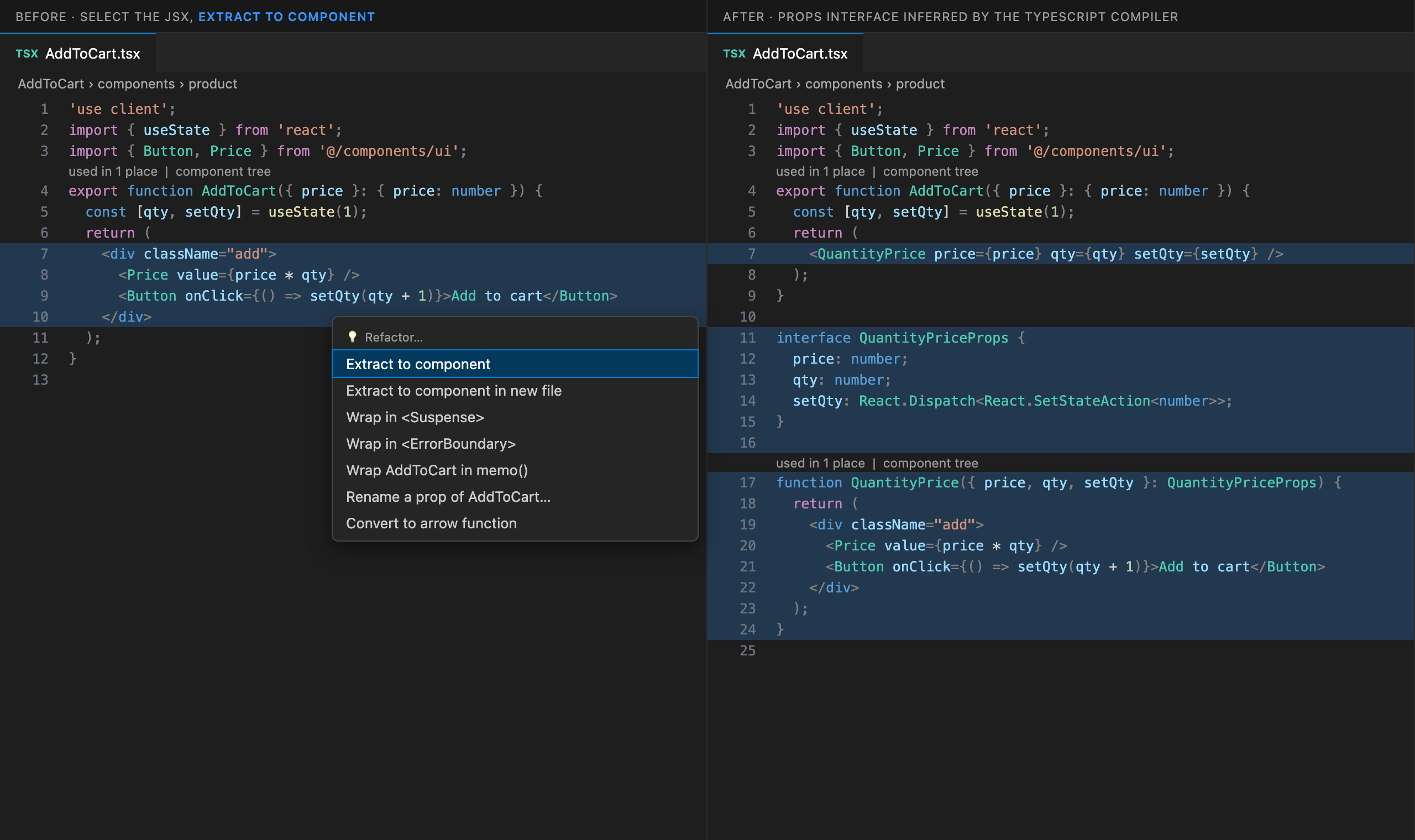
- Select some JSX (or just put the cursor in an element), press the lightbulb (
Ctrl/Cmd+.) and pick Extract to component.
- Every value the JSX uses from the component becomes a prop, and the props interface is typed by the compiler:
setQty: React.Dispatch<React.SetStateAction<number>>, user: User, items: string[].
- Several sibling elements become a fragment. An element returned from
.map() keeps its key at the call site. In class components, this.props.x and this.state.x become props.
- Extract to component in new file creates
Name.tsx next to the current file, copies only the imports it needs (aliases and barrels included), exports and imports helpers it uses from the old file, removes imports the old file no longer needs, and keeps 'use client'.
- The new component matches your style: function components stay functions, arrow components stay arrows.
.jsx files get no types.
- Select the
useState / useEffect / handler statements and pick Extract to custom hook.
- Values the component still uses are returned (
const { value, inc } = useCounter(step)), values the code reads become parameters, typed by the compiler.
- Refuses edits that would change behaviour: a
return of the component, writes to outside variables, values reassigned later.
Rename a prop across all usages
- Rename Prop Across All Usages renames the prop in the destructuring and every local use, in the props interface or type, in
props.x and this.props.x, and in every JSX place that renders the component, across files, through aliases and barrels, in .tsx and .jsx.
- One undoable edit, with a summary of how many places and files changed.
Wrap and convert
- Wrap component in memo(): works on
function declarations, export default function and arrow components, and adds the memo import (or uses React.memo).
- Wrap in <Suspense> and Wrap in <ErrorBoundary>: uses an
ErrorBoundary you already have (and imports it), or adds a small typed one to the file.
- Convert function to arrow function and back.
React.FC<Props> moves onto the parameter, memo(() => …) gets a named function, and it refuses conversions that would break this, arguments or hoisting.
Component Tree
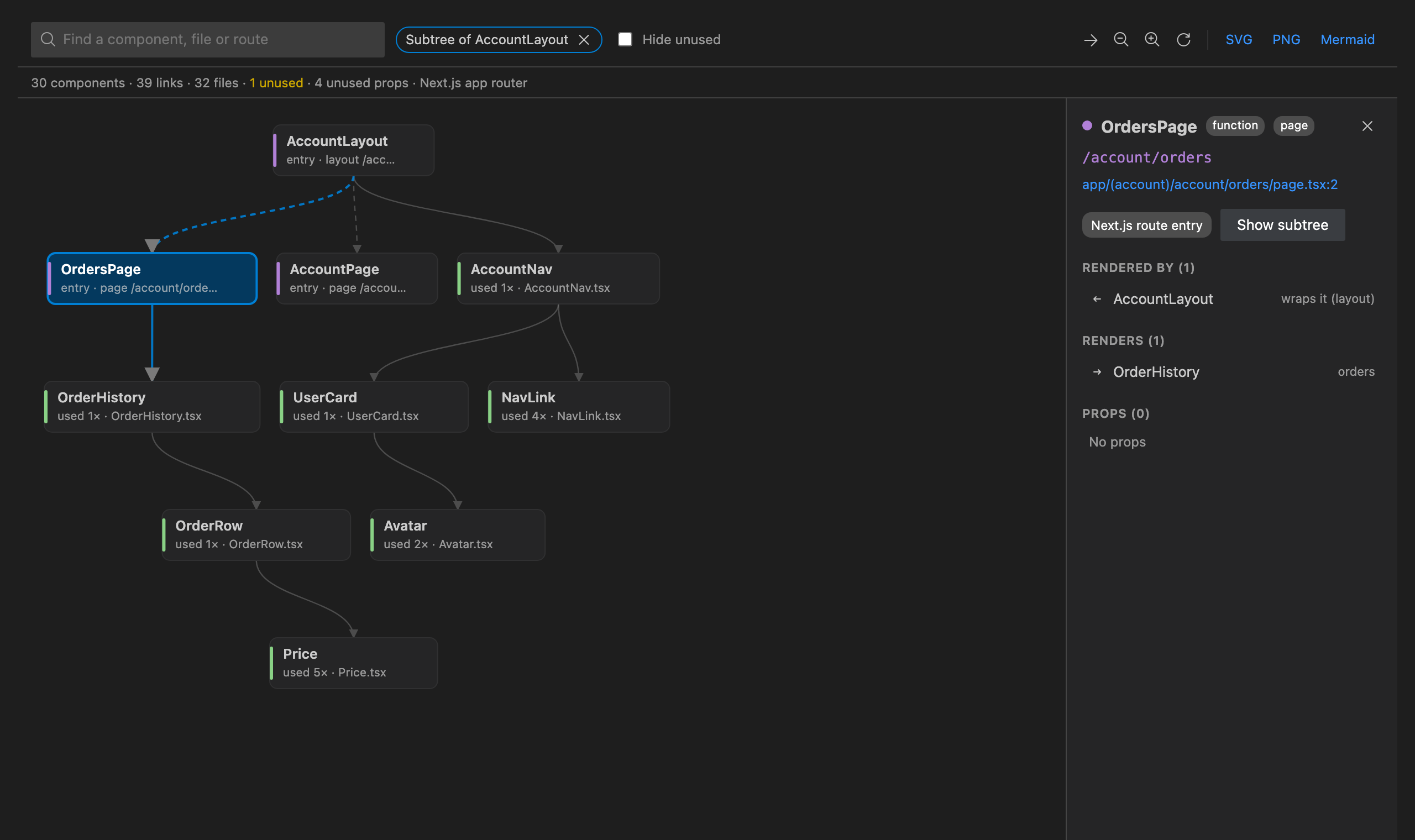
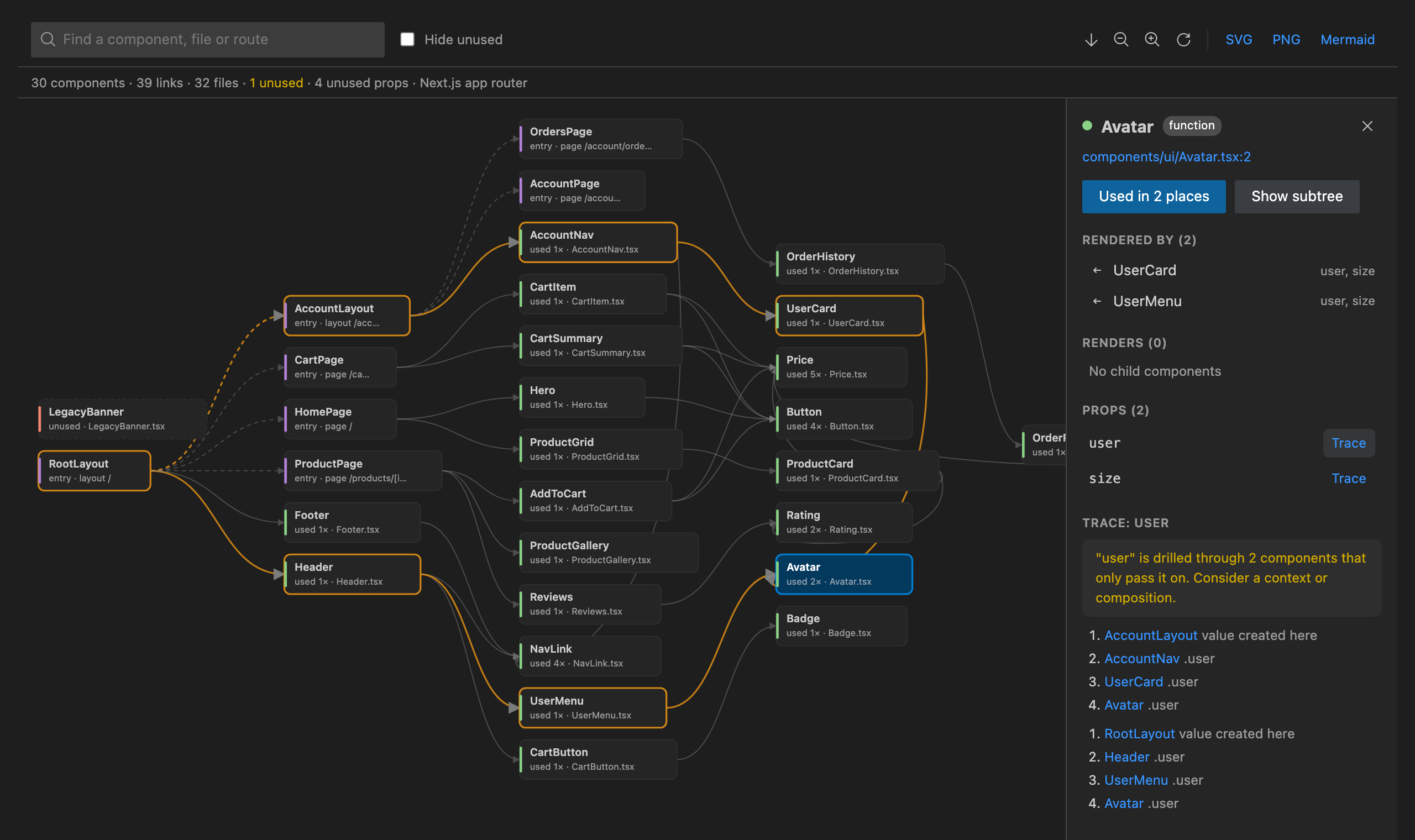
- Show Component Tree draws every component in the workspace and which component renders which, left to right or top to bottom, with the props passed along each link.
- Understands the Next.js app router:
page, layout, template, loading, error and not-found files are route entries, (groups) and @slots are dropped from routes, and each layout wraps the pages below it. The pages router works too.
- Search by component, file or route. Click a component for its file, its parents and children, its props and where it is used. Show subtree to focus on one part of the app. Double-click to open the file.
- Export the tree as SVG, PNG or Mermaid, with your theme colours, for docs, PRs and onboarding.
"Used in N places", prop drilling and unused code
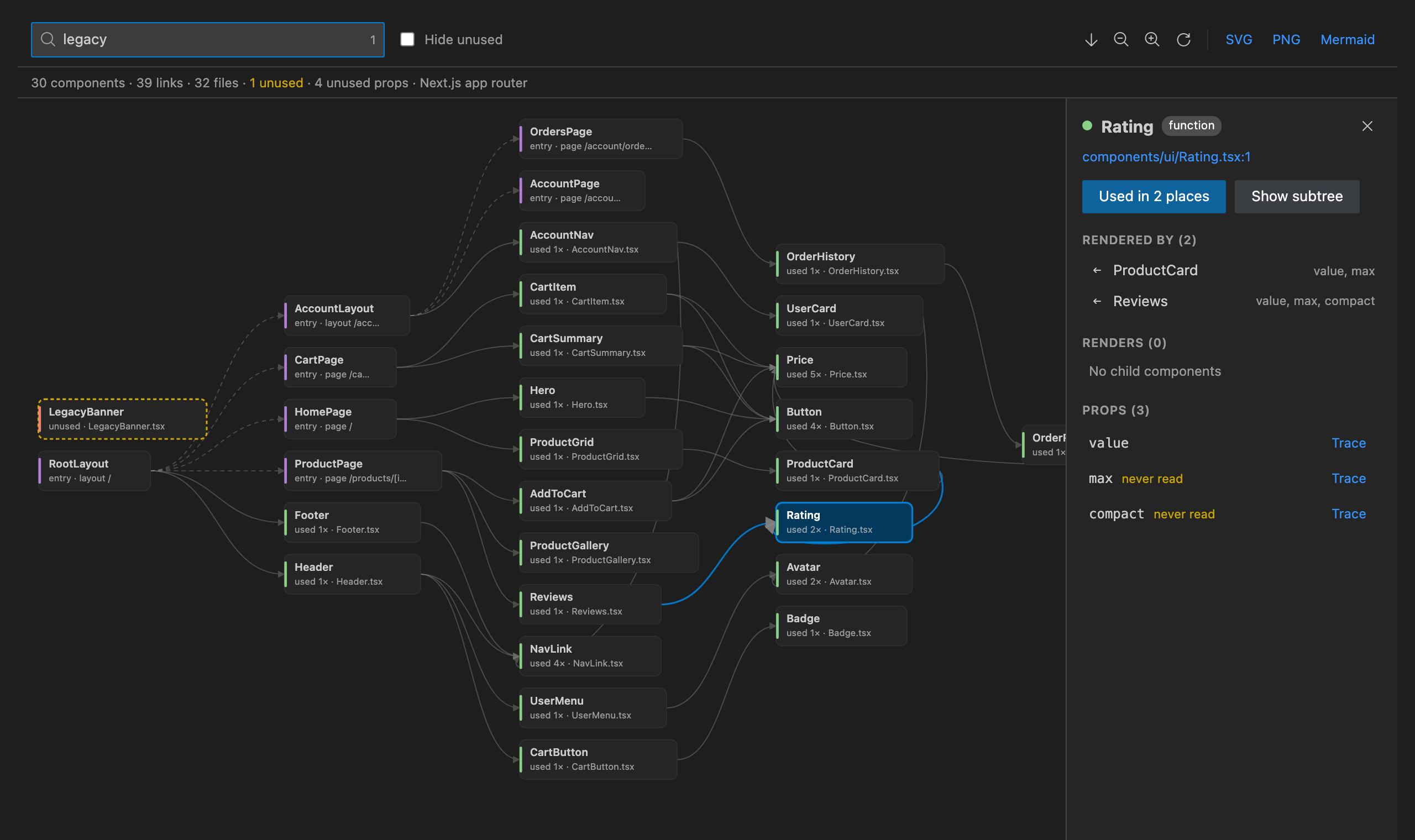
- A CodeLens above every component: used in N places (click for the list), N unused props, and component tree.
- Trace Prop Drilling: pick a prop and see every path it travels, from the component that creates the value down to yours, with a warning when it is passed through two or more components that only hand it on.
- Find Unused Props & Components: components nothing renders or references (pages and layouts are never flagged), props that are declared but never read, and props that no caller ever passes.
How to use it
- Lightbulb: select JSX or statements, or put the cursor in a component, and press
Ctrl/Cmd+..
- Right-click in a
.tsx, .jsx, .ts or .js file → React Refactor.
- Command Palette: type React Refactor.
- Sidebar: click the React icon in the Activity Bar for the tree, every refactor, your recent refactors and the settings.
Commands
- Show Component Tree, Refresh Component Tree, Export Component Tree (SVG, PNG, Mermaid)
- Extract to Component, Extract to Component in New File, Extract to Custom Hook
- Rename Prop Across All Usages, Trace Prop Drilling, Show Where This Component Is Used
- Wrap Component in memo(), Wrap in <Suspense>, Wrap in <ErrorBoundary>
- Convert Function to Arrow Function, Convert Arrow Function to Function Declaration
- Find Unused Props & Components, Restore Purchase
Settings
| Setting |
Default |
What it does |
reactRefactor.codeLens |
true |
Show "used in N places" and unused props above components |
reactRefactor.treeLayout |
LR |
Draw the tree left to right (LR) or top to bottom (TB) |
reactRefactor.maxFiles |
5000 |
Most source files read per tsconfig/jsconfig project |
Free trial and Unlimited
React Refactor & Component Tree starts with a free trial that includes every feature. When it ends, choose an Unlimited plan to keep using it: Unlimited Monthly, Unlimited Yearly or Unlimited Lifetime (pay once). Stripe handles the payment securely in your browser, and Unlimited turns on here by itself, with no restart.
Already paid on another machine? Run React Refactor: Restore Purchase and enter the email you paid with. Subscribers can open Manage subscription from the plans screen.
Privacy
- Your code is read only on your machine (or inside your remote workspace), by the TypeScript compiler bundled with the extension. Nothing from your code is ever sent anywhere.
- The only network calls are the licence checks for the free trial and Unlimited. They send a random install id, a hashed machine id and how many seconds of active use went by, to
api-ext.viralinc.live. If VS Code telemetry is turned on, the extension also sends two anonymous usage events (opened, and the Unlimited page shown) with the same random install id, and nothing else.
Notes
- Works with React, Next.js, Remix, Gatsby, Vite, Create React App and React Native projects in TypeScript or JavaScript. Every
tsconfig.json / jsconfig.json in the folder (including Vite-style project references) is its own project.
- Refactors edit unsaved files too and are one undoable step. New files are saved straight away.
- Components passed around instead of rendered (
element={Home}, lazy(() => import(...)), stories) count as used.
Support
Email ope@trysixth.com. We read everything.
| |

