Kubernetes Dashboard for VS Code
A fast, Lens-style Kubernetes dashboard inside VS Code. See pods, deployments, services, nodes, events and Helm releases across all your clusters. Tail merged logs from many pods at once, open a shell, port-forward with tunnels that reconnect by themselves, and watch CPU and memory live. You never leave the editor.
It uses the kubectl you already have, so it works with every cluster kubectl can reach: EKS, GKE, AKS, OpenShift, Rancher, minikube, kind, k3s/k3d, MicroK8s and Docker Desktop. That includes SSO and exec auth plugins.
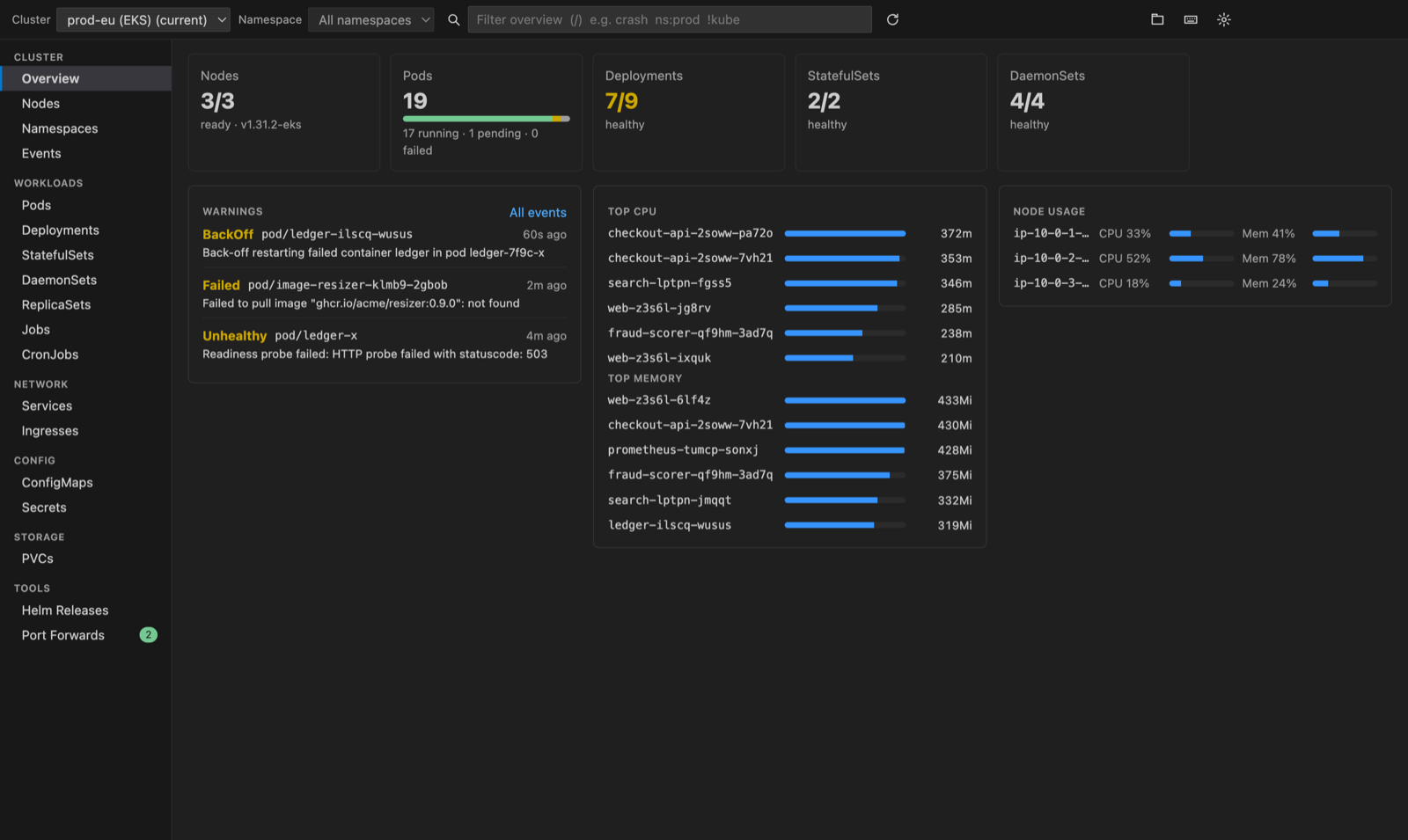
Features
Every workload, one keystroke away
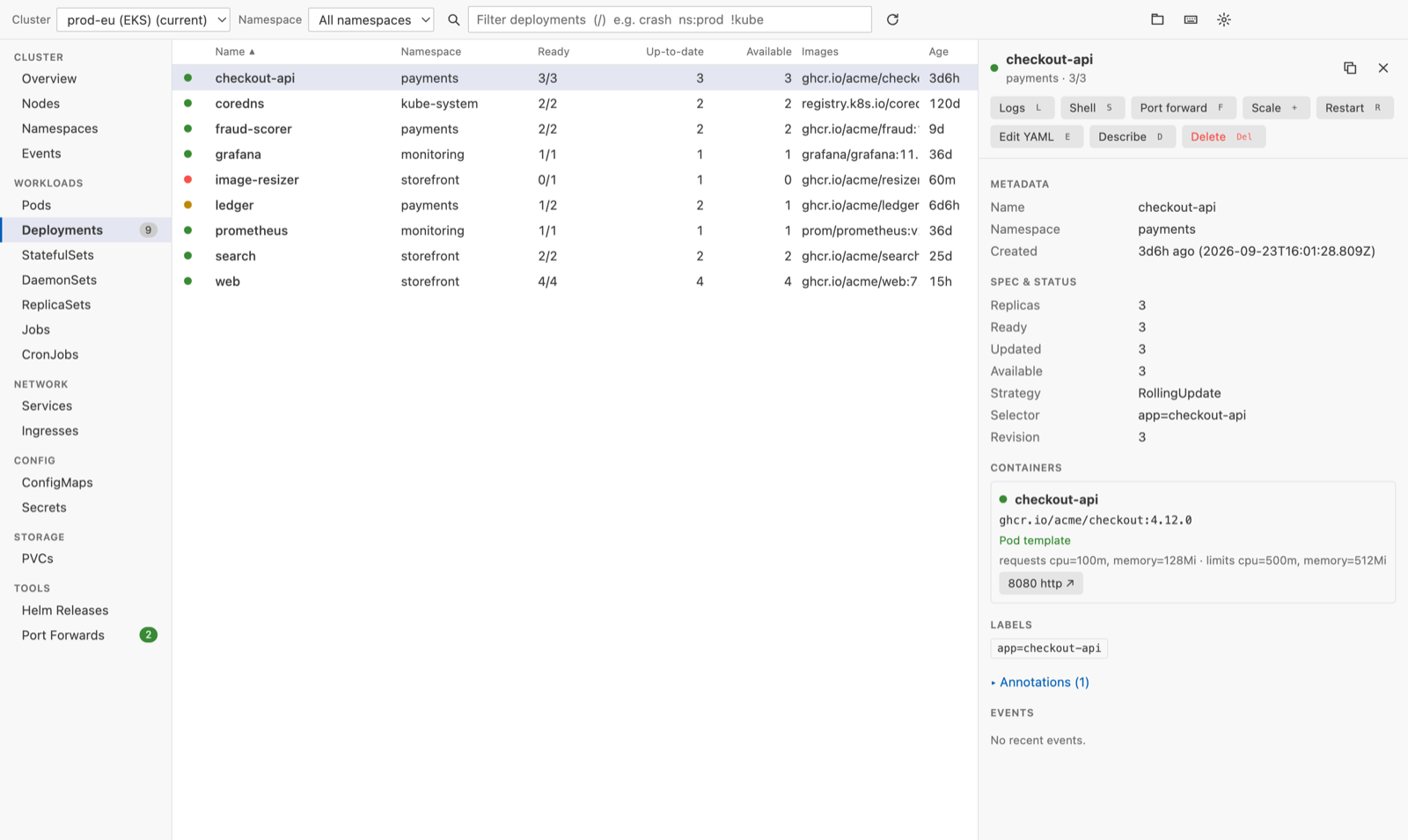
- Pods, Deployments, StatefulSets, DaemonSets, ReplicaSets, Jobs, CronJobs, Services, Ingresses, ConfigMaps, Secrets, PVCs, Nodes, Namespaces and Events. These are fast virtualized tables that stay smooth with thousands of pods.
- kubectl-accurate status.
CrashLoopBackOff, ImagePullBackOff, Init:0/1, Terminating and OOMKilled are colored by health, with ready counts, restarts, node, IP and age.
- Smart filter. Type
crash, ns:payments, status:pending or !kube-system. Click any column header to sort.
- Live refresh while the tab is visible. The dashboard stays quiet in the background.
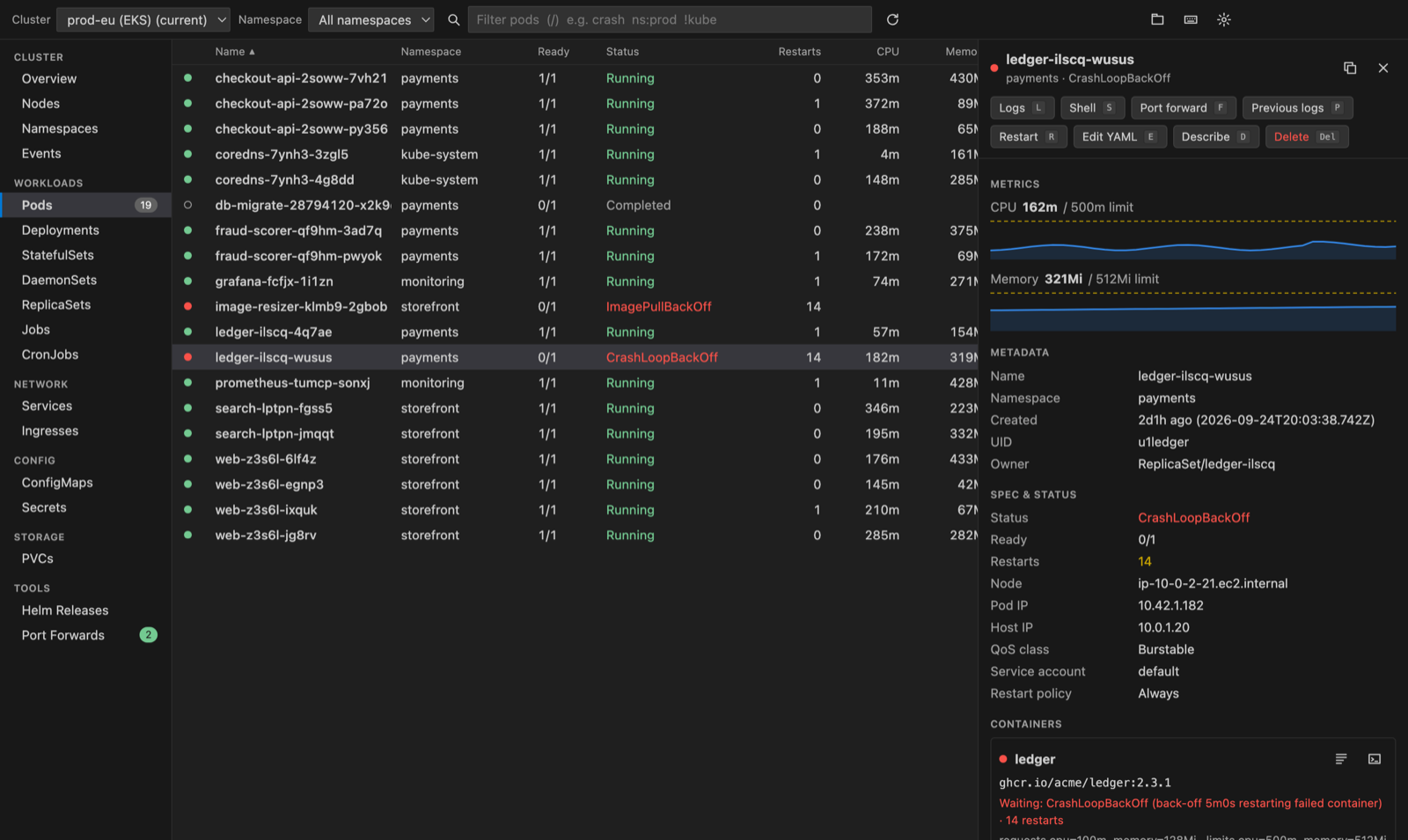
Details that answer "why is it broken?"
- Status, conditions, containers (image, state, restarts, requests and limits, ports) and the object's own events, newest first.
- CPU and memory sparklines per pod, drawn against the container limits (needs metrics-server).
- ConfigMap values inline. Secret values stay hidden until you reveal or copy one key, and the value is decoded for you.
- Labels (click to copy) and annotations.
Actions
| Key |
Action |
L |
Logs (a pod, or every pod of a deployment merged) |
S |
Shell into a container (opens a VS Code terminal) |
F |
Port forward |
R |
Restart a pod, or rollout-restart a workload |
+ |
Scale |
E |
Edit the YAML in a real editor, then Apply to Cluster from the editor title |
D |
Describe |
T / U |
Run a CronJob now, or suspend and resume it |
C |
Cordon or uncordon a node |
Del |
Delete (always asks first) |
/ ↑↓ j k Enter Esc [ ] ? |
Filter, move, details, close, switch kind, show help |
Merged live logs (a stern-style view built in)
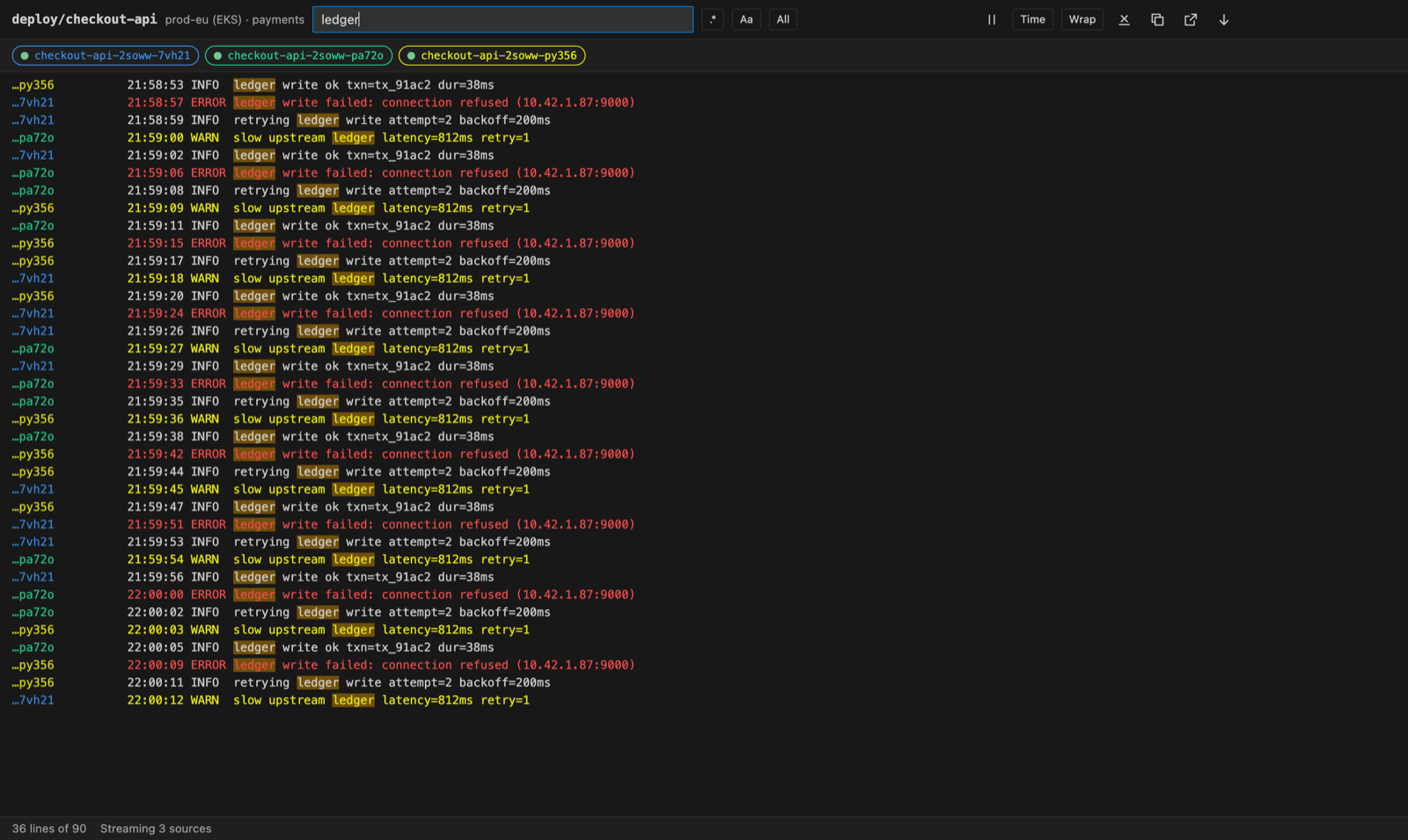
- Stream one pod or every pod behind a deployment, statefulset, daemonset or job in one timeline, ordered by timestamp.
- New pods join automatically during rollouts and scale-ups.
- Filter by text or regex, match case, and choose between showing only matches or highlighting them. Toggle pods on and off, show timestamps, wrap lines, pause and resume, view the previous (crashed) container, and copy, open in the editor or save to a file.
- Errors and warnings are colored. ANSI escape codes are stripped out.
Port forwards that stay up
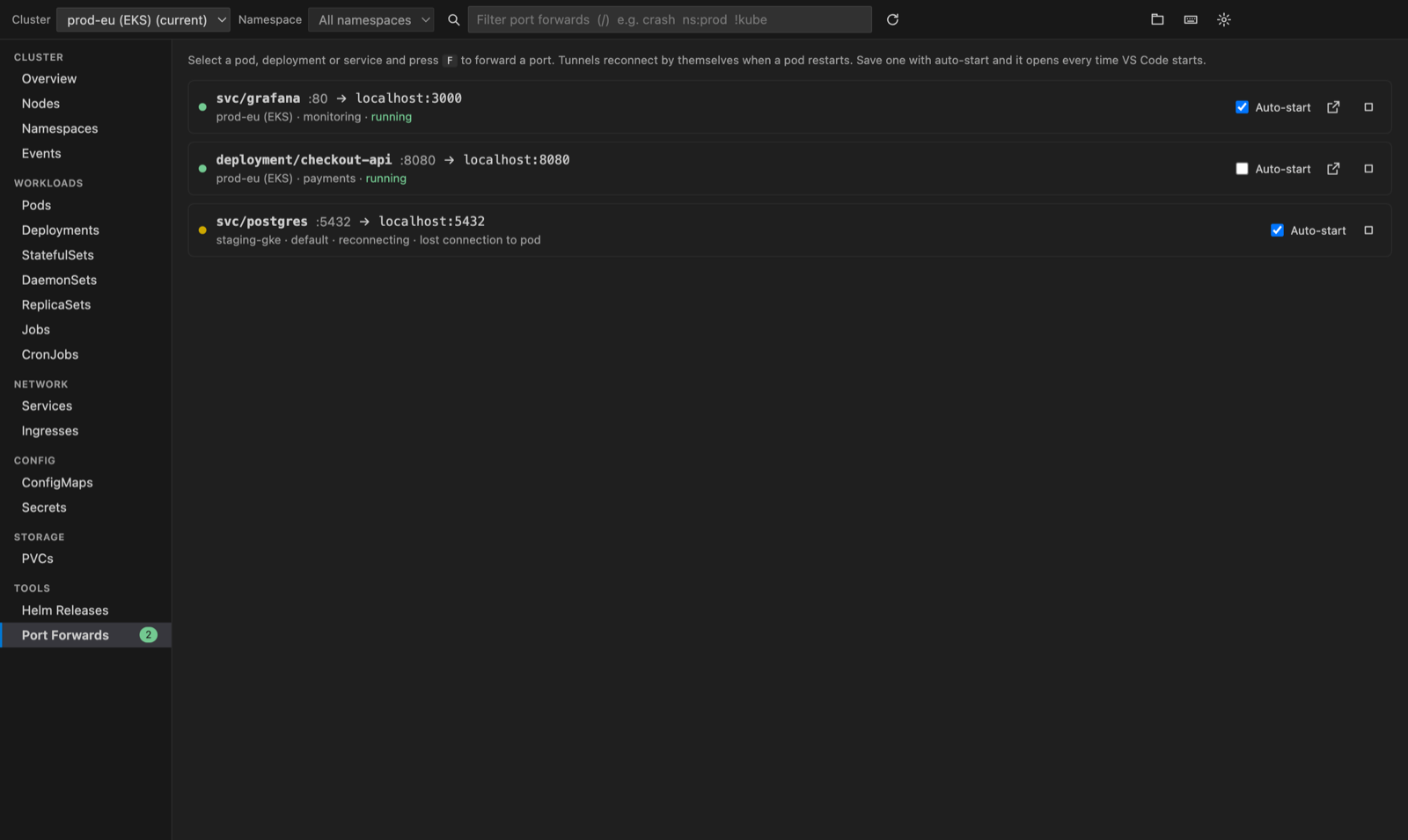
- Forward pods, services, deployments and statefulsets. Pick the port from the container spec. The local port can be anything, or "auto".
- Tunnels reconnect by themselves when a pod restarts or the laptop wakes from sleep.
- Save a forward with auto-start, and it opens every time VS Code starts. Manage forwards from the dashboard or from the Port Forwards view in the activity bar, with one-click "Open in browser".
Multi-cluster
- Switch cluster context from the header, or open another cluster in a new tab to compare them side by side. Every command names its
--context, so nothing changes your current kubectl context unless you ask it to.
- The Clusters view in the activity bar lists every context. "Switch kubectl Context" is there when you do want to change it.
Helm releases
- Releases across namespaces with status, chart and app version. View values, the manifest and notes, see the revision history, roll back to an earlier revision, or uninstall. Needs the
helm CLI.
Looks native
- Built with React and styled only with your VS Code theme colors. Light, dark and high-contrast themes all work.
Requirements
kubectl on your PATH, or set kubernetesDashboard.kubectlPath.- Optional: metrics-server in the cluster for CPU and memory. Optional:
helm for Helm releases.
- Works on macOS, Windows and Linux.
Settings
| Setting |
Default |
|
kubernetesDashboard.kubectlPath |
kubectl |
Path to kubectl |
kubernetesDashboard.helmPath |
helm |
Path to helm |
kubernetesDashboard.kubeconfig |
(empty) |
Kubeconfig file(s); empty uses KUBECONFIG or ~/.kube/config |
kubernetesDashboard.refreshSeconds |
5 |
Refresh interval of an open dashboard |
kubernetesDashboard.metrics |
true |
CPU and memory from metrics-server |
kubernetesDashboard.logTailLines |
300 |
Lines loaded per container when logs open |
kubernetesDashboard.logMaxLines |
50000 |
Lines kept in a logs tab |
kubernetesDashboard.autoStartPortForwards |
true |
Start saved auto-start forwards with VS Code |
Open the dashboard with Kubernetes: Open Dashboard (Cmd+Alt+K / Ctrl+Alt+K) or from the Kubernetes icon in the activity bar.
Free trial and Unlimited
Kubernetes Dashboard starts with a free trial that includes every feature. The trial counts only the time you actively use the extension, not the time VS Code sits open. When the trial ends, choose Unlimited: Monthly, Yearly or a one-time Lifetime licence. The in-app Go Unlimited screen shows the current prices. Checkout is handled securely by Stripe in your browser, and Unlimited turns on right away without a reload. Already paid on another machine? Use Already paid? Restore.
Privacy
- Your cluster data never leaves your computer. The extension runs your local
kubectl and helm, and talks to nothing else about your clusters.
- No cluster data leaves your machine. The network calls the extension makes itself are to the licence server (
api-ext.viralinc.live), to check the trial or licence status and to start checkout, restore or manage a subscription. Those calls carry a random install id and a hashed machine id, never cluster data. If VS Code telemetry is turned on, the extension also sends two anonymous usage events (opened, and the Unlimited page shown) with the same random install id, and nothing else.
Support
Questions or problems? Email ope@trysixth.com.
Kubernetes is a registered trademark of The Linux Foundation. This extension is not affiliated with or endorsed by The Linux Foundation, Lens, k9s or Microsoft.
| |

