i18n Editor & Translation Manager
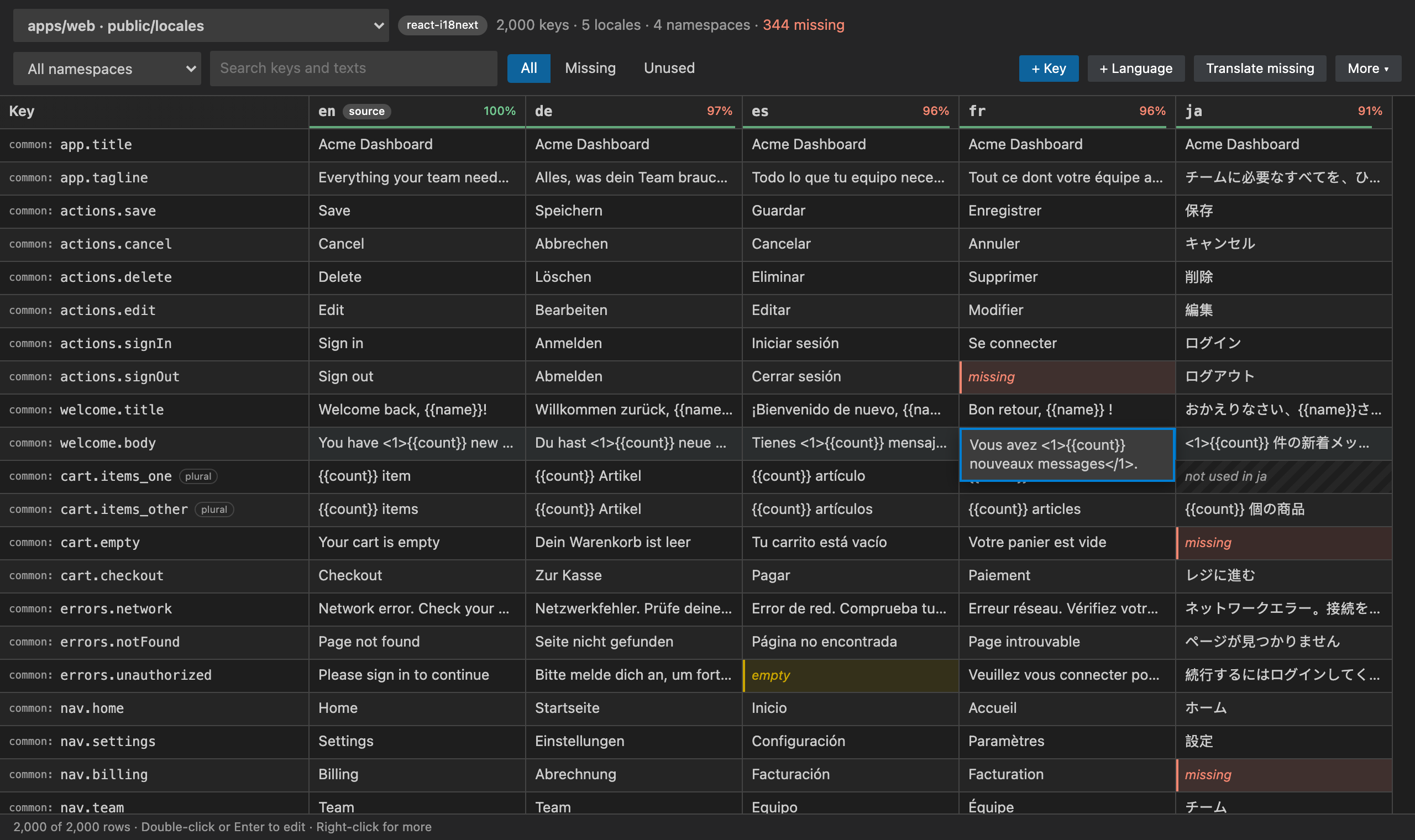
Edit every translation of your app in one spreadsheet inside VS Code: one row per key, one column per language, missing texts highlighted in red. See the translation inline and on hover next to every t('key'), jump to the key with F12, get warnings for missing keys, find unused keys, extract hard-coded strings to keys in one click, hand translators an Excel / CSV file and import it back, and bulk-translate missing texts with your own DeepL or Google key.
Works with react-i18next, i18next, next-intl, react-intl, vue-i18n, Expo / React Native and Flutter ARB. JSON and YAML locale files (YAML comments are kept), namespaces, nested keys, i18next v4 plurals (_one, _other, …), keyPrefix and monorepos. Locale folders are found automatically.
No account, no AI, no cloud sync. Your translation files stay on your machine.
Features
Translations right in your code
- Inline preview: the text appears next to every
t('auth.signIn'), $t('…'), <Trans i18nKey="…">, useTranslations('Home') call, in the language you choose.
- Hover any key to see it in every language, with missing ones flagged. Click a language to open its file at that key.
- Go to key (
F12 / Ctrl+Click) opens the locale file right on the line, for every language. Go to Translation Key… searches all keys and texts.
- Autocomplete keys inside
t('…'), with your keyPrefix and namespace already applied.
- Missing-key warnings: a key used in code but not in your locale files is underlined, with a quick fix to add it. Keys that exist but are missing in some languages are marked too.
Spreadsheet editor
- Rows are keys, columns are languages, with % translated per language in the header.
- Missing cells are red, empty ones yellow, and plural forms a language doesn't use (Japanese has no
_one) are greyed out instead of nagging you.
- Double-click,
Enter or just type to edit. Enter saves and moves down, Tab moves right. Changes are written to the files straight away.
- Add, rename and delete keys across every language at once (plural forms move together). Add a language and its files are created in the right folder.
- Search keys and texts, filter by namespace, show only missing. Scrolls smoothly through tens of thousands of keys.
Missing translations
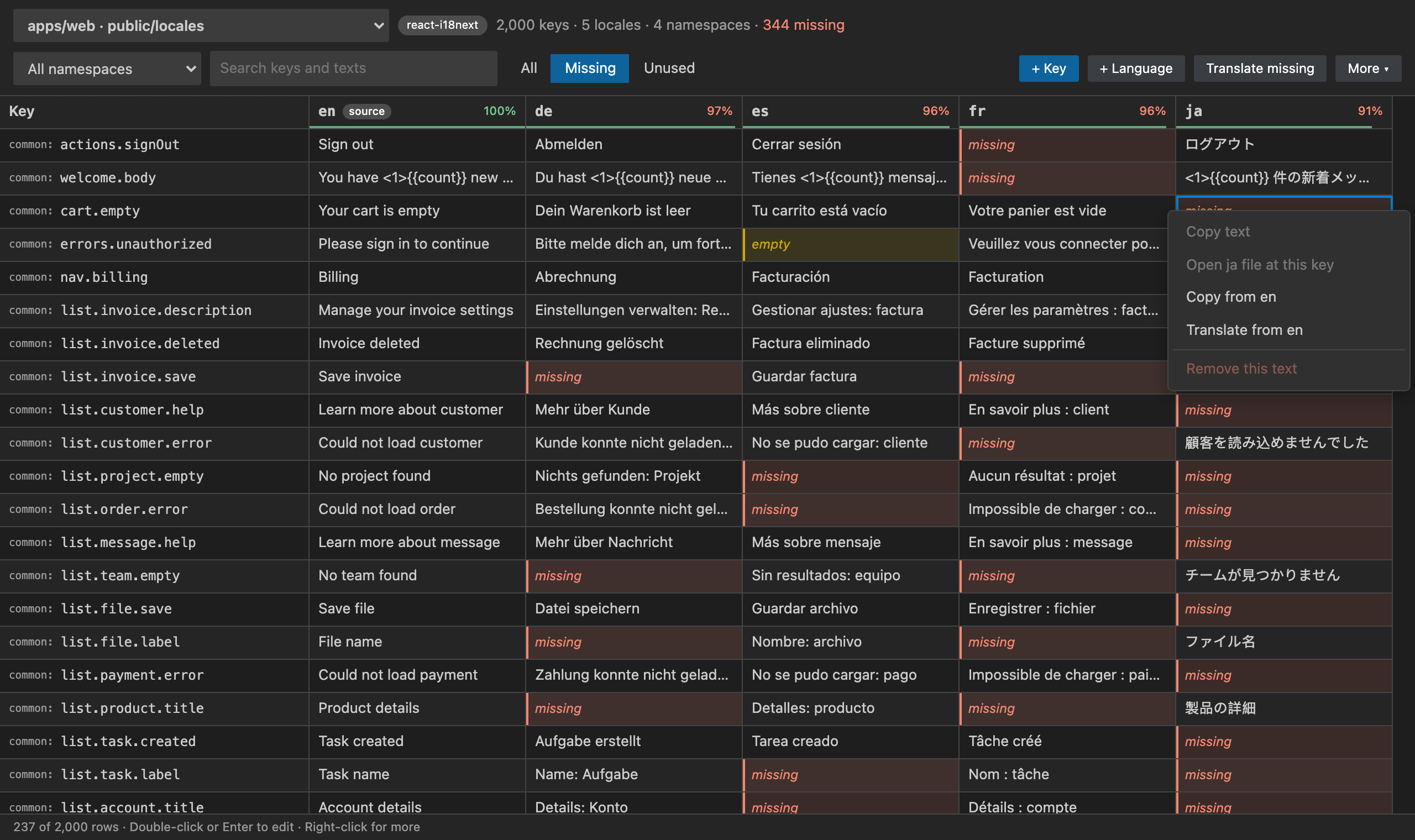
- One click shows only the keys that still need work.
- Right-click a cell to copy from the source language, translate it, open the file at that key, or remove the text.
- i18next v4 plurals done right: the plural forms each language needs come from the official CLDR rules, so Russian asks for
_few and _many, Japanese only for _other.
- Missing Translations Report: a Markdown summary per language, ready for a pull request or CI.
Unused keys
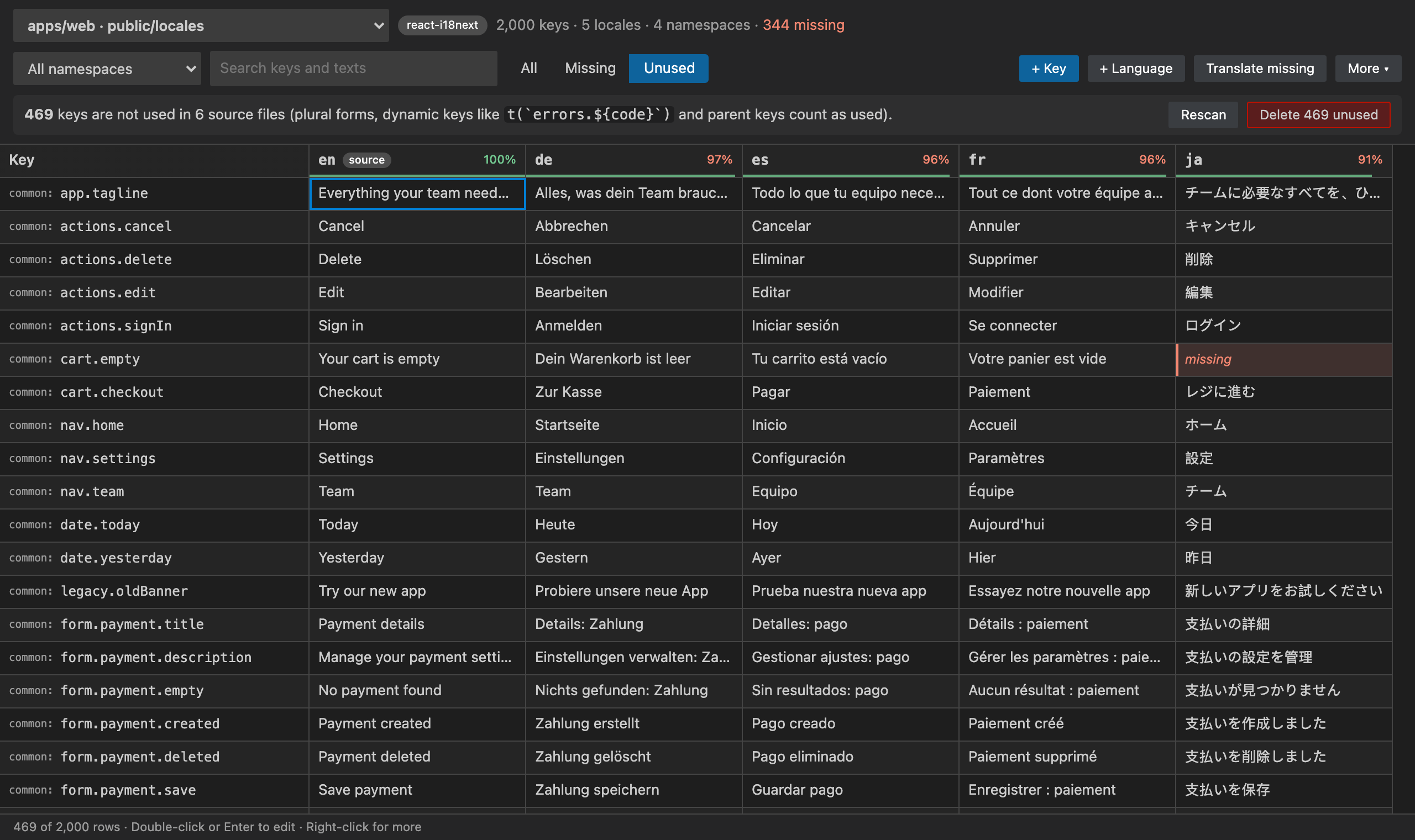
- Scans your code and lists every key nothing uses, then deletes them from every language in one click.
- Smart about what counts as used: plural bases (
t('item', { count }) uses item_one and item_other), dynamic keys (t(`errors.${code}`) keeps every errors.* key) and parent keys used as objects.
- Put the cursor on a hard-coded JSX text, a JSX attribute (
placeholder="Search") or a string, press the light bulb (or Cmd/Ctrl+Alt+E), and pick Extract to a translation key.
- A readable key is suggested (
loginForm.forgotPassword), the text goes to your source language and the code becomes {t('loginForm.forgotPassword')}. The file's namespace and keyPrefix are respected.
Excel / CSV round-trip for translators
- Export all keys, or only the missing ones, to Excel (.xlsx) or CSV (UTF-8, opens correctly in Excel).
- Translators fill in the sheet; import it back and only the changed cells are written. Blank cells never wipe existing translations.
Bulk machine translation with your own key
- Fill every missing text in one go with DeepL (free or Pro key) or Google Cloud Translation.
- Placeholders such as
{{name}}, {count}, %s, <1>…</1> and HTML tags come back untouched.
- Your API key is stored in VS Code Secret Storage on your machine and is only ever sent to DeepL or Google. You pay them directly, at their prices.
Monorepos, namespaces and every common setup
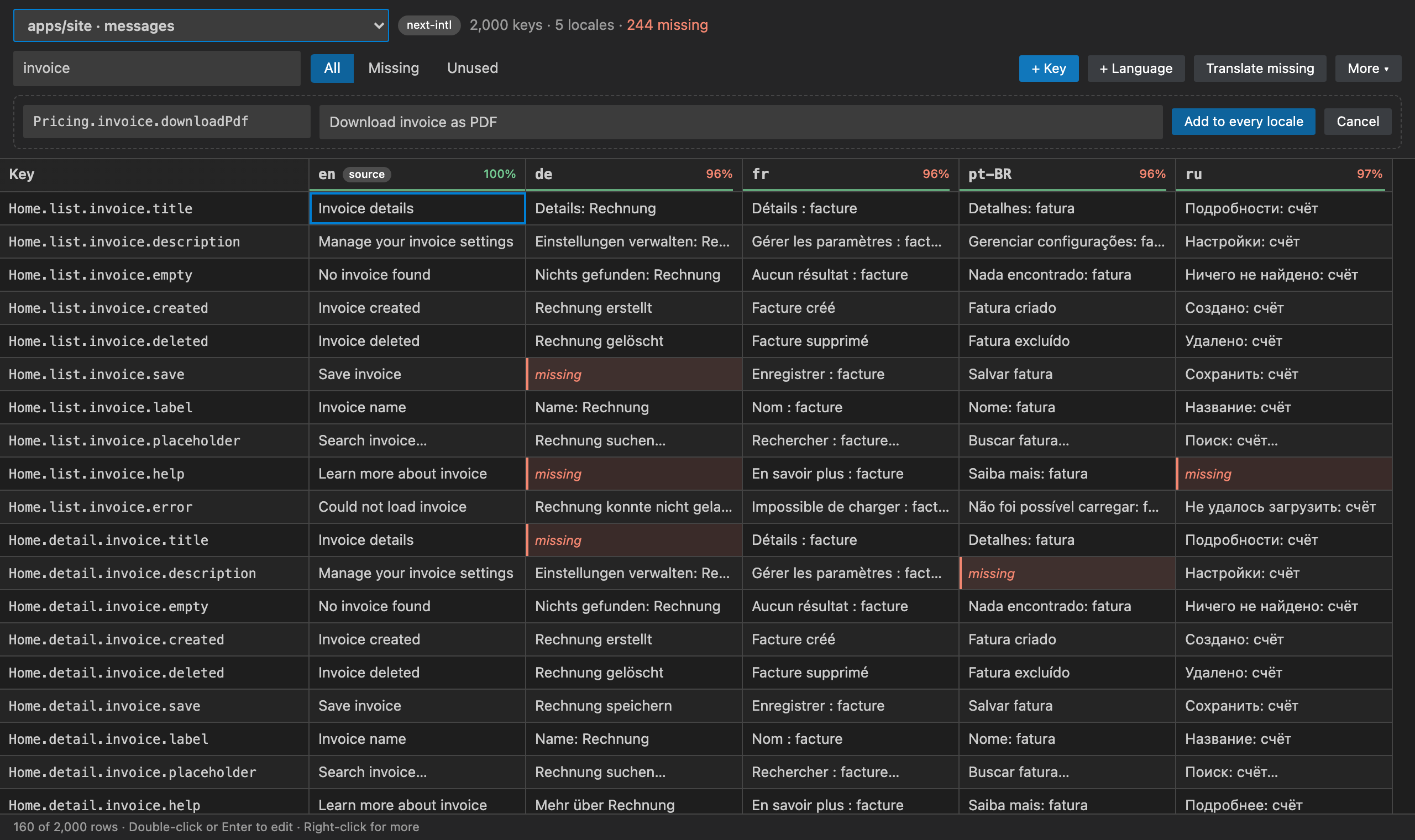
- Finds every locale folder in the workspace:
public/locales/<lang>/<namespace>.json (i18next), messages/<lang>.json (next-intl), locales/<lang>.yml, src/i18n/<lang>.json, lib/l10n/app_<lang>.arb (Flutter), in every package of a monorepo. Each source file uses the translations of its own package.
- Nested and flat keys (
"app.header.title": "…" react-intl style), JSON key order and indentation kept, YAML comments kept, ARB @metadata kept.
- Namespaces:
t('common:save'), t('save', { ns: 'common' }), useTranslation(['common', 'auth']), withTranslation('ns'), getFixedT(lng, ns, prefix).
- next-intl:
useTranslations('Home'), await getTranslations({ namespace: 'Home' }), t.rich(…).
- react-intl:
<FormattedMessage id>, intl.formatMessage({ id }), defineMessages. vue-i18n: $t, useI18n, v-t, <i18n-t keypath>.
Commands
Open the Command Palette and type i18n:
- Open Translation Editor, Show Missing Translations, Find Unused Translation Keys
- Translate Missing Texts (DeepL / Google), Set Translation API Key, Remove Translation API Keys
- Export Translations to Excel / CSV, Import Translations from Excel / CSV, Missing Translations Report
- Extract Text to Translation Key, Go to Translation Key…, Rescan Locale Folders
- Restore Purchase
Click the translate icon in the Activity Bar: open the editor, show missing translations, find unused keys, translate, export and import, your translation folders with their missing counts, and the most-used settings.
Settings
| Setting |
Default |
What it does |
i18nEditor.localesPaths |
[] |
Locale folders to use. Empty = found automatically |
i18nEditor.sourceLocale |
"" |
The language you write first (en when present) |
i18nEditor.displayLocale |
"" |
Language shown inline in code (the source language by default) |
i18nEditor.defaultNamespace |
"" |
i18next default namespace (translation, then common) |
i18nEditor.keySeparator / namespaceSeparator |
. / : |
Key and namespace separators |
i18nEditor.inlinePreview |
true |
Show translations inline next to keys |
i18nEditor.diagnostics |
true |
Warn about keys missing from the locale files |
i18nEditor.missingLocaleDiagnostics |
true |
Also mark keys missing in some languages |
i18nEditor.keyStyle |
camelCase |
Style of suggested keys (camelCase, snake_case, kebab-case) |
i18nEditor.keyScope |
component |
Prefix suggested keys with the component name |
i18nEditor.translationProvider |
deepl |
deepl or google |
Unlimited
Choose an Unlimited plan to keep every feature: Unlimited Monthly, Unlimited Yearly or Unlimited Lifetime (pay once). Stripe handles the payment securely in your browser, and Unlimited turns on here by itself, with no restart.
Already paid on another machine? Run i18n: Restore Purchase and enter the email you paid with.
Privacy
- Your locale files and code are read only on your machine (or inside your remote workspace).
- Machine translation sends the texts you choose to translate to DeepL or Google, with your own API key, and nowhere else.
- The only other network calls are the licence checks. They send a random install id, a hashed machine id and how many seconds of active use went by, to
api-ext.viralinc.live. If VS Code telemetry is turned on, the extension also sends two anonymous usage events (opened, and the Unlimited page shown) with the same random install id, and nothing else.
Notes
- Keys are found with fast pattern matching, not a full type checker: keys built at runtime from variables can't be checked (they are never reported as missing, and keep their prefix "used").
- TypeScript or JavaScript locale files (
export default { … }) are not edited; use JSON or YAML files.
Support
Email ope@trysixth.com. We read everything.
| |

