Import Cost & Bundle Size
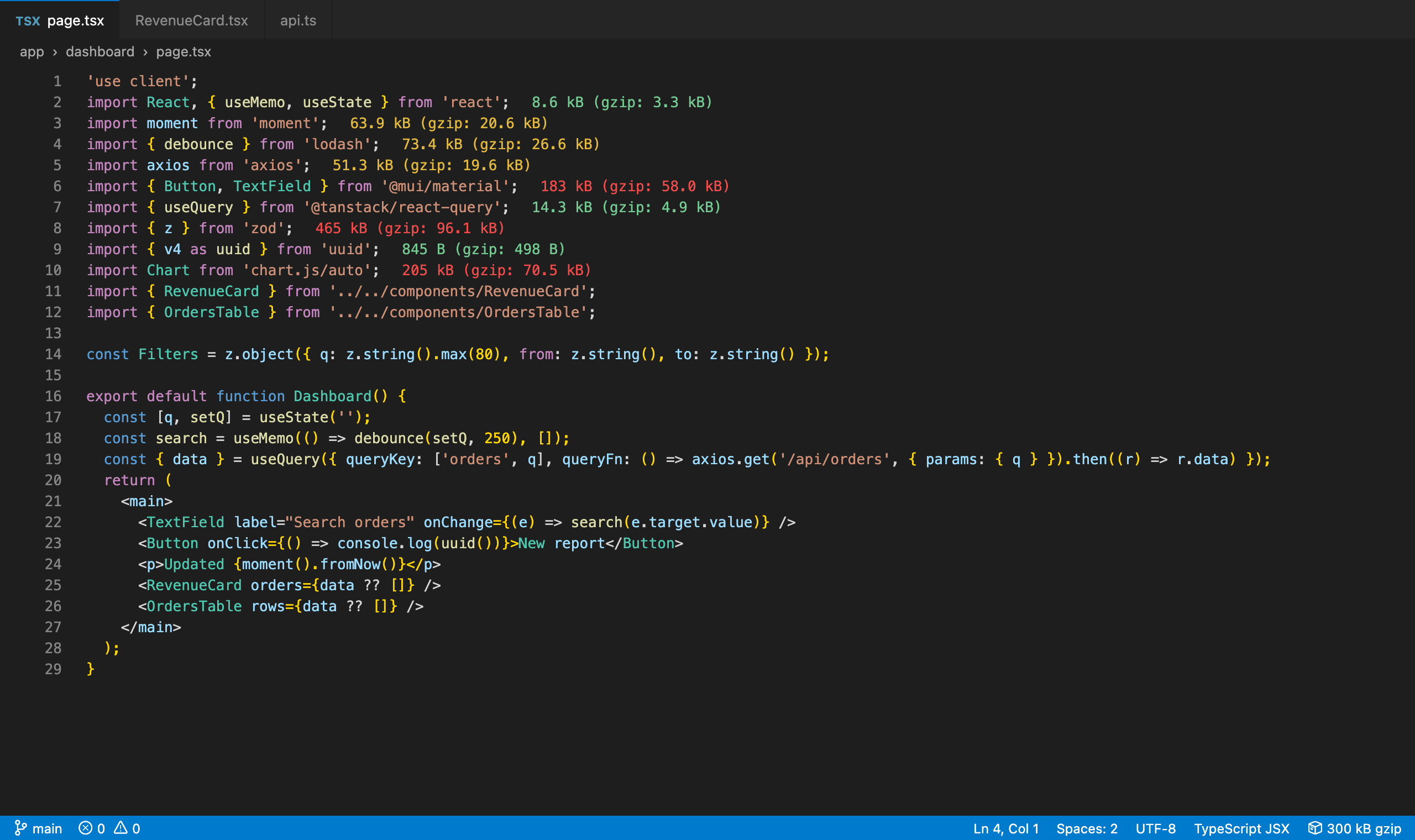
See what every import costs right where you write it. Each import and require in your JavaScript, TypeScript, JSX, TSX, Vue, Svelte and Astro files gets its minified and gzip size at the end of the line, colored green, yellow or red. The size is calculated on your machine by bundling the import with esbuild in a background thread, so the editor never freezes and nothing is uploaded.
Then go further: a bundle treemap for the current file or a whole Next.js route, size budgets in the Problems panel, lighter alternatives (moment → dayjs, lodash → per-method imports), totals per file across the workspace, and Markdown, CSV or JSON reports.
No account, no AI, no network calls for sizes. Works with npm, Yarn, pnpm and Bun, and in monorepos.
Features
The size of every import, inline
import moment from 'moment' → 63.9 kB (gzip: 20.6 kB), right after the line.- Tree-shaking is real:
import { debounce } from 'lodash-es' counts only debounce (about 1 kB gzip), not the whole library, because the import is bundled exactly as you wrote it.
- ESM and CommonJS, default, named and namespace imports,
require(), export … from, side-effect imports and subpath imports (lodash/debounce, @mui/material/Button, date-fns/format).
- Follows
package.json exports maps, module/browser fields and sideEffects, like webpack, Vite and Rollup do.
- peerDependencies (such as
react for a React library) are left out, so you see the cost of the package itself.
- Colors by size: green under 10 kB, yellow under 50 kB, red above (compressed; you can change both limits and the colors).
- Show minified and compressed, compressed only or minified only, with gzip or Brotli.
- The status bar shows the total for the current file.
Hover for details
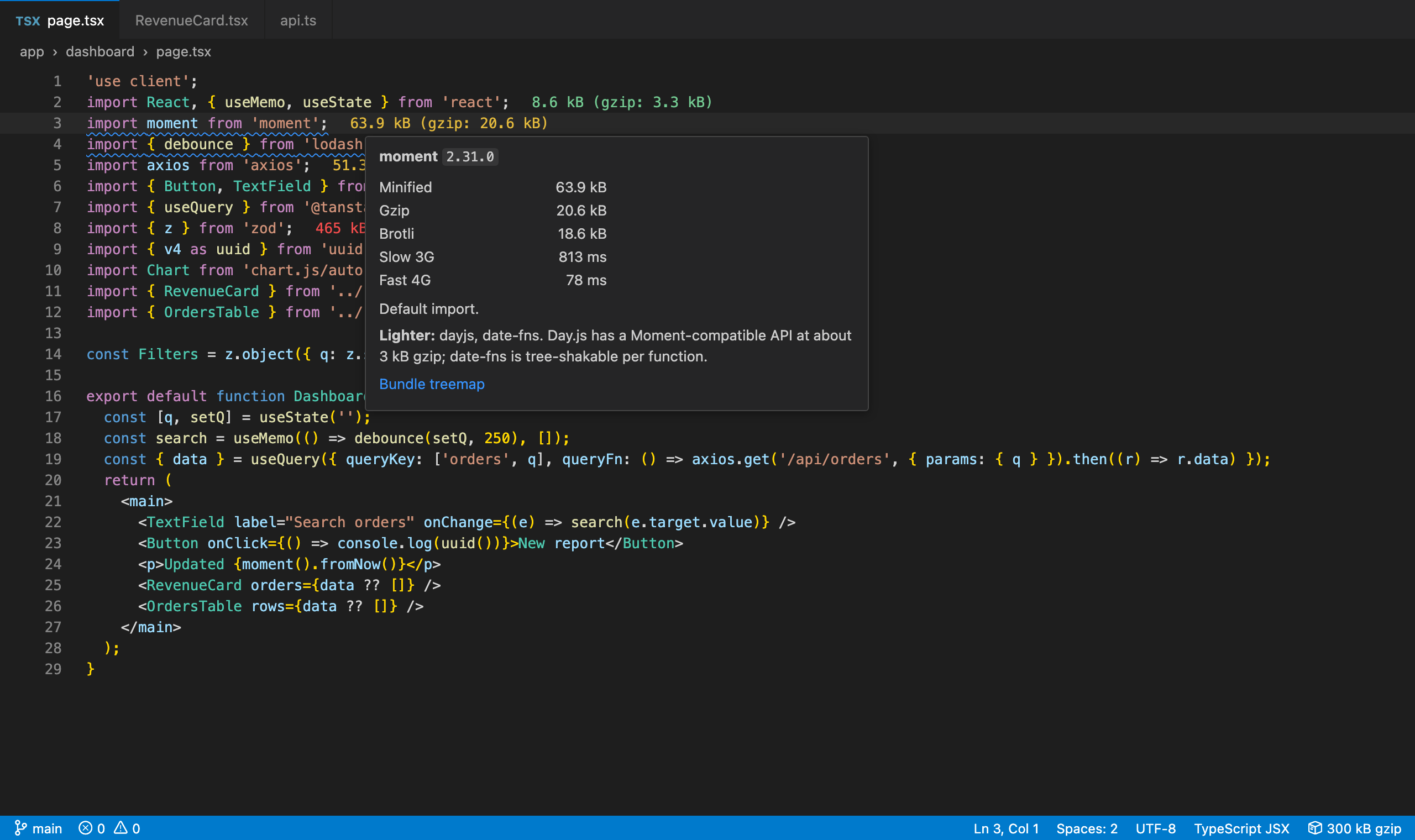
- Hover an import to see the installed version, minified, gzip and Brotli sizes and the download time on slow 3G and fast 4G.
- See which packages are bundled in (a package's own dependencies count too).
Bundle treemap for a file or a Next.js route
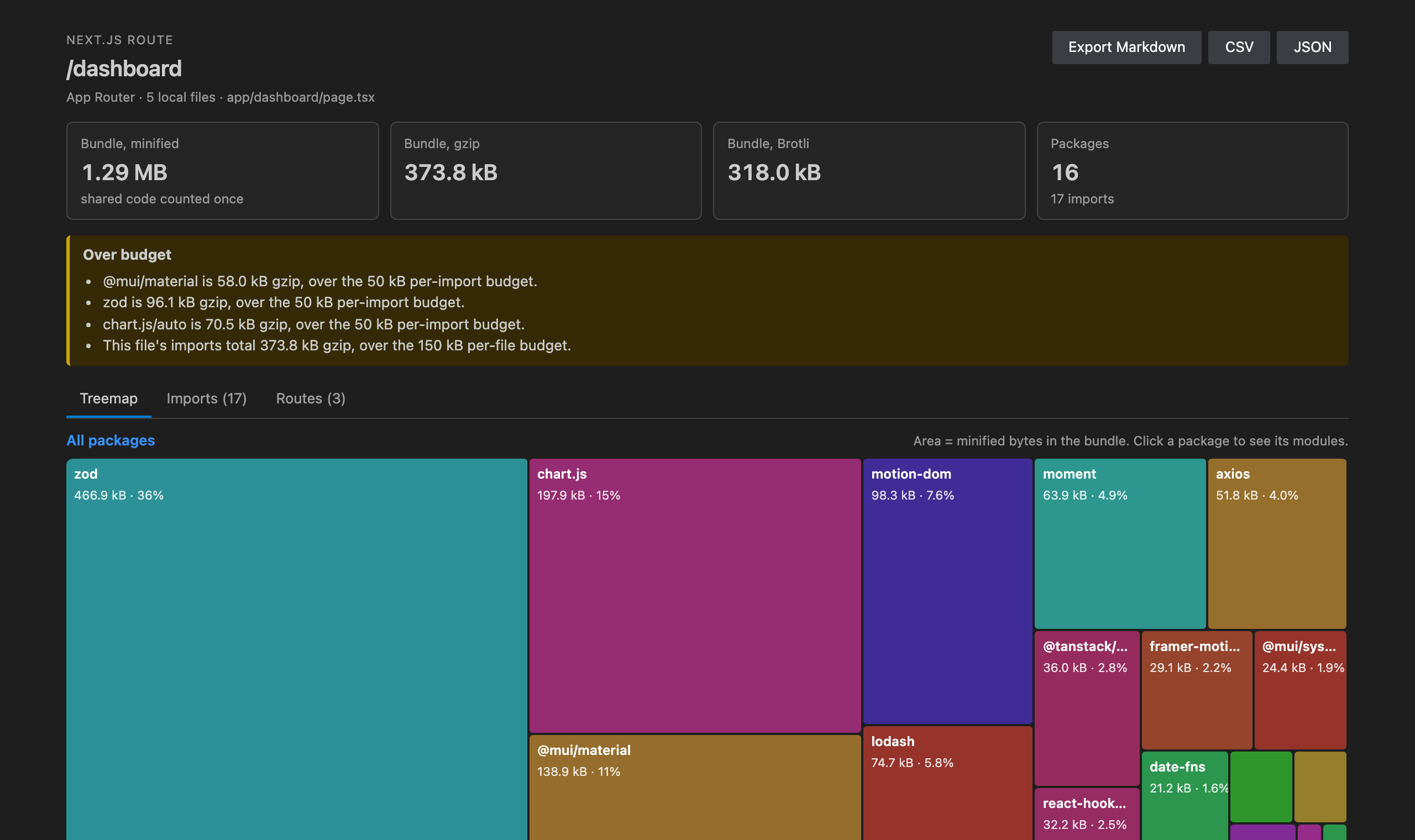
- Show Bundle Treemap (
Ctrl+Alt+B / Cmd+Alt+B, the editor title button or the right-click menu) bundles all of the file's imports together, so shared code is counted once, and draws a treemap by package. Click a package to see its modules.
- In a Next.js project, a
page.tsx opens as its route: the page, its layouts and every local component it imports (relative and @/ paths). Pick any route of the App Router or Pages Router with Show Next.js Route Bundle Size.
- See the bundle's minified, gzip and Brotli size, the list of imports and the routes of the project.
Totals per file
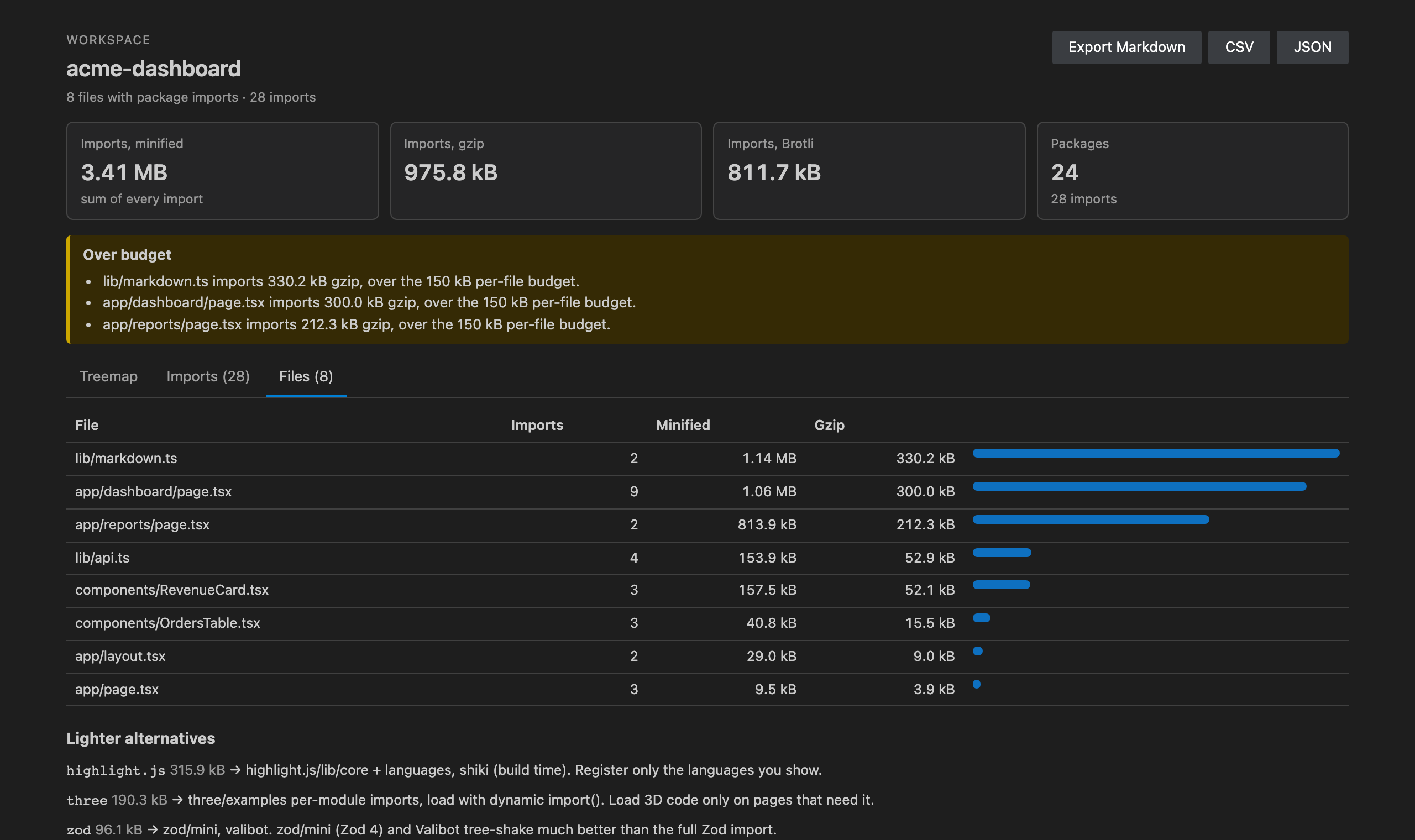
- Show Import Totals per File sizes every import in the workspace and ranks your files by what they pull in. Click a file to open it.
Size budgets
- Set a budget per import, per file and per package (for example
{ "moment": 10 }). Imports over budget get a warning in the Problems panel as soon as their size is known and on save.
- Check Size Budgets checks the current file on demand.
Lighter alternatives
- A built-in list of 70+ heavy packages and what to use instead: moment → dayjs or date-fns, lodash → per-method imports or lodash-es, axios → ky, ofetch or fetch, uuid → crypto.randomUUID(), classnames → clsx, jquery → native DOM, yup → valibot and many more.
- Shown in the hover and in the Problems panel. For
import { debounce, throttle } from 'lodash' a Quick Fix rewrites it into per-method imports.
Reports
- Export Bundle Size Report for the current file or the whole workspace as Markdown (for pull requests), CSV (for spreadsheets) or JSON (for CI scripts): totals per file, per package, every import and the suggested alternatives.
Fast, and light on memory
- Sizes are calculated in one background worker thread with esbuild's WebAssembly build. Nothing runs on the editor's thread and no native binary is needed, so it works the same on macOS, Windows, Linux, WSL, SSH and containers.
- Sizes are cached by package version (in memory and on disk), so a file you opened before shows its sizes instantly, even after a restart. A new version recalculates by itself after
npm install.
- Stale work is cancelled when you keep typing or switch files, and the worker shuts down when idle, giving its memory back.
- Works with pnpm (symlinked store), Yarn (classic and node-modules linker, plus Plug'n'Play), npm, Bun, and with packages installed in a monorepo's root or in a workspace's own
node_modules.
Commands
Open the Command Palette and type Import Cost & Bundle Size:
- Show Bundle Treemap, Show Next.js Route Bundle Size, Show Import Totals per File
- Check Size Budgets, Export Bundle Size Report
- Toggle Inline Import Sizes, Clear Size Cache
- Restore Purchase
Click the package icon in the Activity Bar for one-click access to the treemap, route sizes, totals per file, budgets and export, the heaviest imports in the current file, and the most-used settings.
Settings
| Setting |
Default |
What it does |
bundleSize.enable |
true |
Show the size of each import at the end of its line |
bundleSize.sizeFormat |
both |
both, compressed or minified |
bundleSize.compression |
gzip |
gzip or brotli, for labels, colors, totals and budgets |
bundleSize.smallPackageSize |
10 |
Below this many kB (compressed) an import is green |
bundleSize.mediumPackageSize |
50 |
Below this many kB it is yellow; above it, red |
bundleSize.colors.small / .medium / .large |
green / yellow / red |
Label colors |
bundleSize.statusBar |
true |
Show the file total in the status bar |
bundleSize.suggestAlternatives |
true |
Suggest lighter packages |
bundleSize.budgets.enabled |
true |
Warn when imports go over budget |
bundleSize.budgets.perImport |
50 |
kB per import (0 = off) |
bundleSize.budgets.perFile |
150 |
kB for all imports of a file (0 = off) |
bundleSize.budgets.packages |
{} |
kB per package, e.g. { "moment": 10 } |
bundleSize.languages |
JS, TS, JSX, TSX, Vue, Svelte, Astro |
Languages that get inline sizes |
Free trial and Unlimited
Import Cost & Bundle Size starts with a free trial that includes every feature. When it ends, choose an Unlimited plan to keep using it: Unlimited Monthly, Unlimited Yearly or Unlimited Lifetime (pay once). Stripe handles the payment securely in your browser, and Unlimited turns on here by itself, with no restart.
Already paid on another machine? Run Import Cost & Bundle Size: Restore Purchase and enter the email you paid with. Subscribers can open Manage subscription from the plans screen.
Privacy
- Your code and your
node_modules are read only on your machine (or inside your remote workspace). Sizes are calculated locally; nothing from your project is ever sent anywhere.
- The only network calls are the licence checks for the free trial and Unlimited. They send a random install id, a hashed machine id and how many seconds of active use went by, to
api-ext.viralinc.live. If VS Code telemetry is turned on, the extension also sends two anonymous usage events (opened, and the Unlimited page shown) with the same random install id, and nothing else.
Notes
- Sizes are for the package code as a browser bundler would ship it (minified,
process.env.NODE_ENV = "production"). CSS, images and fonts are not counted.
- Imports must be installed (
npm install first). A package that is not installed shows no size.
- The first size of a large package (for example
@mui/material) can take a second; after that it comes from the cache.
Support
Email ope@trysixth.com. We read everything.
| |

