Grok Changes
Track file changes without git, and revert specific chunks. Designed for AI-assisted editing in Windsurf and VS Code (works great with Grok Build).
Screenshots
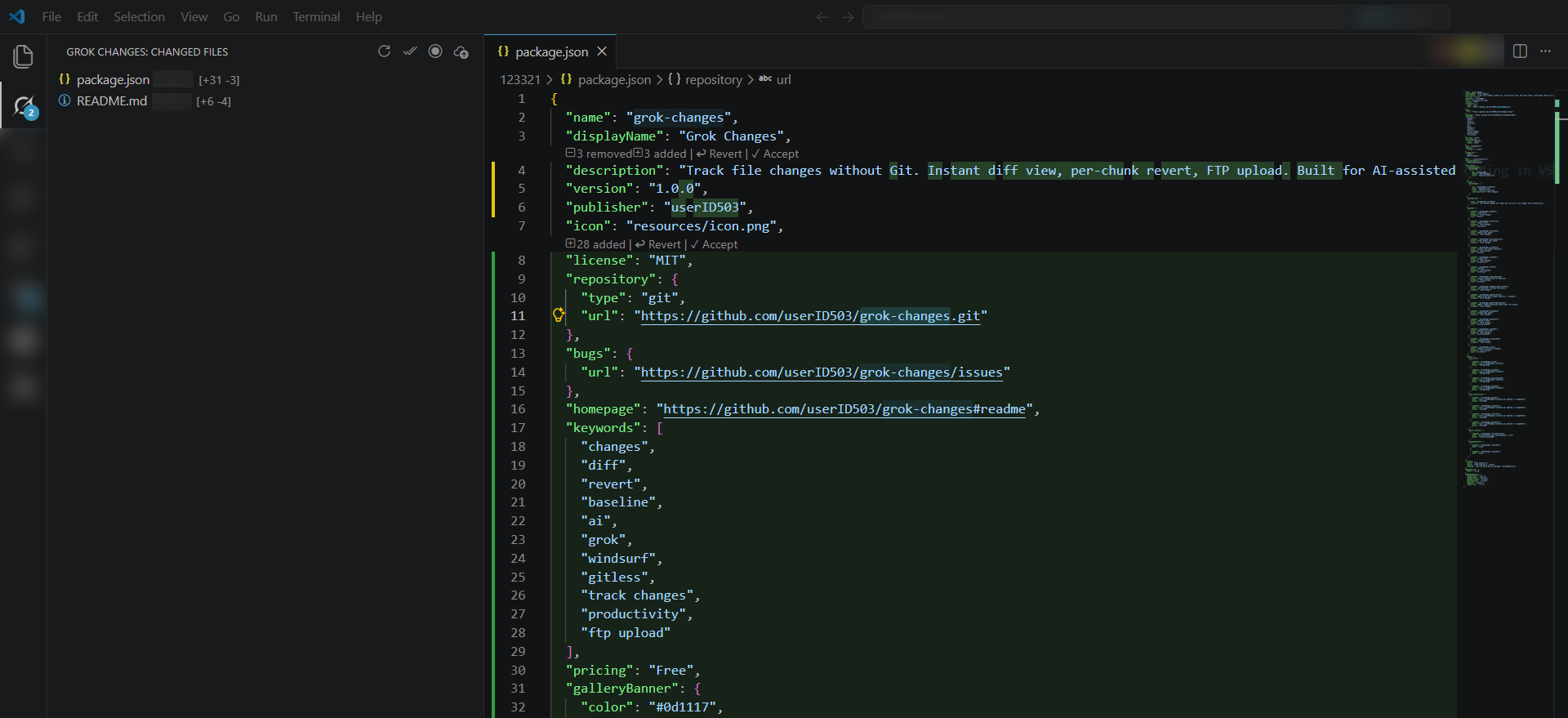
What it does
- Activity Bar panel — list of changed files with
[+added -removed] counters.
- Gutter markers — green / yellow / red highlights on changed lines.
- CodeLens
↩ Revert this chunk above each change.
- Right-click → "Grok: Revert This Chunk" in the editor context menu.
- Click a file in the panel — opens native diff view (baseline ↔ current).
- FTP upload — upload changed files directly to an FTP server.
- Automatic baseline capture — first edit to a file becomes its baseline. No git required.
- External / Grok Build writes support — on activation, seeds
lastKnownContent from existing baselines. Combined with filesystem watcher, this makes Grok Build edits (ACP fs/write) reliably visible in most cases, even for files not recently opened. "Rescan for External Changes" helps further.
Storage
Baselines live in <workspace>/.grok-changes/ (auto-created, with .gitignore so it never gets committed).
FTP credentials are stored in <workspace>/.grok-changes/ftp.json.
Commands
| Command |
Description |
Grok Changes: Open Diff |
Diff baseline ↔ current for the selected file |
Grok Changes: Revert File |
Revert all changes in a file to its baseline |
Grok Changes: Revert This Chunk |
Revert the chunk under cursor / selection |
Grok Changes: Accept File (Clear Baseline) |
Accept current state as new baseline |
Grok Changes: Accept All |
Clear all baselines |
Grok Changes: Capture Unsaved Files as Baseline |
Set baseline from disk for all dirty files |
Grok Changes: Set Baseline = Current File State |
Set baseline to current editor content |
Grok Changes: Upload to FTP |
Upload selected file to FTP |
Grok Changes: Upload All to FTP |
Upload all changed files to FTP |
Grok Changes: Configure FTP |
Open FTP config file |
Grok Changes: Refresh |
Refresh the panel |
Grok Changes: Rescan for External Changes |
Force rescan of all baselines vs current disk (use after heavy Grok Build sessions) |
FTP Setup
Run Grok Changes: Configure FTP or create .grok-changes/ftp.json:
{
  "host": "ftp.example.com",
  "port": 21,
  "user": "username",
  "password": "password",
  "remotePath": "/public_html"
}
Install
- VS Code:
code --install-extension grok-changes-1.0.0.vsix
- Windsurf:
windsurf --install-extension grok-changes-1.0.0.vsix
Or: Extensions panel → ⋯ → Install from VSIX…
Uninstall
- VS Code:
code --uninstall-extension <publisher>.grok-changes
- Windsurf:
windsurf --uninstall-extension <publisher>.grok-changes
Or: Extensions panel → right-click Grok Changes → Uninstall.
Build
npm install
npm run build
npm run package
Grok Build Edit Protocol (Recommended)
When Grok Build edits files, do not use raw filesystem writes (search_replace, direct file write, etc.) if you want reliable chunks and snapshots.
Instead, use the dedicated command:
await vscode.commands.executeCommand('grokChanges.agentWriteFile', {
  uri: 'file:///absolute/path/to/file.ts',
  content: 'new full file content here...'
});
Why this is required
- The command captures the "before" state as baseline synchronously.
- The edit goes through
WorkspaceEdit (proper editor path).
lastKnownContent is updated immediately.- All UI (tree, CodeLens, decorations) refreshes automatically.
- No dependence on flaky
FileSystemWatcher or post-write heuristics.
This is the only way to get production-grade change tracking for Grok Build edits in this setup.
Raw FS writes will continue to work for untracked files or quick experiments, but they will produce unreliable or missing hunks in Grok Changes.
Making Grok Build Edits Create Proper Snapshots Automatically (Hooks)
Even when using the recommended grokChanges.agentWriteFile command, Grok Build may still use raw search_replace / Edit tools in some situations. To guarantee that baselines are captured before any such edit, use a PreToolUse hook.
Recommended Setup (Windows)
Copy the example script:
# From the grok-changes repository
mkdir -p $env:USERPROFILE\.grok\hooks
cp hooks-examples\pre-tool-use-ensure-baseline.ps1 $env:USERPROFILE\.grok\hooks\
Create $env:USERPROFILE\.grok\hooks\pre-tool-use.json:
{
  "hooks": {
    "PreToolUse": [
      {
        "matcher": "Edit",
        "hooks": [
          {
            "type": "command",
            "command": "powershell -File \"$env:USERPROFILE\\.grok\\hooks\\pre-tool-use-ensure-baseline.ps1\""
          }
        ]
      }
    ]
  }
}
Restart your Grok Build session.
The hook will automatically call grokChanges.agentPrepareForEdit for every file Grok Build is about to modify via search_replace. This ensures a correct baseline exists before the write happens.
You can also implement the hook logic directly in PowerShell (without calling the command) by creating the .snap files manually using the same hashing and header format as the extension (see src/util/paths.ts → hashPath and src/snapshotStore.ts → HEADER_PREFIX).

