Skip to content
| Marketplace
Sign in
Visual Studio Code>AI>Aegis AI - Secure Access LayerNew to Visual Studio Code? Get it now.
Aegis AI - Secure Access Layer

Aegis AI - Secure Access Layer

umangbarthwal

|
3 installs
| (2) | Free
Manage, govern, and audit MCP tool access for AI agents
Installation
Launch VS Code Quick Open (Ctrl+P), paste the following command, and press enter.
Copied to clipboard
More Info

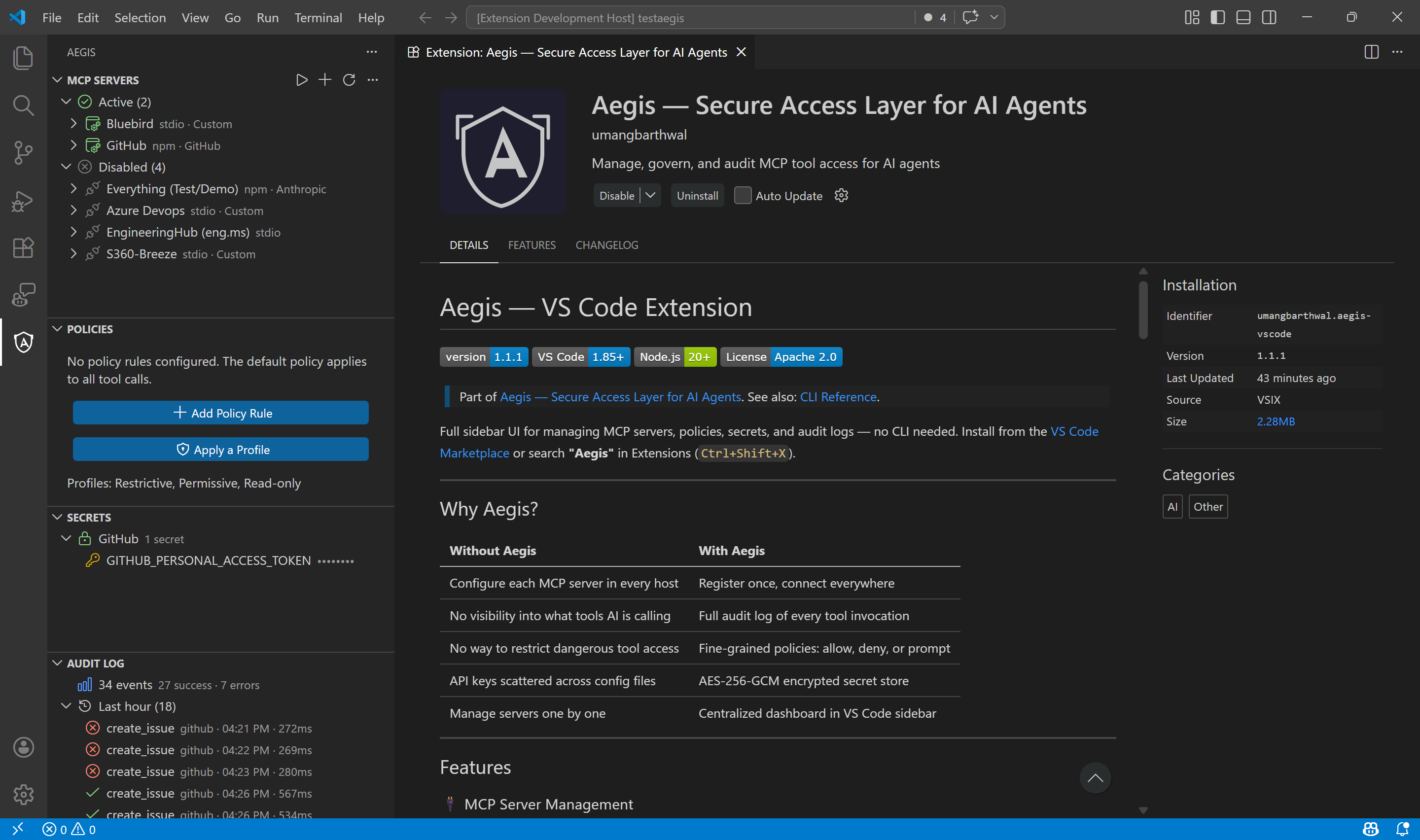
Aegis — VS Code Extension

Version VS Code Node.js License

Part of Aegis — Secure Access Layer for AI Agents. See also: CLI Reference.

Full sidebar UI for managing MCP servers, policies, secrets, and audit logs — no CLI needed. Install from the VS Code Marketplace or search "Aegis" in Extensions (Ctrl+Shift+X).


Why Aegis?

Without Aegis With Aegis
Configure each MCP server in every host Register once, connect everywhere
No visibility into what tools AI is calling Full audit log of every tool invocation
No way to restrict dangerous tool access Fine-grained policies: allow, deny, or prompt
API keys scattered across config files AES-256-GCM encrypted secret store
Manage servers one by one Centralized dashboard in VS Code sidebar

Features

🔌 MCP Server Management

Register and manage all your MCP servers from a single sidebar panel. Add servers from the built-in catalog of 50+ servers, install from npm, configure custom commands, or connect to remote HTTP endpoints.

  • One-click catalog install — browse servers from GitHub, Playwright, PostgreSQL, Slack, Stripe, and 45+ more
  • Enable / Disable servers without removing them
  • Health checks — verify server connectivity and discover available tools
  • Live tool discovery — see exactly what tools each server exposes
  • Custom catalog — save your own server configurations for reuse across projects

MCP Servers Panel

🛡️ Policy Engine

Control what your AI agents can and cannot do with a powerful rule-based policy engine.

  • 3 actions: allow, deny, or prompt (ask before executing)
  • Wildcard patterns: use get*, create*, delete* to match tool families
  • 5-level priority: exact tool → pattern → server-level → tool annotations → default
  • Built-in profiles for quick setup:
    • Restrictive — deny all, allow read-only operations (get*, list*, search*, read*)
    • Permissive — allow everything
    • Read-only — allow all, block mutations (create*, delete*, update*, remove*)

Policies Panel

🔐 Secret Management

Securely store API keys and tokens with AES-256-GCM encryption. No more plaintext credentials in config files.

  • Secrets stored in ~/.aegis/secrets.json, encrypted with a 256-bit master key
  • Scoped per server — each server gets only its own secrets as environment variables
  • Auto-prompted when installing catalog servers that require API keys
  • Manage from the Secrets panel: add, update, delete

Secrets Panel

📋 Audit Log

Every tool call through the Aegis gateway is logged automatically.

  • Detailed events: timestamp, server, tool name, result (success/error/denied), duration
  • Time-grouped view: Just now, Last hour, Today, Yesterday, Earlier
  • Query & filter: search by server, tool name, or date range
  • Export: save audit logs as JSON or CSV
  • Auto-rotation: logs rotate automatically when they exceed the configured size limit

Audit Log Panel

🚀 Gateway Proxy

The Aegis gateway is a single MCP endpoint that proxies to all your downstream servers.

  • Tool namespacing — tools exposed as serverId__toolName to avoid conflicts
  • Dual transport — supports both stdio and HTTP (Streamable HTTP) downstream servers
  • Policy enforcement — every tool call is checked against your rules before execution
  • Hot-reload — edit policies on disk and they take effect immediately, no restart needed
  • Start/stop from VS Code with one click

🔄 VS Code Sync

Connect VS Code Copilot to Aegis with a single command.

  • Generates .vscode/mcp.json pointing to the Aegis gateway
  • Auto-synced when starting the gateway
  • Works with any MCP-compatible VS Code agent

Getting Started

1. Initialize

Open the Command Palette and run Aegis: Initialize — or click the shield icon in the Activity Bar and follow the walkthrough.

2. Add Servers

Click + in the MCP Servers panel to add a server. Choose from:

  • Catalog — 50+ pre-configured servers (GitHub, Playwright, PostgreSQL, Slack, and more)
  • npm package — install any MCP server from npm
  • Custom command — run any stdio-based MCP server
  • Remote HTTP — connect to a remote MCP endpoint

3. Set Policies

Apply a built-in profile or create custom rules. Open the Policies panel and:

  • Click the shield icon to apply Restrictive, Permissive, or Read-only
  • Click + to add individual rules with server, tool pattern, and action

4. Start the Gateway

Click ▶ in the MCP Servers panel to start the gateway. Aegis will:

  • Connect to all enabled servers
  • Namespace their tools
  • Start the HTTP proxy on localhost:6371
  • Auto-generate .vscode/mcp.json so VS Code Copilot connects through Aegis

Built-in Server Catalog

Category Servers
Dev Tools Filesystem, Memory, Git, GitHub, GitLab, Sequential Thinking, Context7, ESLint, SonarQube
Web & Search Fetch, Brave Search, Exa Search, Firecrawl, Apify, Tavily
Browsers Playwright, Puppeteer
Databases PostgreSQL, SQLite, Redis, MongoDB, Supabase, Neo4j, ClickHouse, Elasticsearch, Neon, Pinecone, Milvus
Cloud & Infra Cloudflare, Kubernetes, Azure, AWS, Terraform, Heroku, Railway, Vercel
Communication Slack, Twilio
Productivity Notion, Todoist, Linear, Asana, Atlassian (Jira & Confluence)
Monitoring Sentry, Grafana, Datadog
Other Stripe, Figma, Google Maps, Auth0, Snyk, PagerDuty, HubSpot

Don't see your server? Add it manually or save it to your custom catalog for reuse.


Architecture

┌─────────────────────┐
│  VS Code / Copilot   │
│  (or any MCP host)   │
└────────┬─────────────┘
         │ HTTP
         ▼
┌──────────────────────┐
│    Aegis Gateway      │
│  ┌────────────────┐  │
│  │ Policy Engine   │  │
│  │ Audit Logger    │  │
│  │ Secret Manager  │  │
│  └────────────────┘  │
└──┬──────────┬────────┘
   │ stdio    │ HTTP
   ▼          ▼
┌────────┐ ┌───────────┐
│ GitHub │ │ PostgreSQL │  ... 50+ servers
└────────┘ └───────────┘

Commands

Command Description
Aegis: Initialize Set up ~/.aegis data directory
Aegis: Add MCP Server Register a new server (catalog, npm, command, or HTTP)
Aegis: Start / Stop Gateway Launch or stop the proxy gateway
Aegis: Sync VS Code MCP Config Generate .vscode/mcp.json
Aegis: Add Policy Rule Create an allow/deny/prompt rule
Aegis: Apply Policy Profile Apply Restrictive, Permissive, or Read-only preset
Aegis: Set Secret Store an encrypted secret for a server
Aegis: View Server Tools Discover tools exposed by a server
Aegis: Health Check Server Verify server connectivity
Aegis: Query Audit Log Search audit events with filters
Aegis: Export Audit Log Save audit log as JSON or CSV
Aegis: Install Server (npm) Install a server package from npm
Aegis: Browse Custom Catalog Browse your saved server definitions
Aegis: Show Status View server count, policy count, gateway state

Data Storage

All data is stored locally in ~/.aegis/:

File Purpose
config.json Gateway port, default policy, audit settings
registry.json Registered MCP servers
policy.json Access control rules
secrets.json Encrypted API keys and tokens
audit.log Tool invocation audit log (JSONL)
.master-key AES-256-GCM encryption key (file-permission protected)

Requirements

  • VS Code 1.85+
  • Node.js 20+

Known Issues

  • SVG icons may not render in some Markdown previewers — they display correctly in VS Code and on the marketplace.
  • On Windows, ensure npm is in your PATH for server installation to work.

FAQ

Q: Where is my data stored? A: All data lives locally in ~/.aegis/. Nothing is sent to external servers.

Q: Can I use Aegis with agents other than VS Code Copilot? A: Yes. Any MCP-compatible client can connect to the Aegis gateway at http://localhost:6371/mcp.

Q: How do I reset everything? A: Delete the ~/.aegis directory and run Aegis: Initialize again.

Q: Are my secrets safe? A: Secrets are encrypted with AES-256-GCM using a 256-bit random master key stored locally with restricted file permissions.


Feedback & Support

For issues, feature requests, or licensing inquiries: officialumangbarthwal@gmail.com


License

Licensed under the Apache License, Version 2.0.

Copyright 2026 Umang Barthwal.

  • Contact us
  • Jobs
  • Privacy
  • Manage cookies
  • Terms of use
  • Trademarks
© 2026 Microsoft