Skip to content
| Marketplace
Sign in
Visual Studio Code>SCM Providers>Local Code ReviewNew to Visual Studio Code? Get it now.
Local Code Review

Local Code Review

ugudlado

| (0) | Free
Review code, leave threaded comments, and let Claude resolve them — right in VS Code.
Installation
Launch VS Code Quick Open (Ctrl+P), paste the following command, and press enter.
Copied to clipboard
More Info

Local Code Review

Review code, leave threaded comments, and let Claude resolve them — right in VS Code.

Part of the Local Code Review Claude Code plugin. Works alongside the browser UI and Claude Code CLI — all three share the same session files so everything stays in sync.

Features

Inline comment threads

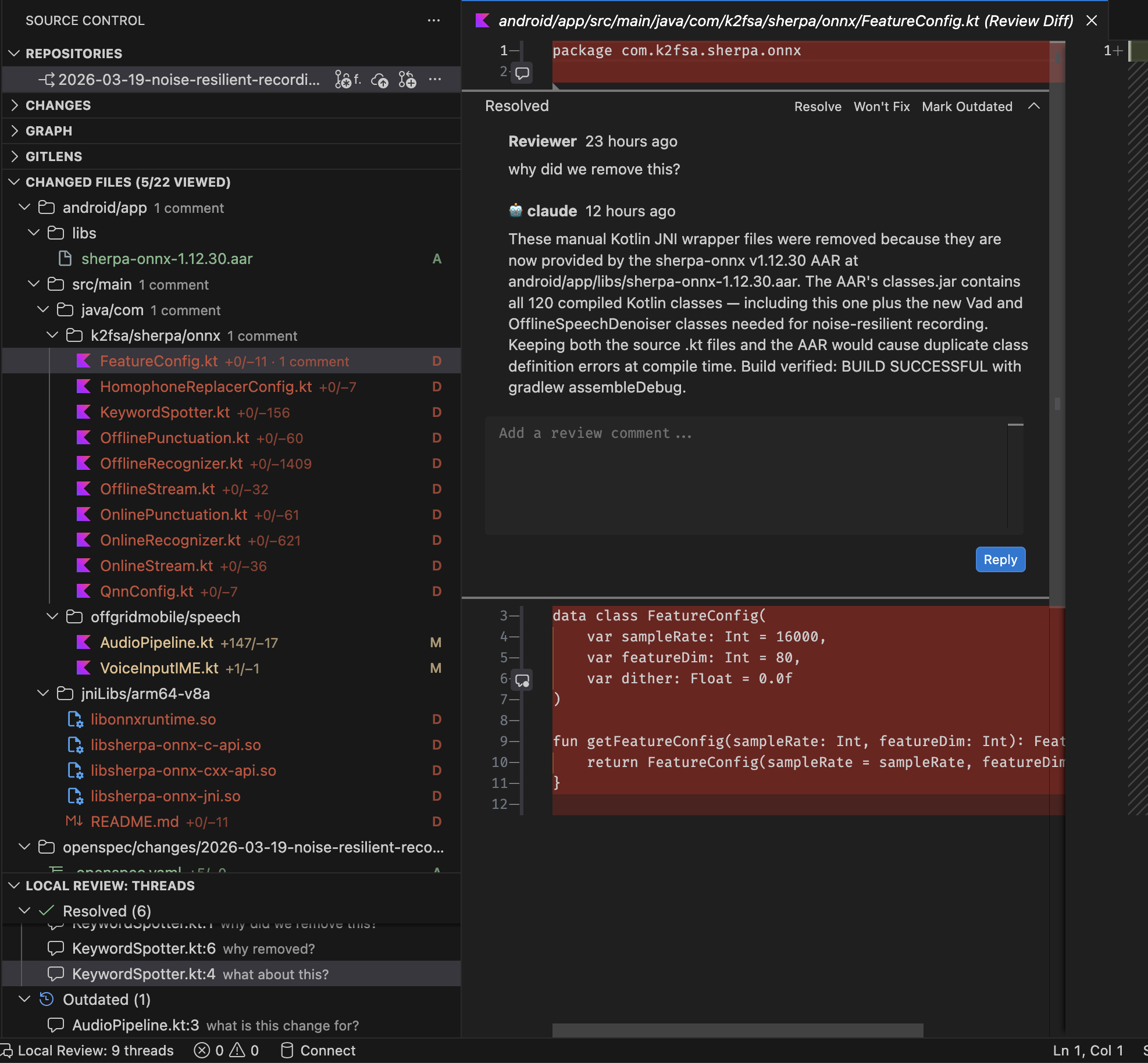
Leave review comments on any line via VS Code's native Comments API. Threads appear inline in the editor, just like GitHub PR comments.

VS Code extension showing changed files tree, inline review comments with Claude's reply, and threads panel

Changed files sidebar

See all changed files with diff stats in the Source Control panel. Click any file to open the diff panel.

Diff panel

Full diff view with inline thread annotations. Navigate between threads, resolve or re-open them without leaving the editor.

Claude integration via Claude Code

This extension works with the Local Code Review Claude Code plugin. When you've added review comments in VS Code, switch to Claude Code and run:

/local-review:resolve

Claude reads every open thread you created — in VS Code, in the browser, or both — and responds to each one:

  • Applies a fix when the issue is clear and unambiguous
  • Replies with an explanation when the comment asks "why"
  • Asks a clarifying question when context is missing

Replies are written back to the same session files, so they appear inline in VS Code immediately — no reload needed.

Serverless — no setup required

The extension reads and writes session files directly. No server to start, no HTTP dependency. File watchers keep VS Code in sync with the browser UI in real time.

Requirements

  • Local Code Review Claude Code plugin installed
  • VS Code 1.85 or later

Install

code --install-extension ugudlado.local-code-review

Or search for Local Code Review in the VS Code Extensions panel.

Usage

  1. Install the Claude Code plugin: claude plugin install local-code-review@ugudlado
  2. Open a repo with a .review/sessions/ directory
  3. The Local Review: Changed Files and Local Review: Threads panels appear in the Source Control sidebar
  4. Click a file to open the diff panel, add comments inline
  5. Run /local-review:resolve in Claude Code to have Claude respond to threads

Works With

The extension is one part of a three-surface review workflow:

Surface What you do
VS Code (this extension) Inline comments, diff panel, file tree
Browser UI Full review dashboard, feature view, task board
Claude Code CLI Resolve threads automatically with AI

All three read and write the same .review/sessions/*.json files.

Links

  • GitHub
  • Issues
  • Changelog

License

MIT

  • Contact us
  • Jobs
  • Privacy
  • Manage cookies
  • Terms of use
  • Trademarks
© 2026 Microsoft