JS Code GuardianDetects JavaScript and TypeScript syntax typos, offers one-click fixes, dims unused symbols, and previews console/popup values inline. Installation Launch VS Code Quick Open ( Ctrl+P), paste the following command, and press enter.Copied to clipboard |

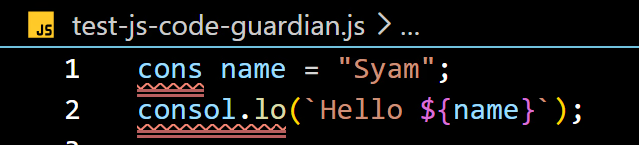
JS Code GuardianVS Code extension for JavaScript/TypeScript (and some embedded JS/TS cases like Vue/Svelte) that helps you catch syntax/keyword typos, offers one-click fixes, and adds useful inline information. Features1) Red diagnostics for keyword / syntax typosThe extension scans code and highlights identifiers that look like JavaScript syntax/keyword typos (example:
2) Hover help + “Fix with JS Code Guardian”When you hover over a highlighted issue, you get:
3) One-click Quick FixFrom the diagnostic or Quick Fix menu, the extension performs an edit that replaces the wrong range with the computed fix.
Command id: 4) Dim unused symbolsThe extension applies text decorations (opacity) to:
5) Inline previews for console & popup callsFor calls where the runtime value can be evaluated statically (limited depth), it shows inline hints:
Safe built-in methods are evaluated when their inputs are known, including string methods like Supported languagesBased on the extension activation and language selectors:
How it works (high level)
|