Research Data Explorer — VS Code Extension
An MCP + harness plugin that helps agents and researchers turn clinical questions into reproducible, reviewable evidence without extensive custom analysis code.
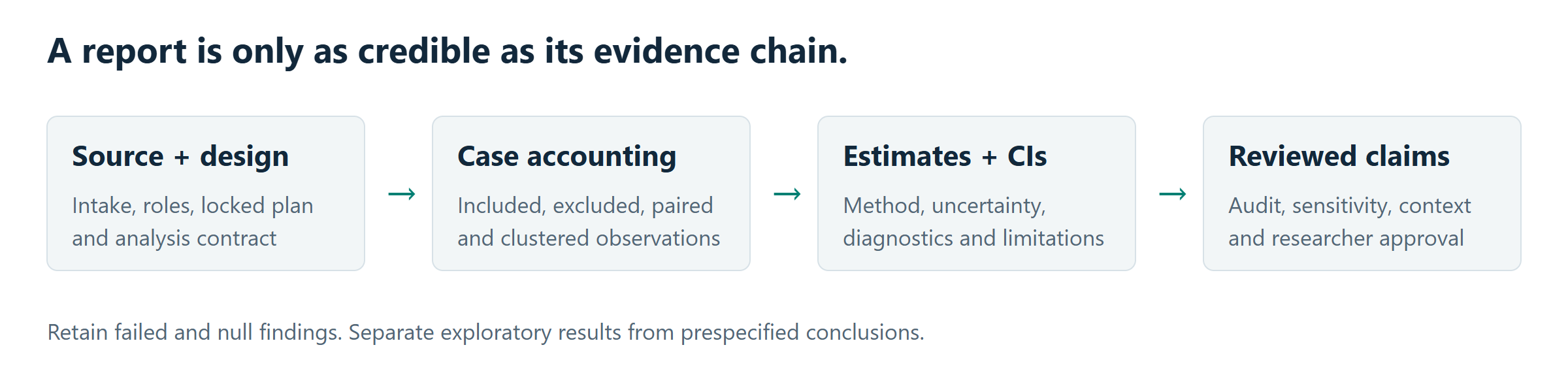
Agents remain free to propose hypotheses and challenge assumptions. RDE provides reusable execution, case accounting and provenance; researchers review the design and clinical claims. Unsupported methods remain explicit gaps, not invented results.
0.6.0: typed clinical research
The native catalog now exposes 25 families and 78 MCP tools. This release adds bounded PMM multiple imputation, binary stratified CMH/MH odds ratios, independent continuous Welch noninferiority, fixed 1:1 matching and baseline target-trial protocols. Each uses exact preflight, reviewed plan lock, source/population checks and immutable results. See method boundaries and validation; these names do not promise unrestricted variants or clinical validity.
/advanced includes get_target_trial_contract so a TTE request can obtain its approved preparation binding before inspection. Matching inference remains approximate and targets retained matched-treated subjects; TTE is limited to baseline point treatment and complete fixed follow-up. These new families do not authorize legacy autoresearch branches.
Clinical and autonomous research
- The legacy local-method adapter includes: risk estimates, diagnostic accuracy, exact McNemar, Bland–Altman, Cohen's kappa, GEE and random-intercept mixed models.
- Paired comparisons match subject IDs and report analyzed/excluded cases. Plan coverage counts successful required analyses rather than reruns.
- Agent-authored autoresearch proposals retain baseline contracts and branch artifacts. Failed and recorded-only tasks are distinguished from completed analyses; significance is not a promotion criterion.
- Official MCP SDK v2 provides structured tool results, annotations, workflow resources and prompts. 78 tools share executable contracts.
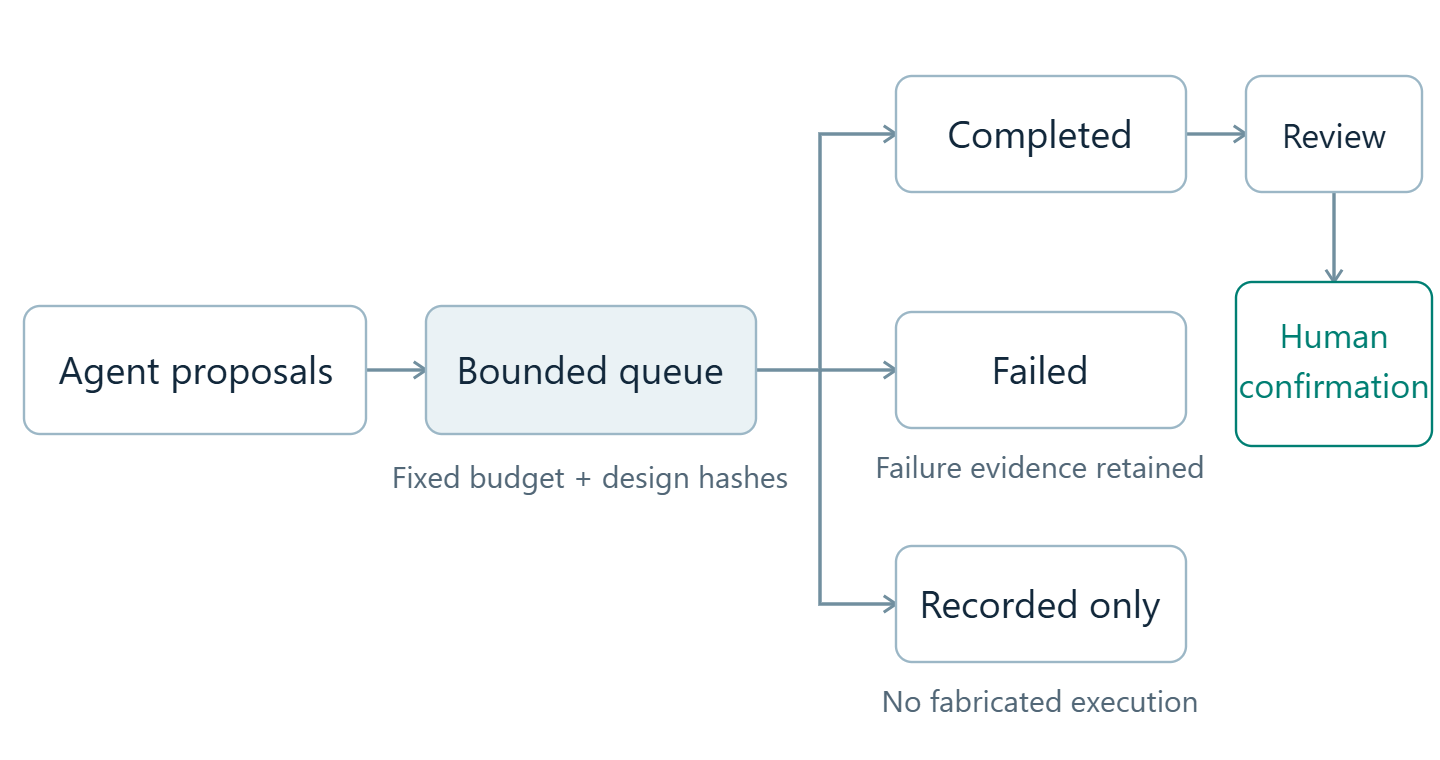
The original accessible SVG illustrations are included in the extension; PNG previews are used here to meet Marketplace README restrictions.
Audit readiness is a workflow check, not a guarantee of clinical validity or publication acceptance. See the clinical-method reference and autoresearch design.
Core Product Contract
The VSIX path is local-first for non-data-scientists. A user should be able to install the extension, point an agent at a new real dataset, and get a governed report without installing Docker or writing analysis code.
RDE therefore treats automl-stat-mcp as optional. The built-in MCP server can complete the core workflow with local statistics, local-lite adjusted models, ROC/AUC, basic power analysis, Kaplan-Meier summaries, and lightweight propensity scoring. Native typed weighting and bounded matching/TTE are available locally through their own contracts. Docker-backed automl-stat-mcp remains optional for its separately supported vendor workflows, including AutoML training; availability does not expand native method scope.
report_readiness and run_audit explicitly check the core goal: data understanding, analysis planning, data correctness, reproducible exploration, analysis execution and interpretation, report generation, no-code operation, and agent-friendly harness artifacts.
Documentation / i18n
Keep these documents aligned when changing phase gates, Codex MCP setup, no-Docker behavior, release validation evidence, or supported-platform expectations.
Features
- Native Data Aggregation — inspect source schemas, compose and locally revise typed rules, compare versions and review row/value provenance through the existing
data_preparation MCP tool. Preview is separate from approval, release and clinical validation.
- 🔍 13-Phase Auditable EDA Pipeline — 結構化、可審計的探索性資料分析
- 📊 78 MCP Tools — 資料載入、greedy plan ideation、YOLO exploration branches、UX harness、描述統計、分組比較、Table 1、進階分析
- 🧪 local-lite + optional automl-stat-mcp — no-Docker adjusted models / ROC / power, with optional heavy delegation
- 📄 報告匯出 — Word/PDF 匯出
- 🔒 品質把關 — Hard Constraints (H-001~H-010) + Soft Constraints (S-001~S-012)
- 💬 Chat Participant — @rde 自然語言互動
Installation
From VSIX
code --install-extension <downloaded-vsix-file>
Or in VS Code: Ctrl+Shift+P → Extensions: Install from VSIX...
Marketplace Publishing
- Visual Studio Marketplace publish uses
VSCE_PAT.
- Open VSX publish uses
OVSX_PAT.
- Tagging
v* now triggers the publish workflow in .github/workflows/publish-extension.yml.
- You can also run the workflow manually with
workflow_dispatch to publish one or both targets.
Requirements
- VS Code 1.100.0 or higher
- GitHub Copilot (for Agent Mode)
- Python 3.11+ with
uv (recommended)
| 平台 |
狀態 |
備註 |
| Windows (x64) |
✅ |
PowerShell 5.1+ |
| macOS (Intel/Apple Silicon) |
✅ |
Homebrew uv 自動偵測 |
| Linux (x64) |
✅ |
snap/apt uv 支援 |
The extension uses Node path, Python pathlib, UTF-8 environment variables, ASCII-escaped JSON/JSONL artifacts, and inherited PATH/HOME/TEMP runtime variables for MCP subprocesses. CI now runs VSIX helper tests, bundled-tool install smoke, package, and package validation on ubuntu-latest, windows-latest, macos-15-intel, and macos-14; release tags are gated by the same cross-platform VSIX smoke before publishing.
MCP Installation Behavior
- RDE source workspaces run the local project directly via
uv run python -m rde.
- Packaged VSIX builds ship a bundled Python project and run it via
uv run --project ... python -m rde.
- No Python package registry publication is required for the MCP server to start.
- If the workspace already has a
.vscode/mcp.json defining rde, the extension skips auto-registration.
- uv 會自動偵測多個可能路徑(
~/.local/bin, ~/.cargo/bin, %LOCALAPPDATA%\uv\bin, /opt/homebrew/bin)。
Release Validation Snapshot
0.5.0: 40 extension tests, lint, canonical asset sync, install-shape smoke,
compilation, VSIX packaging/validation and source-to-payload integrity checks
passed locally. The server suite passed 411 tests with six explicit skips;
desktop/mobile Chromium interaction QA passed. Marketplace previews are rendered
from the bundled native SVGs. Cross-platform release checks run on the version tag.
Historical 0.4.14 baseline
For 0.4.14, the extension-facing path was checked with:
npm test -- test/utils.test.ts test/extensionHelpers.test.ts test/uvManager.test.ts
npm run compile
npm run test:install-smoke
npm run package -- --no-yarn
npm run validate -- --skip-tests
The full governed real-file smoke was also run through the RDE MCP subprocess with scripts/codex_rde_smoke.py --full-yolo, and the KMU SPARK AKI multi-workbook/multi-sheet rerun produced an audit grade A report with report_readiness=production_ready, 43 analyses, 27 figures, and structured figure interpretation artifacts.
automl-stat-mcp (進階分析引擎)
什麼是 automl-stat-mcp?
automl-stat-mcp 是 RDE 的重量級統計分析後端,透過 Docker 服務提供以下分析能力:
| 分析 |
引擎 |
端口 |
| 描述統計、t-test、chi-square、Table 1 |
本地 ScipyEngine |
— |
| Propensity Score Matching |
stats-service |
:8003 |
| Survival Analysis (KM, Cox) |
stats-service |
:8003 |
| ROC/AUC |
stats-service |
:8003 |
| Power Analysis (Advanced) |
stats-service |
:8003 |
| AutoML Training |
automl-service |
:8001 |
automl-stat-mcp 是可選的
不安裝 automl-stat-mcp 也能正常使用 RDE! 基礎統計由本地 ScipyEngine 處理,調整模型、ROC/AUC、基本 power、Kaplan-Meier 與輕量 propensity scoring 由 local-lite statsmodels/scipy fallback 處理。
也要誠實說明:即使安裝了 automl-stat-mcp,也不代表所有特殊分析方法都會自動可用。超出目前委派契約的分析仍可能需要手動處理或額外整合。
啟用方式
# 在專案根目錄
cd vendor/automl-stat-mcp && docker compose up -d

# Optional: VSIX users can complete the core report path without Docker.
# RDE falls back to local-lite advanced analysis when automl is unavailable.
行為邏輯
- Extension 啟動時自動檢查
stats-service:8003/health
- 若服務可用 → 進階分析自動委派
- 若服務不可用 → 靜默降級到本地引擎,不阻擋使用
- 可透過
RDE: Check automl-stat-mcp Status 指令手動檢查
Usage
Chat Commands (@rde)
| 指令 |
說明 |
@rde /explore |
🔍 快速探索資料集概況 |
@rde /fullreport |
📄 從資料到完整分析報告的受治理流程 |
@rde /pipeline |
🔄 查看目前 Pipeline 進度 |
@rde /compare |
📊 比較兩組差異 |
@rde /table1 |
📋 產生 Table 1 (基線特徵表) |
@rde /advanced |
🧪 進階統計分析 (PSM, Survival, ROC) |
@rde /report |
📄 組裝與匯出報告 |
@rde /audit |
🔒 審計紀錄與品質檢查 |
@rde /help |
顯示所有指令 |
Command Palette (Ctrl+Shift+P)
| 指令 |
說明 |
RDE: Run Full Pipeline |
直接啟動完整報告工作流,不是只看 pipeline 狀態 |
RDE: Open UX Harness Dashboard |
開啟 approval card、dashboard、artifact index、blocker playbook 的無代碼檢視;優先讀取 workspace artifacts/,否則讀取 data/projects/ 最新專案 |
RDE: Show Status |
顯示擴充功能狀態 |
RDE: Setup Workspace |
設定 Copilot/Codex/Cline skills、prompts、rules、instructions |
RDE: Configure Codex MCP |
重新寫入 ~/.codex/config.toml 的 RDE MCP server 設定;VSIX 啟用時也會自動執行一次 |
Agent Mode 自然語言
直接在 Agent Mode 輸入:
- 「我有資料想分析」→ 完整 13-Phase
- 「請幫我完成完整分析報告」→
/fullreport
- 「只想看概況」→ Quick Explore
- 「比較兩組差異」→ compare_groups
- 「做 Table 1」→ generate_table_one
- 「跑進階分析」→ run_advanced_analysis
- 「產出報告」→ assemble_report
Recommended Strict Mode
.github/agents/eda.agent.md 提供更硬的受治理 EDA 模式,只保留 memory/context 類工具,要求實際分析必須走 @rde MCP workflow。
給非工程師的最短路徑
- 開啟 VS Code 後執行
RDE: Run Full Pipeline。
- 在 chat 視窗貼上你的資料需求,例如「請從這份 Excel 做完整分析報告」。
- 如果你要 agent 先自主規劃,先讓它跑
propose_analysis_plan(confirm=true) 產生經過內部 review / repair 的 greedy blueprint。這一步現在也會在必要時擴張 soft budget、保留更多 EDA 路線,並輸出 Phase 6 execution schedule。再確認 Phase 4 的分析計畫;若 plan 太薄,Phase 4 會先自動補入 exploratory branches,只有補完後仍不足時才擋下來,之後再讓 @rde 完成 collect_results、assemble_report、run_audit。
Architecture
Capability → Skill → MCP Tool
13-Phase Pipeline
| Phase |
Name |
Purpose |
| 0 |
Setup |
Project and artifact store |
| 1 |
Intake |
File, format, size, and PII checks |
| 2 |
Schema Registry |
Schema, profile, and quality artifacts |
| 3 |
Concept Alignment |
Research question to variable roles |
| 4 |
Creative Ideation |
Greedy analysis candidates |
| 5 |
Plan Completeness Review |
Methodology review before lock |
| 6 |
Plan Registration |
Locked executable analysis plan |
| 7 |
Pre-Explore Check |
Readiness, assumptions, and sample checks |
| 8 |
Execute Exploration |
Planned analyses plus branch-scoped YOLO exploration |
| 9 |
Collect Results |
Results summary and report readiness |
| 10 |
Report Assembly |
EDA report and export |
| 11 |
Audit Review |
Audit score and contract checks |
| 12 |
Auto-Improve |
Final report and handoff |
自動註冊 MCP Server:
- Research Data Explorer — 69 tools (project, discovery, profiling, plan, analysis, YOLO branches, UX harness, report, audit)
Bundled Skills (8)
| 類別 |
Skills |
| 核心 |
eda-workflow, data-profiling, report-generator |
| 管理 |
session-start, session-end |
| 維護 |
memory-updater, memory-checkpoint, git-precommit |
Configuration
| 設定 |
說明 |
預設 |
rde.pythonPath |
Python 執行路徑 |
Auto-detect (uv > venv > system) |
rde.automlEndpoint |
automl-stat-mcp 端點 |
http://localhost:8002 |
rde.automlAutoCheck |
啟動時自動檢查 automl 可用性 |
true |
Development
# Clone
git clone https://github.com/u9401066/research-data-explorer
cd research-data-explorer/vscode-extension

# Install & Build
npm install

# Linux/macOS
./scripts/build.sh

# Windows PowerShell
.\scripts\build.ps1

# Manual steps
npm run compile       # TypeScript only
npm run package       # Generate .vsix

# Optional manual publish
npx @vscode/vsce publish
npx ovsx publish *.vsix

# Validate build output
./scripts/validate-build.sh          # Linux/macOS
.\scripts\validate-build.ps1         # Windows
License
Apache-2.0