Log Lens: Large and Structured Log ViewerViewer for log files of any size, with level filters and follow mode. Optional Pro, a subscription, adds filter queries, export, log statistics and themes, with a 30-day trial on each machine, no key needed. Runs locally. No account, no telemetry. Made for VS Code, Cursor, Windsurf and VSCodium. Installation Launch VS Code Quick Open ( Ctrl+P), paste the following command, and press enter.Copied to clipboard |

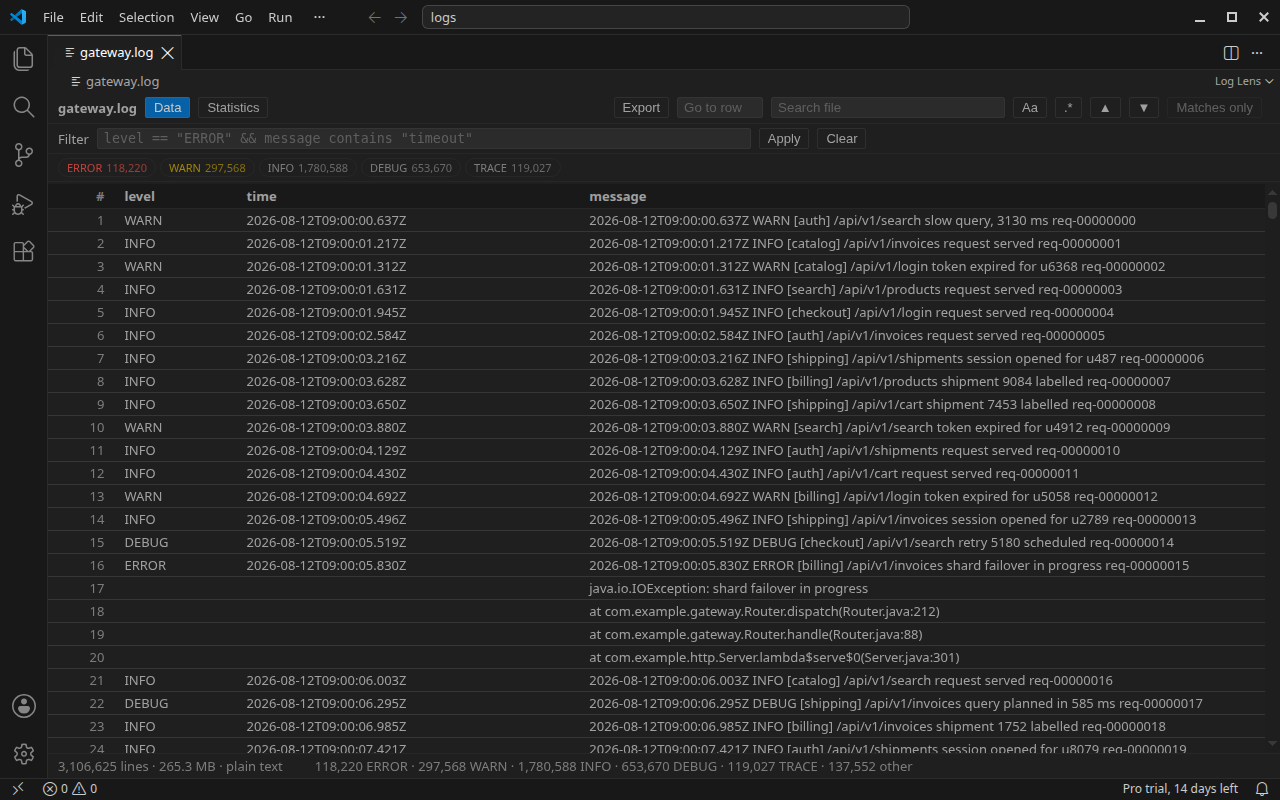
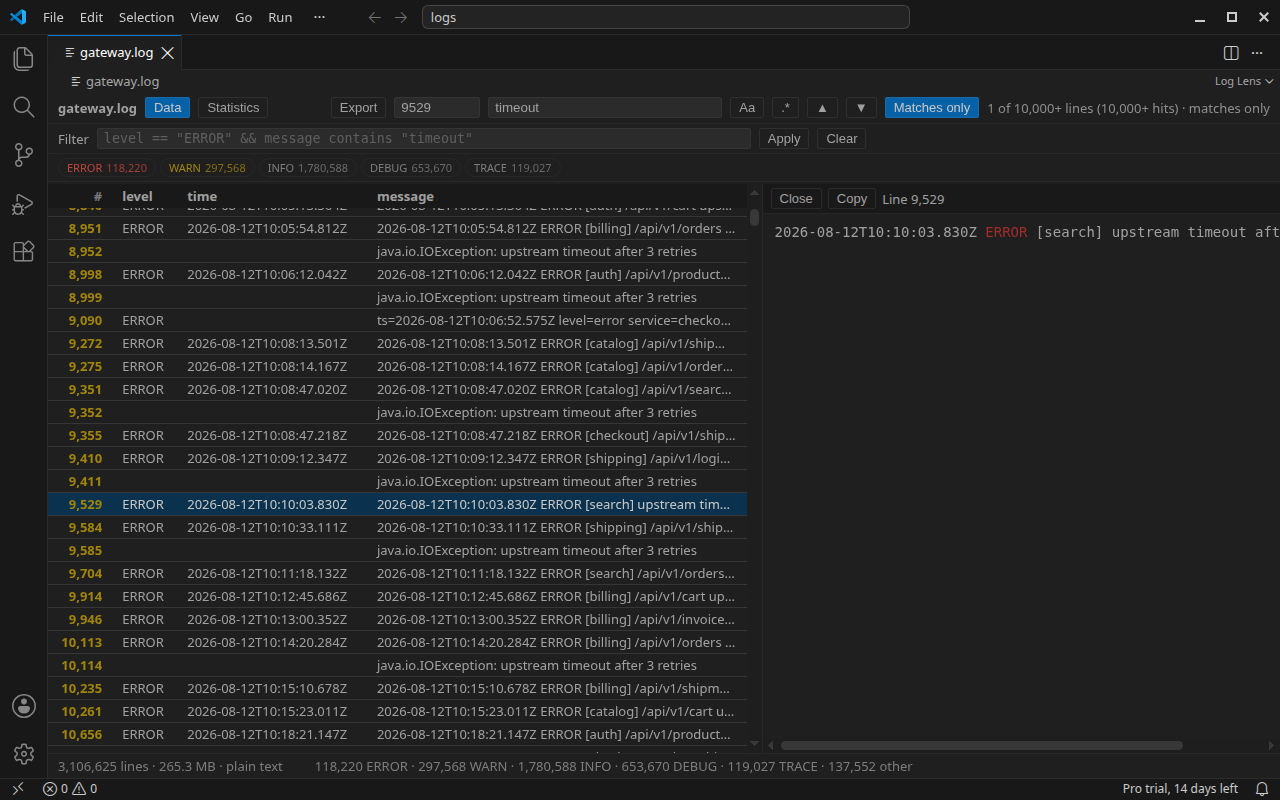
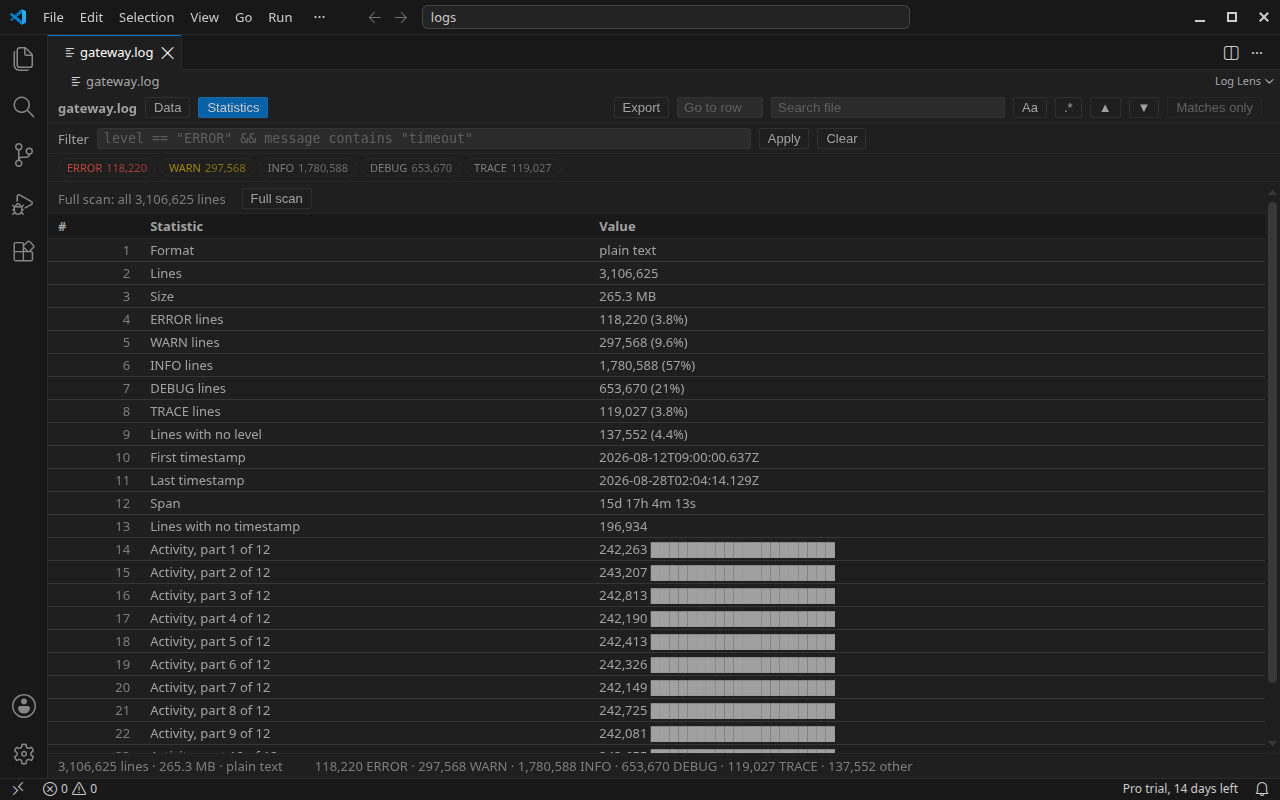
Log Lensopen a .log, .out or .err file and click Open in Log Lens, the list icon at the top right of the editor, or right-click the file or its tab and choose Open in Log Lens. a viewer for log files of any size. lines are indexed by byte offset in one pass and read on demand, so a multi-gigabyte log is on screen while its index builds and the file is never loaded whole into memory. the viewer is free: the grid, the level chips with whole-file counts, find in file, the line detail. with those you can filter and search log files by level and by text. ANSI colored logs read as plain text in the grid and in their colors in the line detail. pro, a subscription, adds whole-file filter queries, export, log statistics and grid themes, and it is on from the first open: each machine gets a 30-day pro trial with no key to enter, and the status bar counts it down from "Pro trial, 30 days left". in Cursor, Windsurf and VSCodium, install it from Open VSX.
Free - the full viewer, for logs of any size
every non-blank line in the file is indexed, at 8 bytes a line, and that index is what a file costs in memory: 800 MB of offsets for a hundred million lines; a blank line, or one of nothing but spaces and tabs, is skipped and never counted. the index is one pass over the file; the level pass is a second, over the head of each line (its first 8 KB; a longer JSON line with no level field in that head is read on to find one), and it keeps one byte more per line, so a chip can page through one level's lines with no further pass over the file. the grid asks for lines in pages of 200 as you scroll. the extension runs on VS Code 1.90 or newer. only .log names, plain, rotated (app.log.1 up to a nine-digit suffix) or gzipped, and .out and .err names, plain or gzipped, are claimed, and a .txt file is not; the text editor stays the tab that opens first: Log Lens is the Open With choice and the Open in Log Lens command. the status bar item shows only while a Log Lens tab is active; the pro dialog appears only when you click a pro item, and what speaks unasked is the four trial notices and the one review ask below. Pro, optional subscription
the trial has four notices, each shown only when a Log Lens tab is in front. one comes inside the last seven days, with the days left in it, and another on the final day; those two keep out of a session the review ask has already had, and never both show in one session. a third comes once the trial has ended. it reads "Your Lens Pro trial has ended. Get Lens Pro to keep filter queries, export, log statistics and themes.", and nothing that worked before it stops working. the fourth comes first, when the trial starts: "Lens Pro is on for 30 days on this machine: filter queries, export, log statistics and themes. No key needed.". a machine sees each of the four once, and a key entered stops all of them. all four carry two buttons, Buy (personal) and Business pricing, which open the two checkouts of the Get Lens Pro pick in the status bar menu. the other three start with what the trial did, as in "This trial: 3 filter queries, 1 export.", and all four end with the price. besides those, the first time a filter query, an export or a log statistics run produces something during the trial, with more than seven days of it left, one plain message names it, as in "That filter query was Pro. Your trial runs 27 more days. Level filters and search stay free."; it comes once and has no button. one review ask comes per machine, for a review on the store you installed from: at once at the first export, the first pro action of a running trial or the first file of 100 MB or more on screen within two seconds, and otherwise after five moments of use, counted from three kinds: a file indexed with lines in it, a first search that found some, an export that wrote lines. no reward is attached. it holds off inside the trial's last three days and in any session that carried a trial notice, and No thanks closes it for good; Write a review in the status bar menu opens the same page at any time. its middle button, Feedback, opens a feature request on the issues page with the extension and its version filled in, for you to read before you post. every pro dialog names the feature, "Filter query is a Lens Pro feature." for the filter box, ends with the price and offers three buttons, Buy (personal), Enter license key and Business pricing; an export or a log statistics run turned down leaves the same price line in a note on the grid. the command palette has the pair as Log Lens: Get Lens Pro and Log Lens: Enter license key, and the status bar item opens a menu with both and Write a review. one Lens Pro key covers Log Lens, JSONL Lens and Parquet Lens for VS Code, but the three do not pass the key between them. paste it into each one you use; the Remove license key command in that extension releases that activation again. $4.90 a month or $49 a year personal, $9.90 a month or $99 a year business: one key for all three extensions, and Pro stays on in every build while the subscription runs. a personal key activates on up to 3 machines, a business key on 10, all three extensions on each (each extension on each machine is one activation: 9 on the personal key, 30 on the business key); release a machine from the Polar customer portal. when the subscription ends, Polar revokes the key and Pro turns off at the extension's next check, about once a week; the free viewer stays. buy on Polar (personal, business), then run Log Lens: Enter license key. receipts, invoices, your subscription, your key and its activations are in the Polar customer portal at polar.sh/twilight-ventures/portal; cancel there any time. sign in with the purchase email. for a refund, write to support@twilightventures.dev. a refund revokes the key. the free viewer is the complete viewer. everything that is free in 0.1.0 stays free in every later build; pro adds the four items above and nothing is taken away. What it does not do
Part of the Lens family
Guides and supportthe guides and the family overview are at twilightventures.dev. write to support@twilightventures.dev about anything to do with Log Lens or a purchase, suggestions included; for a bug, name the version and the rough size of the file. bugs and requests can also go on the issues page of the Lens repository. in your language한국어: Log Lens는 크기에 상관없이 로그 파일을 VS Code에서 엽니다. 로그의 각 줄은 한 번의 스캔에서 바이트 오프셋을 기준으로 인덱싱되고 필요할 때만 읽히므로, 수 GB 로그도 인덱싱이 끝나기 전에 화면에 나타나고 메모리에 통째로 올라가지 않습니다. 뷰어는 그리드, 파일 전체 집계를 보여 주는 레벨 칩, 파일 내 검색, 줄 상세까지 무료입니다. 구독형 Pro는 파일 전체 필터 쿼리, 내보내기, 로그 통계, 그리드 테마를 추가하며, 처음 열 때부터 켜져 있습니다. 컴퓨터마다 30일 Pro 체험이 라이선스 키 입력 없이 시작됩니다. 확장이나 구매에 관한 문의와 제안은 한국어로 보내 주셔도 됩니다 (support@twilightventures.dev). **中文:**Log Lens 可在 VS Code 中打开任意大小的日志文件。日志的每一行在一次扫描中按字节偏移建立索引、按需读取,因此数 GB 的日志在索引完成前就已显示,且不会整个加载到内存。查看器免费:表格、带全文件计数的级别标签、文件内查找、行详情。订阅制的 Pro 版增加全文件过滤查询、导出、日志统计和表格主题,并且从第一次打开起就已启用:每台机器都有 30 天 Pro 试用,无需输入许可证密钥。关于扩展或购买的问题和建议,欢迎用中文发邮件至 support@twilightventures.dev。 **日本語:**Log Lens は、サイズを問わずログファイルを VS Code で開きます。ログの各行は一度の走査でバイトオフセットを基準にインデックス化され、必要なときだけ読み込まれるため、数 GB のログでもインデックス作成を待たずに表示され、メモリに丸ごと載ることはありません。ビューアーはグリッド、ファイル全体の件数付きレベルチップ、ファイル内検索、行詳細まで無料です。Pro(サブスクリプション)はファイル全体のフィルタークエリ、エクスポート、ログ統計、グリッドテーマを追加し、最初に開いたときから有効です。各マシンで 30 日間の Pro トライアルが、ライセンスキーの入力なしで始まります。拡張機能や購入についてのお問い合わせやご提案は、日本語でも support@twilightventures.dev までお送りいただけます。 Türkçe: Log Lens ile log dosyaları, boyutu ne olursa olsun VS Code'da açılır. Log dosyasının satırları tek geçişte bayt offset'ine göre indekslenir ve gerektikçe okunur; bu sayede birkaç GB'lık bir log indeksleme bitmeden ekrana gelir ve belleğe bütünüyle yüklenmez. Görüntüleyici ücretsiz: tablo, tüm dosya için sayım gösteren seviye etiketleri, dosyada arama, satır ayrıntısı. Pro, abonelikle satın alınır; tüm dosya üzerinde filtre sorguları, dışa aktarma, log istatistikleri ve tablo temaları ekler. İlk açılıştan itibaren her makinede 30 günlük Pro denemesi, lisans anahtarı girmeden kendiliğinden başlar. Uzantı veya satın almayla ilgili sorularınızı ve önerilerinizi Türkçe de yazabilirsiniz: support@twilightventures.dev. Português: O Log Lens abre arquivos de log de qualquer tamanho no VS Code. As linhas do log são indexadas por offset de byte em uma única passagem e lidas sob demanda, então um log de vários gigabytes aparece na tela antes de a indexação terminar e nunca é carregado inteiro na memória. O visualizador é gratuito: grade, chips de nível com contagem no arquivo inteiro, busca no arquivo, detalhe da linha. O Pro é vendido por assinatura e acrescenta consultas de filtro no arquivo inteiro, exportação, estatísticas do log e temas de grade, e já vem ativo desde o primeiro uso: cada máquina ganha um teste gratuito de 30 dias do Pro sem digitar nenhuma chave de licença. Dúvidas e sugestões sobre a extensão ou uma compra podem vir em português para support@twilightventures.dev. Deutsch: Log Lens öffnet Logdateien jeder Größe in VS Code. Die Zeilen des Logs werden in einem Durchlauf nach Byte-Offset indexiert und bei Bedarf gelesen, sodass ein mehrere Gigabyte großes Log schon vor dem Ende der Indexierung angezeigt wird und nie vollständig im Speicher liegt. Der Viewer ist kostenlos: Tabelle, Level-Chips mit der Anzahl über die ganze Datei, Suche in der Datei, Zeilendetails. Pro gibt es im Abonnement; es ergänzt Filterabfragen über die ganze Datei, Export, Logstatistiken und Tabellendesigns und ist vom ersten Öffnen an aktiv. Jeder Rechner bekommt eine 30-tägige Pro-Testphase, ohne dass ein Lizenzschlüssel eingegeben werden muss. Fragen und Anregungen zur Erweiterung oder zum Kauf gern auf Deutsch an support@twilightventures.dev. |