TuyaOS
AI Coding Your Next Gen. Hardware — The all-in-one VS Code extension for building AIoT and Agentic AI devices on the TuyaOS platform. Learn more in the Tuya developer docs.



Why TuyaOS?
Building on a licensed IoT SDK means acquisition, entitlements and toolchain plumbing before the first line of code. TuyaOS brings that whole licensed workflow into your favorite editor.
- Authorized SDK management — per-version SDK archives straight from Tuya's backend, every download enforced against MD5 and exact size
- Production-ready — product development packages and device license / auth-code management built in
- AI-native workflow — the same Skills system integrates with Cursor and Claude Code for build, flash, and project workflows via natural language
- Entitlements follow your account — the SDK catalogue shows exactly what your signed-in Tuya developer account is authorized to use
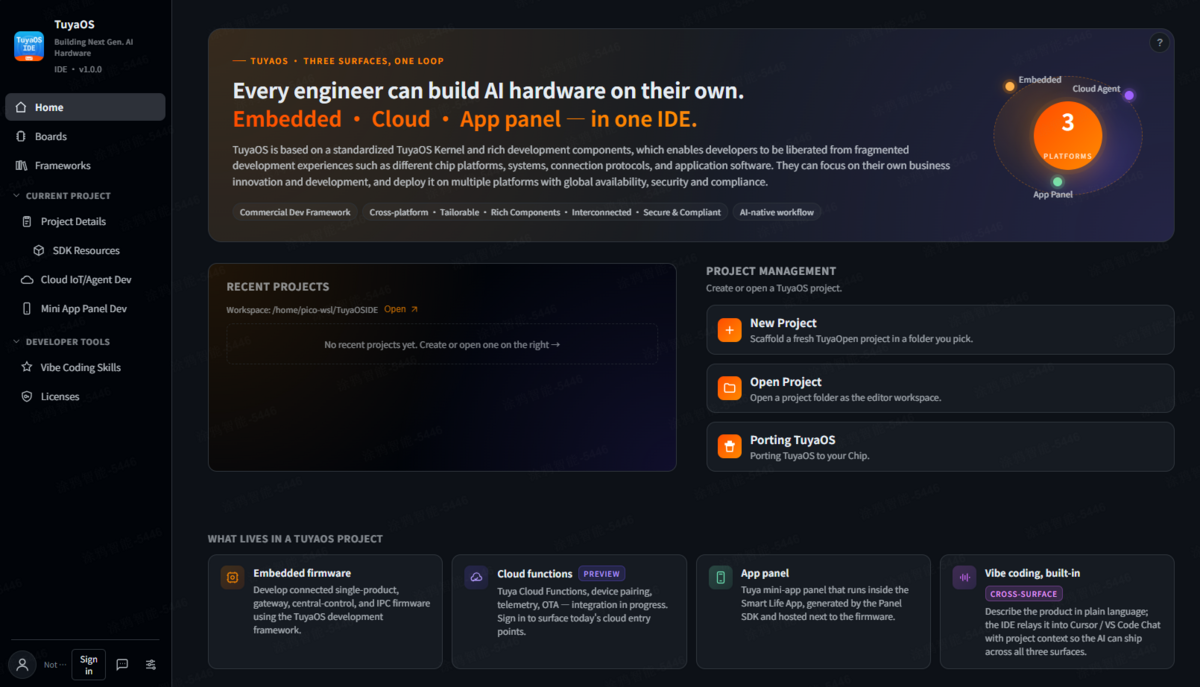
Features
Project Management
Create and manage TuyaOS projects in seconds. A project is an SDK tree: the authorized version's archive is downloaded on demand, integrity-checked, and expanded into software/TuyaOS/apps/<app>/ + hardware/ + pc/tools/ with a root tuya.json — no template stitching, no stale caches. The MiniApp panel lives flat at miniapp/ beside software/.
Hardware Catalogue
Browse supported boards and chips with pinouts, specs, and one-click project creation. Filter by brand, connectivity, or chip family.
SDK Management
The SDK catalogue lists every TuyaOS version your account is entitled to. Access is gated, by design: apply from the IDE (company, developer, contact, reason), wait for approval, and a signed download URL is issued. A granted version offers Create project directly. Newer SDK versions are detected and reported — never silently upgraded.
App Configuration
Full kconfig (menuconfig) configuration for your app, edited through a dedicated App Configuration page with search and dependency-aware visibility.
Product Packages
产品开发包 (product development packages) — ready-made applications per SDK version. Apply → approve → download; the package unpacks straight into software/TuyaOS/apps/ where the toolchain expects it.
Modules
Browse the certified module catalogue with datasheets and vendor download links per module.
AI Skills for Embedded Development
Install coding skills that teach your AI assistant (Cursor / Claude Code) how to:
- Build firmware for your target board
- Flash to connected devices through the SDK's
tyutool_cli
- Pair devices to the Tuya cloud
- Configure project settings and data points
Sign in to the Tuya IoT Platform directly from VS Code. View and manage:
- Product details and data points
- Panel configurations
- Device authorization — including cloud free auth codes, claimable, orderable and verified-downloadable right from the IDE
Ecosystem
Search the PlatformIO registry for community libraries and install them into your project without leaving the editor.
Build, Flash & Monitor
Build entry points match your host OS (build_app.sh on Linux, build_app.py + .bat on Windows — a mismatched host gets build and flash disabled up front rather than failing mid-build). Flashing and serial monitoring run through the SDK's tyutool_cli, resolved automatically from your workspace's tools/tyutool/.
Getting Started
- Install the extension from the VS Code Marketplace
- Sign in with your Tuya developer account
- Create a project — pick an SDK version from the catalogue you are entitled to; the authorized archive downloads, verifies, and expands automatically
- Build and flash from the IDE
No git clone, no mirror picking, no manual toolchain PATH.
| Platform |
Status |
| Windows 10/11 |
Fully supported |
| macOS (Intel & Apple Silicon) |
Fully supported |
| Linux (x64) |
Fully supported |
| WSL (from Windows host) |
Supported |
Settings
Access settings from the TuyaOS panel → Settings page, or via VS Code Settings (Ctrl+,).
| Setting |
Description |
| Workspace Root |
Where projects, SDK archives, and tools live |
| Language |
UI language (Auto / English / 简体中文) |
| Theme |
Follow editor, or force light/dark |
| Manifest Source |
Where to fetch board catalogs from |
Works with Cursor & Claude Code
TuyaOS's Skills system was designed for AI-assisted embedded development. When paired with Cursor or Claude Code, your AI assistant gains domain knowledge about:
- TuyaOS SDK APIs and project structure (
software/TuyaOS/apps/ layout, tuya.json, kconfig options)
- Build system commands and target configurations
- Device authorization and cloud registration
- Hardware pin definitions and peripheral setup
Simply install Skills from the IDE panel and your AI assistant is ready to help you write firmware.
Requirements
- VS Code 1.85+ or Cursor (any recent build)
- A Tuya developer account — SDK versions and product packages are entitlement-gated, applied for and approved through the IDE
- Build prerequisites follow your SDK's own scripts per host OS (see the SDK documentation for your version)
Data & Privacy
TuyaOS is built to be transparent about what leaves your machine:
- No automatic data collection — no third-party analytics or telemetry SDKs,
no background phone-home.
- Consent first — on first run a welcome agreement gates all network
activity. Nothing (SDK archive, catalogue/skill download, MiniApp runtime) is
fetched until you accept. Decline and the extension stays fully local.
- Your code stays local — source file contents are never transmitted.
- Credentials stay local — account details are kept in this extension's
private storage; the SK token, session cookies and CSRF token are stored in
the editor's encrypted
SecretStorage. They are sent only to Tuya's own hosts.
- Feedback is opt-in — diagnostic reports upload to
tuyaopen.ai only when
you use Send Feedback and confirm what's included.
Endpoints contacted (only when you use the related feature, and SDK/catalogue/
runtime downloads only after consent): GitHub / Gitee (SDK + catalogues), the
npm and PlatformIO registries and nodejs.org (toolchain), and Tuya hosts
(auth.tuya.com, platform.tuya.com, wind-ide.tuyacn.com,
miniapp-ark-ide.tuyacn.com, images.tuyacn.com, tuyaopen.ai).
More information is available in the IDE at Settings → About → Terms & Privacy.
Tuya Privacy Policy ·
Tuya Service Agreement.
License
Apache License 2.0

