
Claude Code Notifier PlusGet notifications when Claude Code needs your attention — works in both CLI and VS Code extension mode Installation Launch VS Code Quick Open ( Ctrl+P), paste the following command, and press enter.Copied to clipboard |

Claude Code Notifier Plus
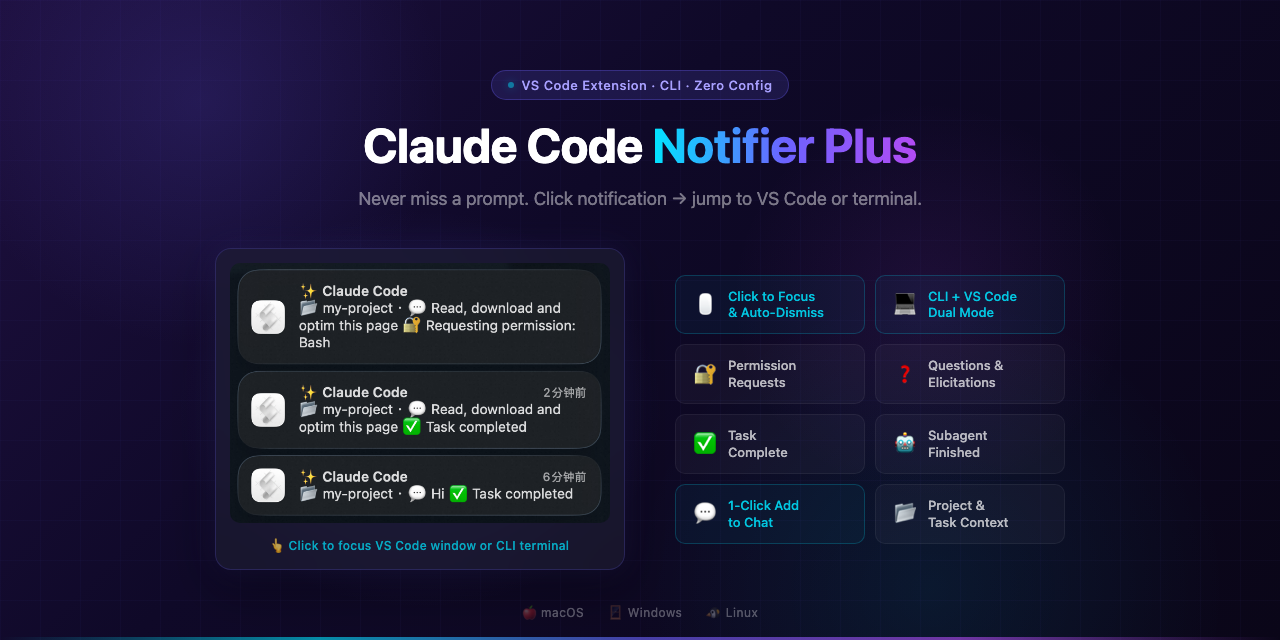
Get notified when Claude Code needs your attention — works in both CLI and VS Code extension mode.
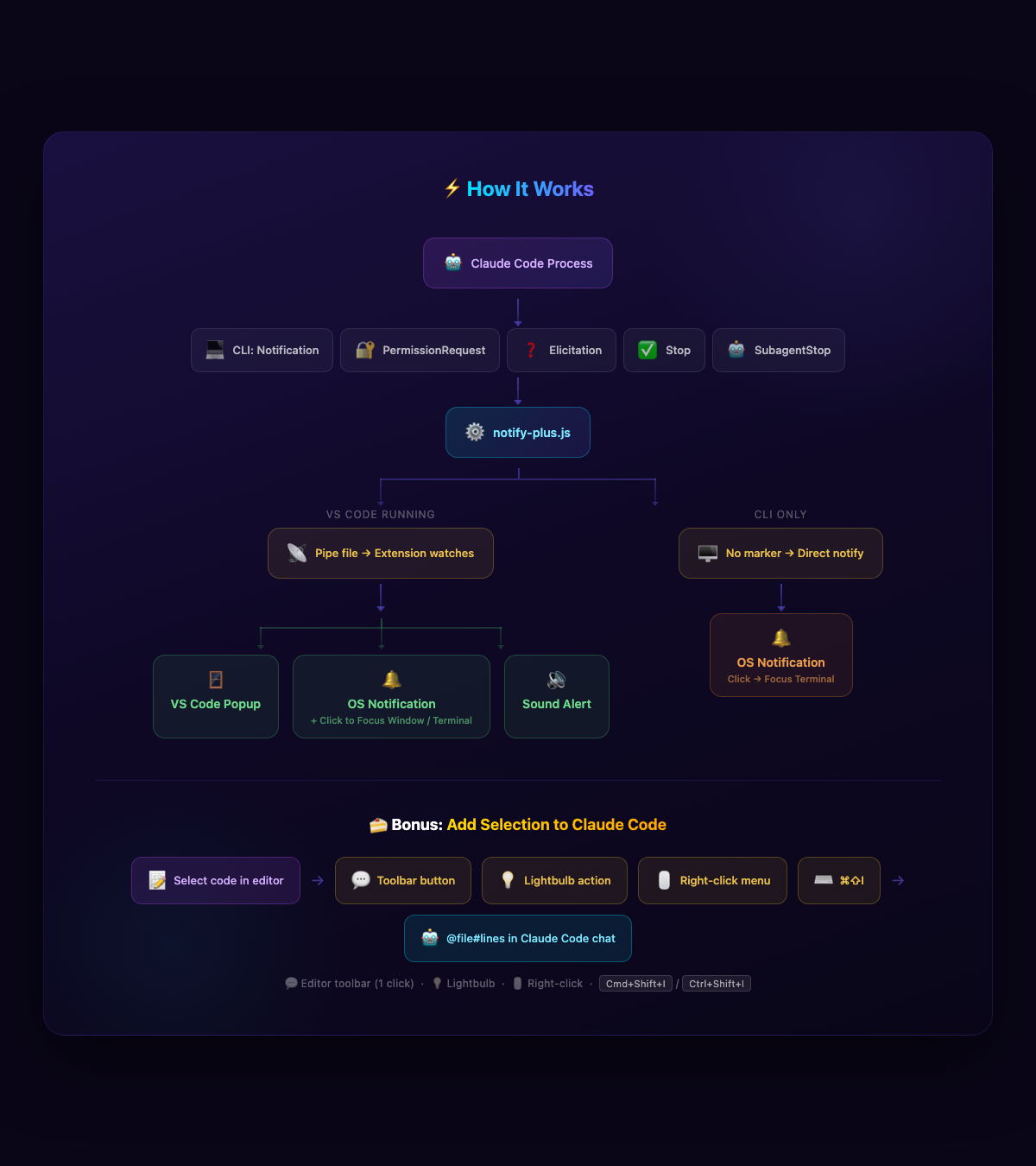
Why This Extension?The official Claude Code VS Code extension handles notifications internally through its webview and does not trigger the Claude Code Notifier Plus solves this by registering event-specific hooks that fire in both CLI and VS Code environments:
Features
InstallationFrom VS Code MarketplaceSearch for "Claude Code Notifier Plus" in the Extensions panel, or: From VSIXAfter installation, reload VS Code (Cmd+Shift+P → "Developer: Reload Window"). Optional: Click-to-Focus (macOS)For the best experience on macOS, install This enables:
The extension will guide you through this on first launch.
ConfigurationAll settings are under
|
| Value | Behavior | Requires |
|---|---|---|
"window" ⭐ |
Click notification → jump to the exact project window (VS Code or CLI terminal) | terminal-notifier + Accessibility permission |
"app" |
Click notification → activate the target app (VS Code or CLI terminal) | terminal-notifier |
"off" |
Click does nothing, uses basic osascript notification |
Nothing |
Bonus: Add Selection to Claude Code
Quickly send selected code to Claude Code's chat input — no copy-paste needed. 4 ways to trigger:
| Method | Clicks | How |
|---|---|---|
| Editor title button 💬 | 1 | Select text → click the chat icon in the editor toolbar |
| Lightbulb code action 💡 | 2 | Select text → click the lightbulb → "Add Selection to Claude Code" |
| Right-click menu | 2 | Select text → right-click → "Add Selection to Claude Code" |
| Keyboard shortcut ⌨️ | 0 | Select text → Cmd+Shift+I (macOS) / Ctrl+Shift+I (Windows/Linux) |
You can also right-click any file in the Explorer panel to add it to Claude Code.
The selected code is inserted as a @file#line reference in Claude Code's chat, so Claude knows exactly where the code is and can read the full context.
How It Works
Test
Open the Command Palette (Cmd+Shift+P) and run:
Claude Code Notifier Plus: Send Test Notification
License
MIT
中文说明
当 Claude Code 需要你的注意时发送系统通知 — 同时支持 CLI 模式和 VS Code 扩展模式。
特性
- 双模式支持 — 终端 CLI 和 VS Code 扩展内都能触发通知
- 纯 CLI 支持 — 无需打开 VS Code 也能收到系统通知
- 点击跳转 — 点击通知直接跳转到对应项目的 VS Code 窗口,或 CLI 终端窗口(Terminal.app / iTerm2 / Warp 等),通过
VSCODE_PID精确识别来源,不会误跳终端;点击后通知自动从通知中心移除(macOS,需安装terminal-notifier) - 系统级通知 — macOS / Windows / Linux 原生系统通知
- 任务上下文 — 通知包含项目名 📂 和任务摘要 💬
- 提示音 — 可选声音提醒
- 焦点感知 — VS Code 为活动窗口时可跳过通知
- 多语言 — 支持中文和英文,跟随系统语言自动切换
- 零配置 — 安装即用,hook 自动注册
甜点功能:快速发送选中代码到 Claude Code
选中代码后,有 4 种方式 将代码引用插入 Claude Code 聊天输入框:
- 💬 编辑器工具栏按钮 — 选中文字后,编辑器右上角出现聊天图标,一键点击
- 💡 灯泡代码操作 — 选中文字后,点击行首灯泡图标选择操作
- 🖱️ 右键菜单 — 选中代码 → 右键 → "将选中内容添加到 Claude Code"
- ⌨️ 快捷键
Cmd+Shift+I
还可以在资源管理器中右键任意文件添加到 Claude Code。
安装
VS Code 扩展商店搜索 "Claude Code Notifier Plus" 直接安装。
推荐额外安装(macOS 点击跳转功能):
brew install terminal-notifier
安装后重新加载 VS Code 即可使用。
⚡ 重要提示(macOS): 要启用点击通知精确跳转到对应项目窗口,需要授予辅助功能权限:
系统设置 → 隐私与安全性 → 辅助功能 → 开启 terminal-notifier
该权限允许插件在你点击通知时定位并激活正确的 VS Code 窗口,只需授权一次。未授权时点击通知仍可激活 VS Code,但不会切换到具体项目窗口。