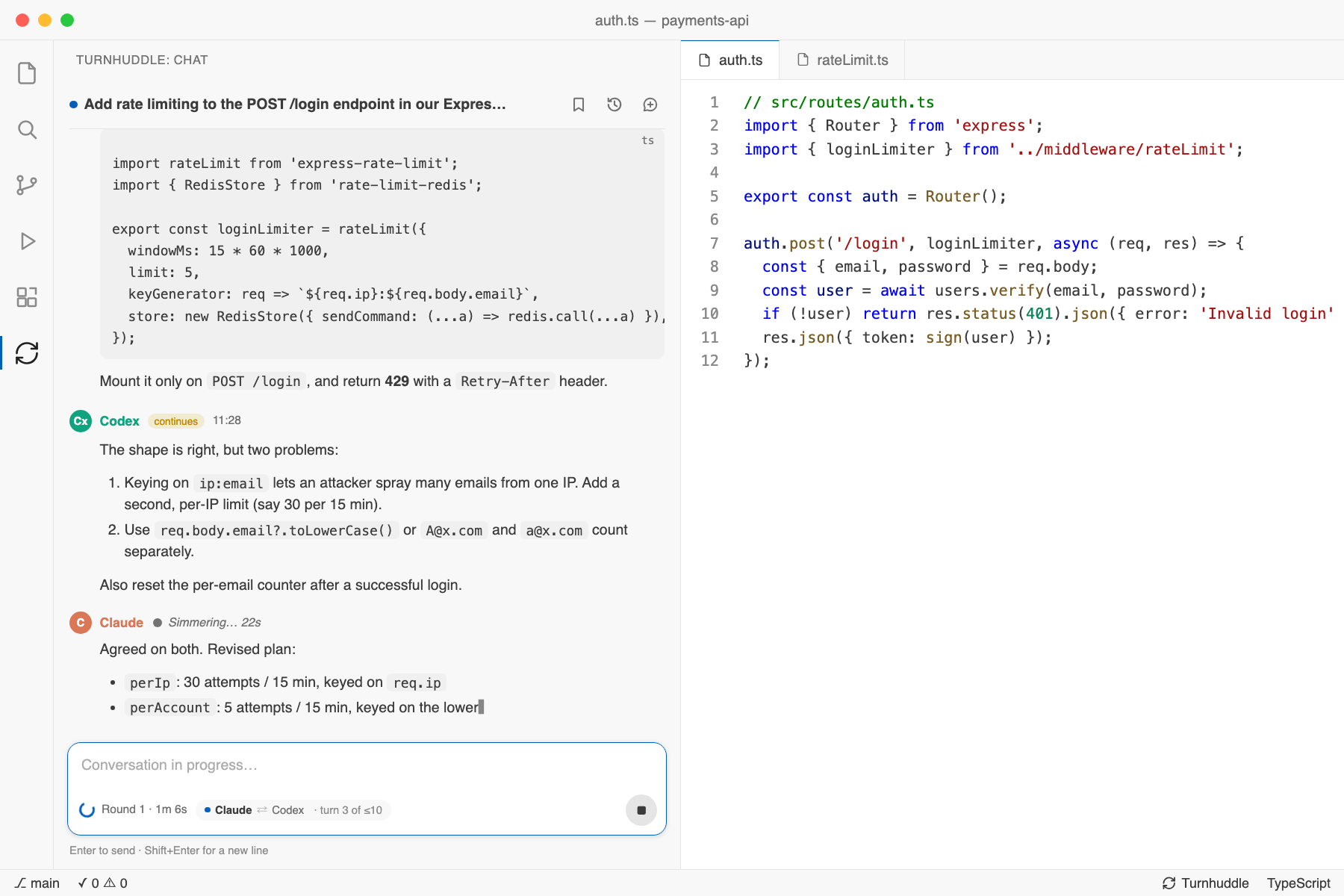
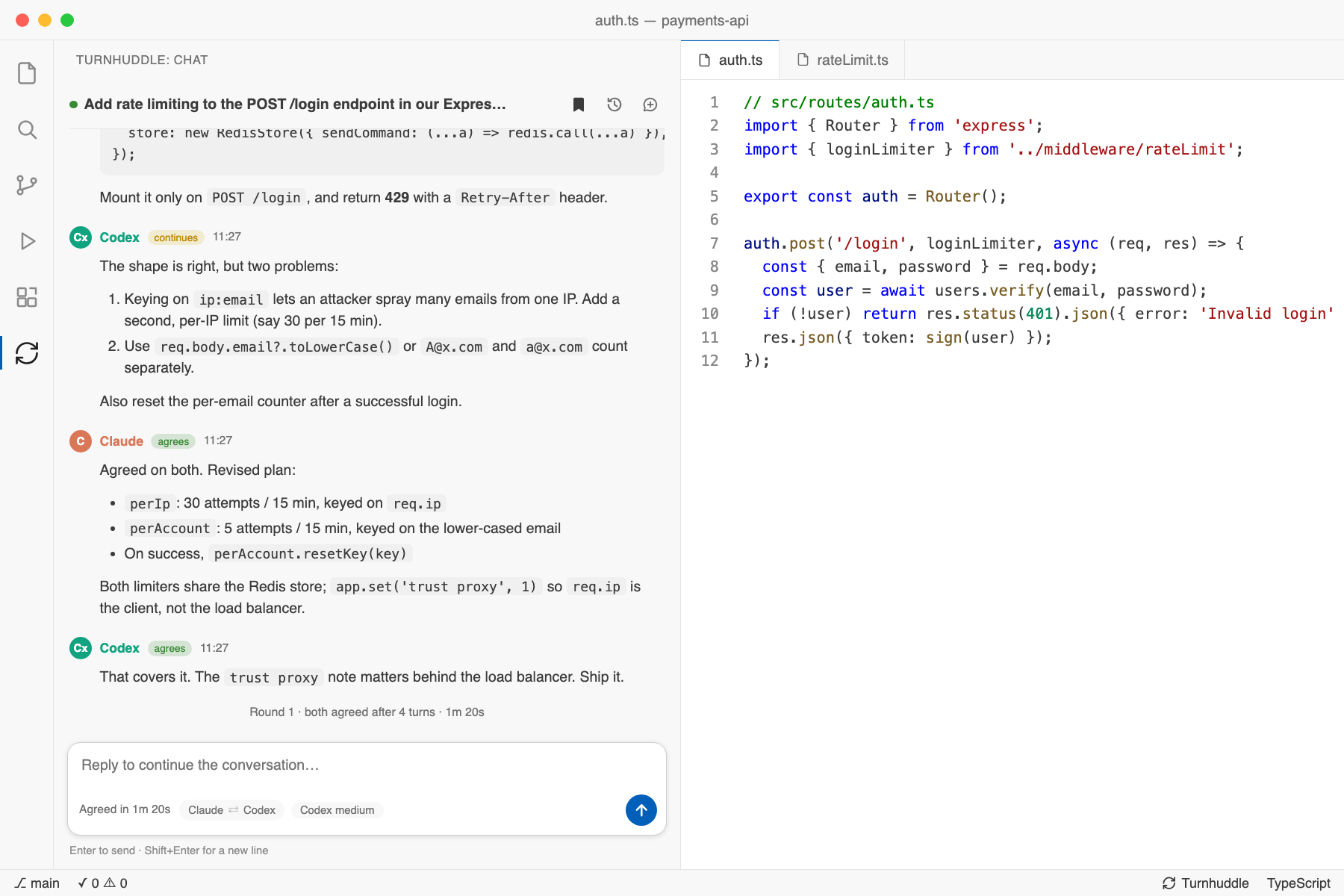
Asking one coding agent gets you one opinion. Asking two means copying answers back and forth between tools. Turnhuddle does the back-and-forth for you: Claude drafts, Codex critiques, Claude revises, and the round ends only when both say the answer is final.
It drives the official Claude Code and Codex command-line tools you already have, under your own accounts. No new logins, no server, no telemetry.
Features
Rounds that end when both agree
Every turn ends with a verdict, shown as agrees or continues next to the agent's name. Two agreements in a row finish the round. A turn limit, 10 by default, stops a round that goes in circles, and says so.
Watch Claude write
Claude's reply streams in as it's written, with a live status like Noodling… 18s while each agent works. Codex shows what it's doing, then its review. Replies render as Markdown: code blocks, lists, tables.
Every conversation, saved, and continued from the CLIs
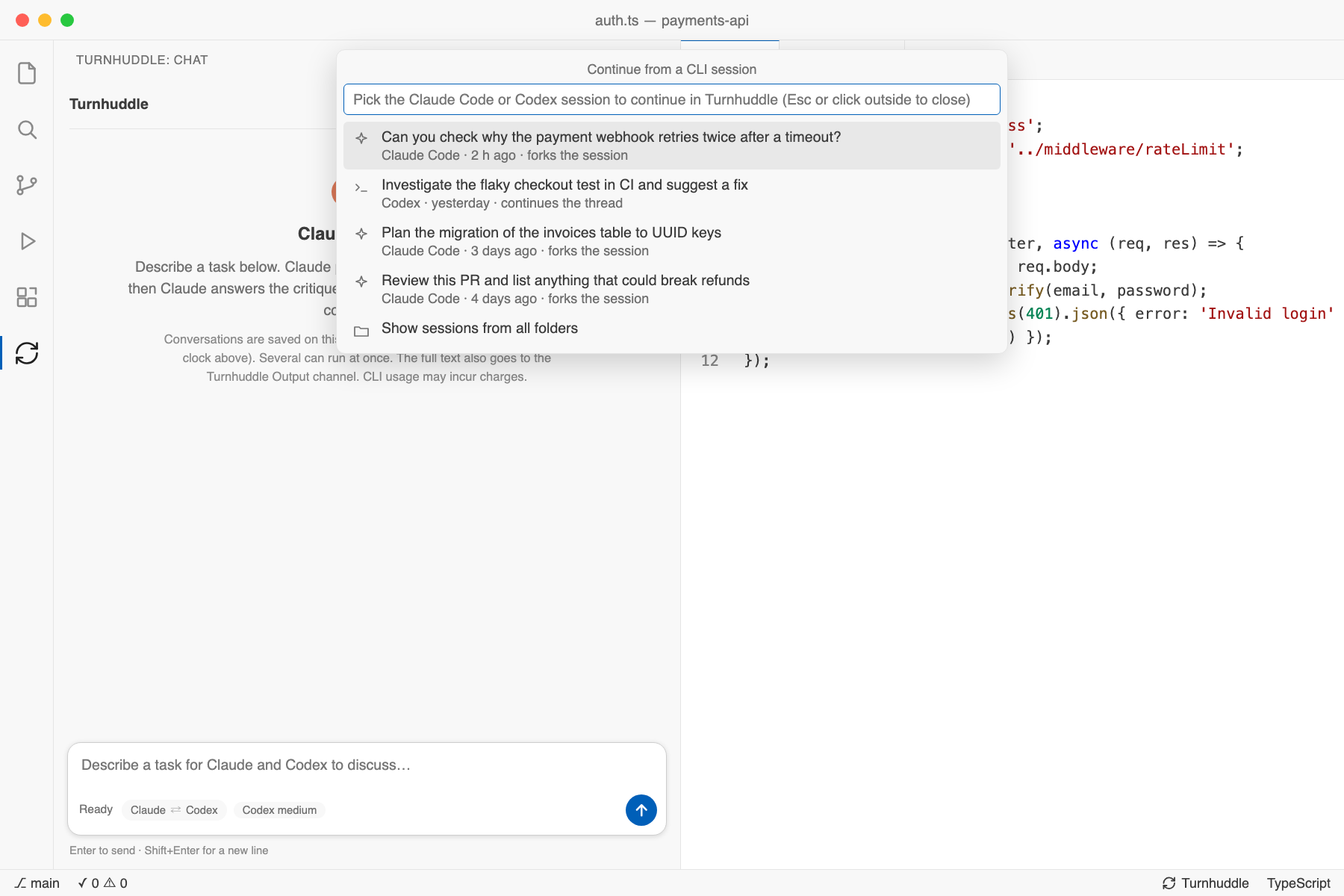
Conversations are saved on your machine. The chat header works like Claude Code's: bookmark the one you're in, open your history from the clock (bookmarked first, searchable), or start a new one. Run several at once, archive instead of delete. Started something in the Claude Code or Codex CLI? Pick that session and continue it here, with everything the agent already knows.
And more
Reply to go deeper. A follow-up runs another round on the same conversation, with the full history.
Speed you control. Set how hard Codex and Claude think, for Turnhuddle only.
Updates itself. Checks GitHub daily and installs new versions after verifying their checksum. Marketplace installs are also updated by VS Code.
Get started
Install the Claude Code CLI and the Codex CLI, and sign in to each once in a terminal.
Run Turnhuddle: Check CLI Installations to confirm both CLIs are found.
Open the Turnhuddle view in the Activity Bar, type a task and press Enter.
Turnhuddle finds the CLIs by itself: on your PATH, in common install folders, or bundled with the Claude Code and Codex VS Code extensions. If you keep them somewhere unusual, point turnhuddle.claudePath and turnhuddle.codexPath at them.
Settings
Setting
Default
What it does
turnhuddle.roundMode
agreement
agreement: agents alternate until both agree. fixed: Claude, Codex, Claude.
turnhuddle.maxTurnsPerRound
10
Most agent turns in one agreement round (2–30).
turnhuddle.codexReasoningEffort
medium
Codex's reasoning effort for Turnhuddle turns only. inherit uses your Codex config.
turnhuddle.claudeEffort
inherit
Passes --effort to Claude: low to max.
turnhuddle.claudePath, turnhuddle.codexPath
claude, codex
Leave as is to find the CLIs automatically, or set a full path.
turnhuddle.timeoutSeconds
180
Per-turn time limit.
turnhuddle.checkForUpdates
true
Daily check for a newer release on GitHub.
turnhuddle.vendorLogos
true
Show the Claude and Codex logos from their installed VS Code extensions.
Commands
Command
Turnhuddle: Start Claude ↔ Codex Conversation
Start a new conversation from an input box.
Turnhuddle: Reply in Conversation
Run another round on the open conversation.
Turnhuddle: Continue from a Claude Code or Codex Session
Pick a CLI session to continue.
Turnhuddle: New Conversation · Cancel Conversation
Clear the chat · stop the running round.
Turnhuddle: Check CLI Installations · Check for Updates
Find the CLIs · look for a new version.
Turnhuddle: Reveal History Folder
Open the folder where conversations are saved.
Privacy and safety
Your task and the replies go to Claude and Codex through their own CLIs, under your accounts; their usage charges and data policies apply.
Conversations are plain JSON files in VS Code's storage on your machine. Nothing is deleted for you; archived conversations stay until you remove them.
No telemetry. The only request Turnhuddle makes itself is the daily update check to GitHub, which you can turn off.
Claude runs in plan mode and Codex in a read-only sandbox, and both are told to discuss only. These are the CLIs' own permission modes, not a security boundary for hooks, plugins or MCP servers you've installed.
Every turn replays the conversation to the CLI, so long conversations cost more per round.
Tested on macOS. Windows and Linux should work but aren't verified.
Turnhuddle doesn't bundle the Claude or OpenAI logos, which belong to Anthropic and OpenAI. When the Claude Code and Codex VS Code extensions are installed, it shows the logos those extensions ship, from where they're installed on your machine; otherwise it shows initials. Turn this off with turnhuddle.vendorLogos.
Contributing
Bug reports and ideas are welcome in Issues. To build, test or release Turnhuddle, see docs/DEVELOPMENT.md; the changelog lists every version.