Rendix
Stop copy-pasting AI output into your editor. Get an AI tool that actually knows your codebase — generates infrastructure code, debugs pipelines, and writes runbooks, all matched to your repo's patterns and conventions.
The problem this solves
Most engineers already use AI for infrastructure work. But they do it by copying from ChatGPT into their editor, getting generic output that doesn't know their naming conventions, their module structure, or why their GitHub Actions job just failed.
This extension fixes that. It lives inside VS Code, indexes your actual repo, and generates infrastructure code that looks like it was written by someone who has read every file in your codebase.
What it does
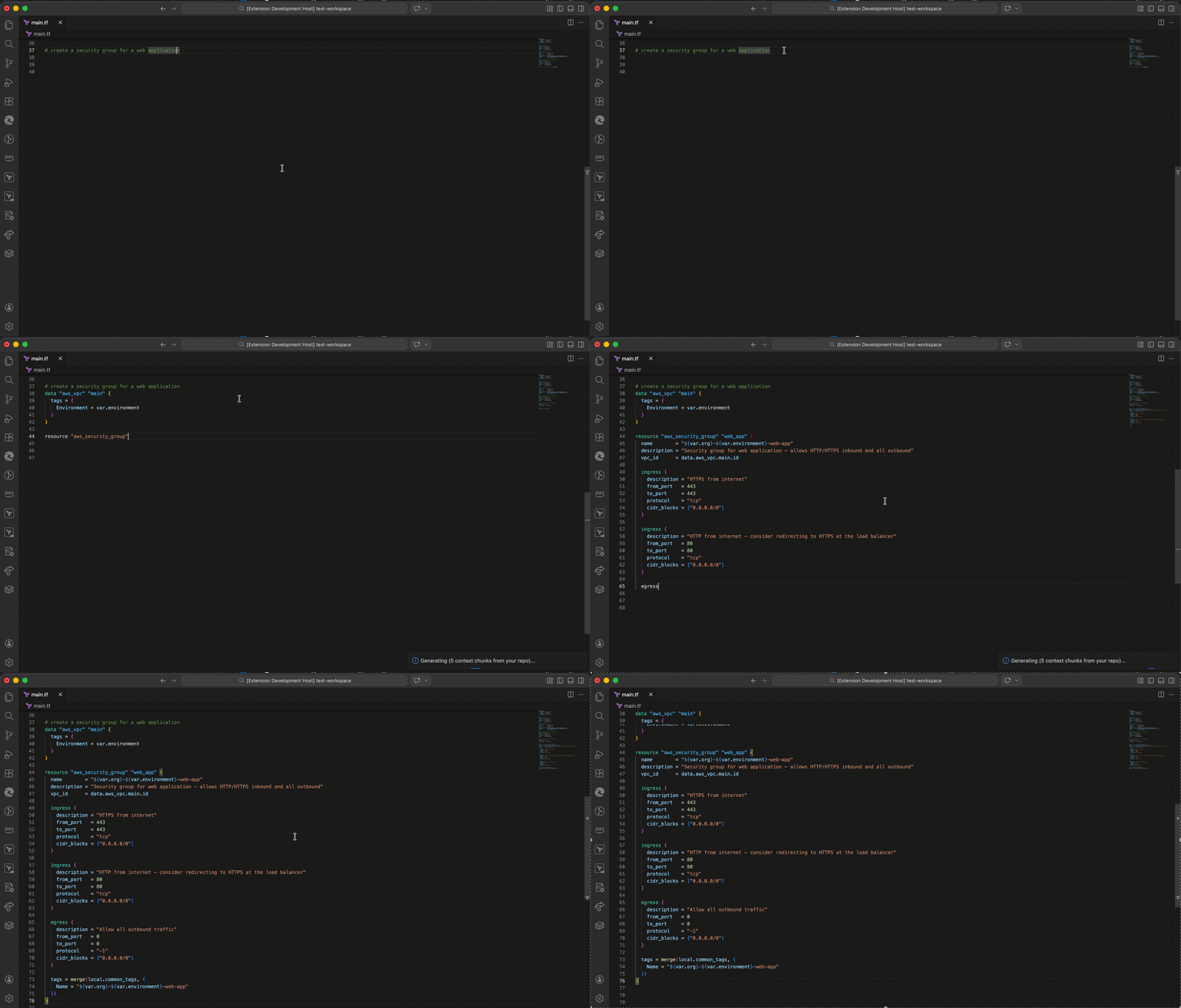
Write a comment describing what you need. Press Cmd+Shift+I (Mac) or Ctrl+Shift+I (Windows). Watch production-quality code stream directly into your editor.
# create an S3 bucket for application logs with 90-day retention
Generates a complete, production-ready resource block — with your naming conventions, your tags, your variable patterns. Not a generic example you have to rewrite.
Supports: Terraform · OpenTofu · Kubernetes YAML · Helm · Dockerfile · Azure Bicep · AWS CloudFormation · Ansible · GitHub Actions · GitLab CI
Your comment stays — Rendix inserts generated code below your comment so you always have the original description as a reference.
Switch files freely — if you switch to another file while generation is running, Rendix keeps streaming in the background. When it finishes a notification appears: ✓ Rendix finished generating in filename.tf with a Go to file button.
Completion signal — when generation finishes the status bar briefly shows ✨ Rendix ✓ and a 🎉 notification confirms the code was inserted successfully.
Debug failing pipelines — with follow-up questions
Select the failure output in your terminal or editor. Press Cmd+Shift+D. A dedicated diagnosis panel opens to the right of your editor and streams a plain-English diagnosis.
ROOT CAUSE: The npm install failed because the registry was unreachable
FAILED AT:  Install dependencies (line 23)
FIX:        Add a retry step or mirror the registry in your CI config
Once the diagnosis is complete, ask follow-up questions directly in the panel:
- "Can you show me the full updated requirements.txt?"
- "What if I can't use apt-get on this runner?"
- "Is there a way to cache this to prevent it happening again?"
The panel keeps the full context of the original failure log and the entire conversation, so every follow-up answer is aware of what came before.
Coming soon: Automatic failure detection — the extension will watch your integrated terminal and prompt you to diagnose failures the moment they happen.
Explain, review, runbook and refactor
Explain — select any infrastructure code you didn't write and press Cmd+Shift+E. Rendix explains what it does in plain English and flags any issues or anti-patterns.
Review — select Terraform code and press Cmd+Shift+R. Rendix reviews it across four categories: SECURITY, COST, RELIABILITY, and CONVENTIONS. Every issue is flagged with HIGH / MEDIUM / LOW severity and a specific fix.
Generate runbook — press Cmd+Shift+P → Rendix: Generate runbook. Type the service name or incident description. Rendix generates a complete Markdown runbook with symptoms, triage steps, investigation commands, resolution steps, and post-incident actions — all using your actual infrastructure from the RAG index.
Refactor — select code and run Rendix: Refactor to match conventions from the Command Palette. Rendix rewrites the code to match your codebase conventions — replacing hardcoded values with variables, adding missing tags, fixing deprecated arguments.
All four open in a side panel with a Copy button on code blocks and a follow-up input for conversational questions.
Accuracy validation — automatic after every generation
Every time Rendix generates infrastructure code it runs an automatic accuracy check against your codebase. If anything cannot be verified from your repo context, a colour-coded report opens showing:
| Status |
Meaning |
| ✅ Verified |
Confirmed from your codebase — safe to apply |
| ⚠️ Needs review |
Could not verify from context — check before applying |
| 🔵 More context needed |
Open these files in your workspace to improve accuracy |
Ask follow-up questions directly in the report panel:
- "Why was this argument flagged?"
- "Show me the correct code for this provider version"
- "Which files do I need to open to verify this?"
When Rendix provides corrected code in the conversation, it renders with a Copy button so you can paste it straight into your editor. If everything is verified you get a green confirmation — no report needed.
SQL generation and dbt support
Open any .sql file, write a comment describing what you need, and press Cmd+Shift+I. Rendix reads your actual schema files, dbt models, and source definitions from your repo and generates SQL that uses your real table names, column names, and conventions — not invented placeholders.
-- get total revenue by customer for the last 30 days, joined to customer tier
For dbt engineers:
- Generate dbt models from a plain English description — with
{{ ref() }}, {{ source() }}, incremental strategies, and your model naming conventions
- Review any dbt model for missing tests, undocumented columns, incorrect ref/source usage, and performance issues
- Auto-generates a suggested
schema.yml entry with column descriptions and recommended tests after every review
For SQL analysts and data engineers:
- Generate complex queries with CTEs — Rendix never nests subqueries when a CTE is cleaner
- Query optimisation — paste a slow query and get a diagnosis of why it is slow, with a fully rewritten optimised version
- Supports: BigQuery · Snowflake · Redshift · PostgreSQL · Athena · DuckDB · MySQL
Every generated SQL line that cannot be verified against your schema files gets a -- VERIFY: comment so you know exactly what to double-check before running it.
Cost optimisation suggestions (coming soon)
Paste or open your existing Terraform, Bicep, or OpenTofu codebase and ask Rendix to identify money-saving improvements — oversized instances, missing lifecycle policies, NAT gateways that could be replaced with VPC endpoints, unoptimised S3 storage classes, and more.
Diagram to infrastructure code (coming soon)
Upload or paste an architectural diagram — from Lucidchart, draw.io, or an AWS architecture screenshot. Rendix reads the diagram and generates the complete IaC for the architecture shown, matched to your existing codebase conventions.
Script and YAML review
Open any bash, Python, Go, or YAML file and press Cmd+Shift+I. A dedicated review panel opens to the right with a syntax check, severity-badged issues, an improved version with a Copy button, and a follow-up input for questions.
Supports: Bash · Shell · Python · Go · YAML · Kubernetes manifests · GitHub Actions · GitLab CI · userdata scripts
Why it's different from GitHub Copilot
|
GitHub Copilot |
Rendix |
| Knows your repo's naming conventions |
✗ |
✅ |
| Matches your existing module structure |
✗ |
✅ |
| Reads failing CI/CD logs with pipeline context |
✗ |
✅ |
| Generates Terraform (not just code snippets) |
✗ |
✅ |
| Writes runbooks and incident docs |
✗ |
✅ |
| Your code stays on your machine |
✗ |
✅ |
| Conversational follow-up on failures |
✗ |
✅ |
| Script + YAML review with syntax check |
✗ |
✅ |
| Automatic accuracy validation after generation |
✗ |
✅ |
| SQL generation with real schema context |
✗ |
✅ |
| dbt model generation and review |
✗ |
✅ |
| Query optimisation with rewritten output |
✗ |
✅ |
| Explain code with a keyboard shortcut |
✗ |
✅ |
| IaC review with severity badges |
✗ |
✅ |
| Runbook generation from incident description |
✗ |
✅ |
| Background generation — switch files freely |
✗ |
✅ |
| Cost optimisation from your codebase |
✗ |
✅ (soon) |
| Diagram to infrastructure code |
✗ |
✅ (soon) |
GitHub Copilot is built for application developers writing Python and JavaScript. Rendix is built for the engineers who manage infrastructure and data — DevOps, platform, data, and analytics engineers.
Local-first privacy
Your code never leaves your machine. The extension indexes your repo using a local embedding model running entirely on your device. Only the most relevant code snippets are included in each AI call — your full codebase never touches any server.
Getting started
1. Install the extension
Search for Rendix in the VS Code Extension Marketplace and click Install.
2. Get an Anthropic API key
Go to console.anthropic.com, sign in, and create an API key. Add $5 of credit to get started — that covers hundreds of generations. Typical usage costs less than $1/month.
3. Open a workspace with infrastructure files
Open a folder containing .tf, .yml, .yaml, or Dockerfile files. The extension will index your workspace automatically and show Ready in the status bar.
4. Generate your first resource
Open any .tf file, write a comment on a new line, and press Cmd+Shift+I:
# create an IAM role for Lambda that reads from DynamoDB
Your API key will be requested on first use and stored securely in your OS keychain.
Keyboard shortcuts
| Command |
Mac |
Windows/Linux |
| Generate infrastructure code |
Cmd+Shift+I |
Ctrl+Shift+I |
| Generate SQL / review script or YAML |
Cmd+Shift+I |
Ctrl+Shift+I |
| Debug pipeline failure |
Cmd+Shift+D |
Ctrl+Shift+D |
| Explain selected code |
Cmd+Shift+E |
Ctrl+Shift+E |
| Review infrastructure for issues |
Cmd+Shift+R |
Ctrl+Shift+R |
Command Palette only (Cmd+Shift+P → search Rendix:):
Rendix: Generate runbook — type a service or incident descriptionRendix: Refactor to match conventions — select code firstRendix: Reindex workspaceRendix: Set API key
Requirements
- VS Code 1.85 or higher
- An Anthropic API key (get one here) — free to create, pay-as-you-go usage. Typical usage costs less than $1/month.
- Your infrastructure repo open as a folder in VS Code (File → Open Folder) — this is how the extension learns your naming conventions, tags, and module patterns.
Supported file types
| Tool |
File types |
| Terraform / OpenTofu |
.tf .tofu .tfvars |
| Kubernetes / Helm / Kustomize |
.yml .yaml |
| Dockerfile |
Dockerfile* |
| Azure Bicep |
.bicep |
| AWS CloudFormation |
*template*.json *cfn*.json |
| GitHub Actions / GitLab CI |
.yml .yaml |
| Ansible |
.yml .yaml |
| Bash / Shell scripts |
.sh .bash |
| Python scripts |
.py |
| Go scripts |
.go |
| SQL queries and dbt models |
.sql |
| dbt project files |
dbt_project.yml schema.yml sources.yml |
Extension settings
| Setting |
Default |
Description |
rendix.model |
claude-sonnet-4-6 |
Claude model to use |
rendix.maxTokens |
8192 |
Maximum tokens per generation |
Pricing
Rendix is free to install. You bring your own Anthropic API key — typical usage costs less than $1/month.
Paid plans with usage limits, team features, and shared knowledge base are coming soon.
Privacy and security
- Your code is indexed locally using a bundled embedding model
- Only the most relevant snippets are sent with each API call
- Your full codebase never touches our servers
- API inputs are not retained by Anthropic beyond the duration of the call
Feedback and support
Release notes
0.0.1 — March 2026
- IaC generation from comments (Terraform, YAML, Dockerfile, Bicep, CloudFormation)
- Pipeline failure diagnosis with pipeline context injection — auto-detects GitHub Actions, GitLab CI, CircleCI, Jenkins, Buildkite
- Conversational follow-up panel with copy buttons for code blocks
- Script review for Bash, Python, and Go — severity badges, syntax highlighting, Copy button, follow-up questions
- YAML review with syntax error detection — identifies indentation errors, type mismatches, missing fields
- Automatic accuracy validation — runs after every generation, flags unverified arguments and module paths
- Conversational accuracy report — ask follow-up questions, get corrected code with Copy button
- SQL generation with schema context — reads your dbt models, schema.yml, and source files
- dbt model review — flags missing tests, undocumented columns, incorrect ref/source usage, performance issues
- Query optimisation — diagnoses slow queries and rewrites them with full explanation
- Local-first RAG indexing — your repo stays on your machine
- Explain command (
Cmd+Shift+E) — explains selected code in plain English with issue flagging
- Review command (
Cmd+Shift+R) — HIGH/MEDIUM/LOW severity badges across SECURITY/COST/RELIABILITY/CONVENTIONS
- Runbook generation — complete Markdown runbook from service name or incident description
- Refactor command — rewrites code to match codebase conventions
- Background generation — streams code in background when switching files, notifies on completion
- Trigger comment preserved — original comment stays in file for reference after generation
- Completion notification — status bar flash and emoji popup when generation finishes
- Auto-continue when generation hits token limit
- Status bar showing index state
Upcoming
- Cost optimisation suggestions from your existing codebase
- Diagram to IaC — upload an architecture diagram, get complete infrastructure code
- Automatic terminal failure detection
- GitHub Actions API integration
- GitLab CI, CircleCI, and Jenkins API integrations
- Cloud data source connectivity — connect to BigQuery, Snowflake, Redshift, or Athena for live schemas

