AgentDock
A kanban-style board inside VS Code for managing multiple AI coding agent sessions side by side.
Features
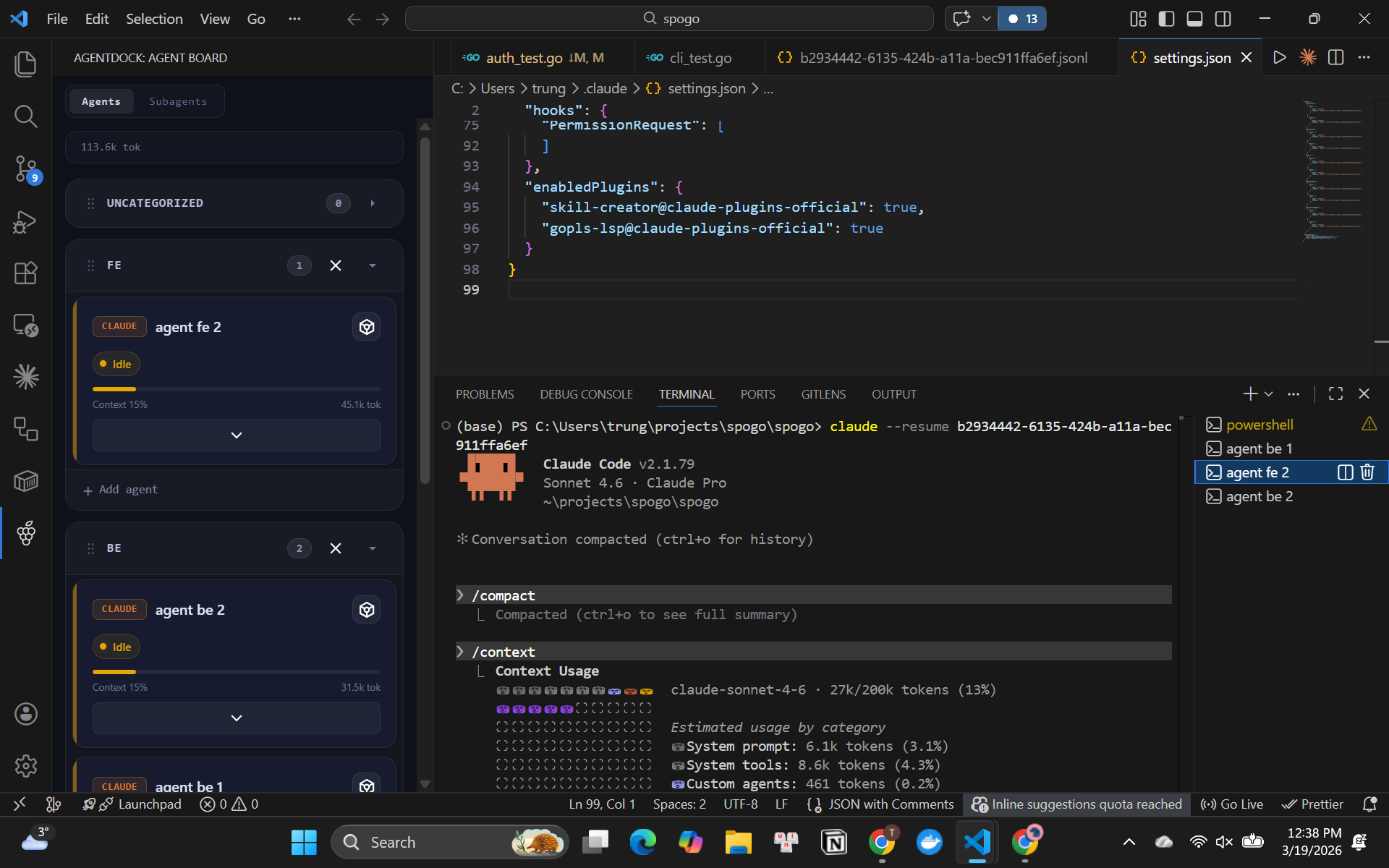
- Visual session board — see all your agent sessions at a glance, grouped by status: Running, Thinking, Idle, and Error
- One-click session management — create, resume, rename, and end sessions without leaving VS Code
- Real-time status updates — live tool-call tracking, token usage, cost estimate, and context window fill %
- Cohorts — group related sessions into swim lanes to organise work by feature, branch, or task
- Skills — attach reusable skill files to a session so agents have the right context from the start
- Permission alerts — get notified inline when an agent is waiting for your approval
- Auto-discovery — existing Claude Code sessions are detected automatically on startup; no manual wiring needed
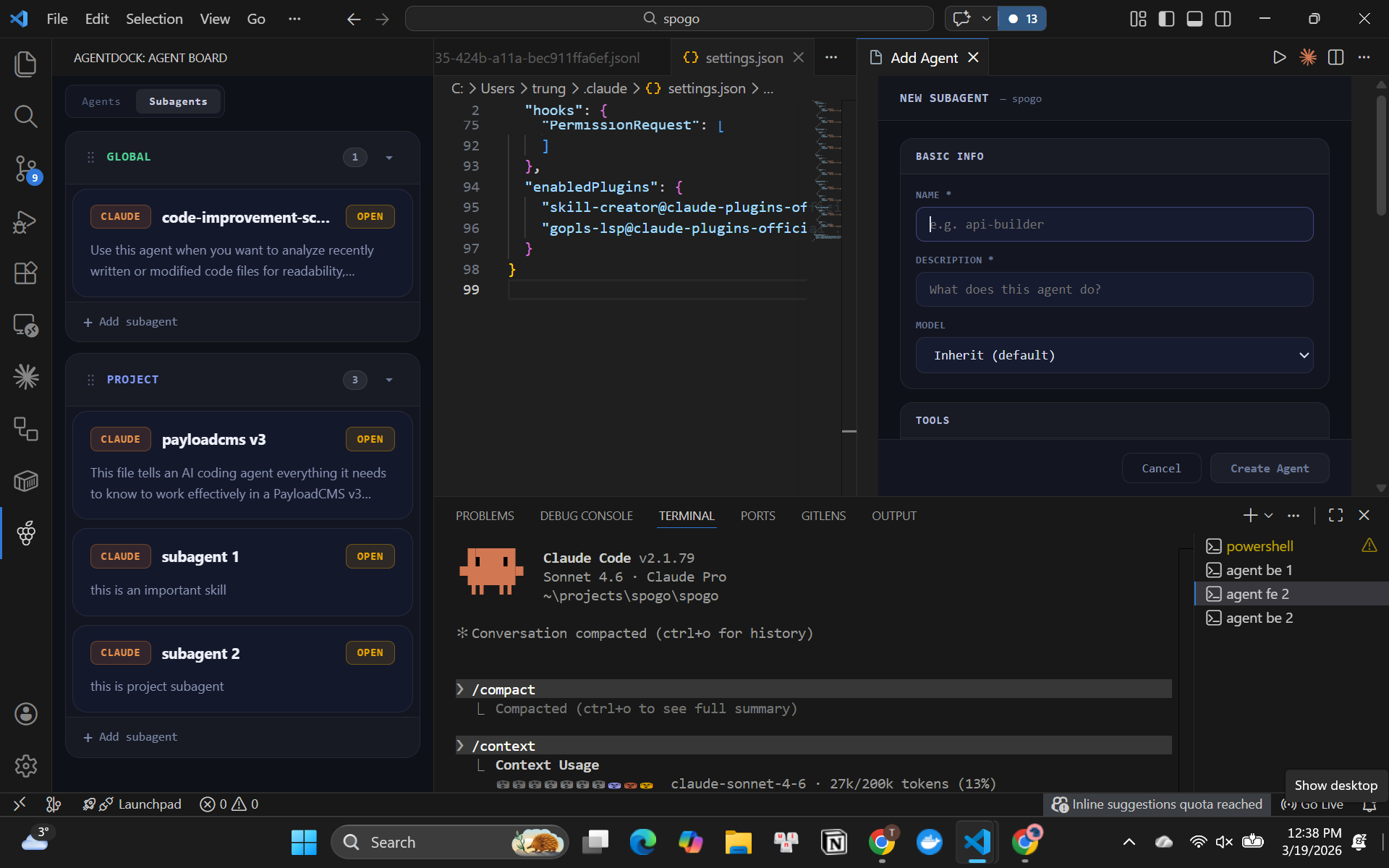
- Sub-agent browser — view all global and project-level sub-agent definitions with their model, tools, and skills; open any file with one click
Requirements
- Claude Code installed and available on your
PATH
- VS Code
1.109.0 or later
- Python 3 (
python3 on macOS/Linux, python on Windows) — for hook-based real-time updates; optional but recommended
Getting Started
- Install the extension
- Open a workspace folder
- Click the AgentDock icon in the Activity Bar
- Click + to start a new Claude Code session, or wait a moment for existing sessions to be detected automatically
Two Tabs
Agents tab
The main kanban board. Shows all active sessions grouped into cohorts.
Each session card displays:
| Field |
Description |
| Name |
Editable session label |
| Status |
running · thinking · idle · error |
| Current tool |
The tool Claude is executing right now |
| Files touched |
Count of files modified this session |
| Tokens |
Input / output token count |
| Context window |
Fill % of the context window |
A summary bar at the top of the tab shows total active sessions, combined token usage, and total cost across all sessions.
Sub-Agents tab
Lists all available sub-agent definition files, grouped by scope:
- Global — agents defined in
~/.claude/agents/ (available across all workspaces)
- Project — agents defined in
.claude/agents/ inside the current workspace
Each card shows the agent's name, description, model, allowed tools, and skills. Click a card to expand these details. Click Open to jump directly to the agent's definition file in the editor.
The two scope groups can be reordered by dragging.
Cohorts
Cohorts are horizontal swim lanes on the Agents tab. Drag sessions between cohorts to organise them, or create a new cohort from the board footer. Sessions in the same cohort typically share a common goal or branch.
Skills
Skills are Markdown files (.md) that provide reusable context or instructions to an agent. Place skill files in .claude/skills/ inside your workspace. Attach one or more skills to a session from the session card menu — the skill content is injected when the session starts.
How Real-Time Updates Work
AgentDock installs a lightweight Python hook script into ~/.claude/settings.json on first activation. The hook posts events (PreToolUse, PostToolUse, Stop, etc.) to a local HTTP server running inside VS Code, which updates the board in real time.
If Python is not available, the extension falls back to polling Claude's log files. All data stays local — nothing is sent to any external service.
Commands
| Command |
Description |
AgentDock: New Agent Session |
Open a new terminal with Claude Code |
AgentDock: End Session |
Close a session and its terminal |
AgentDock: Rename Session |
Rename the selected session |
AgentDock: Switch Agent Session |
Focus the terminal for the selected session |
Extension Settings
This extension does not add any VS Code settings at this time.
Known Issues
- Sessions from other workspaces may appear briefly on startup before being filtered out
- Terminal restore on VS Code reload may create a duplicate terminal in rare cases — workaround: close the duplicate and click Resume on the session card
Release Notes
0.1.0
Initial release — session board, cohorts, skills, real-time hook integration, auto-discovery of Claude Code sessions.
Contributing
Issues and pull requests are welcome. Please open an issue before submitting a large change.


