
TreeViet for Git
Đồ thị commit, nhánh, diff, merge/rebase và hồ sơ Git — trong một panel nhanh ngay trong VS Code
Commit graph, branches, diffs, merge/rebase and Git profiles — in one fast panel inside VS Code
✨ Tính năng / Features
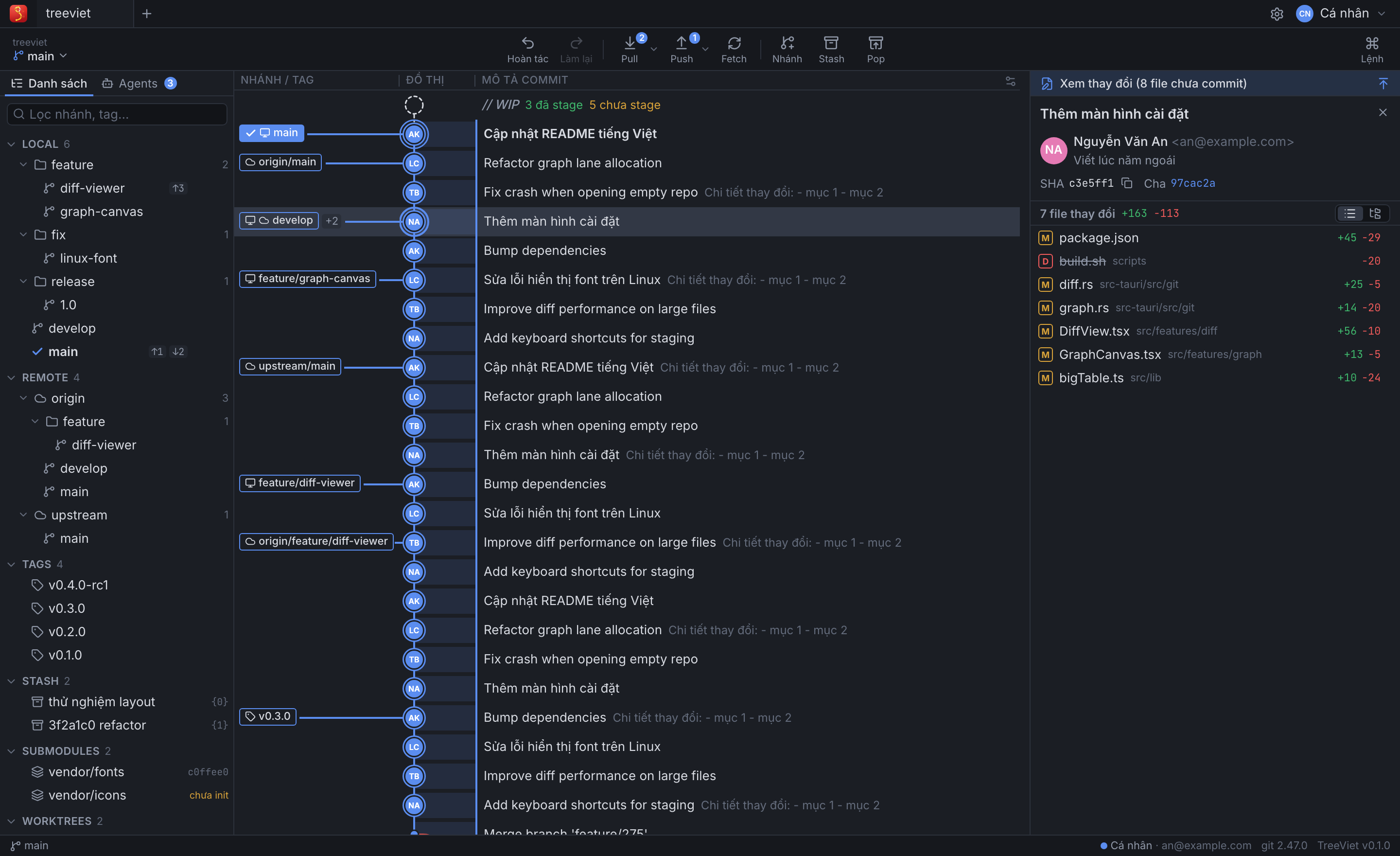
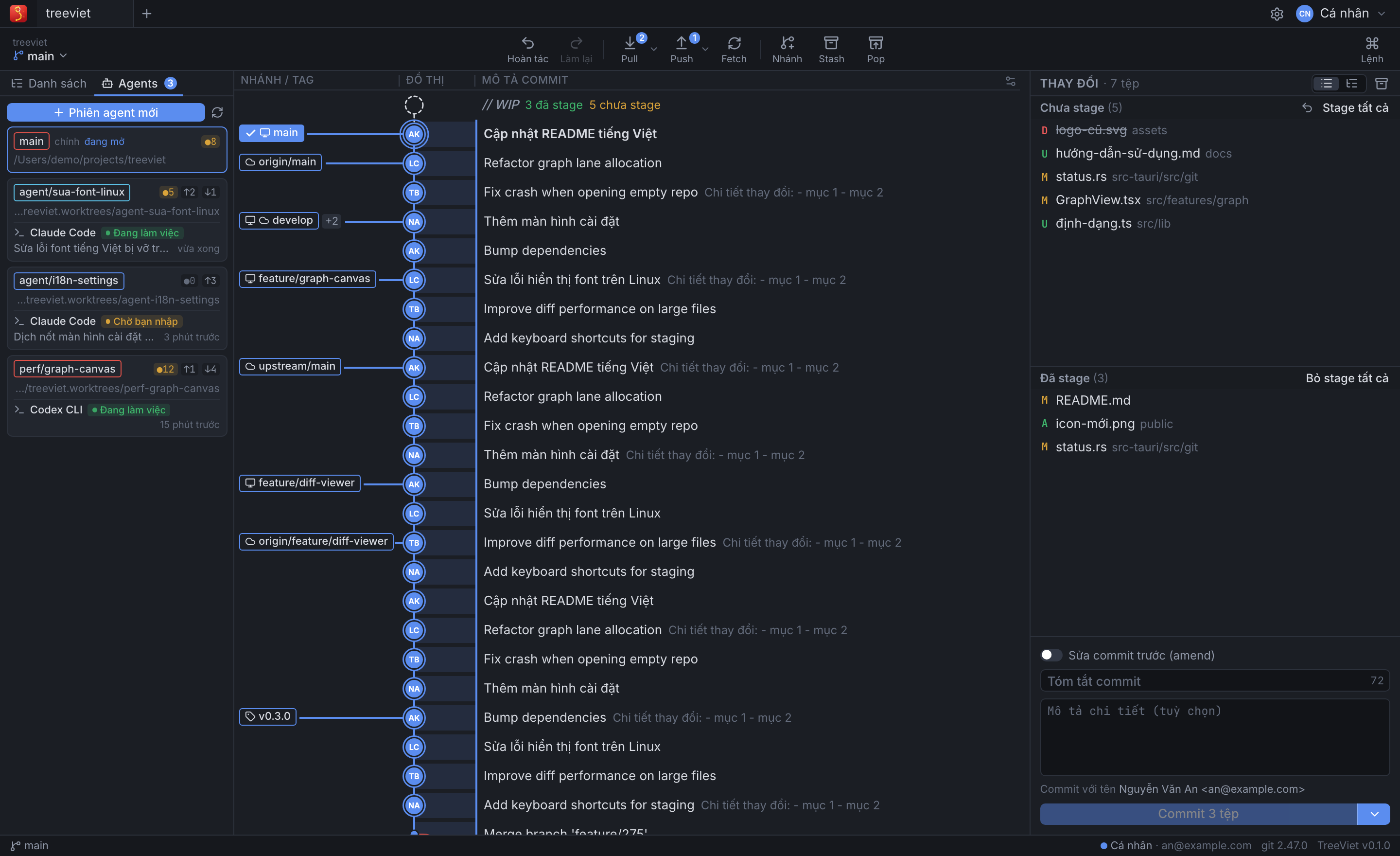
- Commit graph nhanh với repo lớn (50.000+ commit): avatar tác giả, nhãn nhánh/tag, solo/ẩn nhánh, tìm commit, hover xem mọi nhánh trên một commit.
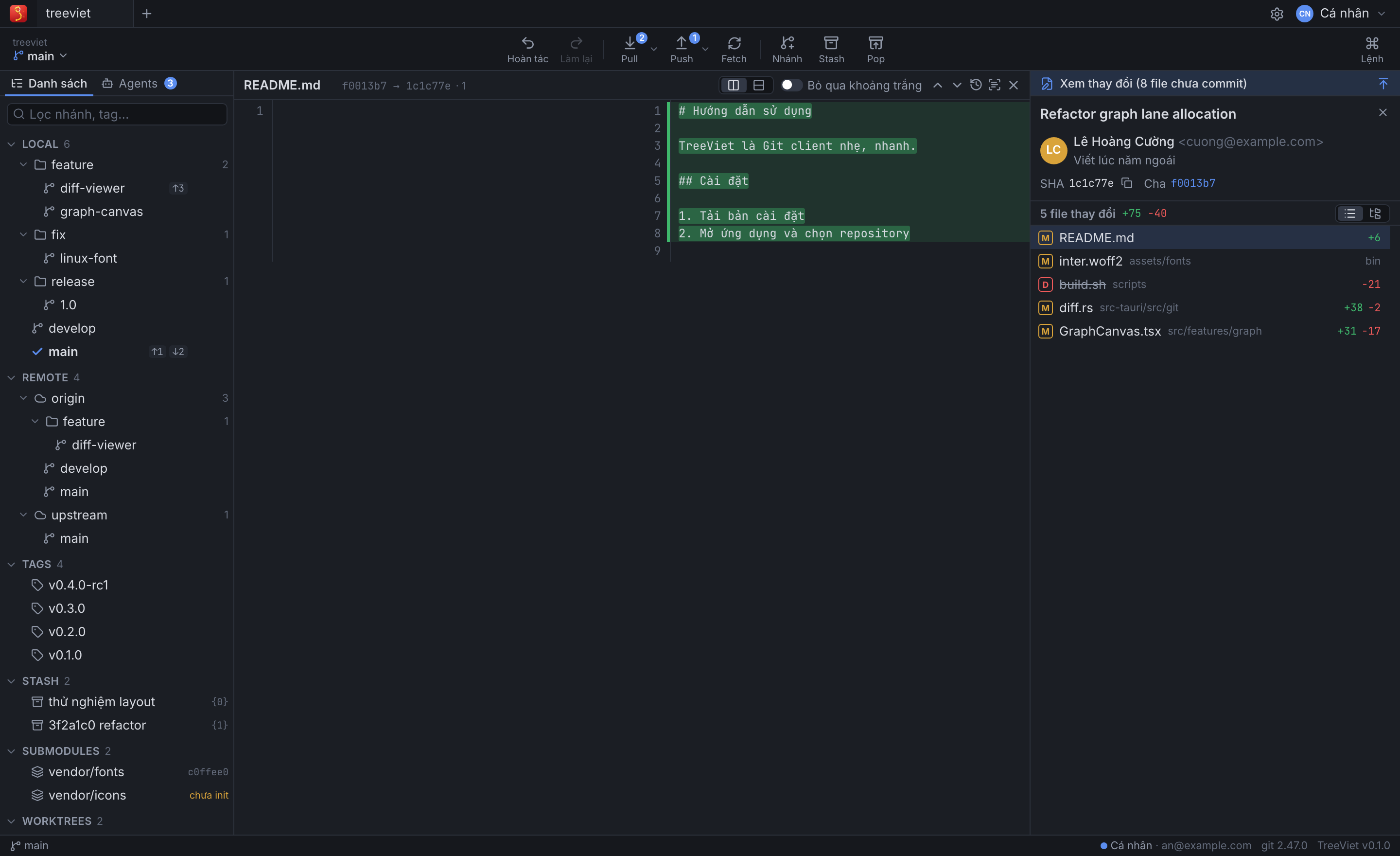
- Diff ngay trong panel, mặc định hai cột (chuyển một cột được), thanh cuộn ngang luôn hiện; một nút để mở sang diff editor của VS Code khi cần xem rộng hơn hoặc sửa file; blame, lịch sử file (Show File History in TreeViet từ Explorer / tab editor), so sánh commit/nhánh.
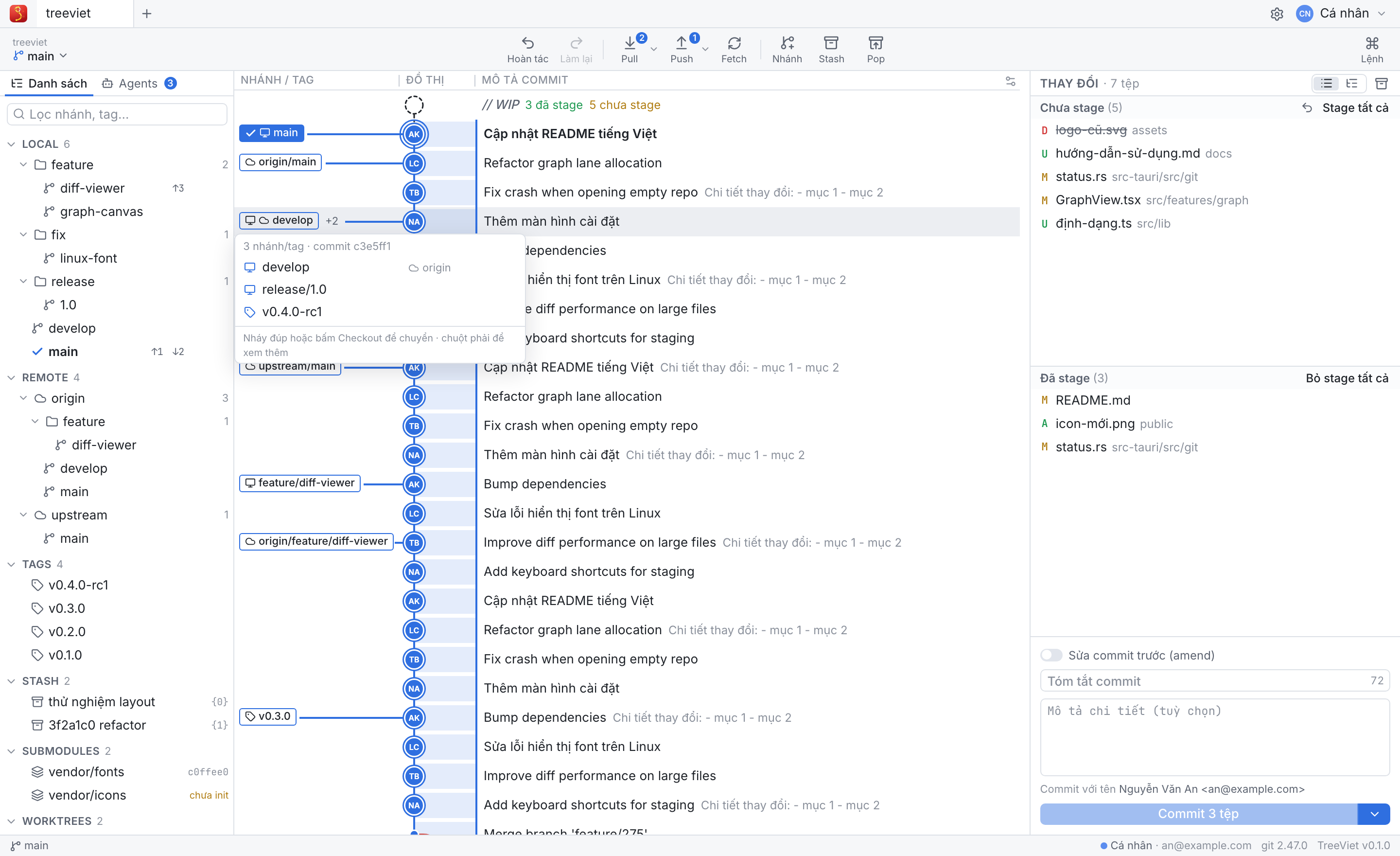
- Working tree: stage/unstage từng file, từng hunk, từng dòng; commit, amend, sửa message commit cuối; stash.
- Nhánh & remote: checkout, tạo/đổi tên/xoá nhánh & tag, fetch/pull/push, quản lý remote, undo/redo, submodule, worktree.
- Merge / Rebase: kéo thả nhánh, giải quyết conflict 3 cột, interactive rebase, cherry-pick, revert, reset.
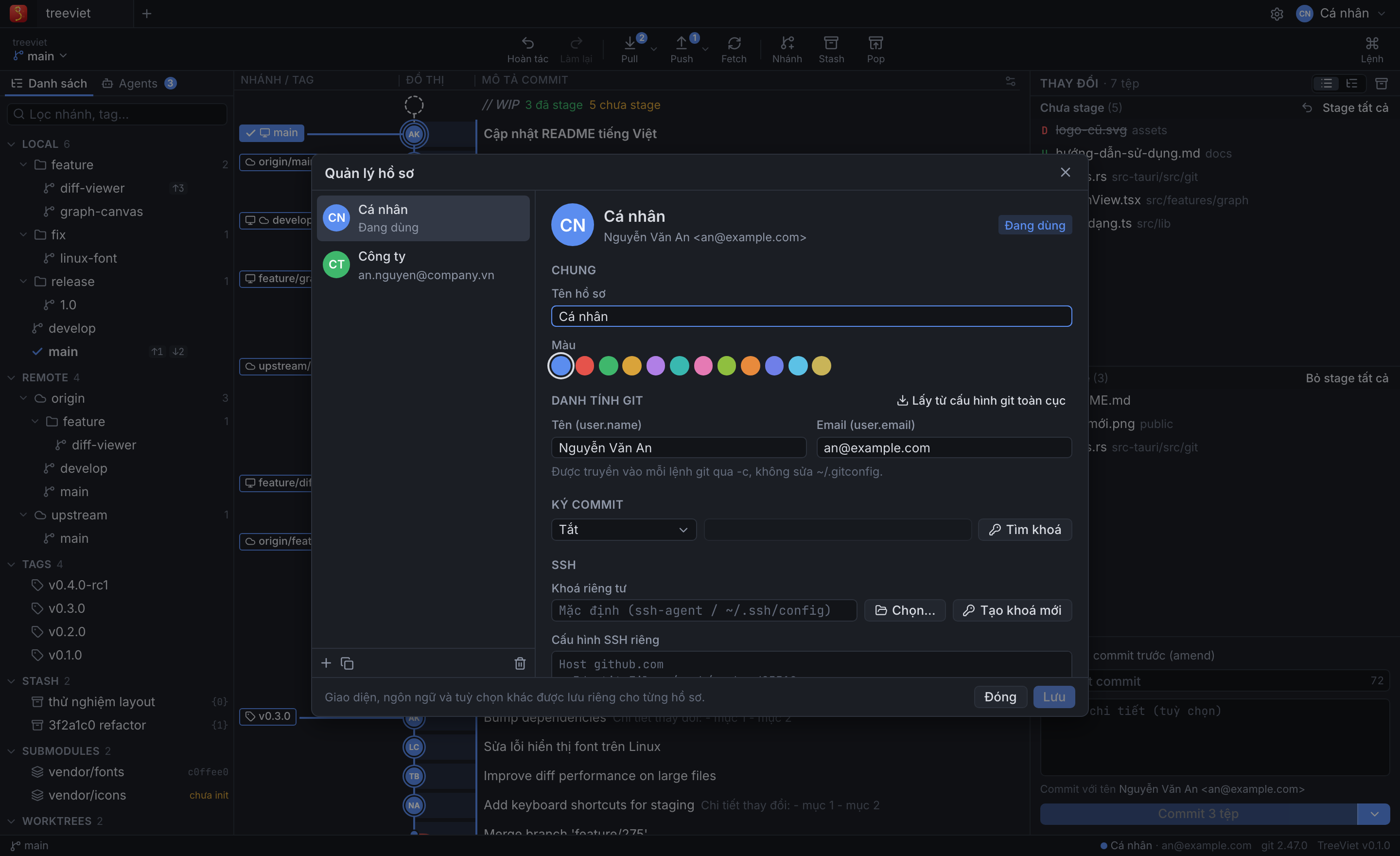
- Profiles: mỗi hồ sơ có danh tính Git, ký commit (GPG/SSH), SSH key & SSH config, tài khoản HTTPS riêng — chuyển đổi tức thì.
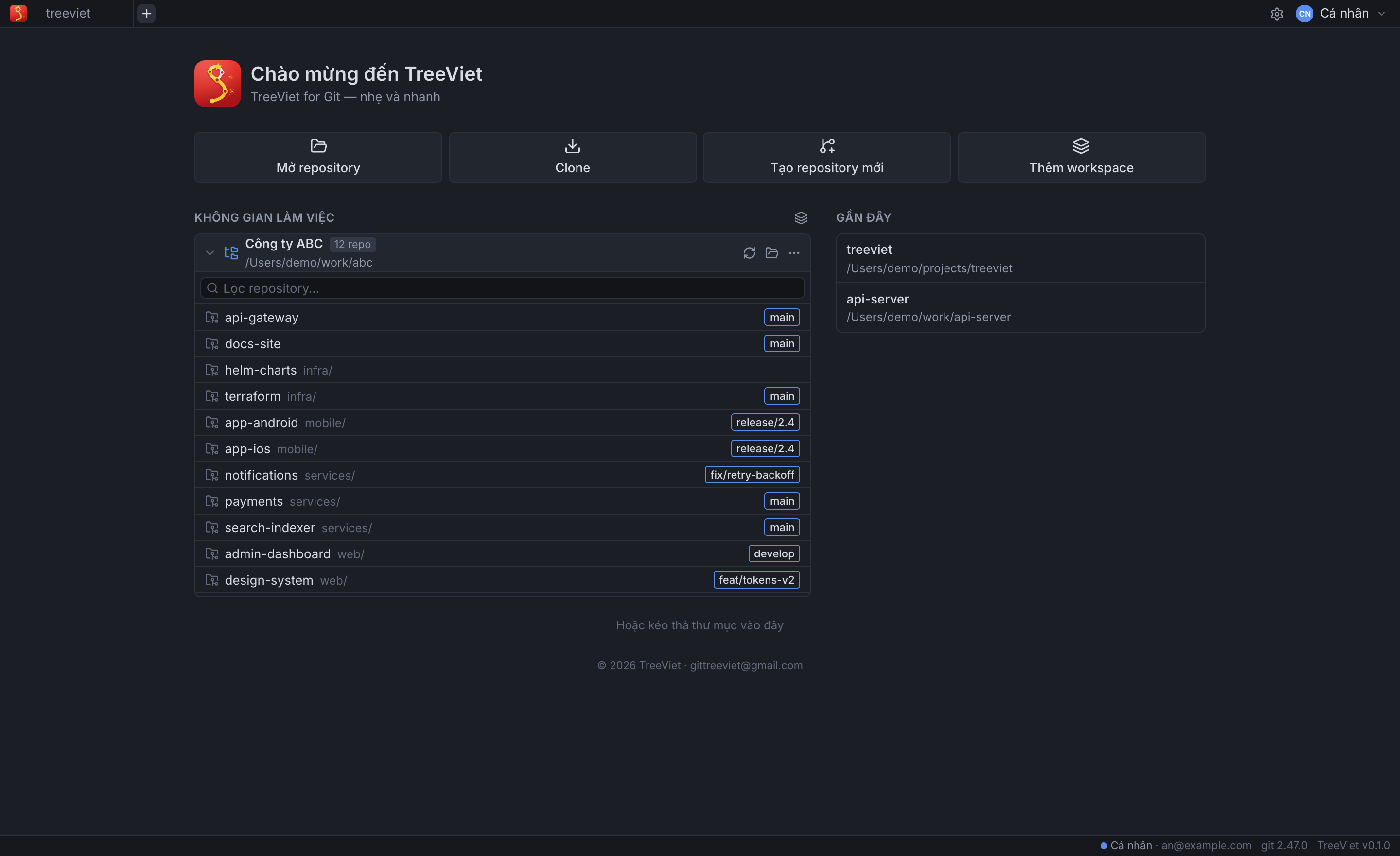
- Workspaces (tự nhận diện mọi repository trong một thư mục cha) và Agents (phiên AI coding agent dòng lệnh theo từng worktree, chạy trong terminal của VS Code).
- A fast commit graph for big repositories (50,000+ commits): author avatars, branch/tag labels, solo/hide branches, commit search, hover to see every branch on a commit.
- Diffs right in the panel, side by side by default (or inline), with an always-visible horizontal scrollbar; one click opens VS Code's own diff editor for a wider, editable view; blame, file history (Show File History in TreeViet from the Explorer or an editor tab), compare commits/branches.
- Working tree: stage/unstage files, hunks or single lines; commit, amend, reword the last commit; stash.
- Branches & remotes: checkout, create/rename/delete branches & tags, fetch/pull/push, remotes, undo/redo, submodules, worktrees.
- Merge / rebase: drag & drop branches, 3-way conflict resolution, interactive rebase, cherry-pick, revert, reset.
- Profiles: each profile has its own Git identity, commit signing (GPG/SSH), SSH key & config and HTTPS accounts — switch instantly.
- Workspaces (finds every repository under a parent folder) and Agents (command-line AI coding agent sessions per worktree, in VS Code's terminal).
🖼 Ảnh chụp / Screenshots
🚀 Cách mở / How to open
|
|
| Thanh bên trái / Activity Bar |
Bấm icon TreeViet (chữ S) ở thanh bên trái để mở Git Graph; danh sách Repositories để chuyển repo / click the TreeViet icon in the left bar to open the Git Graph; the Repositories list switches repositories |
| Status bar |
Bấm TreeViet ở thanh trạng thái / click TreeViet in the status bar |
| Source Control |
Nút Open in TreeViet trên thanh tiêu đề Source Control / the Open in TreeViet button in the Source Control title bar |
| Phím tắt / Shortcut |
Cmd+Alt+G (macOS) · Ctrl+Alt+G (Windows/Linux) |
| Command Palette |
TreeViet: Open Git Graph |
| Explorer / Editor |
Chuột phải một file → Show File History in TreeViet / right-click a file → Show File History in TreeViet |
Mở graph sẽ mở luôn repository bạn đang làm việc (repo của file đang mở, hoặc repo trong workspace); không có repo thì panel hiện màn hình chào để mở / clone. Cần cài Git trên máy.
Opening the graph shows the repository you are working in (the active file's repo, or the workspace's); with no repository the panel shows the welcome screen (open / clone). Requires Git installed.
Cài đặt / Settings
| Setting |
Mặc định / Default |
|
treeviet.diffViewer |
treeviet |
treeviet: diff trong panel (hai cột) / in the panel (side by side) · vscode: luôn mở bằng diff editor của VS Code / always use VS Code's diff editor |
treeviet.statusBar |
true |
Hiện nút TreeViet ở thanh trạng thái / show the status bar button |
🔑 Bản miễn phí & Pro / Free & Pro
- Miễn phí: dùng với repository công khai (public) và repository cục bộ.
- Pro: mở thêm repository riêng tư (private). Cần email và key bản quyền do TreeViet cấp; key gắn với email và có thời hạn. Một key dùng cho cả app desktop TreeViet for Git và extension này.
- Được dùng cho cá nhân và cho công việc / mục đích thương mại. Công ty có thể mua key cho nhân viên — mỗi người một key gắn với email của người đó.
- Nhập key: TreeViet: Enter License Key hoặc Cài đặt → Bản quyền trong panel. Mua key / hỗ trợ: gittreeviet@gmail.com
Free works with public and local repositories. Pro adds private repositories and needs an email and a license key issued by TreeViet (bound to the email, time-limited; the same key works in the TreeViet for Git desktop app). Personal and commercial use are both allowed; companies may buy keys for their staff (one key per person). Enter the key with TreeViet: Enter License Key or Settings → License in the panel. Purchase / support: gittreeviet@gmail.com
🎁 Dùng thử Pro / Free Pro trial
Dùng thử đầy đủ tính năng Pro đến hết ngày 31/12/2026 / try every Pro feature until 31 Dec 2026 — email gittreeviet@gmail.com, key:
GTV1.eyJ2IjoxLCJpZCI6ImFhOTQ0YzNlLTNjYTgtNGM0NS05YjkzLTIxNTcyNGVjNWMzNiIsImVoIjoiWEFtQUh0bWhEM0RNdk9tb2p4eXVlTmhzTlRpQXhMTEtMcUF5ZkNWLV9wayIsInMiOiJndmRWcGVxM09PbW9TNVVHIiwicGxhbiI6InBybyIsImlhdCI6MTc5MjI2MjY5MSwiZXhwIjoxNzk4NzYxNTk5fQ.nnGY5mkLDJNYrdw_8Fg66mdZkfHS4YF2yR9mDMpNYs1wAHFxr_RUd-7ftylxeK1tF57-FiGxiLg3Lhb9WoivCg
Chính sách mua key / Purchase policy
- Mua key chỉ bao gồm key bản quyền và thời hạn sử dụng ghi trên key.
- Đã mua thì không hoàn tiền.
- Mỗi key dành cho một người, không chia sẻ hay bán lại.
- Hỗ trợ: lỗi ứng dụng và lỗi key (ví dụ không kích hoạt được) — TreeViet sẽ sửa lỗi hoặc cấp lại key cho thời hạn còn lại.
A purchase grants a license key and its period of use only. All sales are final — no refunds. One key per person; keys may not be shared or resold. Support covers app bugs and faulty keys (fixed, or the key is reissued for the remaining period).
🔒 Quyền riêng tư / Privacy
TreeViet không thu thập, không lưu trữ và không gửi dữ liệu của bạn cho nhà phát hành: không telemetry (kể cả telemetry của VS Code), không thống kê, không theo dõi. Hồ sơ, cài đặt, token và key bản quyền nằm trên máy bạn; key được kiểm tra ngay trên máy. Chỉ có các kết nối do bạn khởi tạo (máy chủ Git, avatar, kiểm tra ẩn danh repository có công khai không). Chi tiết: PRIVACY.md.
TreeViet does not collect, store or send your data: no telemetry (VS Code's telemetry is not used either), analytics or tracking. Only connections you initiate (your Git servers, avatars, an anonymous public/private check). See PRIVACY.md.
⚖️ Giấy phép / License
© 2026 TreeViet · gittreeviet@gmail.com. Phần mềm độc quyền: được cài và sử dụng bản phát hành chính thức; không được sao chép, chỉnh sửa, phân phối lại hay dịch ngược. Xem LICENSE. Danh sách thành phần mã nguồn mở: Cài đặt → Giới thiệu → Xem giấy phép.
Proprietary software: you may install and use the official releases; copying, modifying, redistributing or reverse engineering is not permitted. See LICENSE. Open-source notices: Settings → About → View license.
Git là nhãn hiệu của Software Freedom Conservancy. TreeViet là sản phẩm độc lập, không liên kết hay được bảo trợ bởi dự án Git.
Git is a trademark of Software Freedom Conservancy. TreeViet is an independent product, not affiliated with or endorsed by the Git project.
| |

