

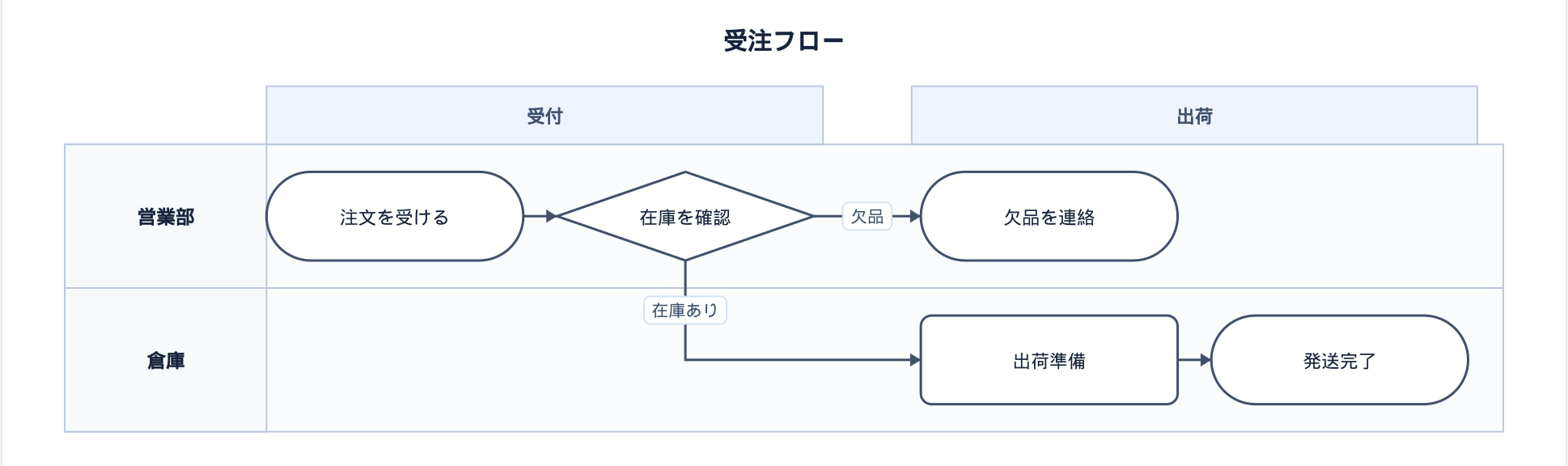
Swimlane Diagram PreviewEnglish | 日本語 VS Code の標準Markdownプレビューで、
上の図は、以下のようなコードブロックをMarkdownに書くだけで得られます。 使い方
まずは以下をそのまま 構文エラーがある場合は、図の代わりにエラー内容(何行目のどこが問題か)がプレビュー上に表示されます。 手で書くのがつらい場合は、Swimlane GUI Studio のGUIで組み立てて
|
| 項目 | 説明 |
|---|---|
<id> |
レーンを識別するID。node の lane= から参照する。必須 |
"<ラベル>" |
レーン名。省略時は <id> がそのまま表示名になる |
#RRGGBB |
レーンの背景色(16進カラーコード、#RGB〜8桁まで可)。省略可 |
phase(フェーズ)
phase <id> "<ラベル>"
レーンを横断する区切り(工程・時系列など)を表します。1つも定義しない場合、図全体が単一フェーズとして扱われます。
| 項目 | 説明 |
|---|---|
<id> |
node の phase= から参照するID。必須 |
"<ラベル>" |
フェーズ名。省略時は <id> がそのまま表示名になる |
node(ノード / 図形)
node <id> "<ラベル>" [lane=<laneId>] [phase=<phaseId>] [shape=<shape>] [color=#RRGGBB]
| 項目 | 説明 |
|---|---|
<id> |
接続(edge)から参照するID。必須 |
"<ラベル>" |
ノード内に表示するテキスト。shape=startdot / enddot のときは省略可 |
lane= |
所属するレーンのID。省略時は先頭のレーンに属する |
phase= |
所属するフェーズのID。省略可 |
shape= |
図形の種類。省略時は process |
color= |
ノードの塗り色(16進カラーコード)。省略可 |
shape= に指定できる値:
| 値 | 形状 |
|---|---|
process(既定) |
四角(処理) |
start |
角丸(開始) |
end |
角丸(終了) |
decision |
ひし形(判断) |
io |
平行四辺形(入出力) |
startdot |
●(開始点。状態遷移図の [*] に相当し、他の図形より小さく描画) |
enddot |
◉(終了点) |
edge(接続)
<fromId> -> <toId> ["<ラベル>"]
<fromId> --> <toId> ["<ラベル>"]
| 記法 | 意味 |
|---|---|
-> |
実線の矢印 |
--> |
破線の矢印 |
"<ラベル>" |
接続線上に表示するテキスト。省略可 |
<fromId> / <toId> は node で定義した <id> を参照します。未定義のIDを指定した場合や、lane= / phase= が未定義のIDを参照している場合は、プレビュー上にエラーとして表示されます。
しくみ
VS Codeの markdown.markdownItPlugins 拡張ポイントを使い、標準プレビューが使っている markdown-it の fence レンダラーを横取りしています。swimlane 言語のフェンスだけを swimlane.js(外部依存ゼロの描画ライブラリ)でSVGに変換し、それ以外の言語は通常どおり(シンタックスハイライト等)に描画します。
swimlane.js はDOMに依存せず解析・レイアウト計算・SVG生成ができる作りになっているため、Webview側で追加のスクリプトを実行する必要がなく、拡張機能ホスト(Node.js)側で同期的に変換しています。
ライセンス
MIT License. 外部通信は一切行いません。
Swimlane Diagram Preview (English)
日本語 | English
A VS Code extension that renders ```swimlane fenced code blocks as swimlane diagrams directly inside the built-in Markdown preview — the same feeling as Mermaid code blocks turning into diagrams in the standard preview.
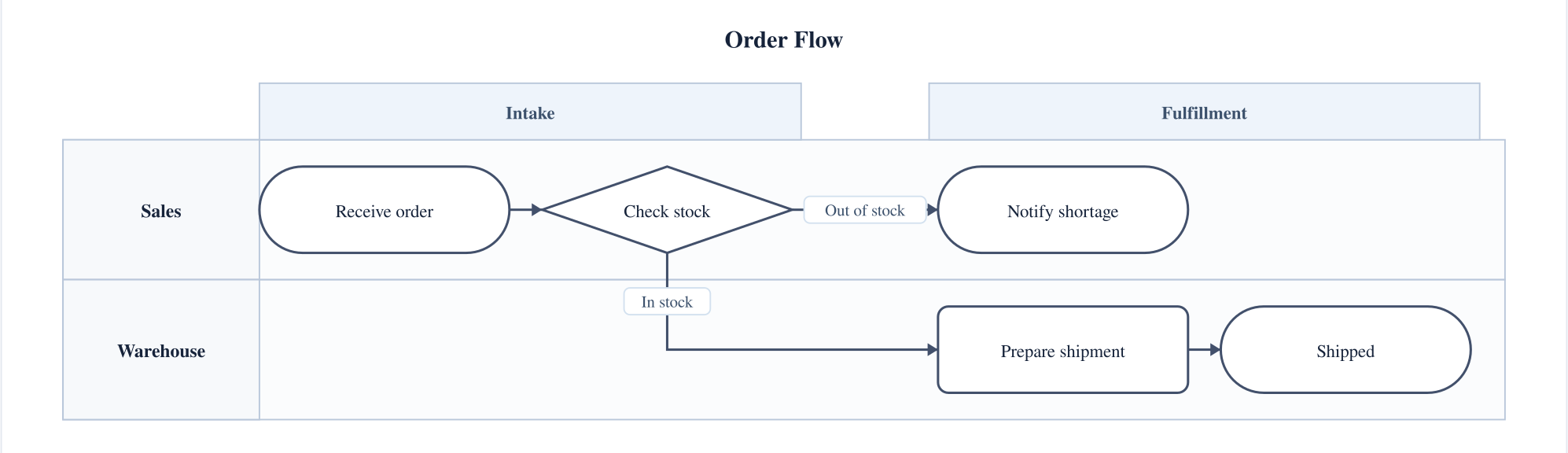
The diagram above is produced from a code block like this:
swimlane
    title "Order Flow"
    direction LR

    lane sales "Sales"
    lane wh "Warehouse"

    phase p1 "Intake"
    phase p2 "Fulfillment"

    node s1 "Receive order" lane=sales phase=p1 shape=start
    node s2 "Check stock" lane=sales phase=p1 shape=decision
    node w1 "Prepare shipment" lane=wh phase=p2
    node w2 "Shipped" lane=wh phase=p2 shape=end
    node s3 "Notify shortage" lane=sales phase=p2 shape=end

    s1 -> s2
    s2 -> w1 "In stock"
    s2 -> s3 "Out of stock"
    w1 -> w2
Usage
- Install this extension
- In a Markdown file (
.md), write.swimcode inside a```swimlanefence - Open the preview (
Ctrl+Shift+V/Cmd+Shift+V) — the diagram renders in place
The quickest way to try it is to paste the following straight into a .md file:
```swimlane
swimlane
title "Example"
direction LR
lane you "You"
node n1 "Write a ```swimlane block" lane=you shape=start
node n2 "Open the preview (Ctrl+Shift+V)" lane=you
node n3 "See the diagram" lane=you shape=end
n1 -> n2
n2 -> n3
```
If there's a syntax error, the preview shows the error message (with the offending line number) instead of the diagram.
If writing it by hand is tedious, you can assemble the diagram in Swimlane GUI Studio, export the .swim code, and paste it in.
.swim syntax
.swim is a simple line-based notation. Leading/trailing whitespace on each line is ignored.
swimlane— a marker on the first line (parsing works the same with or without it)# comment— lines starting with#are ignored as commentstitle "Title"— the diagram's title (optional)direction LR/direction TB— diagram orientation.TDis accepted as an alias forTB. Defaults toTB
Attribute values (lane=, phase=, shape=, color=, etc.) are parsed as whitespace-separated tokens, so a value cannot contain spaces.
lane
lane <id> "<label>" [#RRGGBB]
| Field | Description |
|---|---|
<id> |
ID identifying the lane, referenced from a node's lane=. Required |
"<label>" |
The lane's display name. Defaults to <id> if omitted |
#RRGGBB |
Background color of the lane (hex, #RGB up to 8 digits). Optional |
phase
phase <id> "<label>"
Represents a division that cuts across lanes (e.g. process steps or time periods). If none are defined, the whole diagram is treated as a single phase.
| Field | Description |
|---|---|
<id> |
ID referenced from a node's phase=. Required |
"<label>" |
The phase's display name. Defaults to <id> if omitted |
node
node <id> "<label>" [lane=<laneId>] [phase=<phaseId>] [shape=<shape>] [color=#RRGGBB]
| Field | Description |
|---|---|
<id> |
ID referenced by edges. Required |
"<label>" |
Text shown inside the node. Optional when shape=startdot / enddot |
lane= |
ID of the lane this node belongs to. Defaults to the first lane if omitted |
phase= |
ID of the phase this node belongs to. Optional |
shape= |
The node's shape. Defaults to process |
color= |
Fill color of the node (hex). Optional |
Values accepted by shape=:
| Value | Shape |
|---|---|
process (default) |
Rectangle (process) |
start |
Rounded rectangle (start) |
end |
Rounded rectangle (end) |
decision |
Diamond (decision) |
io |
Parallelogram (input/output) |
startdot |
● (start point — like the [*] in a state diagram, drawn smaller than other shapes) |
enddot |
◉ (end point) |
edge
<fromId> -> <toId> ["<label>"]
<fromId> --> <toId> ["<label>"]
| Notation | Meaning |
|---|---|
-> |
Solid arrow |
--> |
Dashed arrow |
"<label>" |
Text shown on the connecting line. Optional |
<fromId> / <toId> reference the <id>s defined with node. If an ID is undefined, or a lane= / phase= references an ID that hasn't been declared, the preview shows an error instead of the diagram.
How it works
This extension uses VS Code's markdown.markdownItPlugins extension point to intercept the fence renderer of the markdown-it instance the built-in preview uses. Only fences with the swimlane language are converted to SVG via swimlane.js (a zero-dependency rendering library); every other language is rendered as usual (syntax highlighting, etc.).
Because swimlane.js can parse, compute layout, and generate SVG without touching the DOM, there's no need to run extra scripts in the webview — the conversion happens synchronously on the extension host (Node.js) side.
License
MIT License. This extension makes no external network requests.