
Gener - Micro Prompting AI Coding Agent dedicated for VS CodeLightweight and no/low cost but full features coding agent dedicated for VSCode, optimized for local LLM but support every cloud LLMs and provider especially free ones. Installation Launch VS Code Quick Open ( Ctrl+P), paste the following command, and press enter.Copied to clipboard |

Gener - Micro Prompting AI Coding Agent dedicated for VS CodeBuild on
|



| Principle | Meaning |
|---|---|
| 🧬 Generative | AI-native code generation, creation, and transformation — from natural language to production-ready code |
| 🚀 Next Generation | Built on the new era of agentic coding standard: AGENTS.md, .agents, ~/.gener global scope, native tool calling |
| 💸 Generous | Vibe coding shouldn't cost a fortune. Gener provides no API, no subscription, no registration. Use your own keys, run local LLMs on consumer hardware, or tap into Gemini free tier, Nvidia Build free, Mistral free — all optimized with lightweight system prompts and brilliant context management to avoid rate limits. Serper Generous for free web search. |
| 🎖️ General | Beyond the image of an "Ancient General", Gener assists with daily non development tasks and general operations through local LLMs and free providers |
🚀 Why Gener?
Gener is engineered to excel across every layer of the agentic coding experience:
| Scope | What Gener does well |
|---|---|
| 🔄 Conversation Loop | ⚡ Plan → Propose → Execute — a rock-solid agentic core that always keeps you in control |
| 🛠️ Tool System | 🎯 Precision tools that just work: fuzzy-match edits, batch reads & triple-mode search |
| 🔌 MCP Integration | 🔮 Plug into any MCP server in seconds via the bundled mcpc CLI |
| 🧩 Skills Framework | 🦾 Ship reusable superpowers — hierarchical skills with Claude Code baked in |
| 🎨 Webview UI | ✨ A gorgeous, blazing-fast React + Tailwind v4 chat that never lags |
✨ Key Features
🔍 Exclusive Semantic Codebase Index & Dependency Graph
Gener builds a persistent, incremental dependency graph and semantic codebase index under the hood. This enables:
- Symbol-aware dependency graph queries — Find where symbols are defined, imported, and used across your entire codebase works simiar to VSCode's "Find All References/Implemetations" but for AI models
- Local semantic search — Natural language search powered by tiny on-device embedding models (
minilm,jina-small,nomic,jina-code) downloaded on-the-fly from Hugging Face — no API calls, no token cost - Private by design — Your codebase stays 100% local; nothing is sent to any external service, so ownership and privacy are fully yours
- Zero token cost — Because embeddings run locally, semantic search costs you nothing per query
- Regex & dependency graph search modes — Flexible search strategies for different use cases
- Real-time indexing — Background worker with throttled file processing for large repos
- SQLite-backed storage — Fast, local-first indexing that persists across sessions
// Example: Search for symbol usages across the codebase
searchFiles(
  path: "src",
  searchTerm: "getUserInfo",
  mode: "dependencyGraph"  // 🔗 Dependency graph mode
)

// Example: Semantic search by meaning, not just text
searchFiles(
  path: "src",
  searchTerm: "how this app authenticate users",
  mode: "bm25"  // 🧠 AI-powered semantic search
)
🧠 Cross-Session Memory
Gener auto-discovers, creates and manages cross-session memory so it remembers context across conversations:
- Auto-injects the most recent 50 memories into the system prompt with LLM-tagged keywords and a short summary
- Memories live in
.agents/memoryat the workspace root (YAML frontmatter + markdown body) - On-demand retrieval — when a tag or summary matches the current task, Gener reads the full memory via
readFiles - Auto-created on compact — When a conversation compacts its context window (e.g., after very long tasks), Gener distills the key decisions, state, and outcomes into a new memory entry so nothing critical is lost across sessions
- User-triggered — Type
/memoryin chat to instruct Gener to snapshot the current conversation's important context as a memory at any time
🔄 Exclusive Multi-Model & Seamless Switching
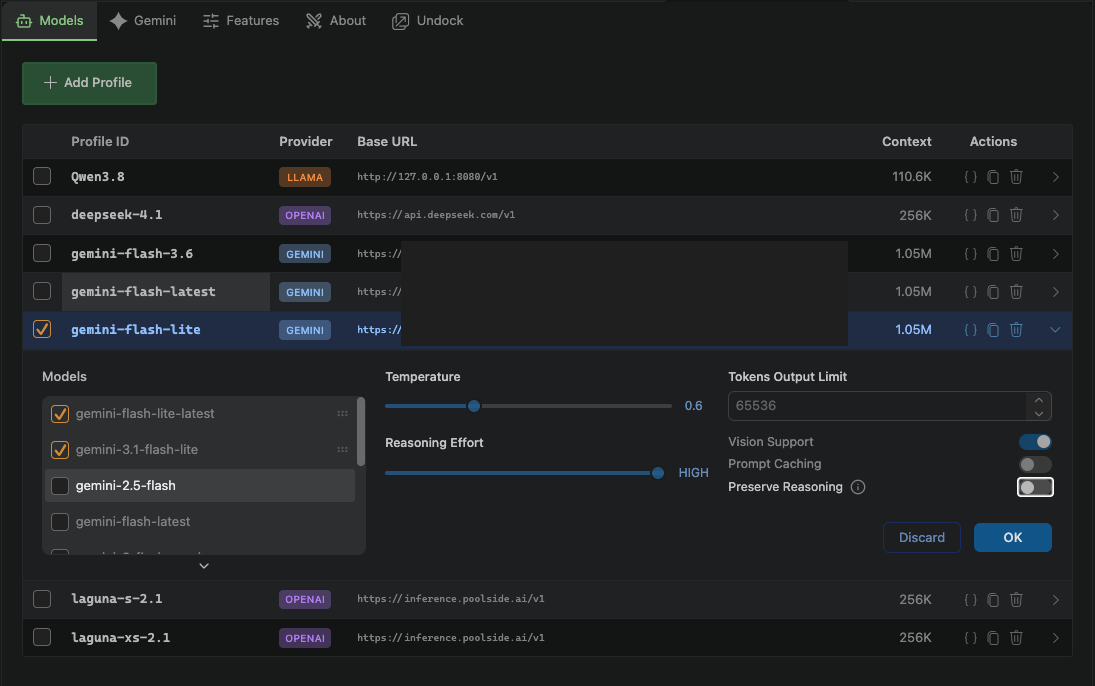
| Control Panel - Profiles | Chat TextArea Pull Up |
|---|---|
 |
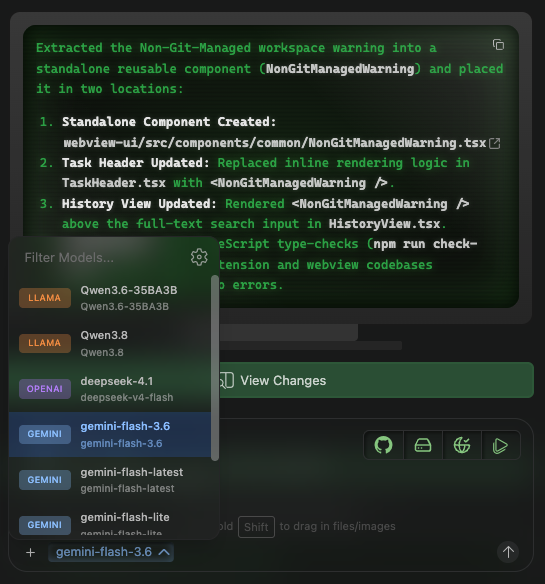 |
Gener supports a unified model selection interface across all providers with exactly the same system prompts. Switch between models instantly without reconfiguring:
- Local LLMs — Recommended/Dogfooding by llama.cpp with qwen Family as well as all other models and self-host providers
- GitHub Copilot — Copilot subscription models via proxy
- Gemini — All Gemini Pro/Flash/Ultra models
- Any OpenAI-compatible endpoint — Third-party Gateways
- Claude / Anthropic
- OpenAI
- OpenRouter
No provider lock-in. No model bundling. Just connect and go.
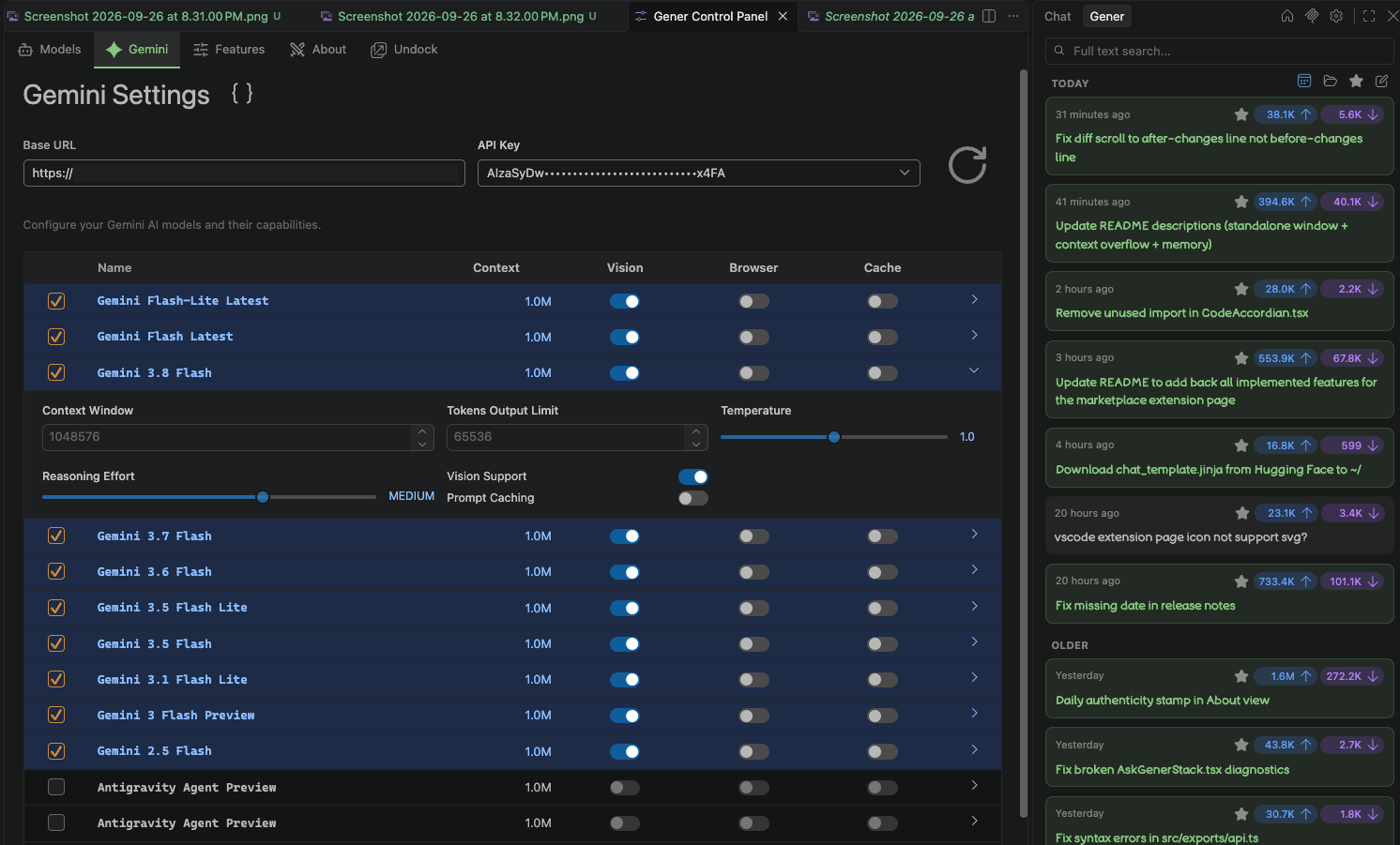
🎯 Exclusive Gemini Key & Model Auto-Rotation
429 is no longer a blocker. Gener's proprietary key + model pool rotation system automatically handles rate limits and server errors:
- Multi-key pooling — Configure multiple Gemini API keys; rotate seamlessly on rate limits
- Multi-model fallback — Rotate between model variants (e.g.,
gemini-3.8-flash→gemini-3.6-flash) when one model is throttled - Exponential backoff — Configurable delay with Retry-After header support
- Intelligent escalation — Smart retry logic that alternates between key rotation and model rotation
- Max attempt bounds — Prevent infinite retry loops with configurable maximum attempts
[Retry Attempt 1] Key [#2](https://github.com/gener-vscode/gener/issues/2) → gemini-3.8-flash (429 → rotating...)
[Retry Attempt 2] Key [#3](https://github.com/gener-vscode/gener/issues/3) → gemini-3.6-flash (success! ✅)
📦 Zero Bundling — Gemini Models
Gener never hardcodes or bundles a fixed list of Gemini models. Instead:
- Fetches available models dynamically from the Gemini API
models.list()endpoint - Caches results locally (daily cached files)
- Filters for models supporting
generateContentaction - Exposes all available models to the user in real-time
This means: new Gemini models are available immediately after Google releases them — no Gener update required.
🔓 Zero Provider & Model Dependency
Gener has no built-in provider or model dependencies. This means:
- Bring your own keys — Connect any API provider with your own credentials
- Local-first support — Run completely local models via Ollama, LM Studio, or any OpenAI-compatible endpoint
- GitHub Copilot integration — Use your existing Copilot subscription models
- Provider-agnostic architecture — Add new providers by implementing the
ApiHandlerinterface - No vendor lock-in — Swap providers or models at any time without breaking changes
// Supported provider types:
const providers = [
  "anthropic",     // Claude API
  "gemini",        // Google Gemini
  "openai",        // OpenAI Chat Completions
  "openai-native", // OpenAI Responses API
  "openrouter",    // OpenRouter gateway
  "ollama",        // Local Ollama
  "lmstudio",      // LM Studio
  "llama",         // Generic llama endpoint
  "ghcp",          // GitHub Copilot proxy
]
⚡ Parallel Tool Calls & Performance
Gener is engineered to stay fast even on very large, long-running tasks:
- Parallel native tool calls — Each parallel tool call executes as soon as its own streamed input JSON is complete, instead of waiting for the whole stream to end — visible results arrive earlier
- Virtualized message list — Very long task histories render smoothly instead of mounting every row
- Fingerprint-based transport — Extension → webview posts full / delta / empty state decided by a fingerprint (count / first timestamp / mutation counter), so the UI never lags on per-tick full-state posts
- Write-behind persistence — Per-tick task message persistence uses a debounced write-behind cache, eliminating MB-scale disk writes on every tick
- Structured payload — Tool content (write operations, low-stake displays, task progress) travels as structured payload with large blobs moved to raw text and unwrapped into per-item messages
- No infinity scroll and typing lag — The input box drives its own local state, so keystrokes no longer re-render the whole message list
🛠️ Rewritten Tool System
Gener's tools are designed for reliability and precision:
| Tool | Description |
|---|---|
writeFiles |
Patch-based file editing with fuzzy matching, multi-patch support, and auto-retry on mismatch |
editFiles |
Fuzzy line-range edits with safe-guard removal semantics |
readFiles |
Batch read up to 8 files in a single request with optional line range selection |
readFile |
Single-file range-aware reading with line markers and context extraction |
searchFiles |
Triple-mode search: regex, semantic (bm25), and dependency graph |
listFiles |
Top-level or recursive directory listing |
executeCommand |
Shell command execution with approval gates and output capture |
executeVSCodeCommand |
Execute built-in VS Code commands directly |
webSearch / webFetch |
Web search (Serper) and multi-URL content fetching |
mcpUse / mcpList |
Full MCP server lifecycle management via mcpc CLI |
presentProposal |
Structured architectural proposals in PLAN MODE |
askFollowUpQuestion |
Clarification dialogs with options |
compact / memory |
Context-window compaction and cross-session memory management |
reportCompletion |
Task completion signaling |
🌐 Browser automation is available through the bundled
browser-automationskill (Playwright) and any MCP browser server — fill forms, click buttons, navigate pages, and scrape the web.
✅ File Review Journey & Checkpoints
Gener treats every file change as a reviewable, reversible action:
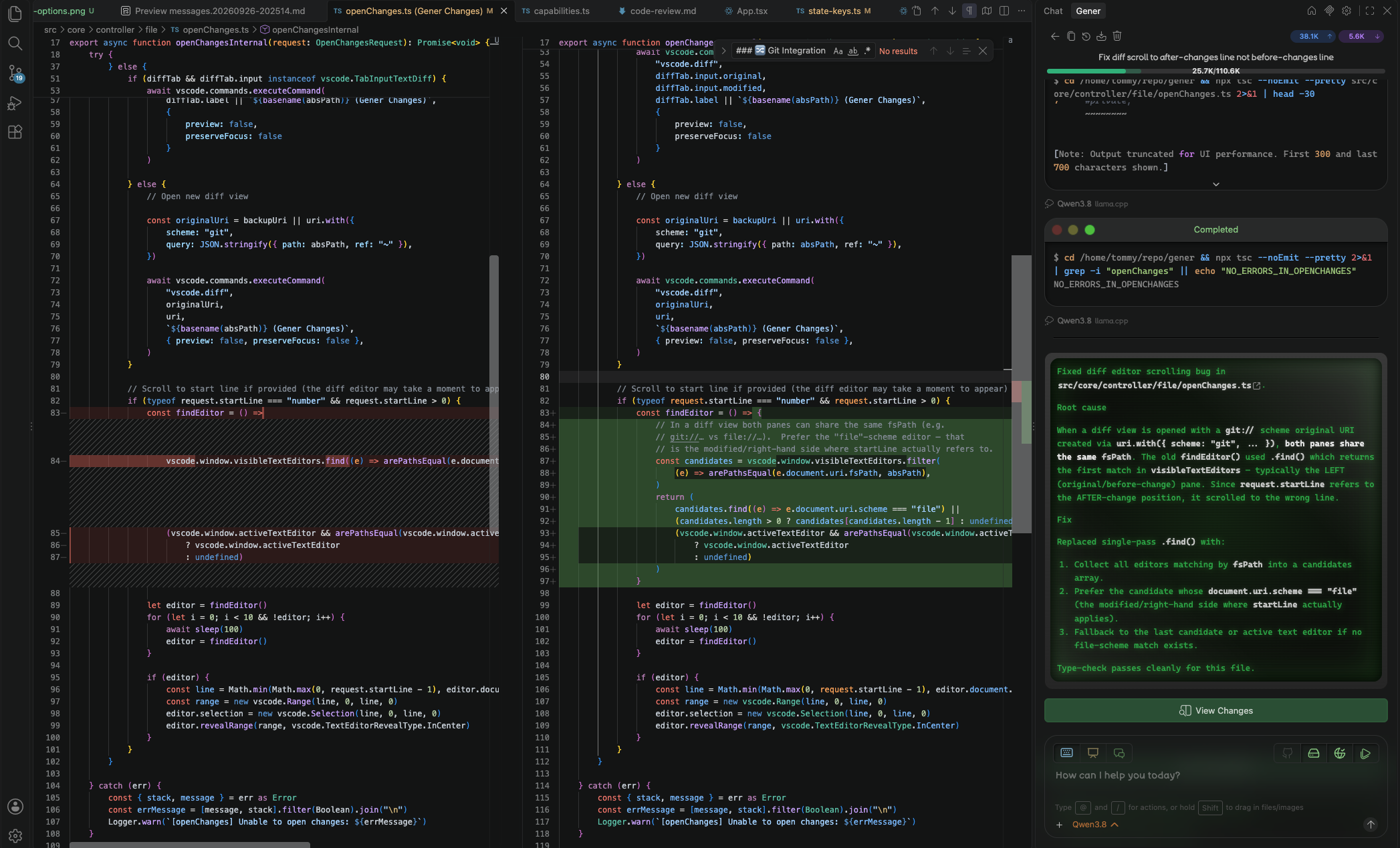
- Patch-based diffs — Changes are presented as reviewable accordions with line-level diffs
- Pending-review pinning — Pending edits are pinned under their original timestamps with the live streaming tail kept at the very bottom
- Bulk actions — Accept-All / Dismiss-All / Revert-All appear when multiple pending items share one type
- Git vs manual review — Review flow adapts to whether the workspace is git-managed
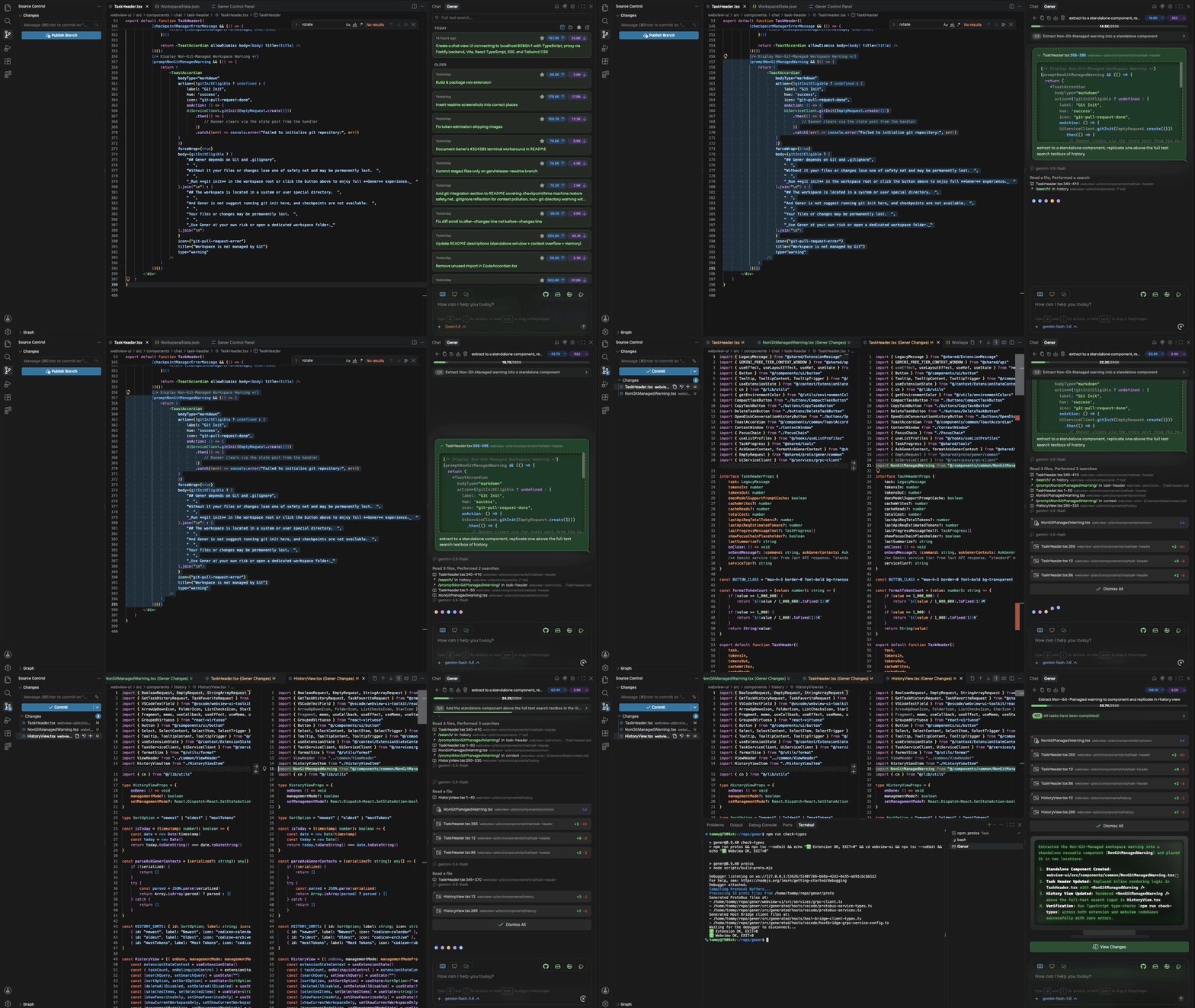
- Checkpoint & restore — Automatic checkpoints with one-click restore of non-git-managed files; interrupted/partial writes are marked Aborted with a terminal state
- Unread indicators — Per-operation unread dots and per-accordion pinning make it easy to track what's been reviewed
- Non-git warning — A task-header warning for unmanaged workspaces with a one-click Git Init action
🔀 Git Integration
Gener leans on Git as its safety backbone — not just optional plumbing, but the foundation under several core reliability features:
| Benefit | How Git is used |
|---|---|
| ⏪ Checkpoint Restore ("Time Machine") | Every task keeps an isolated shadow git repository (under ~/.gener/checkpoints) that snapshots your workspace automatically, without touching your real .git history or requiring you to commit. One-click restore rewinds files to any earlier checkpoint — including in non-git-managed folders — so nothing Gener does is ever unrecoverable |
| 🐈 "Cats Have Nine Lives" Autopilot | Full end-to-end autonomous execution needs a trustworthy baseline before it's safe to run unchecked, so this mode verifies the workspace is properly tracked by Git (with a clean worktree) before enabling itself — no git, no unattended runs |
🚫 .gitignore Reflection Everywhere |
Your workspace's .gitignore is respected across the board: the dependency-graph indexer, semantic embedding pipeline, listFiles, and searchFiles all skip gitignored paths, so build output, minified bundles, lockfiles and other noise never pollute the model's context window — keeping prompts lean and tokens cheap |
| ⚠️ Non-Git Safety Notice & One-Click Git Init | When a workspace isn't under version control, Gener surfaces a persistent warning banner at the top of the chat explaining the risk of permanent file loss, alongside a Git Init button that runs git init in the workspace root, seeds a sensible default .gitignore if none exists, and re-enables checkpoints instantly — no terminal needed |
In short: Git is what makes Gener feel fearless — safe enough to let it drive without babysitting every keystroke, quiet enough not to waste tokens on junk files, and loud about it the moment protection is missing.
🧠 Skills and Commands Framework
Gener has a unified capability framework with three first-class named types, all discoverable from the same layered directory structure:
| Type | Location | Purpose |
|---|---|---|
| Skills | .agents/skills/{name}/SKILL.md |
Rich, reusable instruction blocks auto-discovered by Gener based on task relevance — support multi-file references, tool guidance, and embedded domain knowledge |
| Commands | .agents/commands/{name}.md |
Distinct, independently-authored lightweight procedures invoked explicitly via /command-name in chat — a separate registry from skills, not re-exposures of existing skill files |
Built-in Integrated Commands: /new & /fork
Two special integrated slash commands ship natively — no file required — for managing the current task directly from chat. Both respond only while inside an ongoing conversation; sent during the initial turn they're ignored with a brief on-screen notice.
| Command | Effect | When to use it |
|---|---|---|
/new [prompt?] |
Cancels the current task and restarts from a clean slate | 1. Type some words right after the command — those become the brand‑new starting prompt, letting you reword or add nuance in the same breath 2. Type nothing else — Gener automatically replays your original opening prompt unchanged, as if starting over from scratch Ideally used when something went sideways and you want another attempt at nearly the same ask, only better phrased or slightly extended this time |
/fork [instruction?] |
Clones the entire existing conversation plus every artifact already produced into a brand‑new independent task, leaving the untouched original exactly where it is, then optionally sends instruction as the first turn in that copy |
Exploring an alternative path from your exact current checkpoint without risking the working baseline you've already validated |
Neither can be chained or combined with any other capability in one message — attempting both in the same send surfaces a short warning explaining why only the first takes effect.
Both named types above (and these built-ins) resolve through the same layered discovery hierarchy:
| Scope | Path |
|---|---|
| Bundled | Shipped inside the extension's asset bundle |
| Global | ~/.gener/ — shared across all projects |
| Project | .agents/ — scoped to the current workspace |
Project capabilities override global, which overrides bundled; conflicts resolved at discovery time before injection.
Pre-installed skills: docx, pdf, pptx, xlsx, skill-creator, commit-message, browser-automation, image-ocr
Any capability (skill or command) can be disabled individually from Settings → Features.
Multi-Capability Prompting
Both skills and commands are invoked identically — type /name anywhere in your chat input to load that capability's instructions into the active session. Crucially, Gener supports chaining multiple capabilities in a single message: each resolves independently via the unified lookup table, loads only its own instruction body, and executes sequentially within the same task loop:
/code-review review my auth refactor, then /release-note write changelog for v0.9.38, and /vsix package it up
No need to start separate one-off tasks or copy-paste results between sessions. Describe your end-to-end workflow in one natural-language prompt, mixing any combination of project-specific commands, custom skills, and pre-installed ones — Gener carries full conversation context through every step so later commands can reference outputs produced earlier.
🔌 Rewritten MCP Integration
Full Model Context Protocol support managed through the bundled mcpc CLI:
- Connect, close, restart, login/logout, and ping MCP servers
- List and call tools, list prompts/resources/skills, and subscribe to resources
- Session-scoped management with structured logging
- Configure servers in
~/.gener/mcp/mcp.json(opened from the sidebar ⚙️/mcpbutton)
🤖 Autopilot Mode & Auto-Approval
Take control of how much Gener asks before acting:
- Auto-approval settings — Toggle approval for reading outside the workspace, executing all commands, and web tools
- Autopilot mode — When enabled (with the prerequisite auto-approvals on), Gener works end-to-end until
reportCompletionwithout pausing for proposals or clarifying questions - Plan / Code dual mode — PLAN MODE gathers context and presents proposals via
presentProposal; CODE MODE executes and finishes withreportCompletion - Per-step permission gates — By default, Gener asks for your permission at every sensitive step
💬 Live Chat Mode
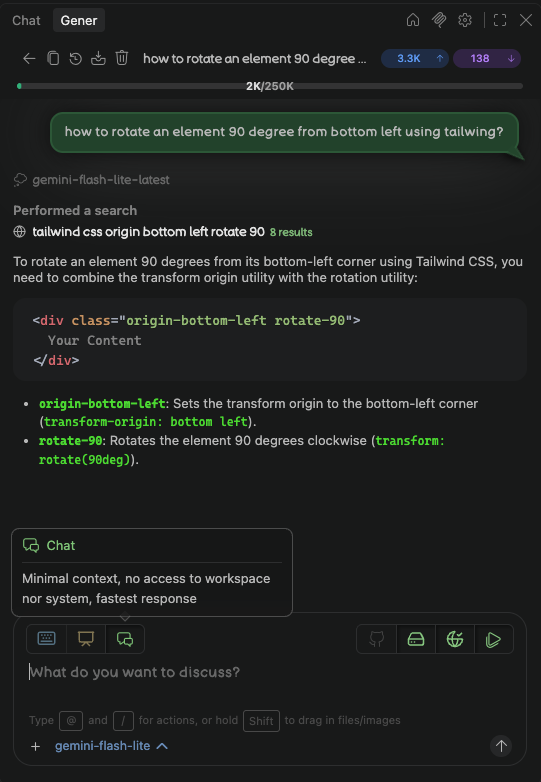
- Live Chat mode — A minimal-context conversational mode (text +
webSearch/webFetch/askFollowUpQuestion) that skips the full coding context for quick questions
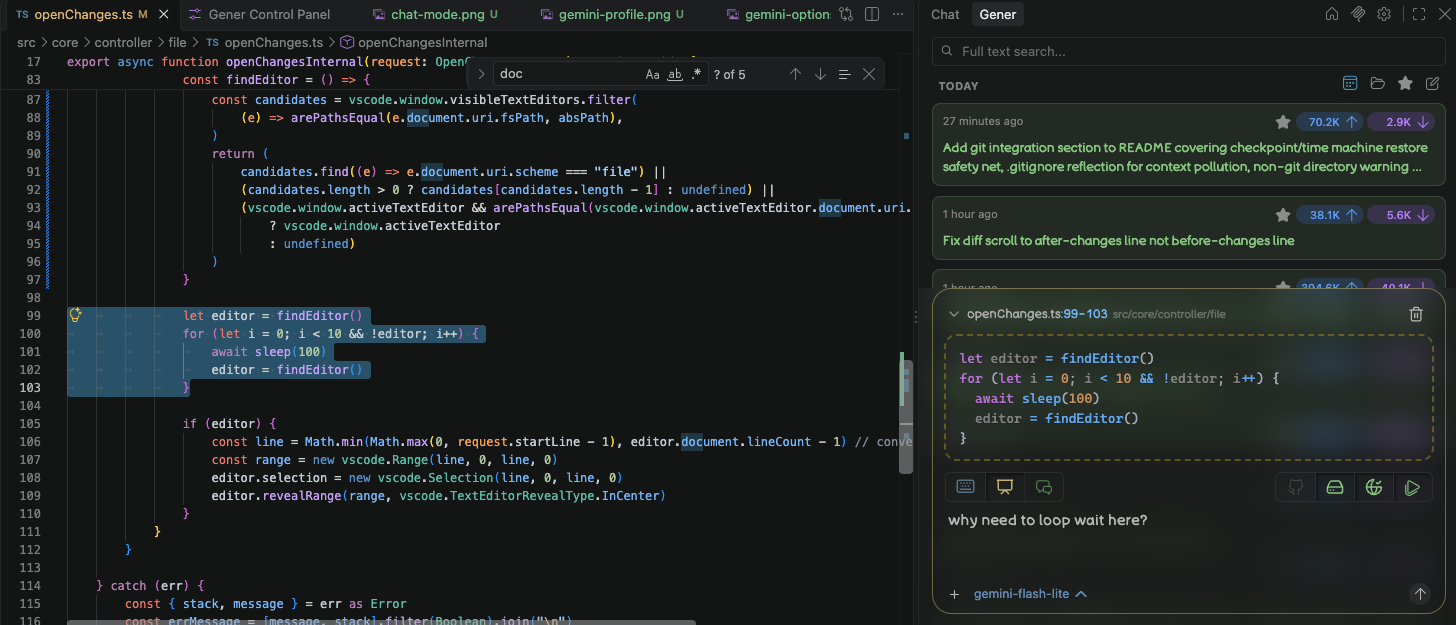
🎯 Ask Gener — Bring Any Context Into the Conversation
It's wired directly into VS Code's surfaces:
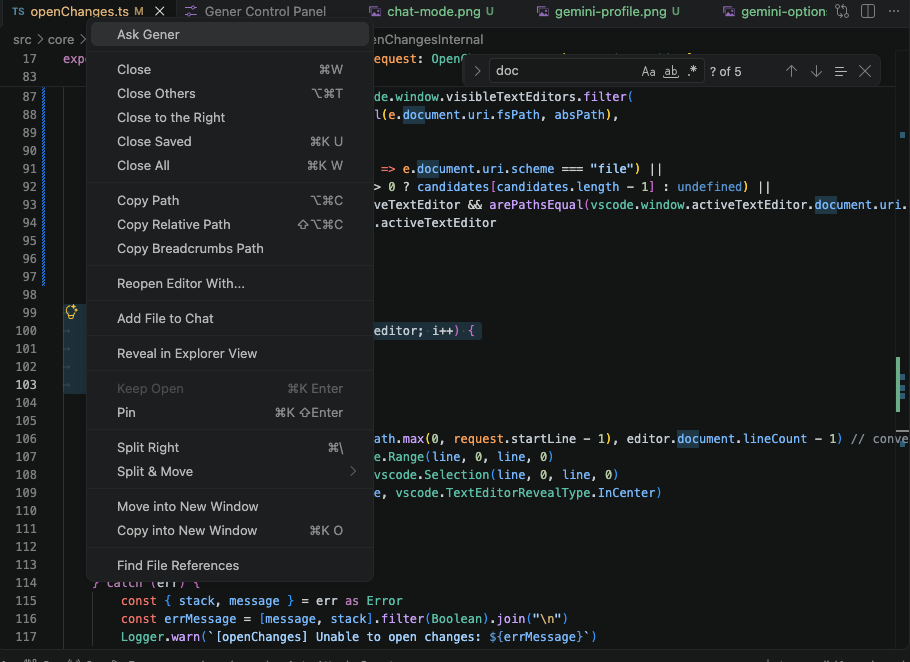
- Editor selection — Select code and press
Cmd/Ctrl + '(or right-click → Ask Gener) to quote the selection
- Explorer files — Right-click any file/directory in the Explorer → Ask Gener to attach it
- Terminal output — Right-click in the integrated terminal → Ask Gener to capture the latest output
- Comment threads — Use "Add to Gener Chat" on an inline comment thread to bring review discussion into the conversation
- Expanded content — Select content in chat view and click the populated
Attach Contextbutton
Usage Guide
- Select the code, file, or terminal output you want Gener to see
- Trigger Ask Gener via the keybinding, the right-click context menu, or the ❝ quote button on any message row
- The context is inserted as Markdown into the chat input — refine your prompt and hit send
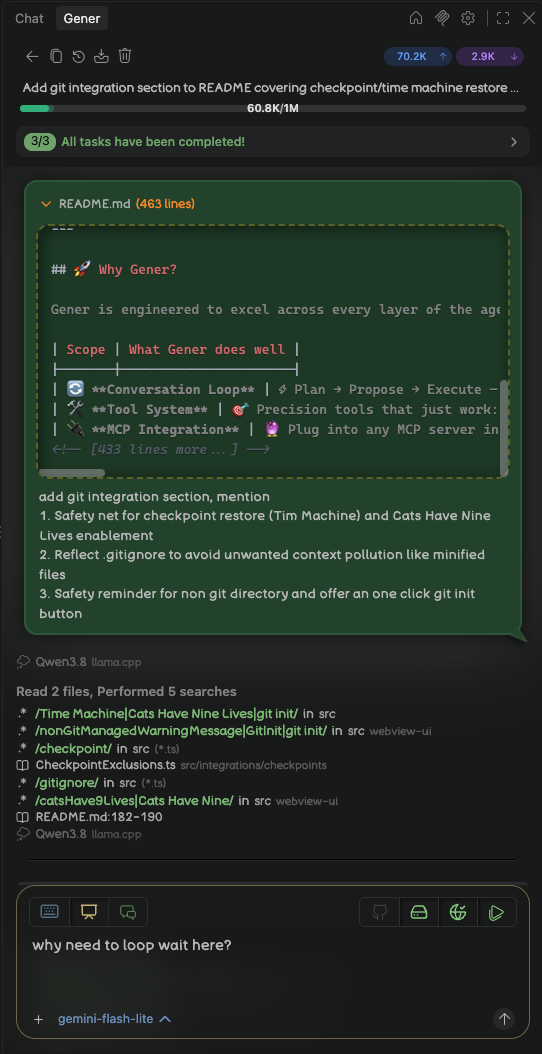
📤 Export Conversation
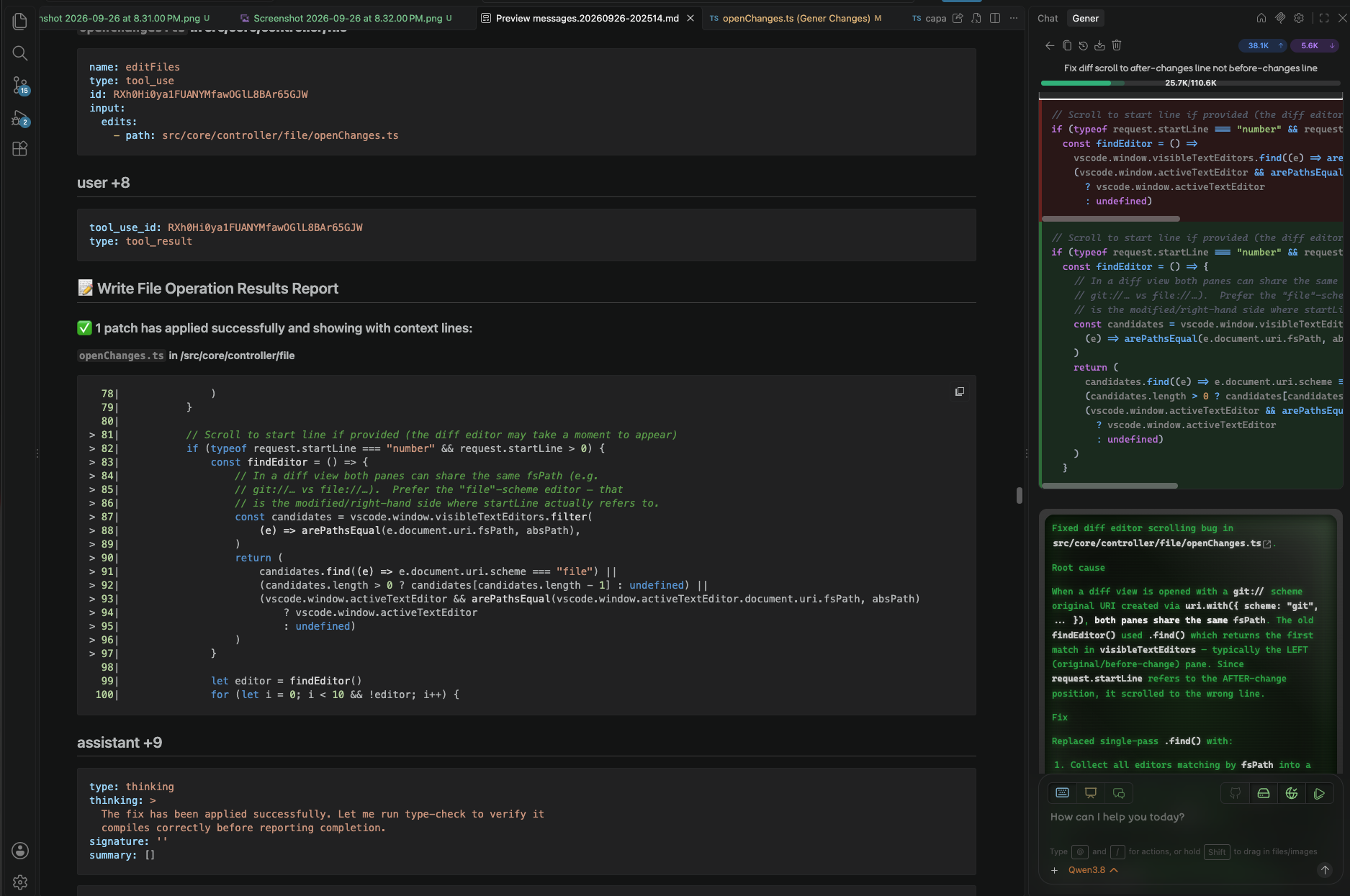
Turn any conversation into a human-readable document you can share, archive, or learn from:
- Full-context export — Converts the entire context window into a clean, structured Markdown/HTML document
- Collaborate & teach — Share exports with teammates so they can pick up where you left off, review decisions, or provide guidance back to the AI
- Learning artifact — Keep a readable record of how a problem was approached and solved
🧩 Context Management & Robustness
Gener is built to stay reliable on long, complex tasks:
- Lightweight system prompts — Lean, cache-friendly prompts tuned for local and free-tier models
- Context-window overflow handling — A multi-tier degradation pipeline that preserves conversation quality as far as possible before resorting to compaction (see below)
- Automatic error retry — Up to 5 retry attempts with intelligent escalation
- Thinking-loop detection — Detects and breaks repetitive reasoning loops
- Task progress tracking — Structured, auto-completing checklists rendered from payload
How Gener Handles Context Overflow
When an active task's accumulated conversation approaches the model's context limit, Gener applies a layered, loss-minimising cascade rather than simply dropping old turns:
Token estimation first — Every outgoing request begins with an estimate of total tokens (all messages + system prompt). Only when this exceeds the provider's declared window does the overflow pipeline engage.
Live-pair preservation — The most recent user ↔ assistant exchange is spliced out and guaranteed to remain in every subsequent send. This ensures the LLM never loses sight of what you asked and its own latest reply, regardless of how aggressively older history is trimmed. If that live pair is itself anomalously large, it is gracefully converted into a compact YAML dump with a safety-net warning header instead of corrupting the entire conversation.
Frozen breakpoint (prompt-cache stability) — On overflow, Gener first reuses the previous truncation point if the frozen prefix still fits within budget. Because byte-identical prefixes are the key requirement for many providers' prompt-caching systems, keeping the same cut stable across consecutive API calls avoids a costly full-prefill on every turn. The result: cheaper inference and faster responses even under pressure.
Surgical block-level stripping — Rather than keeping or discarding whole messages, Gener runs every stale-turn content block through a role-aware filter: all assistant reasoning/narrative text survives; user-quoted content (
<pre>blocks) and high-priority tool outputs are retained based on a whitelist (write_files,edit_files,presentProposal,askFollowUpQuestion, etc.). Bulky intermediate data — full file reads, dependency-graph search dumps, thinking blocks — is dropped first. The filter executes inside the signed shield WASM engine (fail-closed: if the liveness gate rejects the call the build refuses rather than silently degrading). A local reference implementation runs in shadow and logs any divergence.Re-cut at earlier breakpoints — With the stripped sizes computed, Gener scans backward from the newest stale message looking for the earliest boundary whose cumulative size (stripped prefix + raw suffix) falls within half of the usable budget, so the LLM keeps as much conversation history as the window allows.
Force-fit & compaction — As a last resort before triggering a full
compactsummarisation request, Gener force-fits whatever remains into 95 % of the leftover room using progressive truncation helpers (terminal output clipping, tool-use map pruning).Full compact fallback — If none of the above yields a valid context, the function returns
undefined, which signals the call-site to issue a compact request: the provider receives only enough summary to continue coherently.Usage transparency — After every build, Gener injects the current estimated usage (
X / Y (Z%)) into the environment-details table visible to the LLM, so the model can reason about remaining headroom and the user sees the real number in debug logs.
This design keeps prompts cache-friendly by default, degrades gracefully under load, and always gives the model something coherent rather than crashing or silently losing your working state.
🎨 Completely Rebranded Webview UI
Gener kept the same gRPC/Protocol Buffers communication backbone with Cline, but rebranded every visible element of the webview UI:
- Custom React + TypeScript components — All UI components redesigned from scratch
- Tailwind CSS v4 — Modern utility-first styling with Vite integration
- Proto-driven state — Protocol Buffers maintained for efficient serialization between webview and extension host
- Unique visual identity — Distinct icons, color schemes, layouts, and micro-interactions
- Fresh UX patterns — New chat flows, settings panels, and task history views
The result: the same robust backend, a completely fresh and polished user experience.
🖥️ VS Code Exclusive Features Integration
Unlike other coding agents that target multiple IDEs and CLI, Gener is designed exclusively for VS Code to fully leverage VS Code's unique extension API surface:
- Integrated Terminal — Execute commands directly in your active terminal session with full environment context; capture remains hang-free even when VS Code's own shell-integration API goes silently broken (see Hang-Free Terminal Capture)
- Problems Panel — Auto-populate diagnostics from tool output, surfacing errors and warnings inline
- Command Palette — Seamlessly trigger Gener actions (
Ask Gener,New Chat Session,History) alongside native VS Code commands - Editor Context Menu — Right-click any file or selection to ask Gener about it
- Comment Threads — Review code changes in-place with Gener-powered inline comments
- Sidebar, Activity Bar & Standalone Window — Integrated sidebar view with custom icons and activity bar presence; undocks into its own compact auxiliary window for sidecar monitors
This deep VS Code integration means Gener doesn't just talk about your codebase — it operates within it.
🔁 Hang-Free Terminal Capture
Running a command through VS Code's shell-integration API (terminal.shellIntegration.executeCommand) normally gives an extension clean ]633;C/]633;D start/end markers and an exit-code event. That contract has a known failure mode tracked upstream at microsoft/vscode#324392: for certain command shapes — most notably multi-line scripts (an embedded literal newline inside a { … } group) or ( … ) subshells — VS Code's internal OSC‑633 parser mis-parses the command/output boundary and then delivers zero data forever: execution.read() yields nothing (not even the start marker) and onDidEndTerminalShellExecution never fires, indefinitely, while the underlying process has already exited. Any extension waiting naively on that signal hangs, and because no markers arrive there is no application-level way to detect completion.
Rather than sit indefinitely on a completion signal that VS Code may simply never emit, Gener works around this limitation internally — each command run is finalized on time and its real output is reliably recovered.
The net result is command capture that stays responsive and hang-free across normal shells, nested/SSH sessions, interactive prompts, and the very command shapes that break VS Code's own integration reporting.
🪟 Undock — Standalone Chat Window
Gener's chat can undock into its own compact auxiliary window — ideal for small or portable setups:
- Move the chat panel to a sidecar or smaller monitor, freeing up editor space on your main display
- File opens triggered from the undocked window (mentions, diff views, explorer links) route back to the main editor window
- A Dock button re-docks the standalone window back into the sidebar when you're done
🛡️ Security & Privacy
- Local-first by design — Your keys, code, and memory stay on your machine; Gener never requires an account
- Secrets protected at rest — Profiles and API keys are encrypted before they touch disk, so no secrets are ever exposed as plain text in the file system
🏗️ Installation
From Marketplace
- Open VS Code Insiders
- Go to Extensions (
Ctrl+Shift+X) - Search for "Gener"
- Click Install
⚙️ Configuration
API Keys
Configure your API keys in the Gener settings panel:
- Click the ⚙️ gear icon in the Gener sidebar
- Navigate to the API Configuration section
- Enter your provider-specific keys
For Gemini auto-rotation, provide multiple keys separated by commas:
gemini_api_key_1,gemini_api_key_2,gemini_api_key_3
Semantic Index Settings
Customize the codebase indexing behavior:
- Embedding Model: Choose from
OFF,minilm,jina-small,nomic,jina-code— all are tiny local models downloaded on-the-fly from Hugging Face; embeddings run entirely on your machine for full privacy at zero token cost - Heap Limit: Set memory allocation for the indexing worker (default: 2 GB)
- Throttle: Controls per-file processing delay (default: 150ms)
Auto-Approval & Autopilot Mode
In Settings → Auto Approval, toggle:
- Read Full File System — Allow reading files/directories outside the working directory
- Execute All Commands — Skip per-command approval
- Web Tools — Allow
webSearch/webFetchwithout prompting - Autopilot — Run end-to-end until task completion (requires all three above)
🔑 Quick Start
- Open your project in VS Code
- Click the plus button (➕) in the Gener sidebar to start a new chat
- Describe what you want — Gener will plan, propose, and execute
- Review each step — Approve or reject tool usage as it happens
📖 Usage
Chat Commands
| Command | Description |
|---|---|
Ask Gener |
Ask a question about selected code |
| "Add to Gener Chat" | Add comment thread context to chat |
| "New Chat Session" | Start a fresh conversation |
| "Export Conversation..." | Export the current conversation |
Keybindings
| Key | Action |
|---|---|
Cmd/Ctrl + ' (with selection) |
Quote selection to Gener (Ask Gener) |
Cmd/Ctrl + ' (no selection) |
Jump to chat input |
📄 License
Gener Distribution — Proprietary Freeware License
Gener as distributed is licensed under the Proprietary Freeware License © 2026 tommyli
This model ensures:
- Free to use — Anyone can install and use Gener without cost
- Full rights reserved — All source code, branding, and intellectual property remain with tommyli
- No fork risk — Prevents unauthorized forks or re-distribution under competing names
Built With Open Source
Gener is built on and ships with these open-source projects:
- Claude Code — Anthropic's open-source skill, bundled directly into Gener's skills framework
- Playwright — Powers browser automation (form filling, clicking, navigation, scraping) via the bundled
browser-automationskill and MCP servers - mcpc — The MCP client CLI behind Gener's full Model Context Protocol server lifecycle management
- optave-codegraph — The engine integrated as the backbone of Gener's dependency graph & semantic codebase index
Original Cline License — Apache 2.0
Gener is built upon Cline, which is released under the Apache 2.0 License. The conversation loop architecture was preserved and enhanced under the terms of that original license. See Cline's LICENSE for details.
🌐 Links
- Homepage: https://github.com/gener-vscode/gener